
Introduction to EA Black Scorpion MT4
EA Black Scorpion MT4 is an automated Forex trading Expert Advisor (EA) designed for MetaTrader 4, featuring configurable order execution, flexible lot sizing, percentage-based risk management, hidden Stop Loss (SL) and Take Profit (TP) options, and advanced trade management.

The EA provides both fixed lot trading and automatic risk-based position sizing, allowing traders to customize their exposure according to account balance and risk preferences. It also incorporates Break-Even functionality, multiple Trailing stop modes, adaptive pending order distances, and spread protection.
Additionally, EA Black Scorpion MT4 includes customizable trading hours, Friday trading restrictions, and adaptive trailing mechanisms designed to adjust trade management according to market conditions.
General and Order Identification Settings
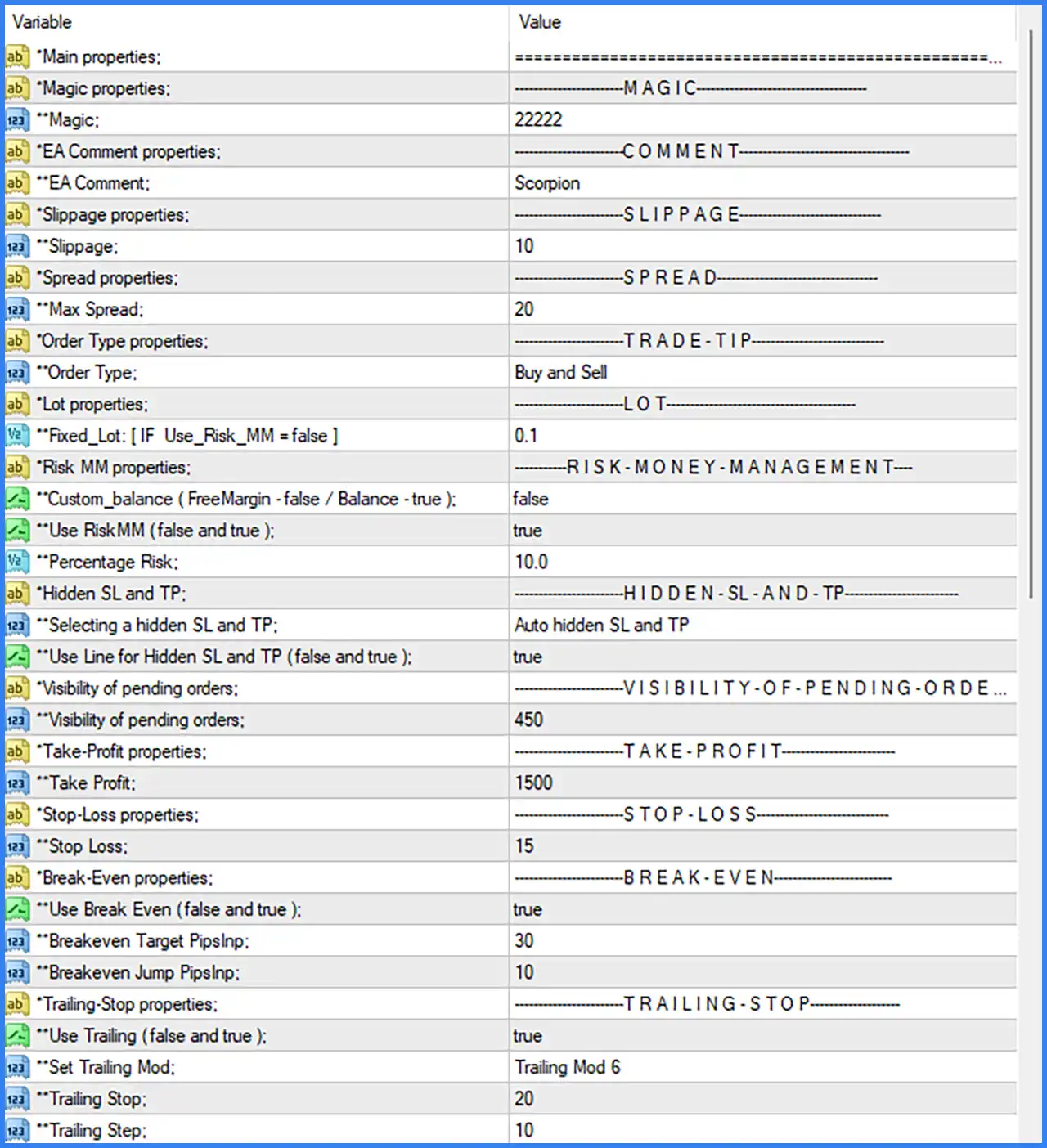
🔹 Main properties = Main Properties – Section heading organizing the EA's primary configuration parameters.
🔹 Magic properties = MAGIC – Section heading for trade identification settings.
🔹 Magic = 22222 – Sets the Magic Number to 22222, allowing the EA to identify and distinguish its trades from manual orders and positions opened by other Expert Advisors.
🔹 EA Comment properties = COMMENT – Section heading for the order comment configuration.
🔹 EA Comment = Scorpion – Sets the trading order comment to Scorpion, making EA Black Scorpion MT4 positions easier to recognize in the trading terminal.
Execution and Spread Settings
🔹 Slippage properties = SLIPPAGE – Section heading for configuring order execution tolerance.
🔹 Slippage = 10 – Sets the maximum permitted execution deviation to 10 points, defining the acceptable difference between the requested and executed trade price.
🔹 Spread properties = SPREAD – Section heading for spread protection configuration.
🔹 Max Spread = 20 – Sets the maximum permitted spread to 20 points, helping prevent the EA from opening trades when transaction costs exceed the configured threshold.
Trading Direction and Lot Size Settings
🔹 Order Type properties = TRADE-TIP – Section heading for selecting the permitted trading directions.
🔹 Order Type = Buy and Sell – Allows the EA to open both Buy and Sell positions, providing flexibility to trade in either market direction.
🔹 Lot properties = LOT – Section heading for the initial trading volume configuration.
🔹 Fixed_Lot: [ IF Use_Risk_MM = false ] = 0.1 – Sets the fixed trading volume to 0.1 lots when the automatic Risk Money Management option is disabled.
Risk Money Management Settings
🔹 Risk MM properties = RISK-MONEY-MANAGEMENT – Section heading for the EA's automatic position sizing and risk management configuration.
🔹 Custom_balance (FreeMargin - false / Balance - true) = false – Selects the account value used for risk calculations; false indicates Free Margin is used, while true selects Account Balance.
🔹 Use RiskMM (false and true) = true – Enables automatic risk-based money management, allowing the EA to calculate trading volume according to the configured risk percentage.
🔹 Percentage Risk = 10.0 – Sets the configured trading risk percentage to 10.0 for the EA's automatic position sizing calculation.
Hidden Stop Loss and Take Profit Settings
🔹 Hidden SL and TP = HIDDEN-SL-AND-TP – Section heading for configuring hidden Stop Loss and Take Profit functionality.
🔹 Selecting a hidden SL and TP = Auto hidden SL and TP – Selects the automatic hidden Stop Loss and Take Profit management mode, allowing the EA to manage protective levels without necessarily displaying conventional broker-side SL and TP orders.
🔹 Use Line for Hidden SL and TP (false and true) = true – Enables the line-based display or management option for hidden Stop Loss and Take Profit levels on the trading chart.
Pending Order Visibility Settings
🔹 Visibility of pending orders = VISIBILITY-OF-PENDING-ORDERS – Section heading for configuring pending order visibility.
🔹 Visibility of pending orders = 450 – Sets the pending order visibility parameter to 450, defining the configured visibility distance or range used by the EA.
Take Profit and Stop Loss Settings
🔹 Take-Profit properties = TAKE-PROFIT – Section heading for configuring the EA's profit target.
🔹 Take Profit = 1500 – Sets the Take Profit parameter to 1500 points, defining the configured target distance for closing profitable positions.
🔹 Stop-Loss properties = STOP-LOSS – Section heading for configuring loss protection.
🔹 Stop Loss = 15 – Sets the Stop Loss parameter to 15 points, defining the configured maximum adverse price distance before a position is closed by its protective stop, subject to the EA's execution mode.
Break-Even Settings
🔹 Break-Even properties = BREAK-EVEN – Section heading for configuring automatic Break-Even functionality.
🔹 Use Break Even (false and true) = true – Enables Break-Even management, allowing the EA to adjust the protective stop when a trade reaches the configured profit threshold.
🔹 Breakeven Target PipsInp = 30 – Sets the Break-Even activation target to 30 pips, determining when the EA begins applying Break-Even protection.
🔹 Breakeven Jump PipsInp = 10 – Sets the Break-Even jump distance to 10 pips, defining the additional movement or adjustment applied by the EA when managing the Break-Even level.
Trailing Stop Settings
🔹 Trailing-Stop properties = TRAILING-STOP – Section heading for configuring automatic trailing stop management.
🔹 Use Trailing (false and true) = true – Enables the trailing stop functionality to dynamically adjust protective stop levels as the market moves in a favorable direction.
🔹 Set Trailing Mod = Trailing Mod 6 – Selects Trailing Mod 6 as the active trailing stop management method.
🔹 Trailing Stop = 20 – Sets the trailing stop distance to 20 points, defining the configured distance between the market price and the protective trailing stop.
🔹 Trailing Step = 10 – Sets the trailing adjustment step to 10 points, controlling the minimum price movement required for the EA to update the trailing stop.
Adaptive Pending Order Settings
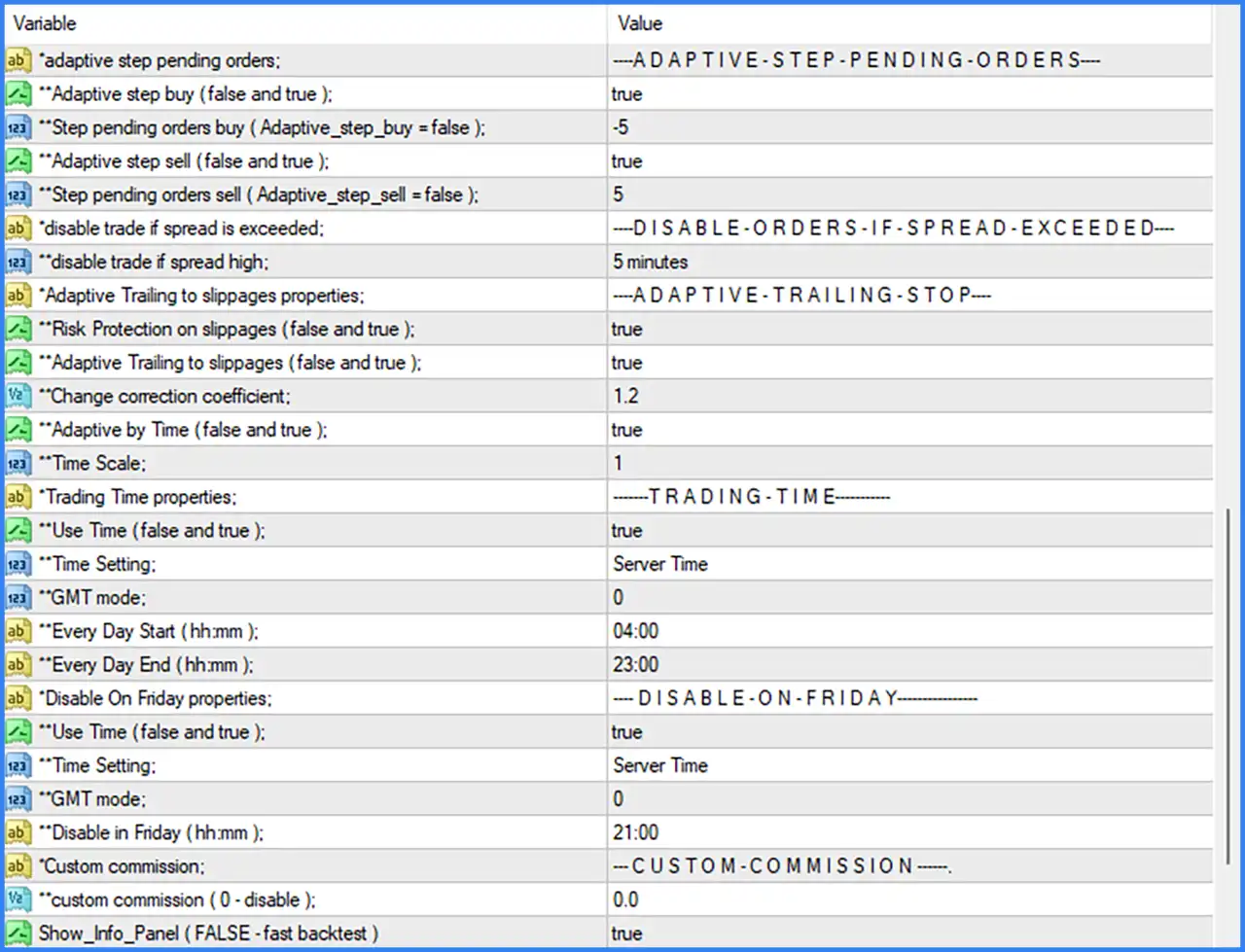
🔹 Adaptive step pending orders = ADAPTIVE-STEP-PENDING-ORDERS – Section heading for configuring adaptive pending order distances.
🔹 Adaptive step buy (false and true) = true – Enables adaptive distance management for Buy pending orders, allowing the EA to adjust their placement according to its adaptive calculation.
🔹 Step pending orders buy (Adaptive_step_buy = false) = -5 – Sets the manual Buy pending order step to -5 points when adaptive Buy step functionality is disabled.
🔹 Adaptive step sell (false and true) = true – Enables adaptive distance management for Sell pending orders, allowing the EA to adjust their placement according to its adaptive calculation.
🔹 Step pending orders sell (Adaptive_step_sell = false) = 5 – Sets the manual Sell pending order step to 5 points when adaptive Sell step functionality is disabled.
Spread Exceeded Protection
🔹 Disable trade if spread is exceeded = DISABLE-ORDERS-IF-SPREAD-EXCEEDED – Section heading for the EA's additional spread protection mechanism.
🔹 Disable trade if spread high = 5 minutes – Sets the high-spread waiting period to 5 minutes, defining the configured time associated with disabling trading when spread conditions become unfavorable.
Adaptive Trailing and Slippage Protection
🔹 Adaptive Trailing to slippages properties = ADAPTIVE-TRAILING-STOP – Section heading for configuring adaptive trailing stop and slippage protection.
🔹 Risk Protection on slippages (false and true) = true – Enables risk protection against slippage, helping the EA manage execution-related risks during unfavorable trading conditions.
🔹 Adaptive Trailing to slippages (false and true) = true – Enables adaptive trailing stop functionality that adjusts its management according to slippage conditions.
🔹 Change correction coefficient = 1.2 – Sets the correction coefficient to 1.2, providing a multiplier used by the EA's adaptive slippage adjustment mechanism.
🔹 Adaptive by Time (false and true) = true – Enables time-based adaptive management, allowing the EA to adjust its trailing behavior according to the configured time scaling mechanism.
🔹 Time Scale = 1 – Sets the time scaling factor to 1, defining the default adjustment multiplier for time-based adaptive functionality.
Trading Time Settings
🔹 Trading Time properties = TRADING-TIME – Section heading for configuring the EA's daily trading schedule.
🔹 Use Time (false and true) = true – Enables the trading time filter, allowing the EA to restrict trading activity to the configured daily session.
🔹 Time Setting = Server Time – Selects broker server time as the reference for the EA's trading schedule.
🔹 GMT mode = 0 – Sets the GMT adjustment mode to 0, representing the default configured offset mode.
🔹 Every Day Start (hh:mm) = 04:00 – Sets the daily trading start time to 04:00 according to the selected server time.
🔹 Every Day End (hh:mm) = 23:00 – Sets the daily trading end time to 23:00 according to the selected server time.
Friday Trading Restriction Settings
🔹 Disable On Friday properties = DISABLE-ON-FRIDAY – Section heading for configuring the Friday trading restriction.
🔹 Use Time (false and true) = true – Enables the Friday-specific time restriction, allowing the EA to stop or restrict trading at the configured Friday cutoff time.
🔹 Time Setting = Server Time – Uses broker server time as the reference for the Friday trading restriction.
🔹 GMT mode = 0 – Sets the Friday GMT adjustment mode to 0.
🔹 Disable in Friday (hh:mm) = 21:00 – Configures the EA to disable trading on Friday at 21:00 server time, helping avoid trading during the late Friday market session.
Custom Commission and Information Panel
🔹 Custom commission = CUSTOM-COMMISSION – Section heading for configuring an additional commission value.
🔹 custom commission (0 - disable) = 0.0 – Sets the custom commission value to 0.0, meaning the additional custom commission calculation is disabled.
🔹 Show_Info_Panel (FALSE - fast backtest) = true – Enables the EA information panel on the chart; setting this parameter to false disables the panel and can help improve backtesting speed.
Conclusion
EA Black Scorpion MT4 provides a comprehensive set of automated trading controls covering order execution, money management, hidden Stop Loss and Take Profit, Break-Even protection, trailing stop management, and adaptive pending order placement.
Its default configuration enables automatic Risk Money Management with Percentage Risk = 10.0, supports both Buy and Sell trading, and activates several protective mechanisms, including spread protection, Break-Even, and adaptive trailing.
The EA also provides flexible trading schedules, operating between 04:00 and 23:00 server time, with a separate Friday trading cutoff at 21:00.
Overall, EA Black Scorpion MT4 offers extensive customization for traders seeking automated trade management. Before live deployment, traders should carefully verify the risk calculation, hidden SL/TP behavior, trailing mode, and the units used by the EA's distance parameters.
Risk Warning: The default Percentage Risk = 10.0 may represent substantial account exposure depending on the EA's calculation method. Traders should verify its actual risk calculation and conduct demo testing before using these settings on a live account.