

This guide walks through the inputs of De Moore EA MT5 with the values recommended for live trading. The set files that come with the EA already contain these settings, so you can load them in one click and adjust only what your broker or account needs.
🔢 De Moore EA MT5 Settings & Configuration Guide
De Moore EA MT5 is an automated trading system designed to manage trades through predefined Take Profit, Stop Loss, trailing-stop, spread-control, automatic risk, and high-impact news-filter settings. The configuration shown in the Inputs panel provides direct control over trade identification, exit management, position sizing, market-spread conditions, and USD news protection.
The displayed setup uses Magic Number 2601, the trade comment DeMoore, a 395-point Take Profit, 295-point Stop Loss, 95.0-point Trailing Start, 55.0-point Trailing Stop, 5.0 Maximum Spread Allowed, and 3.0 Risk % per trade with Auto Risk enabled. The news filter is also active with a 30-minute pause before and after USD news.
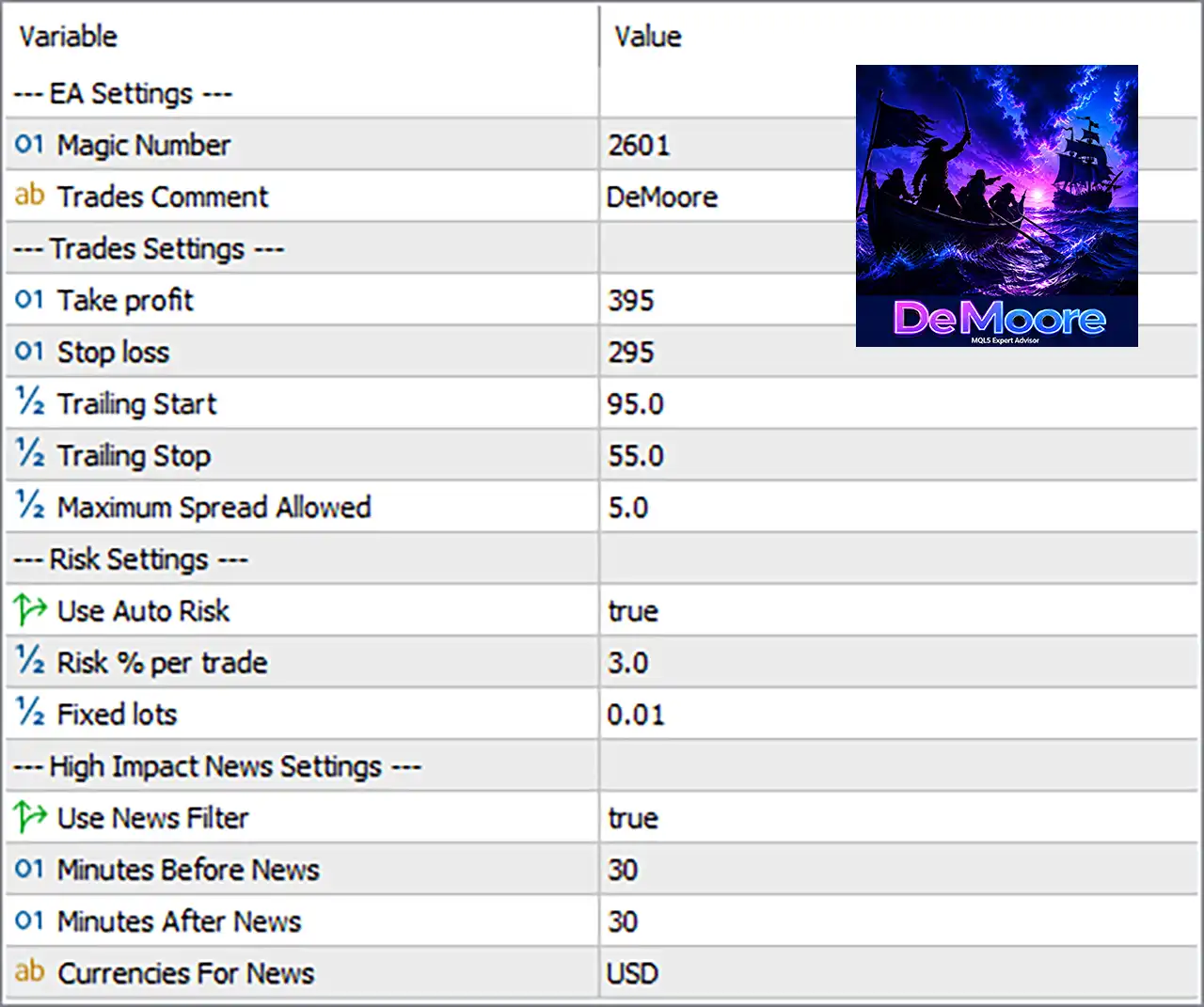
⚙️ EA Settings
🔹 Magic Number = 2601 — Assigns 2601 as the unique identifier for De Moore EA trades, helping MT5 distinguish its positions from other EAs or manual trades.
🔹 Trades Comment = DeMoore — Adds DeMoore as the trade comment, making positions and orders easier to identify in the MT5 terminal and trading history.
⚙️ Trades Settings
🔹 Take Profit = 395 — Sets the Take Profit distance to 395, defining the configured profit target for each trade. In MT5, Take Profit can be represented as a price level or distance depending on the EA's implementation.
🔹 Stop Loss = 295 — Sets the Stop Loss distance to 295, providing a predefined exit level if the market moves against the position.
🔹 Trailing Start = 95.0 — Configures the trailing mechanism to begin after 95.0 points of favorable movement, according to the EA's trailing logic.
🔹 Trailing Stop = 55.0 — Sets the trailing distance to 55.0, determining how far the protective stop can remain behind the relevant market price once trailing is active.
🔹 Maximum Spread Allowed = 5.0 — Limits trading to conditions where the spread is within the configured maximum of 5.0. This helps the EA avoid entering trades when transaction costs become wider than the selected threshold.
⚙️ Risk Settings
🔹 Use Auto Risk = true — Enables automatic risk-based position sizing, allowing the EA to calculate trade volume according to its programmed risk-management logic.
🔹 Risk % per trade = 3.0 — Sets the configured risk parameter to 3.0 per trade. Because Use Auto Risk = true, this value is the active risk-sizing parameter rather than the fixed-lot value.
🔹 Fixed lots = 0.01 — Defines a fixed position size of 0.01 lots as the manual/fixed-lot setting. Its practical role depends on whether Auto Risk is disabled by the EA configuration.
⚙️ High Impact News Settings
🔹 Use News Filter = true — Enables the EA's economic-news protection mechanism.
🔹 Minutes Before News = 30 — Configures the EA to restrict relevant trading 30 minutes before the applicable news event.
🔹 Minutes After News = 30 — Configures the EA to maintain the news restriction for 30 minutes after the applicable event.
🔹 Currencies For News = USD — Limits the configured news filter to USD economic events.
The displayed configuration therefore creates a 30-minute before + 30-minute after protection window around the relevant USD news events. Public information for De Moore likewise describes a USD news filter using 30-minute windows on both sides of high-impact events.
⚙️ Complete De Moore EA MT5 Settings
🔹 Magic Number: 2601
🔹 Trades Comment: DeMoore
🔹 Take Profit: 395
🔹 Stop Loss: 295
🔹 Trailing Start: 95.0
🔹 Trailing Stop: 55.0
🔹 Maximum Spread Allowed: 5.0
🔹 Use Auto Risk: true
🔹 Risk % per trade: 3.0
🔹 Fixed lots: 0.01
🔹 Use News Filter: true
🔹 Minutes Before News: 30
🔹 Minutes After News: 30
🔹 Currencies For News: USD
🔢 How the Current Configuration Works
🔹 Trade identification: Every EA position is associated with Magic Number 2601 and the comment DeMoore, providing an identification framework for EA-managed trades.
🔹 Profit target: The EA uses a configured Take Profit of 395.
🔹 Loss protection: The configured Stop Loss is 295, establishing the predefined downside-exit parameter.
🔹 Trailing protection: The trailing system is configured around a 95.0 starting threshold and 55.0 trailing distance.
🔹 Spread protection: The EA is configured to accept a maximum spread of 5.0 according to the displayed Input.
🔹 Automatic risk management: Use Auto Risk = true means the EA is configured to calculate position sizing using its automatic risk mechanism, with Risk % per trade = 3.0.
🔹 Fixed-lot reference: The fixed lot value remains 0.01, providing the configured manual lot size when the EA operates in its fixed-lot mode.
🔹 News protection: The EA's news filter is active and configured for USD, with 30 minutes before and 30 minutes after the relevant news event.
🔢 Risk & Reward Configuration
🔹 Configured Take Profit: 395
🔹 Configured Stop Loss: 295
🔹 Configured TP-to-SL distance ratio: approximately 1.34:1 based purely on the displayed 395 and 295 values.
🔹 Automatic risk setting: 3.0
🔹 Fixed lot fallback/reference: 0.01
🔹 Maximum permitted spread: 5.0
The exact monetary risk cannot be determined from the screenshot alone because position-size calculations depend on the EA's internal formula, symbol specifications, contract size, tick value, and broker conditions. MT5 also notes that trade volume affects the margin reserved for a position.
🔢 Important Configuration Notes
🔹 The value 3.0 should not automatically be treated as a guaranteed 3% monetary loss: It is the EA's configured Risk % per trade parameter, but the actual calculation depends on the EA's implementation.
🔹 The 0.01 fixed lot is not necessarily the active sizing method: With Use Auto Risk = true, automatic risk sizing is selected.
🔹 Spread values depend on the EA's unit convention: The screenshot identifies the parameter as Maximum Spread Allowed and gives 5.0, but the exact point/pip conversion should be verified against the EA's documentation and broker symbol specification.
🔹 Trailing Stop does not guarantee a specific exit price: Actual execution can be affected by market movement, spread, liquidity, and execution conditions.
🔹 News filtering depends on news-data availability: A news filter must receive the relevant economic-calendar information correctly for the restriction to operate as intended.
🔹 Backtesting and forward testing are important: Different brokers, spreads, execution conditions, and XAUUSD specifications can produce different results.
🔢 Conclusion
De Moore EA MT5 uses a compact configuration focused on automated trade management and market-condition protection. The displayed setup combines a 395 Take Profit, 295 Stop Loss, 95.0 Trailing Start, 55.0 Trailing Stop, and 5.0 Maximum Spread Allowed.
For position sizing, Use Auto Risk = true with Risk % per trade = 3.0, while Fixed lots = 0.01 remains available as the fixed-lot configuration. The EA also enables a USD-focused high-impact news filter with 30 minutes before and 30 minutes after protection.
These settings describe the configuration shown in the Inputs panel rather than guaranteeing a particular trading outcome. Traders should verify the EA's exact calculation logic, broker specifications, spread conditions, and historical performance before using the configuration on a live account.
🔢 FAQs
❓ What is the Magic Number of De Moore EA MT5?
The configured Magic Number is 2601. It is used to identify the EA's trades separately from other trading activity.
❓ What are the Take Profit and Stop Loss settings?
The displayed configuration uses Take Profit = 395 and Stop Loss = 295.
❓ When does the trailing stop start?
The Trailing Start is set to 95.0, while Trailing Stop = 55.0 defines the configured trailing distance.
❓ What is the risk setting of De Moore EA MT5?
Use Auto Risk = true and Risk % per trade = 3.0. The exact monetary exposure depends on the EA's internal position-sizing calculation.
❓ How does the news filter work?
The news filter is enabled with Use News Filter = true, Currencies For News = USD, 30 minutes before news, and 30 minutes after news.
Get De Moore EA MT5
Download De Moore EA MT5 with its set files, read the full product details and requirements here: De Moore EA MT5 →