


🔢 De Moore EA MT5 Settings: Complete Parameter Guide
De Moore EA MT5 is an automated trading solution designed to manage trades systematically through predefined profit targets, stop-loss protection, trailing-stop logic, risk management, spread control and high-impact news filtering.
The configuration shown below provides a clear framework for controlling how the EA enters and manages trades while keeping risk parameters and fundamental-news conditions under control.
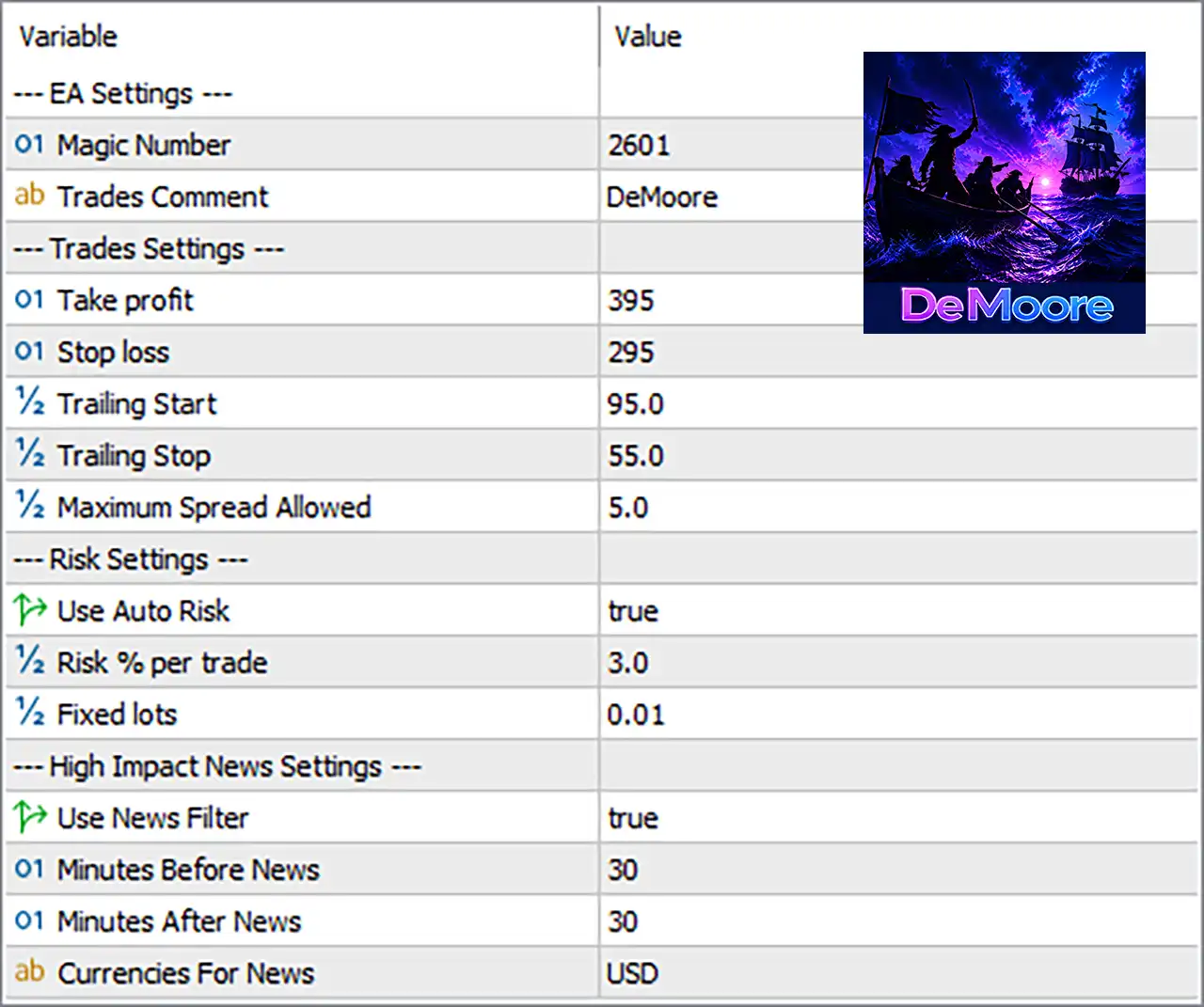
🔢 De Moore EA MT5 Settings Explained
🔄 EA Settings
🔹 Magic Number: 2601 — A unique identifier used by the EA to distinguish its own trades from trades opened by other Expert Advisors or manual trading activities on the same MT5 account.
🔹 Trades Comment: DeMoore — The trade comment assigned to orders/positions generated by the EA, making De Moore EA trades easier to identify in the MT5 trading history and terminal.
🔄 Trades Settings
🔹 Take Profit: 395 — Sets the EA's take-profit distance to 395 points, defining the targeted price movement at which a trade is automatically closed in profit.
🔹 Stop Loss: 295 — Sets the stop-loss distance to 295 points, providing predefined downside protection if the market moves against the position.
🔹 Trailing Start: 95.0 — The trailing-stop mechanism starts after the trade reaches 95.0 points of favorable movement, allowing the EA to begin protecting accumulated profit.
🔹 Trailing Stop: 55.0 — Once trailing is active, the stop is maintained at a distance of 55.0 points from the relevant market price, helping lock in profits while allowing the trade some room to continue moving.
🔹 Maximum Spread Allowed: 5.0 — The EA will only operate when the current spread is within the maximum permitted value of 5.0 points, helping avoid trading during excessively wide-spread conditions.
🔄 Risk Settings
🔹 Use Auto Risk: true — Automatic risk-based position sizing is enabled (true), meaning the EA uses its risk-management calculation rather than relying solely on a manually fixed lot size.
🔹 Risk % per trade: 3.0 — The configured risk level is 3.0% per trade, representing the percentage-based risk parameter used by the EA when calculating trade volume under automatic-risk mode.
🔹 Fixed lots: 0.01 — The manually specified fixed position size is 0.01 lots. Because Use Auto Risk = true, the EA's automatic risk setting takes priority when determining position size, depending on its internal implementation.
🔄 High Impact News Settings
🔹 Use News Filter: true — The high-impact news filter is enabled (true), allowing the EA to restrict trading around relevant high-impact economic events.
🔹 Minutes Before News: 30 — The EA is configured to avoid or restrict trading 30 minutes before a qualifying high-impact news event.
🔹 Minutes After News: 30 — The EA is configured to avoid or restrict trading for 30 minutes after a qualifying high-impact news event.
🔹 Currencies For News: USD — The news filter specifically monitors USD-related economic events, so high-impact news associated with the US dollar is used as the relevant news-filter condition.
🔢 De Moore EA MT5 Risk & Trade Management Overview
🔹 Profit Target: The Take Profit is set to 395 points, while the Stop Loss is 295 points, establishing the configured reward and protection distances.
🔹 Trailing Protection: The EA begins trailing at 95.0 points and uses a 55.0-point trailing distance to help protect favorable price movement.
🔹 Risk-Based Trading: Auto Risk = true with 3.0% risk per trade, making percentage-based risk management the primary configured position-sizing approach.
🔹 Manual Lot Reference: The Fixed Lots parameter remains at 0.01, providing the configured fixed-lot value even though automatic risk sizing is enabled.
🔹 Market Condition Filter: The EA accepts a maximum spread of 5.0 points, helping filter out trading conditions with excessive transaction costs.
🔹 Fundamental News Protection: The news filter is true, with a 30-minute restriction before and 30-minute restriction after relevant high-impact USD news.
🔢 Conclusion
De Moore EA MT5 is configured with a structured combination of trade protection, profit management, automatic risk control, spread filtering, and high-impact USD news protection. The key configuration values are 395 Take Profit, 295 Stop Loss, 95.0 Trailing Start, 55.0 Trailing Stop, 5.0 Maximum Spread, 3.0% Risk per Trade, and a 30-minute before/after USD news filter. With Auto Risk = true, the EA is primarily configured to manage position sizing according to the 3.0% risk-per-trade parameter rather than simply using the 0.01 fixed-lot setting.
🔢 FAQs
❓ What is the Magic Number 2601 used for in De Moore EA MT5? — It identifies and separates De Moore EA's trades from other automated or manual trades on the MT5 account.
❓ What does the 395 Take Profit setting mean? — It specifies a take-profit distance of 395 points, allowing the EA to automatically close a qualifying position once the configured profit target is reached.
❓ How does the 3.0% risk setting work? — With Use Auto Risk = true, the EA uses 3.0% risk per trade as its configured percentage-based risk parameter for calculating position size.
❓ When does the trailing stop start working? — The trailing mechanism is configured to start after 95.0 points of favorable movement, using a 55.0-point trailing distance.
❓ How does the De Moore EA MT5 news filter work? — With Use News Filter = true, the EA is configured around USD high-impact news and uses a 30-minute before-news and 30-minute after-news restriction window.


