🧩 What is Expert Sniper MT4?
The Expert Sniper is a scalping/sniper-style trading robot that focuses on aggressive selling, volume control, martingale options, turbo profit mode, and automated trade management.
🧩 Detailed Analysis of Each Trading Parameter
1. Lot Size & Risk Management
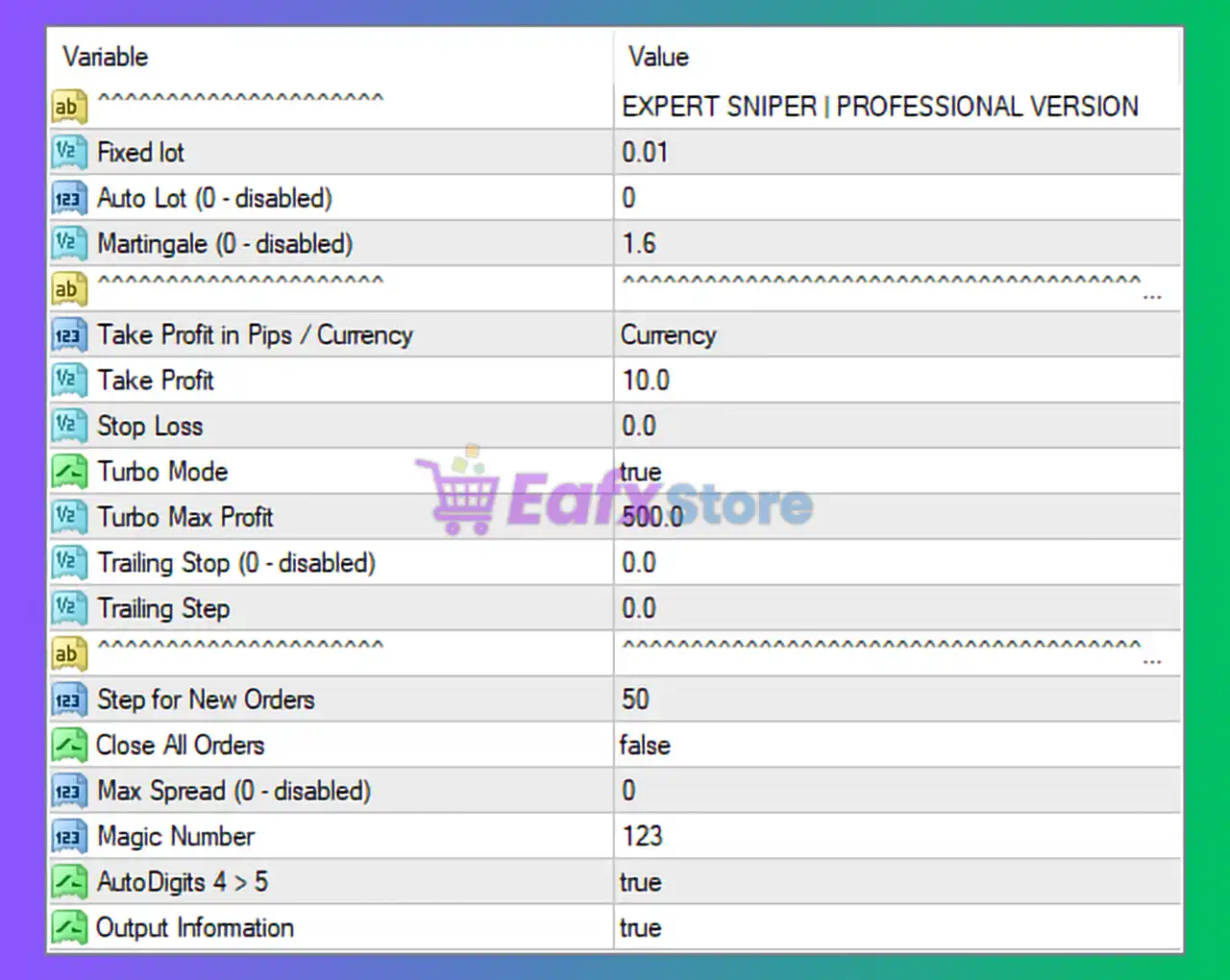
- Fixed Lot: 0.01
- Uses a very small fixed lot size.
- Suitable for small accounts or testing on real accounts with low risk.
- Risk per trade is minimal.
- Auto Lot (0 – disabled): 0
- Auto lot calculation based on balance is disabled.
- Trader has full manual control over position sizing.
- Martingale (0 – disabled): 1.6
- Martingale multiplier is set but not active.
- This is a positive risk-control choice, as martingale strategies significantly increase drawdown risk.
✅ Risk Level: Low to Medium (safe due to disabled martingale and small fixed lot)
2. Take Profit & Stop Loss
- Take Profit in Pips / Currency: Currency
- EA calculates profit target based on account currency, not pips.
- This allows consistent profit goals regardless of symbol volatility.
- Take Profit: 10.0
- Each trading cycle aims for 10 units of account currency.
- Conservative and realistic target for scalping strategies.
- Stop Loss: 0.0
- No hard stop loss is defined.
- Risk is managed by EA logic, trade spacing, and turbo profit mechanism instead.
⚠️ Important Note:
The absence of a stop loss increases exposure during strong market trends.
3. Turbo Mode & Profit Control
- Turbo Mode: true
- Enables aggressive trade handling to reach profit targets faster.
- Usually increases trade frequency and recovery speed.
- Turbo Max Profit: 500.0
- Caps total profit in turbo mode.
- Prevents overtrading after reaching a high profit threshold.
✅ Turbo mode is balanced by a maximum profit limit, which is a smart safety feature.
4. Trailing Stop Settings
- Trailing Stop (0 – disabled): 0.0
- Trailing Step: 0.0
- Trailing stop is not used.
- EA relies on fixed profit targets instead of dynamic trailing exits.
🔍 Suitable for scalping but less adaptive in trending markets.
5. Order Execution & Trade Spacing
- Step for New Orders: 50
- Minimum distance (likely in points or pips) between new orders.
- Helps reduce overtrading and limits clustering of positions.
- Close All Orders: false
- EA does not force-close all trades at once.
- Trades are managed individually or by profit logic.
6. Spread & Broker Protection
- Max Spread (0 – disabled): 0
- No spread filter enabled.
- EA may trade even during high-spread conditions (e.g., news).
⚠️ This can be risky on ECN or volatile sessions.
7. Identification & Automation
- Magic Number: 123
- Unique ID for EA trades.
- Allows multiple EAs or manual trades on the same account.
- AutoDigits 4 → 5: true
- Automatically adjusts for brokers with 4 or 5 decimal pricing.
- Improves compatibility across different brokers.
- Output Information: true
- Displays trading information on the chart.
- Useful for monitoring EA performance in real time.
🧩 Overall Strategy Profile
| Aspect | Evaluation |
|---|---|
| Risk Level | Low – Medium |
| Trading Style | Scalping / Sniper |
| Martingale | Disabled (Safe) |
| Stop Loss | Not Used |
| Profit Target | Small & Consistent |
| Best Market | Sideways / Low Volatility |
| Account Type | Small to Medium |
🧩 Final Conclusion
Expert Sniper, based on the provided settings, is configured as a low-risk, conservative scalping system designed for consistent small profits rather than aggressive growth. The use of a fixed 0.01 lot, disabled martingale, and currency-based take profit makes it suitable for beginners, small accounts, or long-term testing.
However, the lack of a hard stop loss and spread filter means traders should:
- Use reliable low-spread brokers
- Avoid high-impact news trading
- Monitor drawdown during strong market trends
✅ Best Use Case:
- Small accounts
- Stable market conditions
- Traders seeking controlled automation
⚠️ Not Recommended For:
- High volatility sessions
- News trading
- Aggressive compounding strategies