

This guide walks through the inputs of High Frequency Trading Bot MT4 with the values recommended for live trading. The set files that come with the EA already contain these settings, so you can load them in one click and adjust only what your broker or account needs.
🔢 High Frequency Trading Bot MT4 Settings Explained
High Frequency Trading Bot is an automated scalping Expert Advisor (EA) developed for MetaTrader 4 (MT4) traders who want fast market execution, precision trade management and optimized money management.
The EA is designed to operate during specific trading hours with configurable spread control, trailing range inhibition, and dynamic order management settings. It is suitable for traders looking for high-speed trading automation in volatile Forex market conditions.
🔢 High Frequency Trading Bot MT4 Full Settings Explanation
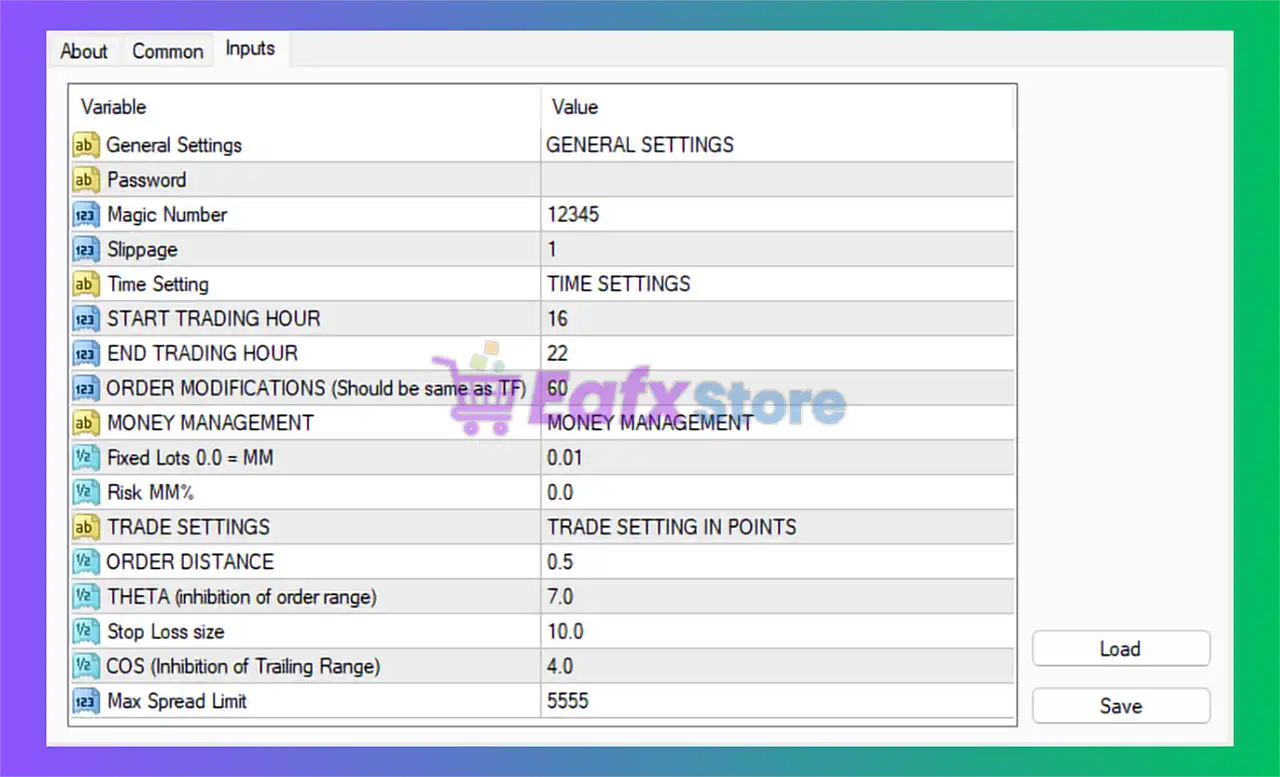
Below are the details of the parameters in the advisor’s trading system settings table:
🔶 GENERAL SETTINGS
🔹 General Settings = GENERAL SETTINGS: Main section header containing the EA’s core configuration parameters.
🔹 Password: Reserved field used for EA activation or licensing authentication.
🔹 Magic Number = 12345: Unique Magic Number 12345 identifies all trades opened by this EA.
🔹 Slippage = 1: Maximum allowed slippage during trade execution is limited to 1 point.
🔶 TIME SETTINGS
🔹 Time Setting = TIME SETTINGS: Section header for trading schedule configuration.
🔹 START TRADING HOUR = 16: The EA begins trading operations at server hour 16.
🔹 END TRADING HOUR = 22: The EA stops opening trades at server hour 22.
🔹 ORDER MODIFICATIONS (Should be same as TF) = 60: Trade modification interval is set to 60, typically matching the chart timeframe in minutes.
🔶 MONEY MANAGEMENT SETTINGS
🔹 MONEY MANAGEMENT = MONEY MANAGEMENT: Section header for risk and lot management parameters.
🔹 Fixed Lots 0.0 = MM = 0.01: Fixed lot size is set to 0.01; using 0.0 would enable automatic money management mode.
🔹 Risk MM% = 0.0: Risk percentage for automatic money management is 0.0%, meaning MM is disabled.
🔶 TRADE SETTINGS
🔹 TRADE SETTINGS = TRADE SETTING IN POINTS: Section header for order execution and protection settings.
🔹 ORDER DISTANCE = 0.5: Minimum distance between trading orders is configured at 0.5 points.
🔹 THETA (inhibition of order range) = 7.0: Restricts order placement range using a theta value of 7.0.
🔹 Stop Loss size = 10.0: Sets the Stop Loss distance to 10.0 points.
🔹 COS (Inhibition of Trailing Range) = 4.0: Controls trailing stop inhibition sensitivity using value 4.0.
🔹 Max Spread Limit = 5555: Maximum allowed spread for trade execution is set to 5555.
🔢 Conclusion
High Frequency Trading Bot MT4 is a lightweight but powerful automated scalping EA focused on fast execution, controlled trading windows, and simplified money management. With configurable order distance logic, spread filtering, and time-based execution settings, the EA provides traders with a flexible framework for high-frequency Forex trading on MetaTrader 4 platforms.
🔢 FAQs
❓ What is High Frequency Trading Bot MT4?
High Frequency Trading Bot MT4 is an automated Forex scalping EA designed for rapid trade execution and high-frequency market operations.
❓ What does the Magic Number do in this EA?
The Magic Number uniquely identifies trades opened by the EA to separate them from manual trades or other robots.
❓ Can I use automatic money management with this EA?
Yes, setting Fixed Lots = 0.0 enables automatic money management based on risk percentage.
❓ Why is the trading time restricted from 16 to 22?
The EA is optimized to trade during specific market sessions with higher volatility and liquidity.
❓ What is the purpose of the Max Spread Limit setting?
The Max Spread Limit protects the EA from entering trades during extremely high spread conditions.
Get High Frequency Trading Bot MT4
Download High Frequency Trading Bot MT4 with its set files, read the full product details and requirements here: High Frequency Trading Bot MT4 →