

Introduction
Midasama Trader EA is an automated trading Expert Advisor (EA) for the MetaTrader 4 platform, featuring trend-following and counter-trend trading configurations. Its input parameters combine Stochastic indicators, Moving Average filtering, Martingale lot management, and automated trade protection.
The EA provides separate controls for Buy and Sell trend entries, counter-trend operations, panic closing, monetary risk management, and profit targets. Traders can also customize trading hours, lot sizing, maximum trading levels, Stop Loss, Take Profit, and Trailing Stop settings to suit their trading strategies.

Midasama Trader EA MT4 Settings Explained
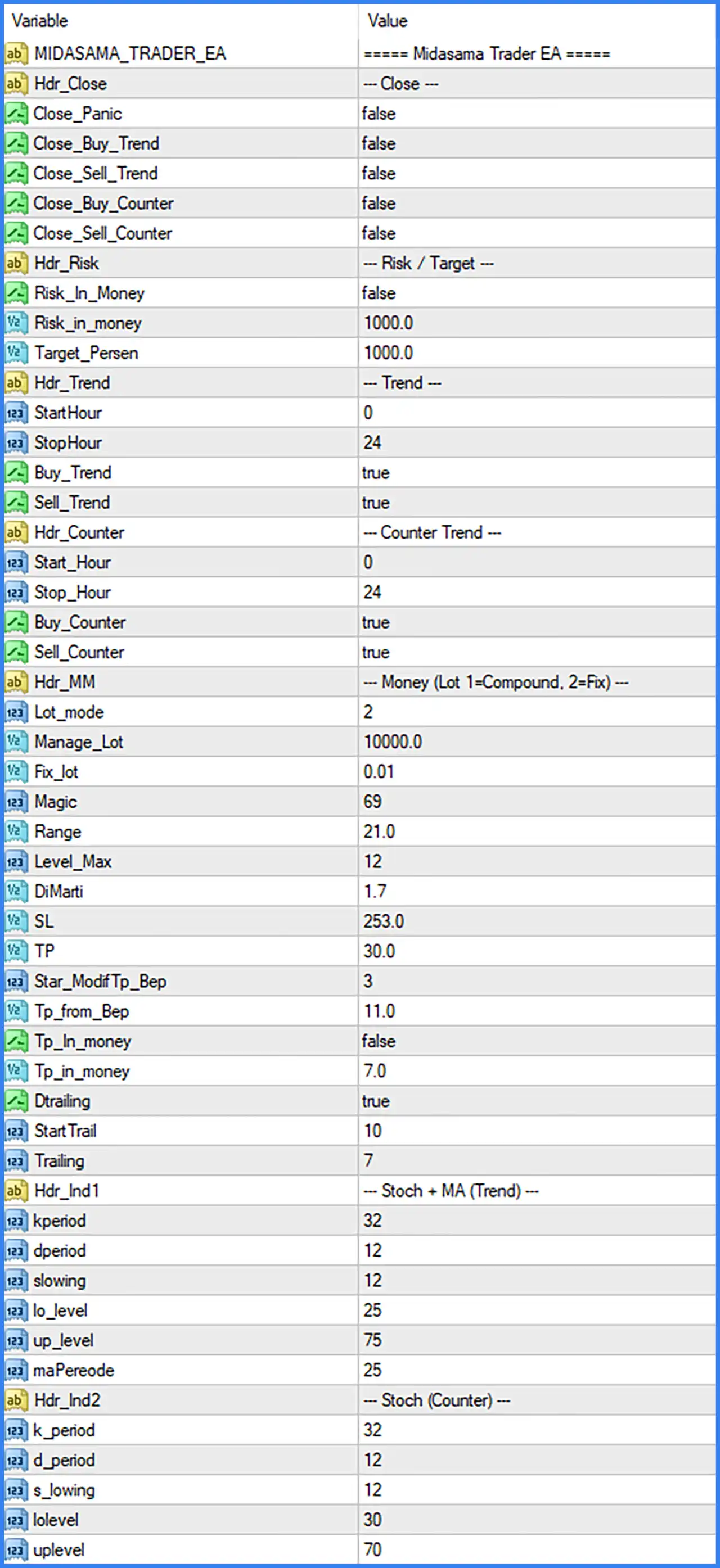
Close Settings
🔹 MIDASAMA_TRADER_EA – Main configuration section identifying the Midasama Trader EA settings.
🔹 Hdr_Close = --- Close --- – Section heading containing the EA's automated trade-closing options.
🔹 Close_Panic = false – Enables or disables the panic-closing function. The default value of false means panic closing is disabled in the supplied configuration.
🔹 Close_Buy_Trend = false – Controls the automatic closing function for Buy positions generated by the trend-following strategy. The default value of false disables this option.
🔹 Close_Sell_Trend = false – Controls the automatic closing function for Sell positions generated by the trend-following strategy. The default value of false means this closing option is disabled.
🔹 Close_Buy_Counter = false – Enables or disables automatic closing of Buy positions generated by the counter-trend strategy. The default value of false disables this function.
🔹 Close_Sell_Counter = false – Enables or disables automatic closing of Sell positions generated by the counter-trend strategy. The supplied value of false means this option is disabled.
Risk and Target Settings
🔹 Hdr_Risk = --- Risk / Target --- – Section heading for monetary risk management and trading target configuration.
🔹 Risk_In_Money = false – Enables or disables monetary-based risk management. The default value of false means this particular risk mode is not activated.
🔹 Risk_in_money = 1000.0 – Sets the monetary risk reference value to 1000.0. This parameter provides the configured amount used by the EA's monetary risk management logic when the corresponding option is enabled.
🔹 Target_Persen = 1000.0 – Defines the trading target parameter with a default value of 1000.0. Its exact calculation method and whether the value represents a percentage or another target unit should be confirmed with the EA developer.
Trend Trading Settings
🔹 Hdr_Trend = --- Trend --- – Section heading containing the configuration options for trend-following trading operations.
🔹 StartHour = 0 – Defines the starting hour for the trend trading schedule. The default value of 0 allows the configured trading session to begin at the start of the day.
🔹 StopHour = 24 – Defines the ending hour for the trend trading schedule. The default value of 24 represents the end-of-day boundary.
🔹 Buy_Trend = true – Enables Buy trades generated by the trend-following strategy. When set to true, the EA is allowed to execute Buy-side trend signals.
🔹 Sell_Trend = true – Enables Sell trades generated by the trend-following strategy. The default value of true allows the EA to execute Sell-side trend signals.
Counter-Trend Trading Settings
🔹 Hdr_Counter = --- Counter Trend --- – Section heading for the counter-trend trading configuration.
🔹 Start_Hour = 0 – Specifies the starting hour for counter-trend trading operations. The default value of 0 allows this trading mode to begin at the start of the day.
🔹 Stop_Hour = 24 – Specifies the ending hour for counter-trend trading operations. The default value of 24 represents the end-of-day boundary.
🔹 Buy_Counter = true – Enables Buy positions generated by the counter-trend strategy. When true, the EA can execute Buy signals according to its counter-trend conditions.
🔹 Sell_Counter = true – Enables Sell positions generated by the counter-trend strategy. The default value of true allows the EA to execute Sell-side counter-trend signals.
Money Management and Martingale Settings
🔹 Hdr_MM = --- Money (Lot 1=Compound, 2=Fix) --- – Section heading identifying the money management configuration. It also explains the available lot modes: 1 = Compound and 2 = Fixed.
🔹 Lot_mode = 2 – Selects the lot-sizing method used by the EA. According to the input description, 1 represents Compound mode and 2 represents Fixed mode. The default value of 2 selects Fixed lot sizing.
🔹 Manage_Lot = 10000.0 – Defines the account or capital reference value used by the EA's lot management system. The default value is 10000.0, although its precise calculation role depends on the internal money management implementation.
🔹 Fix_lot = 0.01 – Sets the fixed trading lot size to 0.01. This parameter determines the configured position volume when Fixed lot mode is selected.
🔹 Magic = 69 – Assigns the Magic Number 69 to trades opened by Midasama Trader EA MT4. This identifier helps distinguish the EA's positions from manually opened trades and positions managed by other Expert Advisors.
🔹 Range = 21.0 – Defines the range parameter used by the EA's trading or entry management logic. The default value is 21.0, while its precise calculation and application depend on the EA's internal strategy.
🔹 Level_Max = 12 – Sets the maximum trading level to 12. This parameter establishes the configured upper limit for the EA's trading levels or position sequence.
🔹 DiMarti = 1.7 – Defines the Martingale multiplier at 1.7. When the EA applies its Martingale logic, the lot size can be increased by a factor of 1.7 according to its position management rules.
Stop Loss and Take Profit Settings
🔹 SL = 253.0 – Sets the Stop Loss parameter to 253.0. This value defines the configured Stop Loss distance or level used by the EA, with the exact unit depending on its internal implementation.
🔹 TP = 30.0 – Sets the Take Profit parameter to 30.0. This value determines the configured profit-taking distance or target used by the EA's trade management logic.
🔹 Star_ModifTp_Bep = 3 – Defines the starting level for modifying Take Profit toward the Break-Even Point (BEP). The default value of 3 establishes the configured activation level for this adjustment function.
🔹 Tp_from_Bep = 11.0 – Sets the Take Profit distance or reference from the Break-Even Point to 11.0. This parameter determines the configured profit offset associated with the EA's BEP-based Take Profit modification.
🔹 Tp_In_money = false – Enables or disables monetary-based Take Profit management. The default value of false means this particular profit-target mode is disabled.
🔹 Tp_in_money = 7.0 – Defines the monetary Take Profit reference value of 7.0. This parameter provides the configured profit amount used by the EA when monetary Take Profit functionality is activated.
Trailing Stop Settings
🔹 Dtrailing = true – Enables or disables the EA's Trailing Stop functionality. The default value of true means the trailing mechanism is activated in the supplied configuration.
🔹 StartTrail = 10 – Defines the starting threshold for activating the Trailing Stop mechanism. When the trade reaches the configured level of 10, the EA can begin applying its trailing logic.
🔹 Trailing = 7 – Sets the trailing distance to 7. This parameter determines how far the Stop Loss follows the market price after the Trailing Stop becomes active.
Indicator Settings – Stochastic + Moving Average (Trend)
🔹 Hdr_Ind1 = --- Stoch + MA (Trend) --- – Section heading identifying the Stochastic and Moving Average indicator configuration used for trend-following signals.
🔹 kperiod = 32 – Sets the Stochastic %K calculation period to 32. This parameter determines the number of price periods used to calculate the main Stochastic line.
🔹 dperiod = 12 – Sets the Stochastic %D smoothing period to 12. This parameter controls the smoothing calculation of the signal line.
🔹 slowing = 12 – Sets the Stochastic slowing value to 12. This parameter controls additional smoothing of the %K line and influences the responsiveness of the indicator.
🔹 lo_level = 25 – Defines the lower Stochastic threshold at 25. This level represents the configured lower reference zone used by the EA when evaluating trend-related indicator conditions.
🔹 up_level = 75 – Defines the upper Stochastic threshold at 75. This level represents the configured upper reference zone used when evaluating Stochastic signals.
🔹 maPeriode = 25 – Sets the Moving Average period to 25. The EA uses this parameter for its trend-related Moving Average calculation, helping establish the configured trend reference.
Indicator Settings – Stochastic (Counter-Trend)
🔹 Hdr_Ind2 = --- Stoch (Counter) --- – Section heading identifying the Stochastic indicator configuration for counter-trend trading signals.
🔹 k_period = 32 – Sets the Stochastic %K period to 32 for the counter-trend strategy. This parameter determines the number of price periods used in the main Stochastic calculation.
🔹 d_period = 12 – Sets the Stochastic %D period to 12. It controls the smoothing period used to calculate the counter-trend indicator's signal line.
🔹 s_lowing = 12 – Sets the Stochastic slowing parameter to 12. This value controls additional smoothing of the %K calculation for counter-trend signal evaluation.
🔹 lolevel = 30 – Defines the lower Stochastic threshold at 30. This level provides the lower reference boundary used by the EA when evaluating counter-trend trading conditions.
🔹 uplevel = 70 – Defines the upper Stochastic threshold at 70. This level provides the upper reference boundary for evaluating counter-trend indicator conditions.
Conclusion
Midasama Trader EA MT4 offers a combination of trend-following and counter-trend trading strategies supported by Stochastic indicators, Moving Average filtering, and configurable money management.
Its default settings enable both Buy and Sell trend trading as well as both counter-trend directions. The EA uses Fixed lot mode with a 0.01 lot size, a Martingale multiplier of 1.7, a maximum trading level of 12, and Magic Number 69. It also includes a Stop Loss setting of 253.0, Take Profit of 30.0, and an enabled Trailing Stop with StartTrail = 10 and Trailing = 7.
Traders should pay particular attention to the Martingale multiplier, maximum trading levels, and the separate risk and target parameters. These settings can significantly influence overall exposure and drawdown. Before using Midasama Trader EA on a live account, it is advisable to test both trading modes, verify the Stop Loss and Take Profit units, and adjust the money management configuration according to individual risk tolerance.