

Introduction to Mission Profit EA MT4
Mission Profit EA is an automated Forex trading Expert Advisor (EA) designed for MetaTrader 4, featuring configurable Stop Loss (SL) and Take Profit (TP) levels, Trailing stop management, multiple technical indicator filters, and adjustable lot sizing.

The EA provides several trading strategy components, including Awesome Oscillator, Trend Indicator, ATR, and Bollinger Bands. It also incorporates a News Filter to help manage trading activity around economic announcements.
With customizable trading parameters, Mission Profit EA allows traders to adjust position sizing, configure risk management levels, and enable or disable individual technical analysis components according to their trading preferences.
Stop Loss and Take Profit Settings
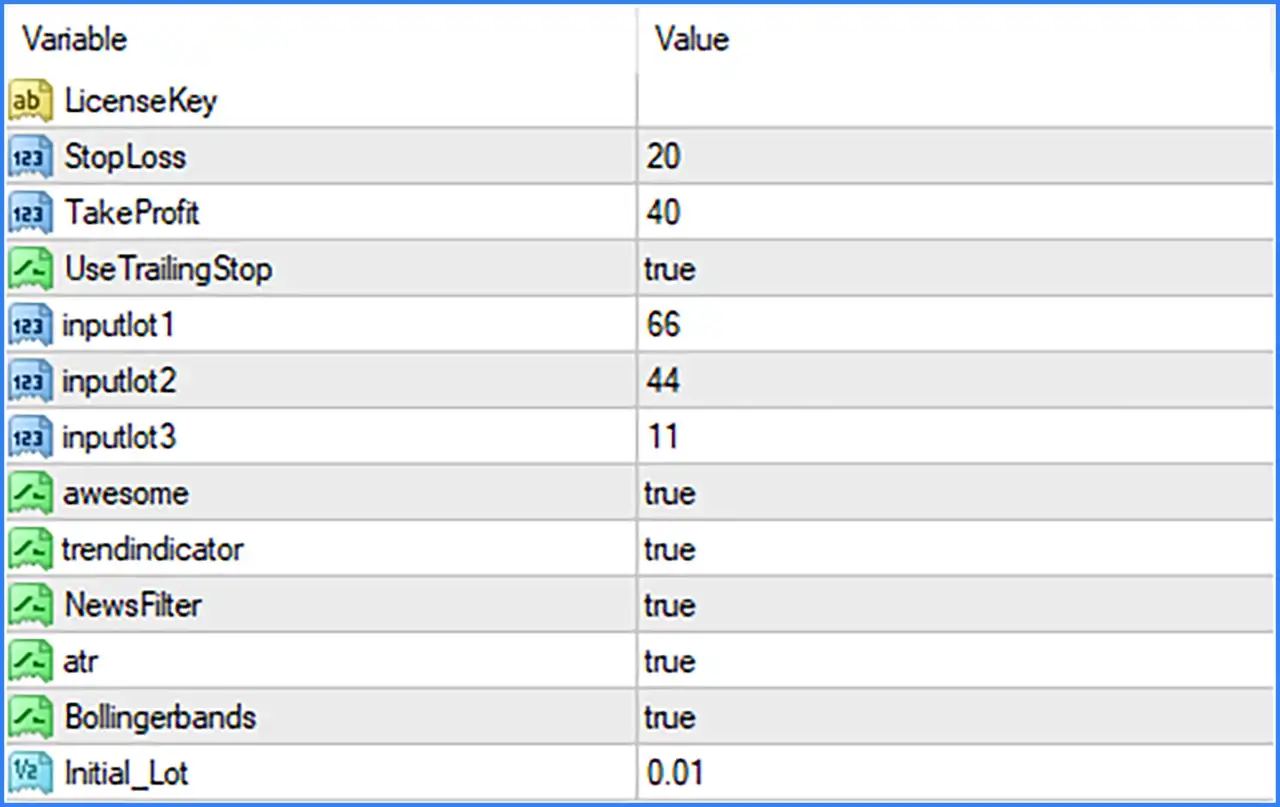
🔹 StopLoss = 20 – Sets the Stop Loss distance to 20 points or pips, depending on the EA's internal calculation, defining the configured loss threshold for each trade.
🔹 TakeProfit = 40 – Sets the Take Profit distance to 40 points or pips, depending on the EA's implementation, defining the target price movement for closing profitable positions.
🔹 UseTrailingStop = true – Enables the Trailing Stop feature, allowing the EA to adjust the stop-loss level as the market moves favorably to help protect accumulated trading profits.
Trading Strategy Parameters
🔹 inputlot1 = 66 – Sets the first custom numerical strategy parameter to 66, which is used by the EA's internal trading configuration.
🔹 inputlot2 = 44 – Sets the second custom numerical strategy parameter to 44, providing an additional configurable value for the EA's internal trading logic.
🔹 inputlot3 = 11 – Sets the third custom numerical strategy parameter to 11, defining another numerical input used by the EA's trading configuration.
Technical Indicator Settings
🔹 awesome = true – Enables the Awesome Oscillator (AO) component, allowing the EA to incorporate this momentum indicator into its configured trading strategy.
🔹 trendindicator = true – Enables the Trend Indicator component, allowing the EA to use its configured trend analysis functionality when evaluating potential trading opportunities.
🔹 NewsFilter = true – Enables the News Filter feature, allowing the EA to apply its configured economic news filtering mechanism to trading operations.
🔹 atr = true – Enables the Average True Range (ATR) indicator component, which measures market volatility and can be used by the EA as part of its trading strategy.
🔹 Bollingerbands = true – Enables Bollinger Bands analysis, allowing the EA to incorporate volatility bands and price positioning into its configured trading logic.
Lot Size and Money Management
🔹 Initial_Lot = 0.01 – Sets the initial trading volume to 0.01 lots, defining the starting position size used by Mission Profit EA MT4 when opening trades.
Conclusion
Mission Profit EA MT4 offers a configurable automated trading system with several technical analysis components and essential trade management features.
Its default configuration includes a Stop Loss of 20, a Take Profit of 40, and an initial lot size of 0.01. The Trailing Stop is enabled to help manage open positions, while Awesome Oscillator, Trend Indicator, News Filter, ATR, and Bollinger Bands are also activated.
The three additional numerical parameters, inputlot1 = 66, inputlot2 = 44, and inputlot3 = 11, provide further customization options for the EA's internal trading configuration.
Before running Mission Profit EA MT4 on a live account, traders should verify the exact functions of these three custom parameters and confirm whether the Stop Loss and Take Profit values are measured in points or pips. Testing different configurations on a demo account is recommended to evaluate trading behavior and risk exposure.