

Introduction
Pac Man BTC EA is an automated trading Expert Advisor (EA) designed for Bitcoin trading on the MetaTrader 5 platform. Version 1.7 provides configurable breakout trading, flexible money management, position limits, broker spread protection, and economic news filtering.

The EA includes fixed-lot and risk-based position sizing options, allowing traders to adjust their trading volume according to their account balance and risk preferences. It also supports a maximum of 3 positions at the same breakout level to manage trade exposure.
Pac Man BTC incorporates a dedicated news filter for major economic announcements, including FOMC, CPI, NFP Jobs, and PCE. Additional settings allow traders to control weekend trading, display an information dashboard, and configure trading behavior around important economic events.
Pac Man BTC EA MT5 Settings Explained
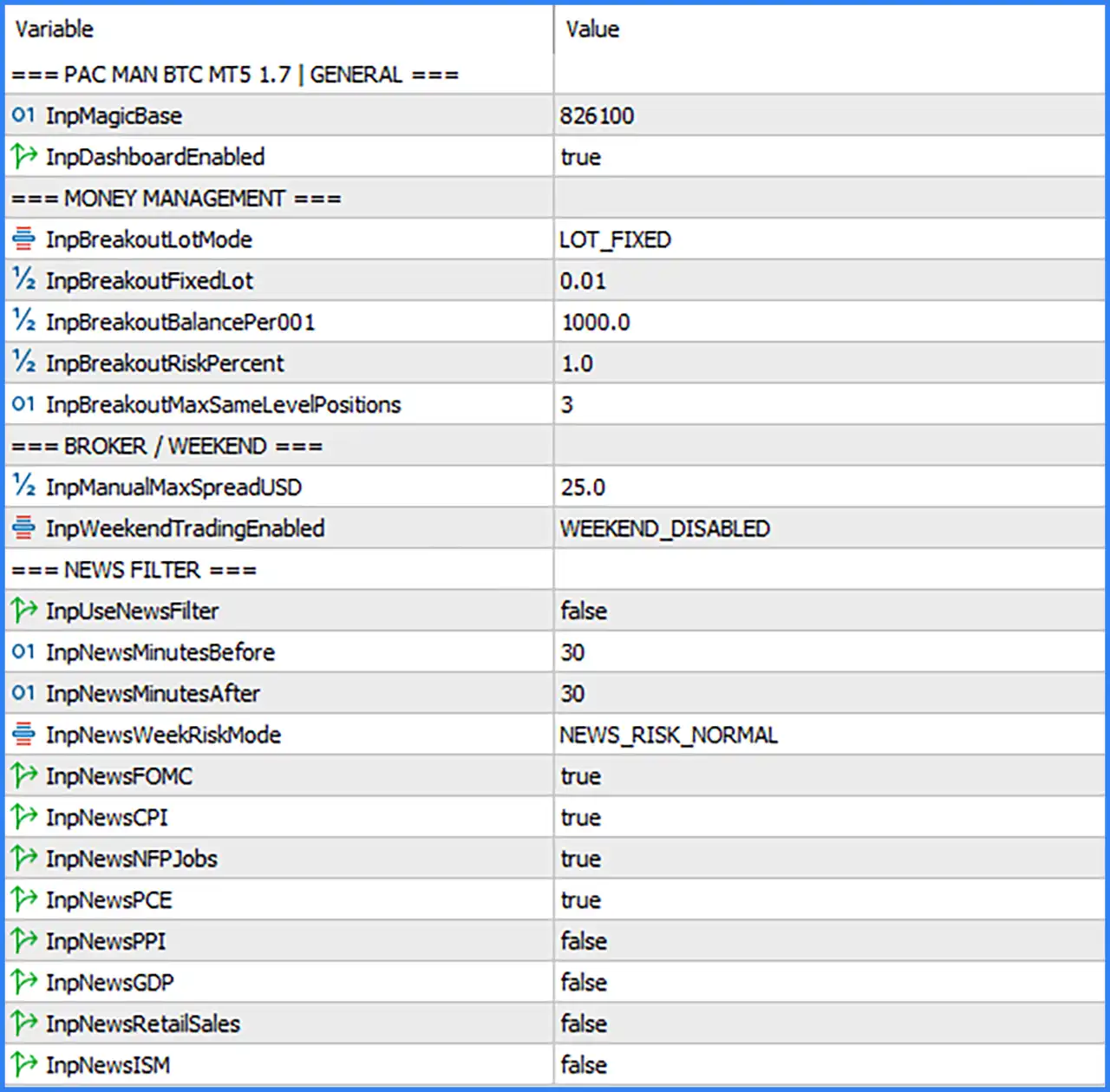
1. General Settings
🔹 InpMagicBase = 826100 – Sets the base Magic Number to 826100, allowing the EA to identify and distinguish its trading orders from other Expert Advisors and manual trades.
🔹 InpDashboardEnabled = true – Enables the trading dashboard on the chart, providing access to the EA's displayed trading information and operational status.
2. Money Management Settings
🔹 InpBreakoutLotMode = LOT_FIXED – Selects Fixed Lot mode for breakout trading, allowing the EA to use a predefined trading volume instead of automatically calculating lot sizes based on account risk.
🔹 InpBreakoutFixedLot = 0.01 – Sets the fixed breakout trading vol
ume to 0.01 lots for each applicable order when LOT_FIXED mode is selected.
🔹 InpBreakoutBalancePer001 = 1000.0 – Defines the account balance reference of 1000.0 for each 0.01 lot when the corresponding balance-based lot-sizing calculation is used.
🔹 InpBreakoutRiskPercent = 1.0 – Sets the configured breakout risk percentage to 1.0, providing the risk reference for the EA's percentage-based position-sizing method when applicable.
🔹 InpBreakoutMaxSameLevelPositions = 3 – Limits the maximum number of simultaneous positions at the same breakout level to 3, helping control the number of entries opened around an individual price level.
3. Broker and Weekend Settings
🔹 InpManualMaxSpreadUSD = 25.0 – Sets the maximum permitted spread threshold to 25.0 USD according to the EA's spread-control parameter, helping restrict entries when trading costs exceed the configured limit.
🔹 InpWeekendTradingEnabled = WEEKEND_DISABLED – Disables weekend trading, preventing the EA from opening new trades during the weekend according to its weekend trading configuration.
4. News Filter Settings
🔹 InpUseNewsFilter = false – Disables the main economic news filter, meaning the EA's news-based entry protection is not activated under the supplied configuration.
🔹 InpNewsMinutesBefore = 30 – Sets the news protection window to 30 minutes before a scheduled economic announcement when the news filter is enabled.
🔹 InpNewsMinutesAfter = 30 – Sets the news protection window to 30 minutes after a scheduled economic announcement when the news filter is enabled.
🔹 InpNewsWeekRiskMode = NEWS_RISK_NORMAL – Selects Normal news-risk mode, defining the EA's configured risk behavior during economic news periods.
5. Economic News Event Settings
The following parameters determine which economic announcements are included in the EA's news-filter configuration.
🔹 InpNewsFOMC = true – Enables FOMC (Federal Open Market Committee) announcements as monitored economic events, allowing the news filter to recognize important US monetary policy decisions.
🔹 InpNewsCPI = true – Enables Consumer Price Index (CPI) announcements as monitored events, covering important inflation-related economic releases.
🔹 InpNewsNFPJobs = true – Enables Non-Farm Payroll (NFP) employment reports as monitored economic events, helping identify major US labor-market announcements.
🔹 InpNewsPCE = true – Enables Personal Consumption Expenditures (PCE) announcements as monitored economic events, covering an important US inflation indicator.
🔹 InpNewsPPI = false – Disables Producer Price Index (PPI) announcements in the selected news-event configuration, excluding this event category from the enabled news list.
🔹 InpNewsGDP = false – Disables Gross Domestic Product (GDP) announcements as monitored events under the supplied configuration.
🔹 InpNewsRetailSales = false – Disables US Retail Sales announcements in the EA's selected economic news-event configuration.
🔹 InpNewsISM = false – Disables ISM economic reports as monitored events, excluding this category from the enabled news-event selection.
Conclusion
Pac Man BTC EA MT5 offers a configurable automated Bitcoin breakout trading environment with fixed-lot money management, risk-based position-sizing options, maximum position limits, weekend protection, and economic calendar filtering.
The supplied configuration uses LOT FIXED mode with a fixed lot size of 0.01, a breakout balance reference of 1000.0 per 0.01 lot, a risk percentage setting of 1.0, and a maximum of 3 positions at the same breakout level.
The EA also includes a maximum spread setting of 25.0 USD and disables weekend trading. Its economic news configuration recognizes FOMC, CPI, NFP Jobs, and PCE announcements, while PPI, GDP, Retail Sales, and ISM are disabled.
One important detail is that InpUseNewsFilter = false, meaning the main news filter is currently inactive despite several individual news-event options being enabled.
Before running Pac Man BTC EA MT5 on a live account, traders should verify broker spread conditions, understand the breakout risk settings, and test its position management under different Bitcoin market conditions. Backtesting and demo trading are recommended before committing real capital.