






Pac Man BTC EA MT5 (Latest version) - Unlimited

Subscriptions for Special Plan
- 30 EA package is more economical!
- Special package with 99%
- Download 1 EA/Day

Subscriptions for Premium Membership
- Download Unlimited in 1 Year
- Get 100% Discount
- Get free access to all

Subscriptions for Gold Membership
- 1 Year Membership
- Get 100% Discount
- Access EA+Indicator+Course
Frequently bought together 🎁
Add these products to enhance your purchase


Quick Overview
Pac Man BTC MT5 is a fully automated Expert Advisor for BTCUSD that combines two different trading systems in one EA: Breakout and Runner. Both can be used individually or together.
The EA manages entries, pending orders, Stop Loss, Take Profit, Break-Even, Trailing and position management on its own. It was specifically developed for the high volatility and unique market conditions of Bitcoin.
Best For:
✅ Bitcoin traders who want a dedicated BTCUSD system on MetaTrader 5.
✅ Traders who like the idea of two systems in one EA, Breakout and Trend following.
✅ Users who want separate money management for each system.
✅ Traders who want spread and weekend controls built into the EA.
What is Pac Man BTC MT5?
Pac Man BTC MT5 is an Expert Advisor (EA) for BTCUSD on MetaTrader 5. Rather than relying on a single idea, it runs two systems that approach Bitcoin in different ways. The Breakout system waits for valid setups and places pending orders. The Runner system looks for stronger movements and follows them while they develop.
Bitcoin behaves differently from forex pairs. Spreads, liquidity and execution speed can change sharply from one broker to another, and price can move far in a short time. The EA was written with those conditions in mind and includes spread control and a real-time dashboard.
 Vendor Website: View here
Delivery time 24h-48h after payment.
Refund if not delivered.
You will receive the current version without any limitations (ID+Time).
Pac Man BTC MT5 Review
How Does Pac Man BTC MT5 Work?
The Breakout System
The Breakout system works with several internal strategies designed for different market conditions.
Pending orders are only placed when the matching strategy detects a valid setup, which means the EA is not permanently active in the market. It waits for suitable breakout situations.
Each strategy has its own settings for Entry, Stop Loss (SL), Take Profit (TP), Break-Even and Trailing.
The Runner System
The Runner system was designed to identify stronger movements in the Bitcoin market and actively follow ongoing price movements.
For this purpose, the EA uses Multi-Timeframe Analysis and evaluates up to 12 internal confirmation signals.
The more confirmations a setup receives from the internal analysis, the higher its signal strength classification.
Signal Strength Multiplier
The Runner includes an optional Signal Strength Multiplier. When it is enabled, the selected base lot size or risk is adjusted according to the signal strength.
| Signal class | Multiplier | Example with Fixed Lot 0.01 |
| Standard Signal | 1 times | 0.01 lot |
| Strong Signal | 2 times | 0.02 lot |
| Premium Signal | 3 times | 0.03 lot |
The same principle applies to Risk Percent and Balance Based Money Management.
Traders who prefer the same lot size or risk level for every Runner signal can disable the multiplier, and all Runner signals are then traded at 1 times.
Verified Live Signal Performance
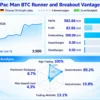
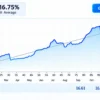
✅ Pac Man BTC Runner and Breakout VT shows positive live trading performance, achieving 35% account growth over 3 weeks. The signal has generated €85.07 profit from a €240 initial deposit, with 89% profitable trades and a reported 7.3% maximum drawdown.
Pac Man BTC EA Live Signal
| Parameter | Result |
|---|---|
| Account Growth | +35% |
| Total Profit | €85.07 |
| Initial Deposit | €240 |
| Current Equity | €325.07 |
| Profit Trades | 89% |
| Maximum Drawdown | 7.3% |
| Tracking Duration | 3 weeks |
✅ Pac Man BTC Runner and Breakout Vantage achieved 17% account growth over 3 weeks, generating €82.66 profit from a €500 initial deposit. With 89.2% profitable trades and 8.7% maximum drawdown, the signal shows promising early performance.
Pac Man BTC EA Live Signal Results
| Parameter | Result |
|---|---|
| Account Growth | +17% |
| Total Profit | €82.66 |
| Initial Deposit | €500 |
| Current Equity | €582.66 |
| Profit Trades | 89.2% |
| Maximum Drawdown | 8.7% |
| Tracking Duration | 3 weeks |
Key Features of Pac Man BTC MT5
Two Systems in One EA
Breakout and Runner, usable individually or together.
Automatic Entry and Pending Order Management
The EA places and manages entries and pending orders without manual work.
Stop Loss and Take Profit
Each strategy has its own Entry, Stop Loss and Take Profit settings.
Break-Even Management
Positions can be protected once a trade moves into profit.
Dynamic Trailing
Trailing follows the move as it develops.
Multi-Timeframe Analysis
Performed automatically inside the EA, so only one BTCUSD chart is needed.
Signal Strength Multiplier
Optional lot or risk scaling for Runner signals, from 1 times to 3 times.
Spread Adaptive Trading and Maximum Spread Protection
The EA considers current trading conditions when placing orders and limits trading when the spread is too wide.
Weekend Trading Control
Gives control over trading around the weekend.
Separate Money Management
Breakout and Runner each have their own system, with Fixed Lot, Risk Percent or Balance Based options.
Real-Time Dashboard
Shows the EA status directly on the chart.
Pac Man BTC MT5 Trading Strategy
🔹 Wait for the setup: the Breakout system stays out of the market until a strategy detects a valid breakout situation.
🔹 Place pending orders: orders are placed only when the matching internal strategy confirms the setup.
🔹 Follow the move: the Runner system tracks stronger Bitcoin movements through Multi-Timeframe Analysis.
🔹 Count the confirmations: up to 12 internal signals decide the signal strength of a Runner setup.
🔹 Manage the position: Stop Loss, Take Profit, Break-Even and Dynamic Trailing handle each trade after entry.
How to Get the Most from Pac Man BTC MT5
🔹 Install on one chart: attach the EA to a BTCUSD chart and set the chart timeframe to H1.
🔹 Enable Algo Trading: then choose the Trading Mode and the money management option.
🔹 Start conservatively: use Fixed Lot with a small size at first, and test on demo before going live.
🔹 Leave the core settings alone: the internal strategy settings are preconfigured.
🔹 Choose the broker with care: BTCUSD spreads and execution vary a great deal between brokers.
🔹 Use a VPS: a stable VPS with a good connection to the broker server is recommended for continuous operation.
🔹 Plan the risk first: the risk management guide helps with choosing a lot size or risk percent.
Pac Man BTC MT5 Risk Management
Bitcoin Is Volatile
BTCUSD can move far in a short time. Even with Stop Loss and trailing in place, gaps and fast candles can lead to slippage.
A guide to stop-loss placement explains how stops protect an account.
Signal Multiplier Raises Exposure
With the multiplier enabled, a Premium Signal trades three times the base lot or risk.
This should be considered when choosing the base size. A guide to take-profit methods shows how targets relate to risk.
Broker and Execution
Spread, slippage, liquidity, execution speed and account type can all change the results.
Real trading results may differ between brokers, so the EA is best tested on the broker that will be used.
What Sets It Apart
🔹 Two systems in one EA: breakout entries and trend following, selectable by mode.
🔹 Built for Bitcoin: designed around the volatility of BTCUSD and its broker differences.
🔹 Confirmation based sizing: up to 12 signals and an optional multiplier for Runner setups.
🔹 Independent risk settings: a separate money management system for each of the two systems.
Strengths and Limitations
Strengths
🔹 Two different approaches in a single EA.
🔹 Pending orders only when a valid setup appears.
🔹 Spread control, weekend control and a dashboard.
🔹 Preconfigured internal settings.
Limitations
🔹 One market: BTCUSD only.
🔹 Broker dependence: spread and execution can change results.
🔹 Higher exposure with the multiplier: Premium signals trade three times the base size.
🔹 No guarantees: nothing here promises profit.
Who Should Use Pac Man BTC MT5?
🔹 Bitcoin traders: those who want an automated system dedicated to BTCUSD.
🔹 Users who like flexibility: traders who want to pick between breakout, trend following or both.
🔹 Careful risk takers: users who will begin with Fixed Lot and a demo test.
🔹 Not for traders who: want a multi-asset EA, expect guaranteed returns or cannot use a VPS or a suitable broker.
Recommended Trading Conditions
For the best performance, the developer recommends:
| Features | Type |
|---|---|
| Trading platform | MetaTrader 5 (MT5) |
| Time frames | H1 |
| Currency pairs | BTCUSD |
| Minimum / Recommended deposit | $200+ |
| Minimum / Recommended leverage | Any |
| Account type | Any |
| Additional services | Unlock and Decompile |
| Recommended brokers | Exness Broker, Icmarkets Broker |
| Recommended VPS | MyfxVPS.com (Blue VPS, Golden VPS). Lowest Latency, 2 week Free Trial, 100% Free for 12-18 Months. |
Product Download Package?
The download package of the product suite includes:
 Experts: Pac Man BTC.ex5
 Reviewed by David Easton
Final Verdict
Pac Man BTC MT5 gives Bitcoin traders two systems in one EA, with separate money management, spread protection and a dashboard. The mode selection makes it easy to begin with one system and extend later.
Its results depend heavily on broker conditions, and no performance figures are published here. A careful start with a demo test, a conservative Fixed Lot and a stable VPS is the sensible way to begin.
🔢 Pac Man BTC EA MT5 Settings: Complete Inputs Guide
Pac Man BTC EA MT5 is an automated Bitcoin trading system designed for MetaTrader 5, primarily targeting BTCUSD on the H1 timeframe. It combines two trading systems, Breakout and Runner, which can operate independently or together. Breakout focuses on pending-order entries around potential price breakouts, while Runner is designed to follow stronger market movements using additional signal confirmations.
The EA provides separate money-management settings for each strategy, alongside spread protection, weekend controls, economic news filters, and an optional signal-strength multiplier. Understanding these parameters helps traders configure the system, evaluate potential exposure, and test the settings against their broker’s Bitcoin trading conditions.
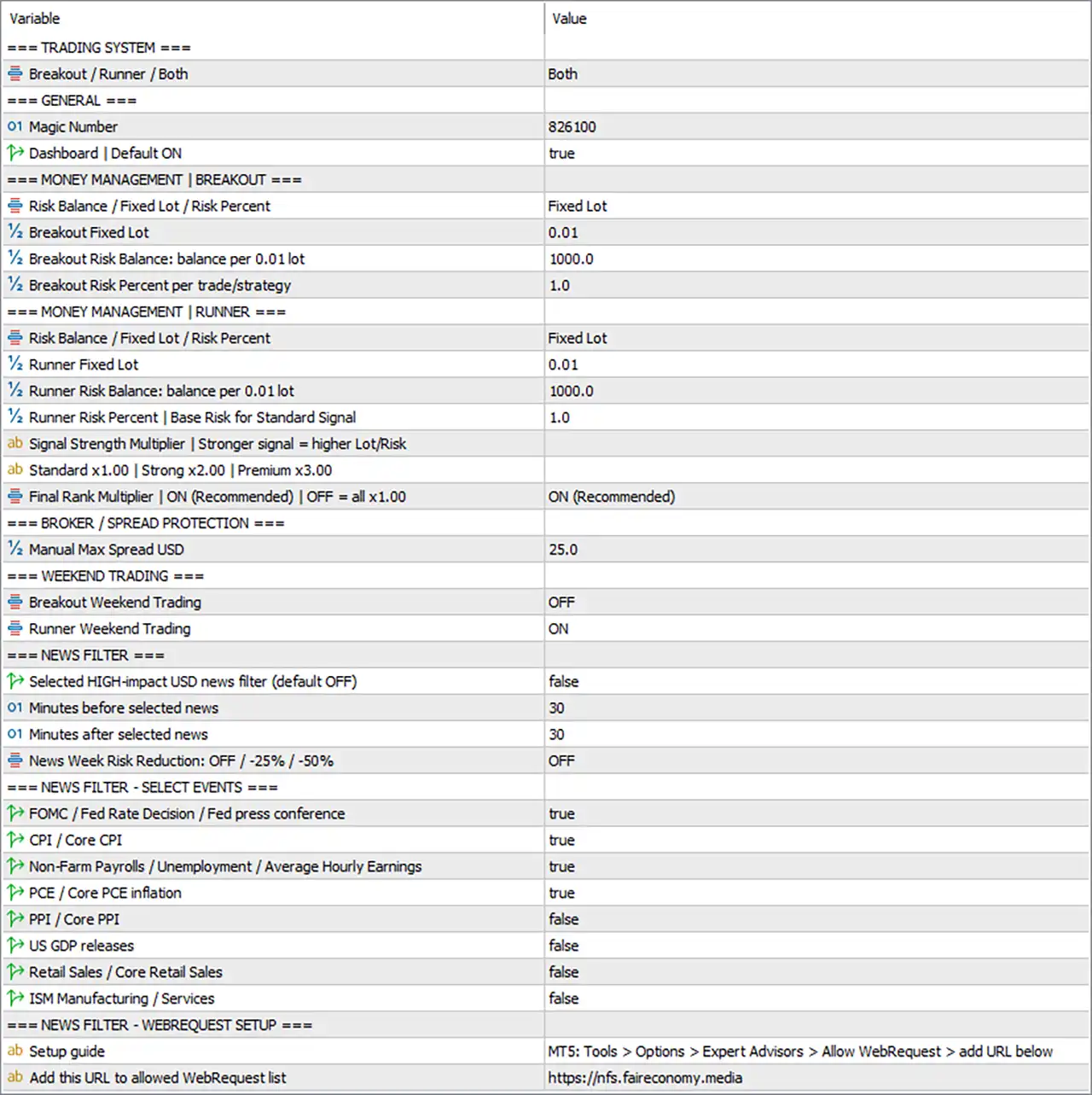
Pac Man BTC EA MT5 Settings Panel
⚙️ Trading System and General Settings
🔹 Breakout / Runner / Both = Both: Selects Both, enabling the Breakout and Runner systems together. Each system has separate position-sizing controls, although trades from both systems can contribute to the same account’s total exposure.
🔹 Magic Number = 826100: Assigns the magic number 826100 for identifying trades associated with the EA. This identifier helps distinguish the EA’s orders from trades managed by other systems, depending on its order-management logic.
🔹 Dashboard | Default ON = true: Enables the on-chart dashboard by default. The dashboard can display trading status or other EA information supported by the installed version.
⚙️ Money Management — Breakout System
🔹 Risk Balance / Fixed Lot / Risk Percent = Fixed Lot: Selects Fixed Lot as the Breakout system’s position-sizing method. This means the configured fixed volume is used rather than relying on the alternative balance-based or percentage-risk modes.
🔹 Breakout Fixed Lot = 0.01: Sets the Breakout system’s fixed trading volume to 0.01 lots. This is the configured base volume for Breakout orders when fixed-lot sizing is selected.
🔹 Breakout Risk Balance: balance per 0.01 lot = 1000.0: Sets the balance-based sizing reference to 1000.0 for each 0.01 lot. This setting is relevant when the Breakout system uses the balance-based sizing mode instead of the currently selected fixed-lot mode.
🔹 Breakout Risk Percent per trade/strategy = 1.0: Sets the Breakout system’s percentage-risk parameter to 1.0. This value is used when the percentage-risk sizing mode is selected; the exact risk calculation depends on the EA’s implementation and stop-distance rules.
⚙️ Money Management — Runner System
🔹 Risk Balance / Fixed Lot / Risk Percent = Fixed Lot: Selects Fixed Lot as the Runner system’s position-sizing method. Runner therefore uses its own configured fixed volume rather than the alternative balance-based or percentage-risk methods.
🔹 Runner Fixed Lot = 0.01: Sets the Runner system’s fixed trading volume to 0.01 lots. This setting is separate from the Breakout fixed lot, allowing the two systems to be configured independently.
🔹 Runner Risk Balance: balance per 0.01 lot = 1000.0: Sets the Runner’s balance-based sizing reference to 1000.0 per 0.01 lot. This parameter becomes relevant if the Runner system’s sizing mode is changed to the balance-based option.
🔹 Runner Risk Percent | Base Risk for Standard Signal = 1.0: Sets the Runner’s base percentage-risk parameter for a Standard signal to 1.0. Its effect depends on the selected risk mode and whether the signal-strength multiplier is enabled.
🔹 Signal Strength Multiplier | Stronger signal = higher Lot/Risk: Describes the Runner’s optional signal-strength scaling feature. When enabled, the EA can adjust position sizing according to the signal category rather than using the same base size for every signal.
🔹 Standard x1.00 | Strong x2.00 | Premium x3.00: Defines the displayed signal-strength scaling levels: Standard uses 1.00×, Strong uses 2.00×, and Premium uses 3.00×. These are position-sizing multipliers, not independently verified probabilities that a trade will be profitable.
🔹 Final Rank Multiplier | ON (Recommended) | OFF = all x1.00 = ON (Recommended): Enables the final rank multiplier using the recommended ON (Recommended) setting. When switched off, the input description indicates that all signal categories use 1.00× rather than their different multipliers. With the multiplier enabled, a Premium Runner signal can use up to three times the selected base size, according to the EA’s sizing rules.
⚙️ Broker and Spread Protection
🔹 Manual Max Spread USD = 25.0: Sets the manual maximum-spread parameter to 25.0. This defines the configured spread threshold used by the EA’s spread protection. The label includes USD, but the exact interpretation of this unit and how the threshold is calculated should be verified against the EA’s implementation and broker’s BTCUSD quote format.
⚙️ Weekend Trading Settings
🔹 Breakout Weekend Trading = OFF: Disables weekend trading for the Breakout system. Breakout entries are therefore restricted by this weekend setting, subject to the EA’s scheduling logic.
🔹 Runner Weekend Trading = ON: Enables weekend trading for the Runner system. Runner may continue evaluating or placing trades during weekends when the broker’s BTCUSD market is available and other conditions are satisfied.
⚙️ General News Filter
🔹 Selected HIGH-impact USD news filter (default OFF) = false: Disables the general high-impact USD news filter. The individual economic-event selections below are enabled or disabled separately, but their practical effect depends on how the EA combines them with this master switch.
🔹 Minutes before selected news = 30: Sets the configured pre-news protection window to 30 minutes. If the applicable news filters are active, the EA can use this period to restrict trading before selected economic announcements.
🔹 Minutes after selected news = 30: Sets the configured post-news protection window to 30 minutes. When the relevant filters are active, this value defines the period after an event during which trading may be restricted.
🔹 News Week Risk Reduction: OFF / -25% / -50% = OFF: Disables the optional news-week risk reduction feature. With OFF selected, the EA does not apply the additional -25% or -50% risk-reduction options through this setting.
⚙️ Economic News Event Selection
🔹 FOMC / Fed Rate Decision / Fed press conference = true: Enables selection of Federal Open Market Committee events, including Federal Reserve rate decisions and press conferences. When the relevant news filter is active, these events can be included in the EA’s news-protection schedule.
🔹 CPI / Core CPI = true: Enables selection of Consumer Price Index and Core CPI announcements. These US inflation reports can affect Bitcoin and other financial markets through changes in interest-rate expectations and market sentiment.
🔹 Non-Farm Payrolls / Unemployment / Average Hourly Earnings = true: Enables selection of major US employment reports, including Non-Farm Payrolls, unemployment data, and average hourly earnings. These events may influence market volatility when the applicable news filter is operating.
🔹 PCE / Core PCE inflation = true: Enables selection of Personal Consumption Expenditures and Core PCE inflation reports. These indicators are closely watched for information about US inflation and monetary-policy expectations.
🔹 PPI / Core PPI = false: Disables selection of Producer Price Index and Core PPI events. These reports are excluded by this individual event-selection setting unless other EA logic overrides it.
🔹 US GDP releases = false: Disables selection of US Gross Domestic Product releases through this parameter. GDP-related announcements are therefore not selected by this particular event switch.
🔹 Retail Sales / Core Retail Sales = false: Disables selection of US retail-sales and core retail-sales reports. These events are excluded by this individual selection setting.
🔹 ISM Manufacturing / Services = false: Disables selection of ISM Manufacturing and Services reports. These economic releases are not selected by this setting when the EA processes its event filters.
⚙️ News Filter — WebRequest Setup
🔹 Setup guide = MT5: Tools > Options > Expert Advisors > Allow WebRequest > add URL below: Provides the configuration instruction for enabling WebRequest access in MetaTrader 5. The EA may require this permission to retrieve external economic-calendar data for its news-related functions.
🔹 Add this URL to allowed WebRequest list = https://nfs.faireconomy.media: Specifies the URL that should be added to MT5’s allowed WebRequest list. The URL must be entered exactly as shown if the EA relies on this service for retrieving news information.
🔢 Conclusion
Pac Man BTC EA MT5 combines Breakout and Runner trading systems with independent money-management settings and additional controls for spread, weekends, and economic news. The displayed configuration enables both systems, uses 0.01 fixed lots for each, and enables the Runner’s final rank multiplier with the signal categories set to 1.00×, 2.00×, and 3.00×.
Several settings deserve particular attention. The general high-impact USD news filter is currently false, even though selected economic events are individually enabled. The optional news-week risk reduction is also OFF. Consequently, the individual event selections should not be assumed to guarantee that trading will be blocked around announcements.
The Runner’s Premium multiplier can increase its base position size to three times the selected amount, and running both systems can increase combined account exposure. Before live deployment, verify the broker’s BTCUSD contract specifications, spread calculation, weekend availability, and news-data connectivity. Demo testing with conservative fixed lots is recommended before enabling larger sizing multipliers.
User Reviews
Only logged in customers who have purchased this product may leave a review.
❓ What is Pac Man BTC MT5?
A fully automated MetaTrader 5 Expert Advisor for BTCUSD that combines a Breakout system and a Runner system.
❓ Which market does Pac Man BTC MT5 trade?
BTCUSD, on a single chart.
❓ Which timeframe does Pac Man BTC MT5 use?
The chart timeframe should be set to H1. Multi-Timeframe Analysis is performed automatically inside the EA.
❓ What is the Breakout system in Pac Man BTC MT5?
It uses several internal strategies and places pending orders only when a valid breakout setup is detected.
❓ What is the Runner system in Pac Man BTC MT5?
It looks for stronger Bitcoin movements and follows them, using up to 12 internal confirmation signals.
❓ What does the Signal Strength Multiplier do?
It adjusts the lot size or risk by signal strength: 1 times for Standard, 2 times for Strong and 3 times for Premium. It can be disabled.
❓ Can Pac Man BTC MT5 run both systems at once?
Yes. The Breakout and Runner mode runs both together, and each system can also run alone.
❓ What money management does Pac Man BTC MT5 offer?
Fixed Lot, Risk Percent and Balance Based Money Management, configured separately for Breakout and Runner.
❓ What is the minimum account size for Pac Man BTC MT5?
500 USD is recommended. For smaller accounts, Fixed Lot with a conservative size is advised.
❓ Do the settings of Pac Man BTC MT5 need to be changed?
Under normal conditions, no. The internal strategy settings are preconfigured.
❓ Does Pac Man BTC MT5 guarantee profits?
No. Results can differ between brokers because of spread, slippage and execution speed, and no result is guaranteed.
-
 Original price was: $9,999.00.$249.00Current price is: $249.00.
 -
 Original price was: $30,000.00.$249.00Current price is: $249.00.
 -
 Original price was: $30,000.00.$249.00Current price is: $249.00.
 -
 Original price was: $5,000.00.$249.00Current price is: $249.00.
-
 4Original price was: $499.00.$249.00Current price is: $249.00.
 -
 0Original price was: $290.00.$179.00Current price is: $179.00.
 -
 27Original price was: $60,000.00.$239.00Current price is: $239.00.
 -
 6Original price was: $1,000.00.$599.00Current price is: $599.00.
There are no reviews yet.