🔶 What is Perceptrader AI MT4?
Perceptrader AI EA is an advanced automated trading Expert Advisor (EA) designed for intelligent Forex trading using algorithmic logic, grid optimization, and machine learning filters. The EA integrates adaptive risk management, news filtering, and volatility protection to improve trade stability across multiple currency pairs.
With smart lot sizing, portfolio control, and neural network probability filters, Perceptrader AI aims to balance profitability with controlled drawdown while maintaining consistent automated execution.
📌📌📌 Buy this unlimited Perceptrader AI MT4 product here 📌📌📌
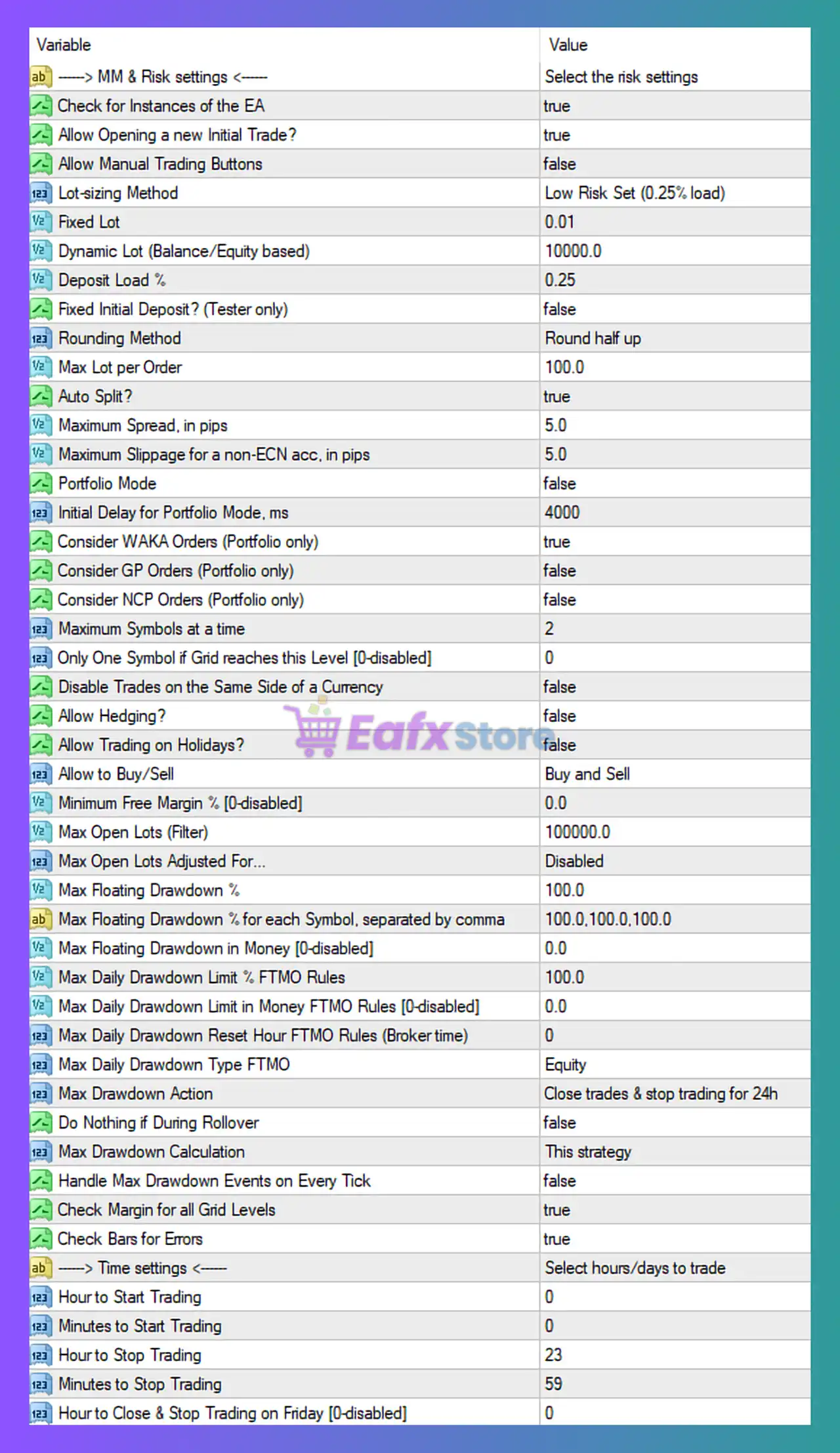
🔶 Money Management & Risk Settings
| Parameter | Value | Explanation |
|---|---|---|
| Check for Instances of the EA | true | Prevents multiple instances of the EA from conflicting with each other on the same account or symbol. |
| Allow Opening a New Initial Trade | true | Enables the EA to start new trading cycles when conditions are met. |
| Allow Manual Trading Buttons | false | Disables manual trading buttons on the chart interface. |
| Lot-sizing Method | Low Risk Set (0.25% load) | Determines how the EA calculates position sizes based on risk configuration. |
| Fixed Lot | 0.01 | Minimum lot size used if fixed lot trading is enabled. |
| Dynamic Lot (Balance/Equity based) | 10000 | Defines the balance reference used when calculating dynamic lot sizes. |
| Deposit Load % | 0.25 | Controls the risk exposure percentage applied to the account balance. |
| Fixed Initial Deposit | false | Used mainly in strategy testing to simulate account balance. |
| Rounding Method | Round half up | Defines how calculated lot sizes are rounded before trade execution. |
| Max Lot per Order | 100 | Sets the maximum allowable lot size for a single trade. |
➡️ This section focuses on controlling exposure and ensuring stable position sizing.
🔶 Execution & Spread Protection
| Parameter | Value | Explanation |
|---|---|---|
| Maximum Spread | 5 pips | Prevents the EA from opening trades when spreads exceed this value. |
| Maximum Slippage | 5 pips | Limits slippage during order execution to improve entry precision. |
| Auto Split | true | Splits large orders into smaller positions to reduce execution risk. |
➡️ These parameters help maintain trade quality in volatile market conditions.
🔶 Portfolio & Symbol Management
| Parameter | Value | Explanation |
|---|---|---|
| Portfolio Mode | false | Enables multi-symbol portfolio trading when activated. |
| Maximum Symbols at a Time | 2 | Limits the number of symbols traded simultaneously. |
| Allow Hedging | false | Prevents opposite positions from being opened simultaneously. |
| Allow Trading on Holidays | false | Prevents trading during holiday sessions when liquidity is low. |
| Allow to Buy/Sell | Buy and Sell | Enables both long and short trades. |
➡️ This section ensures diversification while limiting exposure.
🔶 Drawdown Protection & Risk Limits
| Parameter | Value | Explanation |
|---|---|---|
| Max Floating Drawdown % | 100 | Maximum allowed floating loss before risk controls activate. |
| Max Daily Drawdown | 100% | Daily drawdown limit based on equity monitoring. |
| Max Drawdown Action | Close trades & stop trading | Defines the action when drawdown thresholds are exceeded. |
| Max Drawdown Calculation | This strategy | Drawdown calculation is based on this EA’s trades only. |
➡️ These protections help control account risk during unfavorable market conditions.
🔶 Trading Time Settings
| Parameter | Value | Explanation |
|---|---|---|
| Hour to Start Trading | 00 | Defines when the EA begins trading operations. |
| Hour to Stop Trading | 23 | Defines when the EA stops opening new trades. |
| Minutes to Start/Stop Trading | 00 / 59 | Provides precise minute-level control for trading sessions. |
➡️ This allows traders to align EA activity with preferred market sessions.
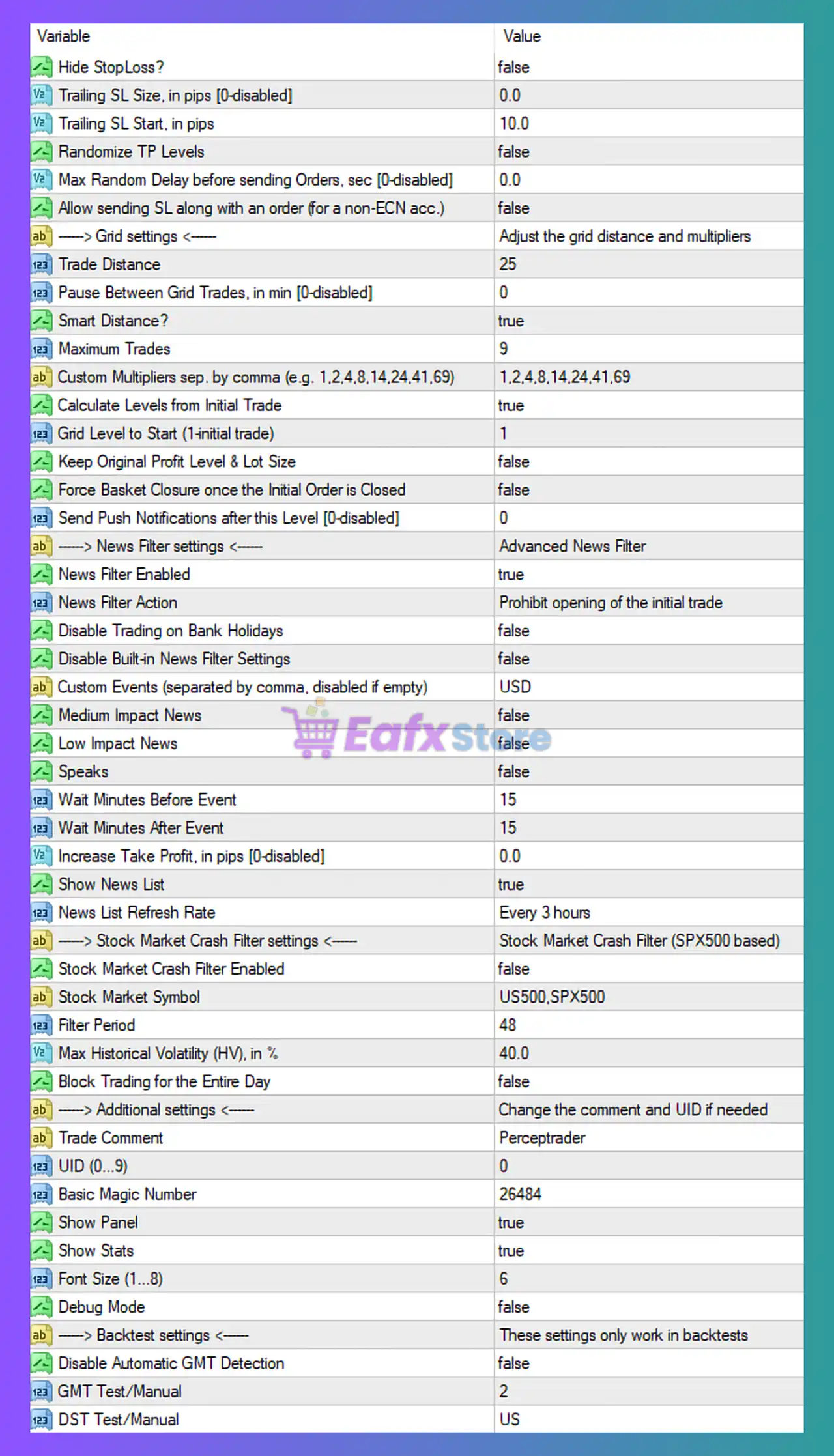
🔶 Grid Strategy Settings
| Parameter | Value | Explanation |
|---|---|---|
| Trade Distance | 25 | Distance in pips between grid orders. |
| Smart Distance | true | Allows dynamic grid spacing based on market conditions. |
| Maximum Trades | 9 | Maximum number of positions within the grid cycle. |
| Custom Multipliers | 1,2,4,8,14,24,41,69 | Defines progressive grid scaling for position management. |
| Grid Level to Start | 1 | Defines the starting point of the grid structure. |
➡️ These parameters control how the EA builds and manages grid positions.
🔶 News Filter Settings
| Parameter | Value | Explanation |
|---|---|---|
| News Filter Enabled | true | Prevents trading during major economic news events. |
| News Filter Action | Block initial trade | Stops new trades during high-impact news periods. |
| Custom News Events | USD | Filters events related to the USD currency. |
| Wait Minutes Before/After Event | 15 / 15 | Defines buffer time before and after economic releases. |
➡️ This filter protects the EA from sudden volatility spikes.
🔶 Machine Learning & AI Filter
| Parameter | Value | Explanation |
|---|---|---|
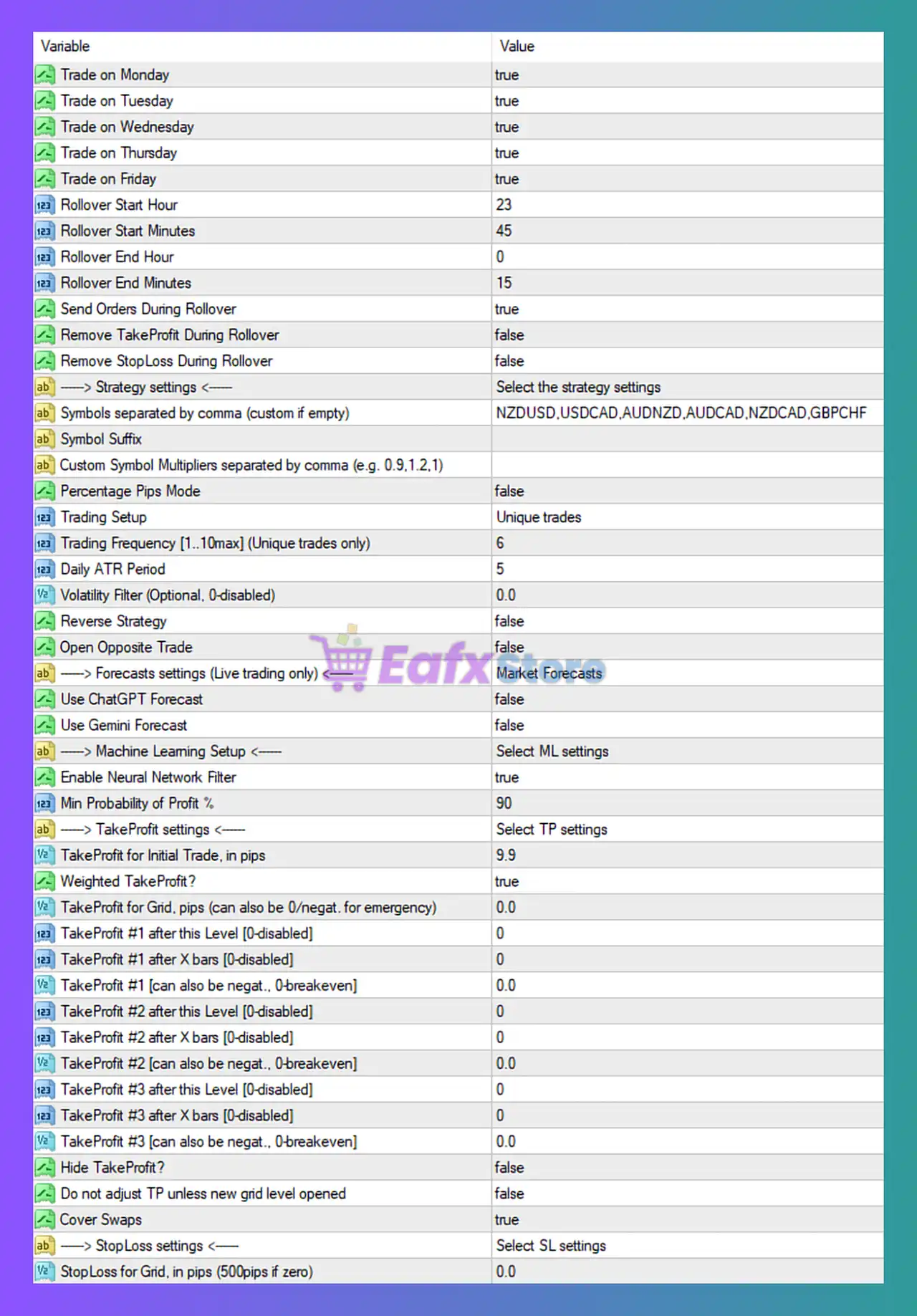
| Enable Neural Network Filter | true | Activates AI-based filtering for higher probability trade signals. |
| Minimum Profit Probability | 90% | Minimum confidence level required before opening trades. |
➡️ The AI layer helps improve signal accuracy.
🔶 Take Profit Management
| Parameter | Value | Explanation |
|---|---|---|
| Take Profit Initial Trade | 9.9 pips | Default profit target for the first trade. |
| Weighted Take Profit | true | Adjusts TP dynamically based on grid size and positions. |
| Hide Take Profit | false | Displays TP levels on the chart. |
| Cover Swaps | true | Adjusts profit levels to account for swap costs. |
➡️ These settings optimize exit conditions for grid baskets.
🔶 Stop Loss Settings
| Parameter | Value | Explanation |
|---|---|---|
| Stop Loss for Grid | 0 | No fixed stop loss is applied to grid baskets unless manually defined. |
➡️ Risk is mainly managed through drawdown limits and grid structure.
🔶 Strategy Configuration
| Parameter | Value | Explanation |
|---|---|---|
| Trading Setup | Unique trades | Ensures each trade cycle is independent. |
| Trading Frequency | 6 | Controls how often the EA searches for new opportunities. |
| Daily ATR Period | 5 | Measures volatility for dynamic trade decisions. |
| Reverse Strategy | false | Disables reverse trade logic. |
| Open Opposite Trade | false | Prevents simultaneous opposing positions. |
➡️ These settings define the EA’s overall trading logic.
🔶 Additional System Controls
| Parameter | Value | Explanation |
|---|---|---|
| Trade Comment | Perceptrader | Custom trade identification label. |
| Basic Magic Number | 26484 | Unique identifier used to manage EA trades. |
| Show Panel | true | Displays EA statistics and system information. |
| Show Stats | true | Enables real-time performance monitoring. |
🔶 Conclusion
Perceptrader AI MT4 is a sophisticated automated trading system that combines grid trading logic, advanced risk management, and AI-driven probability filters. The EA incorporates protective features such as news filtering, drawdown limits, and volatility detection to improve trading stability. By integrating dynamic position management and machine learning-based signal validation, Perceptrader AI offers traders a powerful algorithmic solution designed to operate across multiple currency pairs while maintaining disciplined risk control.