









Galaxy Prop Firm EA MT5 with Setfiles (Unlimited)

Subscriptions for Special Plan
- 30 EA package is more economical!
- Special package with 99%
- Download 1 EA/Day

Subscriptions for Premium Membership
- Download Unlimited in 1 Year
- Get 100% Discount
- Get free access to all

Subscriptions for Gold Membership
- 1 Year Membership
- Get 100% Discount
- Access EA+Indicator+Course
Frequently bought together 🎁
Add these products to enhance your purchase



What is Galaxy Prop Firm EA?
Galaxy Prop Firm EA MT5 is designed to automate trading strategies on the MT5 platform, catering particularly to the needs and constraints of proprietary trading firms. These firms usually provide capital to traders in exchange for a share of the profits generated. The EA aims to maximize profitability while adhering to the risk management guidelines typically imposed by Prop firms.
Why should you use Galaxy Prop Firm MT5?
🔹 Customization: It likely offers a high degree of customization to match the specific trading strategies and risk management rules of different prop firms.
🔹 Risk Management: Proprietary trading firms have stringent risk management requirements. This EA might be equipped with features that help ensure these requirements are met, minimizing the risk of significant drawdowns.
🔹 Automation: It automates trading, allowing for 24/5 market monitoring without the need for constant human oversight, potentially capturing more opportunities.
🔹 Compatibility: Being designed for MT5, it takes advantage of the advanced features of this platform, such as multi-asset trading, advanced charting tools, and superior backtesting capabilities.
Galaxy Prop Firm EA Features
🔹 Multi-Currency System: Supports diversified Forex trading across several currency pairs from a single EA.
🔹 Automatic Money Management: Dynamically calculates position size according to the configured risk framework.
🔹 Spread Protection: Filters trading opportunities when market spread exceeds the permitted execution condition.
🔹 Drawdown Protection: Includes an automatic emergency mechanism designed to close positions when the drawdown threshold is reached.
🔹 Flexible Lot Control: Provides minimum, maximum, fixed and automatic position-sizing options.
🔹 TP & SL Management: Offers configurable Stop Loss (SL) and Take Profit (TP) multipliers for flexible trade management.
🔹 Trailing Stop: Provides automated profit-protection management once the required market movement occurs.
🔹 Prop Firm Ready: Includes dedicated drawdown protection and configurable trading controls for funded-account environments.
🔹 Trading Schedule: Allows traders to define when the EA is permitted to operate, including Friday trading.
Galaxy Prop Firm EA MT5 Review
When considering reviews, it’s important to look for feedback from credible sources or users who have used the EA in a prop firm setting. Reviews can provide insight into the EA’s performance, reliability, and the quality of support provided by its developers.
Be wary of overly positive reviews without substantive evidence or overly negative reviews that might not reflect the product’s capabilities accurately.
Galaxy Prop Firm EA Backtest
Galaxy Prop Firm EA MT5 Backtest
Galaxy Prop Firm MT5 Backtest
Trading Strategy
🔹 Multi-Currency Trading: The EA can operate across a diversified basket of Forex pairs, allowing opportunities to be distributed across different currency markets.
🔹 Automatic Position Sizing: The Auto Lot function calculates trading volume according to the configured risk-management framework instead of relying solely on a fixed lot.
🔹 Market Execution Filter: The EA checks spread conditions before opening trades, helping avoid entries when transaction costs become unfavorable.
🔹 Trading Schedule: The EA operates within a configurable daily trading window and can continue trading on Friday.
🔹 Flexible Trade Management: TP and SL multipliers allow the EA’s profit and protection levels to be adjusted according to its internal trading logic.
🔹 Multiple Position Management: The EA is not restricted to a single order per currency pair, allowing it to manage multiple positions when its trading conditions permit.
🔹 Trailing Protection: The EA can activate trailing management after a profitable price movement, helping protect gains as trades develop.
🔹 Prop Firm Protection: The dedicated drawdown-control function can close active trades when the configured maximum drawdown condition is reached.
Recommended settings
Recommended settings and parameters to pay attention to from developers and experts:
| Features | Type |
|---|---|
| Trading platform | MetaTrader 5 (MT5) |
| Minimum / Recommended deposit | $200 |
| Time frames | H1 (60 minute chart) |
| Currency pairs | NZDCAD, EURCAD, USDCHF, AUDUSD, CADJPY, EURCHF, EURJPY, GBPNZD |
| Setup files | Available |
| Product type | NoDLL / Unlimited |
| Additional services | Unlock and Decompile |
| Recommended brokers | Exness Broker, Icmarkets Broker |
| Recommended VPS | MyfxVPS.com ( Blue VPS, Golden VPS). Lowest Latency, 2 week Free Trial, 100% Free for 12-18 Months. |
What’s in the package?
The download package of the product suite includes:
✅ Experts: Galaxy PropFirm EA.ex5
✅ SetFiles: PROP Firm MT5.set
✅ Pair and Timeframe.txt
➡️ Reviewed by David Easton
Conclusion
In short, Galaxy Prop Firm EA for MT5 is built for traders who operate under strict prop firm rules. With customizable strategies, disciplined risk management, and full MT5 automation, it helps maintain compliance while pursuing consistent profits. Its flexibility across pairs and timeframes, combined with powerful backtesting and drawdown controls, makes it a reliable solution for challenge and funded accounts.
🔢 Galaxy PropFirm EA MT5 Settings Guide
Galaxy PropFirm EA MT5 is an automated multi-currency Expert Advisor designed with a strong focus on prop firm risk management, automatic lot sizing, spread control, trading schedules, drawdown protection and trailing-stop management.
The supplied configuration shows support for multiple Forex pairs, flexible position sizing, configurable TP/SL multipliers, Friday trading control and a dedicated Prop Firm protection system.
The displayed setup uses Magic Number 71823, automatic lot sizing with Risk = 1.0, a 0.1 fixed-lot value, 0.05 minimum lot, 60.0 maximum lot, 140.0 maximum spread, and a trading schedule from 00:01 to 23:59. It also includes a maximum drawdown threshold of 80.0 and trailing-stop activation from 20 pips.
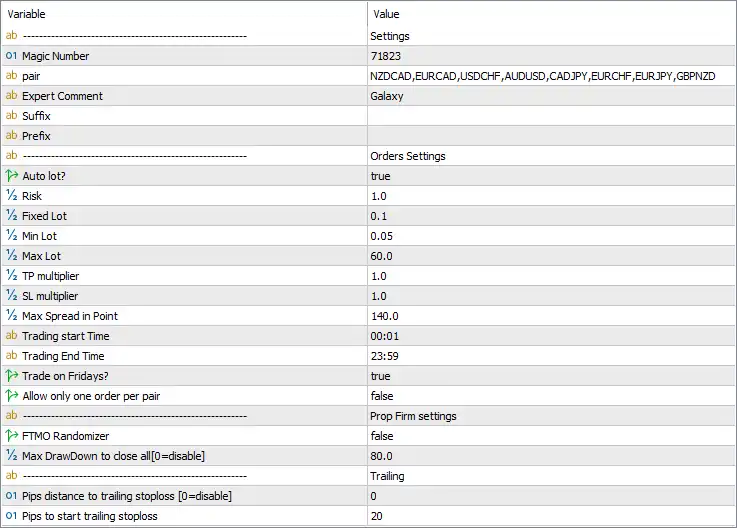
Galaxy PropFirm EA MT5 Settings Panel
🔢 Galaxy PropFirm EA MT5 Settings Explained
🔄 General EA Settings
🔹 Magic Number: 71823 — Assigns 71823 as the EA’s unique Magic Number, allowing MT5 to identify and manage trades generated by Galaxy PropFirm EA.
🔹 pair: NZDCAD,EURCAD,USDCHF,AUDUSD,CADJPY,EURCHF,EURJPY,GBPNZD — Defines the configured trading pairs as NZDCAD, EURCAD, USDCHF, AUDUSD, CADJPY, EURCHF, EURJPY, and GBPNZD, providing a multi-currency trading setup.
🔹 Expert Comment: Galaxy — Sets the trade comment to Galaxy, making positions generated by the EA easier to identify in the MT5 terminal.
🔹 Suffix: — The Suffix field is blank, meaning no additional symbol suffix is configured in the displayed settings.
🔹 Prefix: — The Prefix field is blank, meaning no additional symbol prefix is configured.
🔄 Orders Settings
🔹 Auto lot: true — Enables automatic lot-size calculation, allowing the EA to determine position size using its configured money-management logic.
🔹 Risk: 1.0 — Sets the automatic risk parameter to 1.0. The exact percentage interpretation depends on the EA’s internal lot-calculation formula.
🔹 Fixed Lot: 0.1 — Sets the fixed-lot reference value to 0.1 lots. This parameter is available even though Auto lot = true.
🔹 Min Lot: 0.05 — Sets the minimum permitted trading volume to 0.05 lots.
🔹 Max Lot: 60.0 — Sets the maximum permitted trading volume to 60.0 lots.
🔹 TP multiplier: 1.0 — Sets the Take Profit multiplier to 1.0, meaning the base TP calculation is not multiplied upward or downward.
🔹 SL multiplier: 1.0 — Sets the Stop Loss multiplier to 1.0, leaving the base SL calculation unchanged.
🔹 Max Spread in Point: 140.0 — Sets the maximum allowed spread to 140.0 points, helping prevent new trades when market spread exceeds the configured threshold.
🔄 Trading Schedule
🔹 Trading start Time: 00:01 — Sets the daily trading start time to 00:01.
🔹 Trading End Time: 23:59 — Sets the daily trading end time to 23:59, providing an almost full-day trading window.
🔹 Trade on Fridays?: true — Enables trading on Friday.
🔹 Allow only one order per pair: false — Disables the restriction that would limit the EA to only one order per currency pair.
🔄 Prop Firm Settings
🔹 FTMO Randomizer: false — Disables the FTMO/Prop Firm randomization feature. When enabled, such a feature may introduce controlled variation in execution parameters to reduce overly deterministic trading behavior, depending on the EA’s implementation.
🔹 Max DrawDown to close all [0=disable]: 80.0 — Sets the maximum drawdown threshold to 80.0. If the EA’s internal drawdown calculation reaches this level, it is configured to close all trades. The parameter explicitly states that 0 = disable.
🔄 Trailing Settings
🔹 Pips distance to trailing stoploss [0=disable]: 0 — Sets the trailing-stop distance to 0. According to the parameter description, 0 = disable, so this distance-based trailing-stop function is disabled through this parameter.
🔹 Pips to start trailing stoploss: 20 — Sets the trailing-stop activation threshold to 20 pips. Once the EA’s trailing conditions are satisfied, trailing management can begin after the configured 20-pip movement.
🔄 Key Configuration Highlights
🔹 Multi-Currency Trading: The EA is configured for 8 currency pairs: NZDCAD, EURCAD, USDCHF, AUDUSD, CADJPY, EURCHF, EURJPY, and GBPNZD.
🔹 Automatic Money Management: Auto lot = true, with Risk = 1.0, so automatic position sizing is active.
🔹 Fixed Lot Reference: The displayed Fixed Lot = 0.1, providing a fixed-lot value within the EA’s configuration.
🔹 Lot Range: The EA allows a minimum lot of 0.05 and a maximum lot of 60.0.
🔹 Take Profit Multiplier: TP multiplier = 1.0, leaving the base Take Profit calculation unchanged.
🔹 Stop Loss Multiplier: SL multiplier = 1.0, also leaving the base Stop Loss calculation unchanged.
🔹 Spread Protection: Max Spread in Point = 140.0, providing a maximum spread threshold for trade execution.
🔹 Trading Hours: The configured schedule runs from 00:01 to 23:59.
🔹 Friday Trading: Trade on Fridays = true, so Friday trading is enabled.
🔹 Multiple Orders: Allow only one order per pair = false, meaning the EA is not restricted to one order per currency pair.
🔹 Prop Firm Protection: Max DrawDown to close all = 80.0, with 0 explicitly available to disable the function.
🔹 FTMO Randomizer: The FTMO Randomizer is false, so randomization is currently disabled.
🔹 Trailing Stop: The trailing-stop distance is set to 0, which explicitly means disabled, while the activation threshold is 20 pips.
🔄 Risk Management Considerations
🔹 Automatic Risk Sizing: With Auto lot = true, the EA is configured to calculate position sizes automatically rather than simply relying on the Fixed Lot = 0.1 value.
🔹 Risk Parameter: The displayed Risk = 1.0 should be verified against the EA’s documentation to determine whether it represents exactly 1.0% account risk or another internal risk unit.
🔹 Maximum Exposure: Max Lot = 60.0 is substantially larger than the 0.05 minimum lot, so traders should ensure that the automatic money-management calculation cannot generate excessive exposure under their account conditions.
🔹 Drawdown Protection: The 80.0 maximum drawdown setting is particularly important for prop-firm accounts. The exact drawdown unit or percentage should be confirmed from the EA documentation before relying on it as a firm risk limit.
🔹 Spread Control: A 140.0-point maximum spread is configured. Traders should compare this threshold with the intended broker’s typical spreads for all 8 supported pairs.
🔢 Conclusion
Galaxy PropFirm EA MT5 provides a versatile automated Forex trading framework combining multi-pair execution, automatic lot sizing, risk management, spread filtering, trading schedules, Prop Firm protection, and trailing-stop controls.
The displayed configuration supports 8 currency pairs and uses Magic Number 71823 with the trade comment Galaxy. Automatic lot sizing is enabled through Auto lot = true, with Risk = 1.0, while the available lot range extends from 0.05 to 60.0 lots.
Trading is configured almost around the clock, from 00:01 to 23:59, with Friday trading enabled. The EA also allows multiple orders per pair because Allow only one order per pair = false.
For Prop Firm risk management, the configuration includes FTMO Randomizer = false and Max DrawDown to close all = 80.0. The trailing section shows 0 for the trailing-stop distance, which explicitly means the distance-based trailing function is disabled, while the configured trailing activation threshold is 20 pips.
Before using Galaxy PropFirm EA MT5 on a live or funded account, traders should carefully verify the EA’s exact interpretation of Risk = 1.0, Max DrawDown = 80.0, Max Lot = 60.0, and Max Spread = 140.0 points. These parameters can have a significant impact on exposure and account protection, particularly when trading multiple currency pairs simultaneously.
🔢 FAQs
❓ Which currency pairs does Galaxy PropFirm EA MT5 trade?
The displayed configuration includes 8 pairs: NZDCAD, EURCAD, USDCHF, AUDUSD, CADJPY, EURCHF, EURJPY and GBPNZD.
❓ What is the lot-sizing method used by Galaxy PropFirm EA MT5?
The EA uses Auto lot = true with Risk = 1.0. A Fixed Lot = 0.1 is also configured, while the minimum and maximum lots are 0.05 and 60.0 respectively.
❓ What is the maximum spread allowed?
The Max Spread in Point is set to 140.0 points. New trading may be restricted when the broker’s spread exceeds this configured threshold.
❓ Does Galaxy PropFirm EA MT5 have drawdown protection?
Yes. Max DrawDown to close all = 80.0 is configured, and the parameter explicitly states that 0 = disable. The exact unit or percentage should be confirmed from the EA’s documentation.
❓ Is the trailing stop enabled?
The trailing-stop distance is set to 0, which means the distance-based trailing function is disabled according to the parameter description. However, Pips to start trailing stoploss = 20, meaning the activation threshold is configured at 20 pips if the trailing mechanism is otherwise enabled.
User Reviews
Only logged in customers who have purchased this product may leave a review.
1. What is Galaxy Prop Firm EA MT5?
Galaxy Prop Firm EA MT5 is an automated trading system designed specifically for proprietary trading firms. It helps traders maximize profits while following the risk management rules set by prop firms.
2. How does Galaxy Prop Firm EA MT5 work?
The EA executes trades based on pre-set strategies, ensuring compliance with risk parameters such as maximum drawdown, stop-loss, and take-profit levels. It automates trading and monitors the market 24/5 without requiring manual intervention.
3. Can I customize the trading strategies in Galaxy Prop Firm EA?
Yes, the EA allows customizable parameters, enabling traders to adapt strategies to meet the requirements of different prop firms. You can adjust risk settings, trade frequency, and stop-loss/take-profit levels.
4. What currency pairs does Galaxy Prop Firm EA support?
It supports multiple currency pairs, including NZDCAD, EURCAD, USDCHF, AUDUSD, CADJPY, EURCHF, EURJPY, and GBPNZD.
5. What is the minimum deposit required to use Galaxy Prop Firm EA?
The minimum recommended deposit is $200, but it may vary based on prop firm requirements.
6. What timeframes does Galaxy Prop Firm EA use?
The EA operates on the H1 (1-hour) timeframe, optimizing trade execution based on market trends and price action.
7. Can I use Galaxy Prop Firm EA for personal trading, or is it only for prop firms?
While designed for prop firms, individual traders can also use the EA for personal accounts to automate their trading and implement professional risk management strategies.
8. Is Galaxy Prop Firm EA risk-free?
No trading system is risk-free. However, Galaxy Prop Firm EA includes built-in risk management tools like stop-loss, trailing stops, and maximum drawdown limits to help protect capital and comply with prop firm rules.
🔥 Get This EA for FREE with Our Membership! 🚀🚀
Unlock access to this EA, premium Indicators, and exclusive trading tools completely FREE with any of our Membership Plans! Thousands of traders already benefit from our VIP library—join them and level up your trading instantly. Choose Your Membership:
- SPECIAL – 1 Month Membership
- GOLD – 1 Year Membership
- PREMIUM – 1 Year Membership
-
 Original price was: $439.00.$249.00Current price is: $249.00.
 -
 Original price was: $9,999.00.$249.00Current price is: $249.00.
 -
 Original price was: $30,000.00.$249.00Current price is: $249.00.
 -
 Original price was: $30,000.00.$249.00Current price is: $249.00.
-
 10Original price was: $499.00.$69.00Current price is: $69.00.
 -
 1Original price was: $1,599.00.$59.00Current price is: $59.00.
 -
 1Original price was: $599.00.$59.00Current price is: $59.00.
 -
 1Original price was: $950.00.$59.00Current price is: $59.00.
There are no reviews yet.