

Introduction
Quantum Ticks EA is an automated trading Expert Advisor (EA) designed for the MetaTrader 4 platform. It provides configurable trading parameters for position sizing, Take Profit, Stop Loss, trade management, and automated profit protection.

The EA includes adjustable lot sizes, maximum trade limits, pip-step management, profit locking, and Trailing Stop functionality. It also features a daily profit target reference and account protection guidance to help traders manage trading exposure more responsibly.
Understanding the Quantum Ticks EA settings allows traders to customize trade execution, control position sizes, manage potential losses, and configure automated profit protection according to their trading preferences.
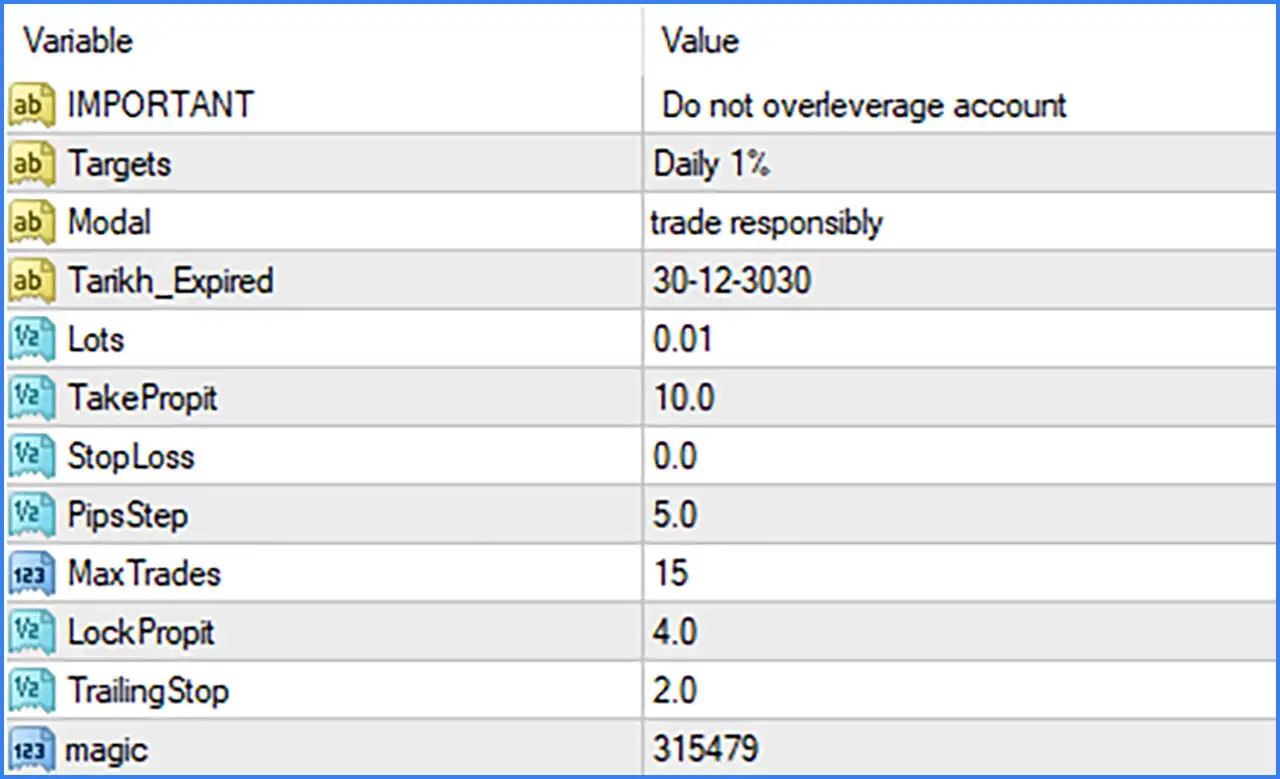
Important Settings
🔹 IMPORTANT = Do not overleverage account: Displays an important risk management reminder advising traders not to use excessive leverage or open positions beyond their account's financial capacity.
🔹 Targets = Daily 1%: Indicates a daily trading target of 1%, providing a reference objective for traders when managing their daily trading performance.
🔹 Modal = trade responsibly: Displays a trading responsibility reminder, encouraging users to apply appropriate risk management and avoid excessive trading exposure.
🔹 Tanik h_Expired = 30-12-3030: Specifies the displayed EA expiration date as 30-12-3030, representing the configured expiration or license-validity information.
Lot Size and Position Management Settings
🔹 Lots = 0.01: Sets the fixed trading volume to 0.01 lots, defining the position size used by Quantum Ticks EA MT4 when opening automated trades.
🔹 MaxTrades = 15: Sets the maximum number of trades to 15, controlling the number of trading positions the EA is configured to open or manage according to its internal order management rules.
🔹 PipsStep = 5.0: Sets the pip-step parameter to 5.0, defining the configured price-distance interval used by the EA when managing trading entries or subsequent positions.
🔹 magic = 315479: Assigns Magic Number 315479 to trades opened by Quantum Ticks EA MT4, allowing the EA to identify and manage its own positions separately from manual trades or other Expert Advisors.
Take Profit and Stop Loss Settings
🔹 TakeProfit = 10.0: Sets the Take Profit parameter to 10.0, defining the configured profit-taking distance or target used by the EA to close profitable trading positions.
🔹 StopLoss = 0.0: Sets the Stop Loss parameter to 0.0, indicating that no fixed Stop Loss distance is configured through this parameter by default.
Profit Protection and Trailing Stop Settings
🔹 LockProfit = 4.0: Sets the profit-locking parameter to 4.0, defining the configured profit level used by the EA's profit protection mechanism to help preserve accumulated gains.
🔹 TrailingStop = 2.0: Sets the Trailing Stop distance to 2.0, allowing the EA to adjust its protective exit level as the market moves in a favorable direction when the trailing mechanism is activated.