






Razor MT5 with SetFiles (Latest version) – GroupBuy
Select a variant to see availability.
What is Razor MT5?
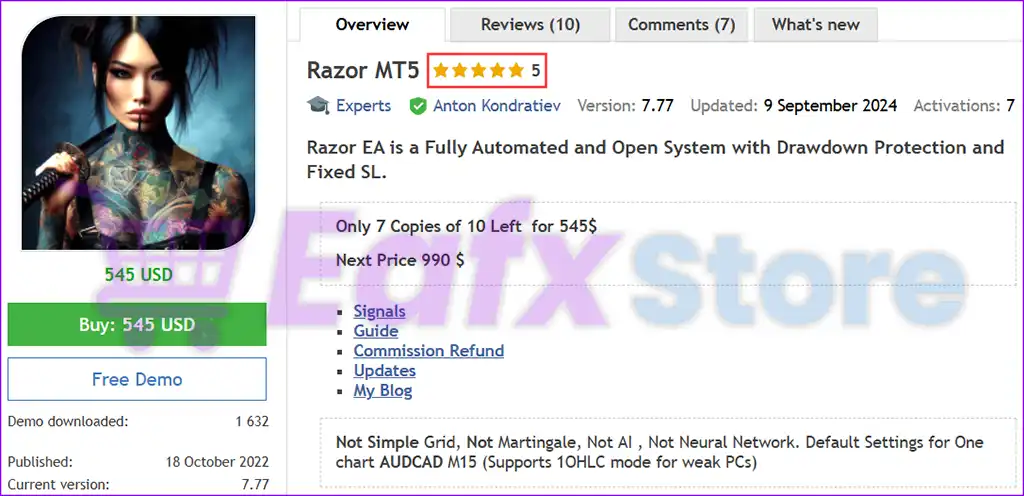
Razor MT5 is a professional Expert Advisor (EA) designed for automated forex trading with adaptive grid management, intelligent hedging and advanced risk management. The EA incorporates volatility filters, RSI indicators, weighted profit control, and economic news protection to deliver stable, flexible and sustainable trading performance.
🔶 Vendor Website: View here
🔶 This is GroupBuy ==> How to Join
About the Author
This product is compiled by Anton Kondratev. This author has more than +6 years of experience working on MQL5 with many famous products such as Razor MT5, Zeno EA MT5, DOW King EA MT5, Aurum MT5, Nova EA MT5 and other advisors. Among them, Razor MT5 is his best performing products.
Key Features of Razor MT5
🔹 Adaptive Grid Trading: Uses intelligent Grid management with dynamic spacing for stable execution flow.
🔹 Advanced News Protection: Filters high-impact economic events to reduce exposure during volatility spikes.
🔹 Smart Hedging System: Supports simultaneous Buy and Sell positions for balanced market management.
🔹 RSI & Volatility Filters: Combines RSI confirmation with volatility analysis for accurate trade entries.
🔹 One Chart Multi-Pair Mode: Manages multiple currency pairs efficiently from a single trading chart.
Why choose to use Razor MT5?
🔹 Stable Automated Trading: Designed for traders seeking disciplined and consistent market automation.
🔹 Advanced Risk Management: Includes spread control, drawdown protection and adaptive lot sizing.
🔹 Flexible Trading Framework: Supports multi-pair trading with customizable execution parameters.
🔹 Prop Firm Compatible: Optimized settings support funded trading environments and FTMO challenges.
🔹 Marketplace-Ready Solution: Suitable for traders seeking scalable and resilient trading systems.
Razor EA MT5 Review
Razor EA MT5 Signal Results
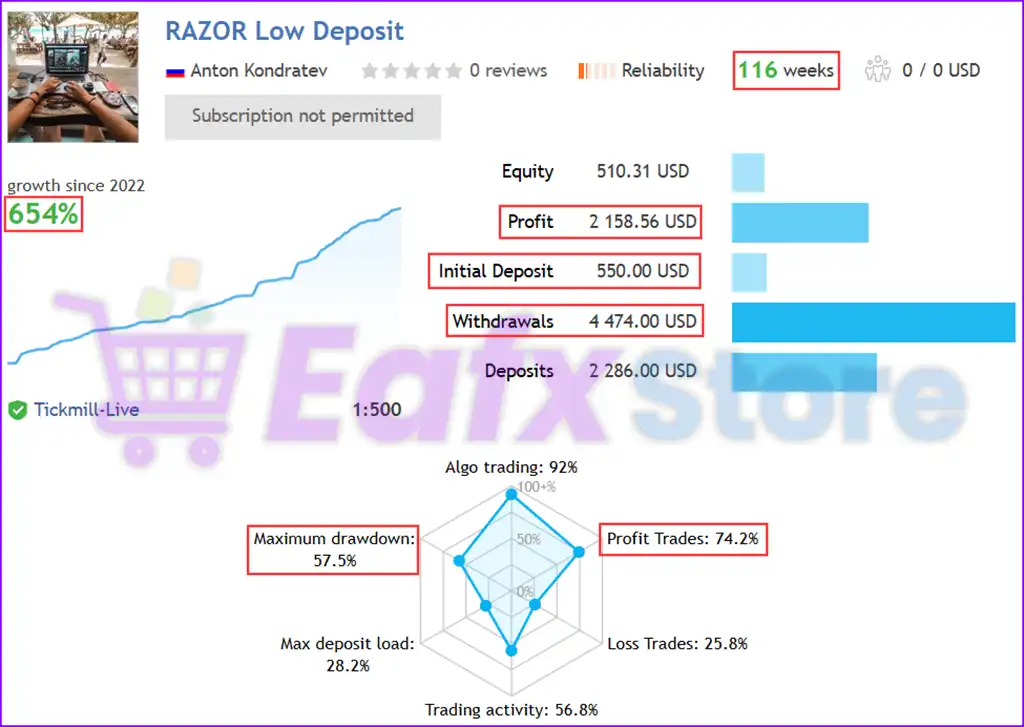
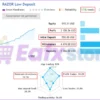
The Razor MT5 achieved impressive profit performance when trading with AUDCAD, AUDNZD, NZDCAD. Trading results on real account for 116 weeks of trading.
✅ Initial Deposit: $550
✅ Total profit: 654%
✅ Total Deposits: $2,286
✅ Total Withdrawals: $4,474
✅ Win Rate (% of total): 92%
Razor EA Live Trading
Razor MT5 Backtest Results
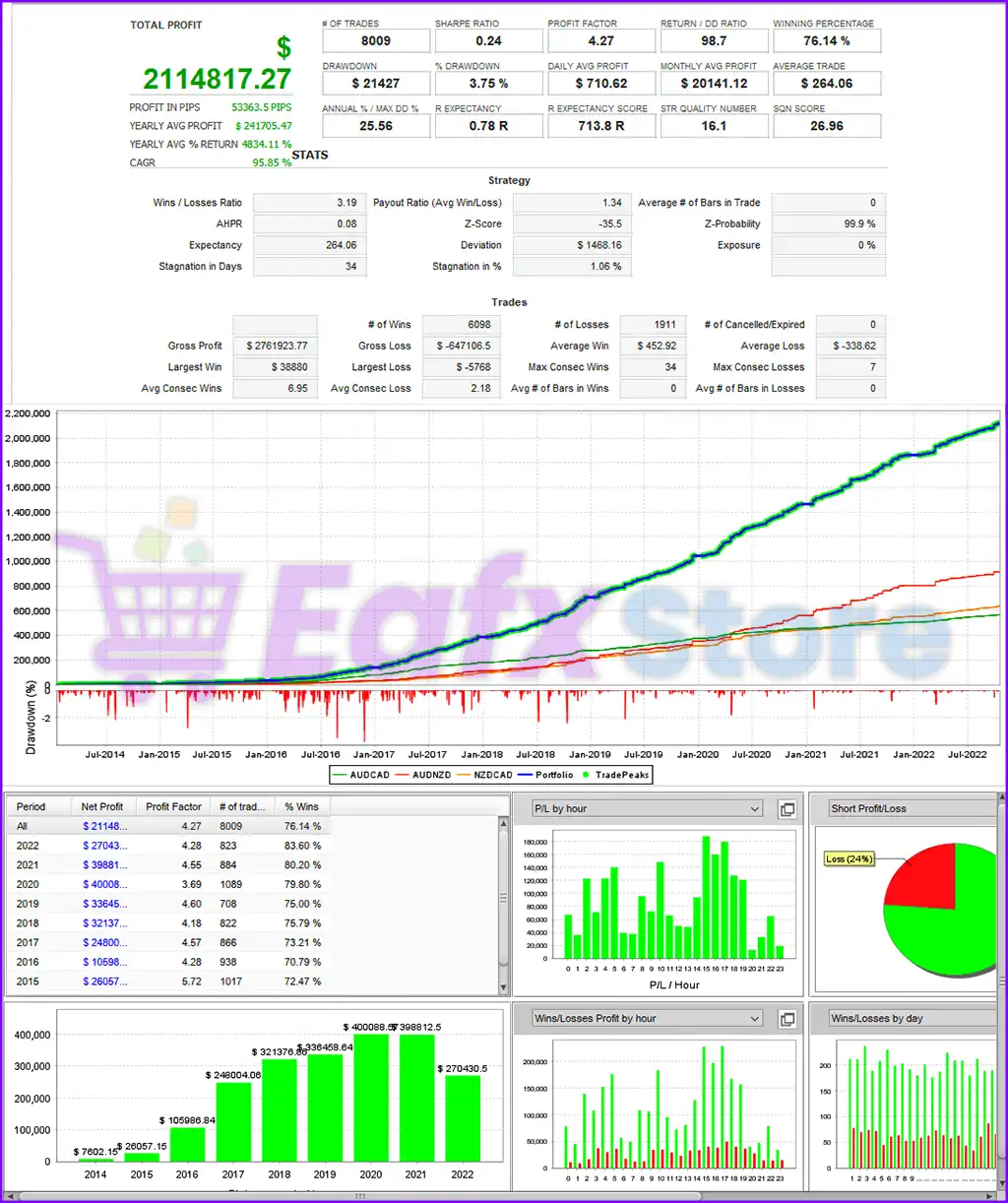
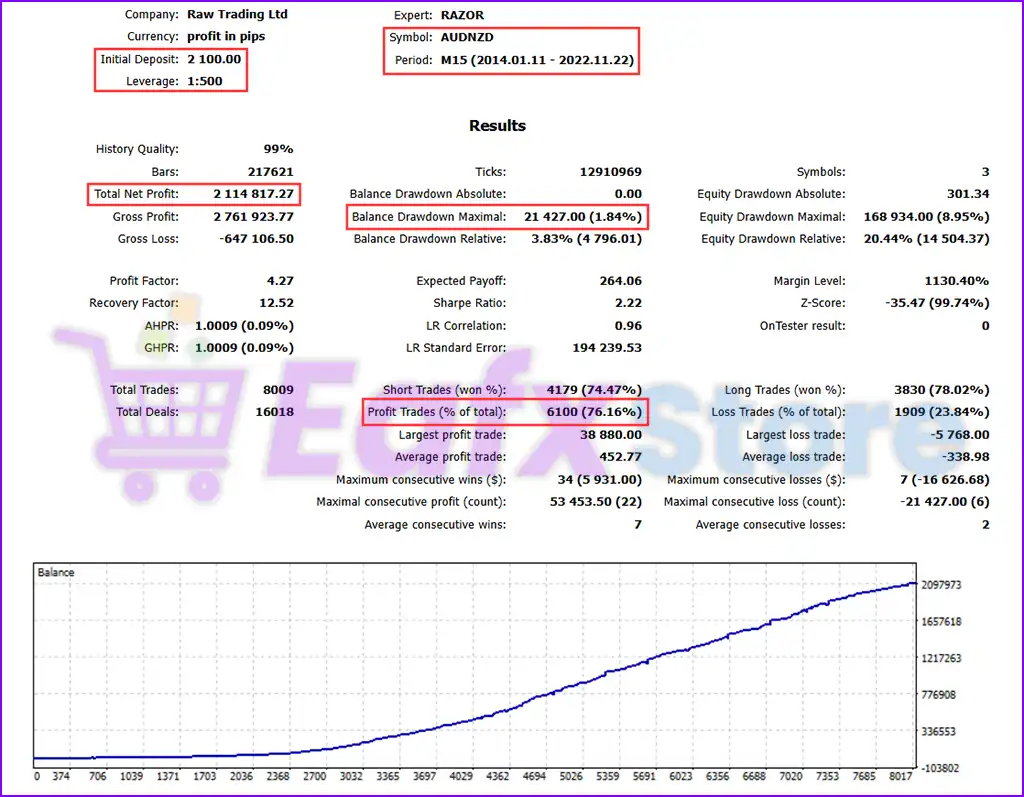
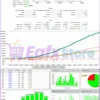
The high-performance automated trading expert advisor (EA) was tested on the AUDNZD currency pair with a 15-minute (M15) timeframe. The backtesting period lasted almost 9 years (2014 – 2022), demonstrating stable long-term profitability. Detailed performance parameters include:
✅ Initial Deposit: $2,100
✅ Total Net Profit: $2,1M
✅ Win Rate: 76.16%
✅ Maximum Balance Drawdown: 1.84%
✅ Equity Drawdown Maximal: 8.95%
Razor EA Backtest Results
Performance Verified
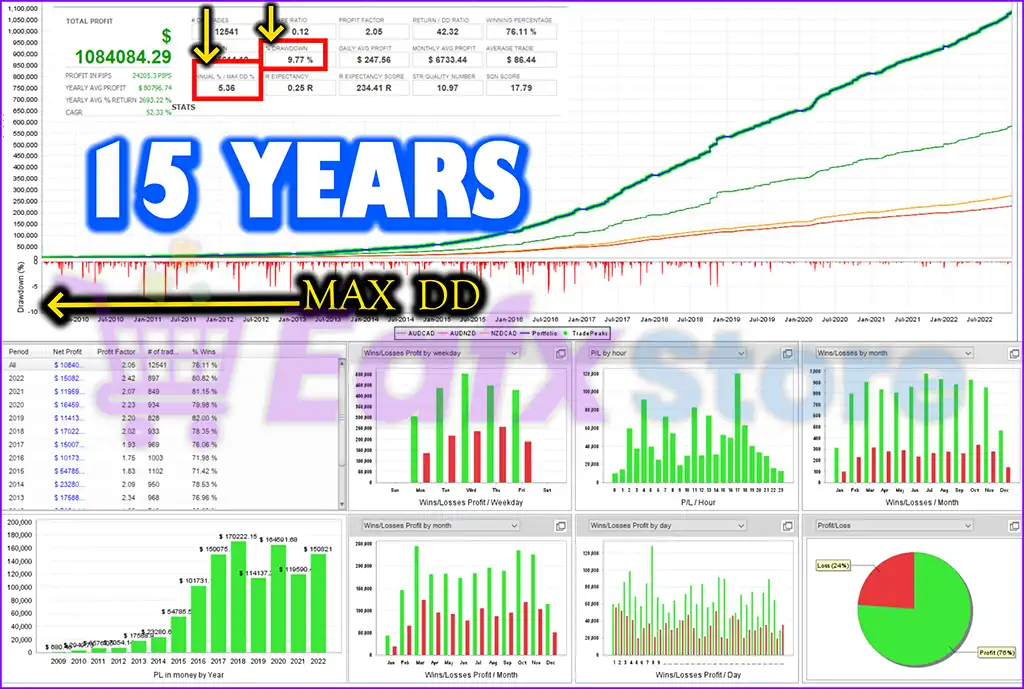
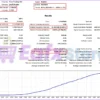
The provided backtest results reveal a robust trading algorithm that has been tested over 15 years, demonstrating consistent profitability and risk management. The Expert Advisor (EA) has accumulated an impressive total profit of $1M from an initial deposit, maintaining a stable growth trajectory over time.
✅ Total Trades: 12,500
✅ Winning Percentage: 76.11%
✅ Maximum Drawdown: 9.77%
✅ Daily Profit: $248
✅ Monthly Profit: $6,700
Razor EA Performance Verified
What is the Razor MT5 Trading Strategy?
🔹 Mean Reversion Logic: Uses market reversion behavior to identify high-probability entry opportunities.
🔹 Volatility-Based Entries: Applies smart volatility filters to improve timing and market precision.
🔹 Weighted Take Profit: Uses adaptive profit calculations for balanced and structured trade exits.
🔹 Dynamic Grid Management: Controls order spacing intelligently according to market conditions.
🔹 Economic News Filtering: Suspends trading activity around major FOMC and NonFarm announcements.
Is Razor MT5 Safe?
Razor EA showcases exceptional potential in generating consistent and reliable profits, positioning itself as a valuable tool in the forex market. Highly acclaimed by the MQL5 community for its performance and stability, this expert advisor has earned the trust of traders worldwide.
⭐⭐⭐⭐⭐ Jay Milo (2023.10.11)
“An absolute beast! Very well made and excellent support from the author. Highly recommended.”
⭐⭐⭐⭐⭐ Philipp Hermann (2024.04.30)
“Works also with small deposits and made me good profits. Where other products blow accounts this one withstands the changing markets. I absolutely recommend this one.”
Trading Specifications
Recommended settings and parameters to pay attention to from developers and experts:
| Features | Type |
|---|---|
| Trading platform | MetaTrader 5 (MT5) |
| Time frames | M15 (15 minute chart) |
| Currency pairs | AUDCAD, AUDNZD, NZDCAD |
| Minimum / Recommended deposit | $500 |
| Minimum / Recommended leverage | 1:30+ |
| Additional services | Unlock and Decompile |
| Recommended brokers | Exness Broker, Icmarkets Broker |
| Recommended VPS | MyfxVPS.com ( Blue VPS, Golden VPS). Lowest Latency, 2 week Free Trial, 100% Free for 12-18 Months. |
Product Download Package?
The download package of the product suite includes:
Experts
✅ Setting (If Any).docx
✅ Installation Guide.docx
SetFiles
✅ AUDCAD_M15_LOW_Risk_MT5.set
✅ AUDNZD_M15_LOW_Risk_MT5.set
✅ NZDCAD_M15_LOW_Risk_MT5.set
➡️ Reviewed by David Easton
Conclusion: Game Changer for Automated Forex Trading
In short, Razor EA stands out as a powerful, fully automated trading system designed for long-term profitability while maintaining strict risk management. Unlike many EAs that rely on high-risk strategies such as grid or martingale, Razor EA leverages market mean reversion, advanced volatility filters, and adaptive lot sizing to ensure precise trade execution. With built-in drawdown protection, a fixed stop-loss mechanism, and real-time broker adaptation, traders can confidently use this EA across different market conditions.
🔢 Razor MT5 – Complete Settings & Parameters Guide
Razor MT5 is a powerful automated trading Expert Advisor (EA) designed for MetaTrader 5 traders who want advanced grid trading, smart hedging, volatility filtering, dynamic profit management and economic news protection.
The EA supports multi-pair trading, One Chart Mode, FTMO-safe settings, RSI filtering, weighted take profit systems, and adaptive grid management for professional forex trading environments.
Razor MT5 Settings
🔢 Razor MT5 General Settings
Below are the details of the parameters in the advisor’s trading system settings table:
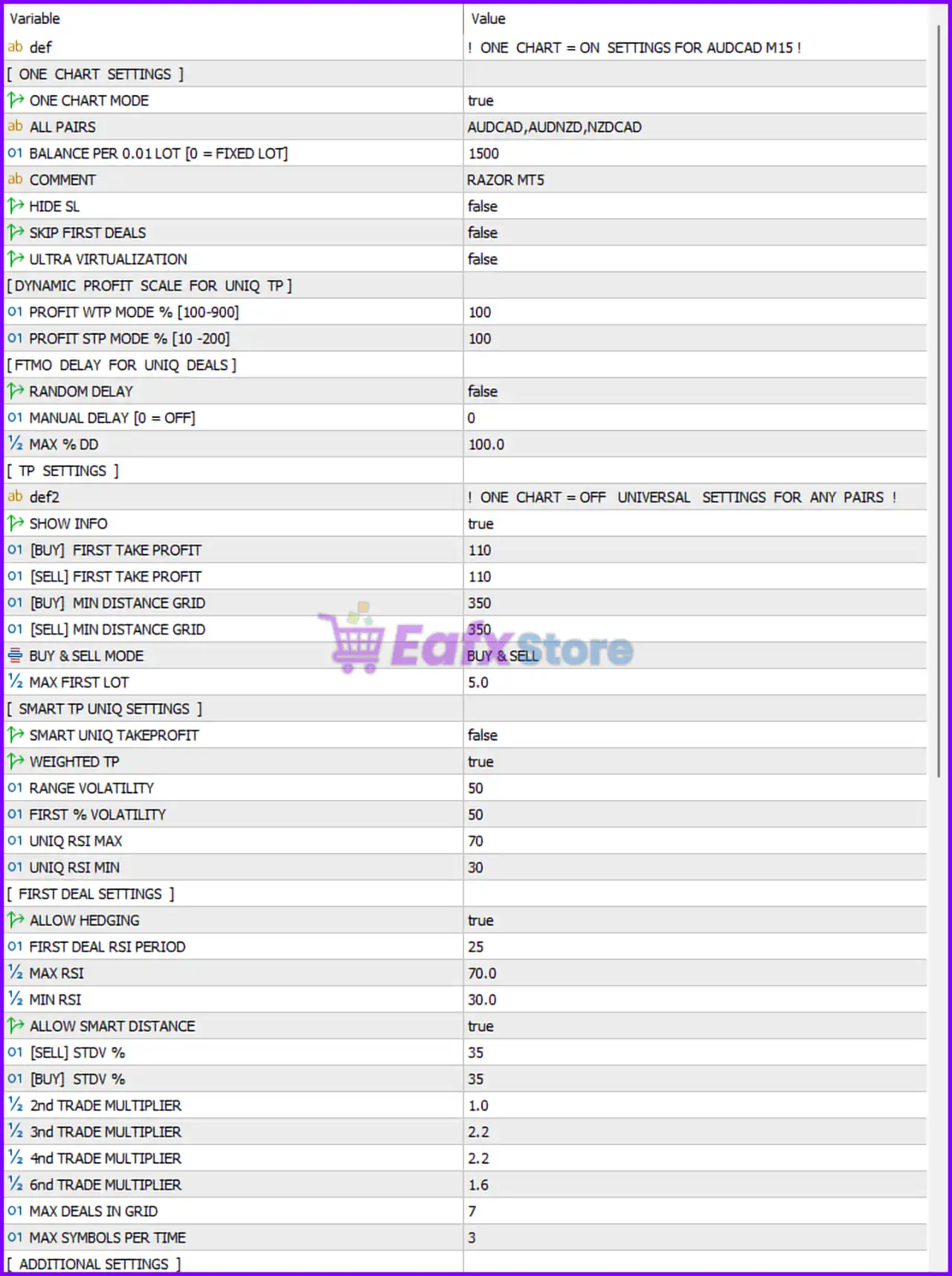
Razor MT5 Settings Panel
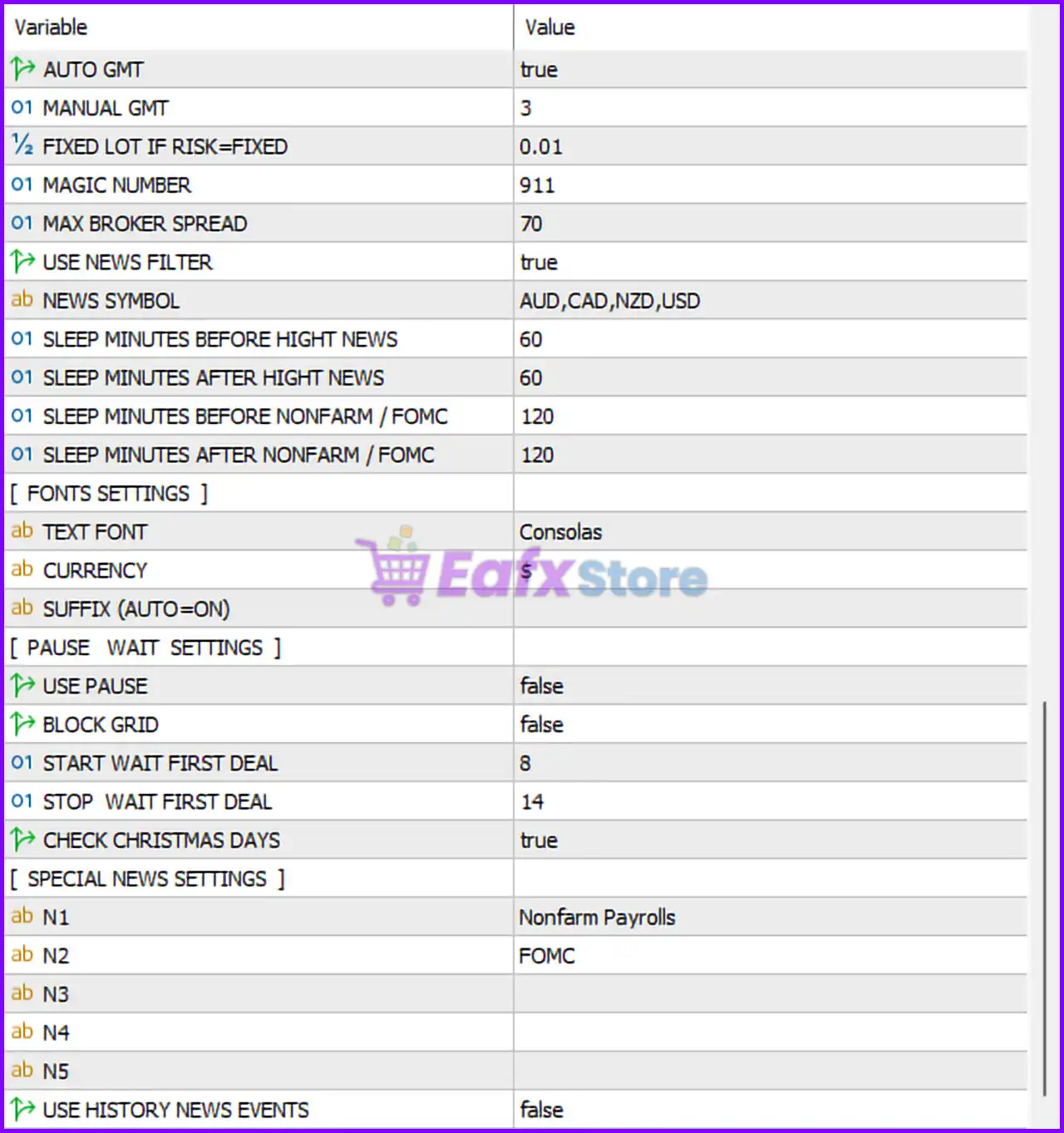
Razor MT5 Setting Panel
🔹 AUTO GMT = true — Automatically detects broker GMT offset for accurate trading session timing.
🔹 MANUAL GMT = 3 — Manual GMT offset value used if AUTO GMT is disabled.
🔹 FIXED LOT IF RISK=FIXED = 0.01 — Uses a fixed lot size of 0.01 when risk mode is fixed.
🔹 MAGIC NUMBER = 911 — Unique identifier assigned to all Razor MT5 trades.
🔹 MAX BROKER SPREAD = 70 — Maximum spread allowed before the EA stops opening new trades.
🔢 Razor MT5 News Filter Settings
🔹 USE NEWS FILTER = true — Enables economic news filtering protection.
🔹 NEWS SYMBOL = AUD,CAD,NZD,USD — News filter monitors AUD, CAD, NZD, and USD currencies.
🔹 SLEEP MINUTES BEFORE HIGHT NEWS = 60 — Stops trading 60 minutes before high-impact news.
🔹 SLEEP MINUTES AFTER HIGHT NEWS = 60 — Resumes trading 60 minutes after high-impact news.
🔹 SLEEP MINUTES BEFORE NONFARM / FOMC = 120 — Pauses trading 120 minutes before NFP or FOMC events.
🔹 SLEEP MINUTES AFTER NONFARM / FOMC = 120 — Resumes trading 120 minutes after NFP or FOMC events.
🔢 Fonts Settings
🔹 TEXT FONT = Consolas — Uses the Consolas font for EA display information.
🔹 CURRENCY = $ — Displays account currency symbol as USD ($).
🔢 Pause Wait Settings
🔹 USE PAUSE = false — Trading pause functionality is disabled.
🔹 BLOCK GRID = false — Grid blocking system is disabled.
🔹 START WAIT FIRST DEAL = 8 — Trading wait period begins at hour 8.
🔹 STOP WAIT FIRST DEAL = 14 — Trading wait period ends at hour 14.
🔹 CHECK CHRISTMAS DAYS = true — EA checks holiday periods during Christmas trading sessions.
🔢 Special News Settings
🔹 N1 = Nonfarm Payrolls — Special news keyword filter for NFP events.
🔹 N2 = FOMC — Special news keyword filter for FOMC announcements.
🔹 N3 = Empty — Additional custom news filter slot not configured.
🔹 N4 = Empty — Additional custom news filter slot not configured.
🔹 N5 = Empty — Additional custom news filter slot not configured.
🔹 USE HISTORY NEWS EVENTS = false — Historical news event filtering is disabled.
🔢 One Chart Settings
🔹 ONE CHART MODE = true — Enables multi-symbol trading from a single chart.
🔹 ALL PAIRS = AUDCAD,AUDNZD,NZDCAD — Currency pairs managed in One Chart Mode.
🔹 BALANCE PER 0.01 LOT [0 = FIXED LOT] = 1500 — Dynamic lot scaling based on every $1500 balance per 0.01 lot.
🔹 COMMENT = RAZOR MT5 — Trade comment label attached to all orders.
🔹 HIDE SL = false — Stop Loss visibility remains enabled.
🔹 SKIP FIRST DEALS = false — The EA does not skip initial trade entries.
🔹 ULTRA VIRTUALIZATION = false — Advanced virtualization mode is disabled.
🔢 Dynamic Profit Scale for Unique TP
🔹 PROFIT WTP MODE % [100-900] = 100 — Weighted Take Profit percentage configuration.
🔹 PROFIT STP MODE % [10-200] = 100 — Smart Take Profit scaling percentage.
🔢 FTMO Delay for Unique Deals
🔹 RANDOM DELAY = false — Random order execution delay is disabled.
🔹 MANUAL DELAY [0 = OFF] = 0 — Manual execution delay is disabled.
🔹 MAX % DD = 100.0 — Maximum account drawdown limit before restriction.
🔢 TP Settings
🔹 SHOW INFO = true — Displays trading information panel on the chart.
🔹 [BUY] FIRST TAKE PROFIT = 110 — Initial Buy Take Profit target set to 110 points.
🔹 [SELL] FIRST TAKE PROFIT = 110 — Initial Sell Take Profit target set to 110 points.
🔹 [BUY] MIN DISTANCE GRID = 350 — Minimum grid spacing for Buy positions set to 350 points.
🔹 [SELL] MIN DISTANCE GRID = 350 — Minimum grid spacing for Sell positions set to 350 points.
🔹 BUY & SELL MODE = BUY & SELL — EA can open both Buy and Sell trades simultaneously.
🔹 MAX FIRST LOT = 5.0 — Maximum allowed first lot size is 5.0 lots.
🔢 Smart TP Unique Settings
🔹 SMART UNIQ TAKEPROFIT = false — Smart unique take-profit system is disabled.
🔹 WEIGHTED TP = true — Weighted take-profit calculation is enabled.
🔹 RANGE VOLATILITY = 50 — Volatility range threshold used for smart TP calculations.
🔹 FIRST % VOLATILITY = 50 — Initial volatility percentage filter.
🔹 UNIQ RSI MAX = 70 — Maximum RSI threshold for trade entries.
🔹 UNIQ RSI MIN = 30 — Minimum RSI threshold for trade entries.
🔢 First Deal Settings
🔹 ALLOW HEDGING = true — Hedging functionality is enabled.
🔹 FIRST DEAL RSI PERIOD = 25 — RSI indicator period for first trade confirmation.
🔹 MAX RSI = 70.0 — Maximum RSI overbought level.
🔹 MIN RSI = 30.0 — Minimum RSI oversold level.
🔹 ALLOW SMART DISTANCE = true — Enables dynamic distance calculations between grid orders.
🔹 [SELL] STDV % = 35 — Standard deviation percentage for Sell trades.
🔹 [BUY] STDV % = 35 — Standard deviation percentage for Buy trades.
🔹 2nd TRADE MULTIPLIER = 1.0 — Lot multiplier applied to the second trade.
🔹 3rd TRADE MULTIPLIER = 2.2 — Lot multiplier applied to the third trade.
🔹 4nd TRADE MULTIPLIER = 2.2 — Lot multiplier applied to the fourth trade.
🔹 6nd TRADE MULTIPLIER = 1.6 — Lot multiplier applied to the sixth trade.
🔹 MAX DEALS IN GRID = 7 — Maximum grid trade levels allowed.
🔹 MAX SYMBOLS PER TIME = 3 — Maximum simultaneously traded symbols allowed.
🔢 Additional Settings
🔹 ONE CHART = ON SETTINGS FOR AUDCAD M15 ! — Indicates optimized One Chart Mode setup for AUDCAD M15 timeframe.
🔹 ONE CHART = OFF UNIVERSAL SETTINGS FOR ANY PAIRS ! — Universal settings mode available for any currency pair.
🔢 Conclusion
Razor MT5 is an advanced MetaTrader 5 Expert Advisor built for traders who prefer intelligent grid trading, hedging systems, and volatility-based automation. With features such as One Chart Mode, weighted take profit, FTMO-friendly delay controls, smart RSI filtering, and advanced news protection, Razor MT5 provides a flexible and professional automated trading solution for forex traders seeking high-performance risk-managed trading.
🔢 FAQs
❓ What is Razor MT5?
Razor MT5 is an automated MetaTrader 5 Expert Advisor focused on grid trading, hedging, volatility filtering, and smart take-profit management.
❓ Does Razor MT5 support multi-currency trading?
Yes, Razor MT5 supports multi-pair trading using One Chart Mode.
❓ Can Razor MT5 filter economic news events?
Yes, the EA includes advanced news filters for high-impact news, FOMC, and Nonfarm Payrolls.
❓ Is Razor MT5 suitable for prop firm trading?
Yes, Razor MT5 includes FTMO-safe settings, drawdown controls, and execution delay options suitable for prop firms.
❓ Does Razor MT5 support hedging strategies?
Yes, the EA supports simultaneous Buy and Sell hedging strategies with configurable grid multipliers.
User Reviews
Only logged in customers who have purchased this product may leave a review.
1. What is Razor EA MT5?
Razor EA MT5 is a fully automated trading system designed for long-term profitability without using risky strategies like grid, martingale, AI, or neural networks. It operates based on market mean reversion and a Market Volatility Filter to identify optimal trade entries.
2. How does Razor EA MT5 manage risk?
Razor EA incorporates built-in drawdown protection and fixed Stop-Loss (SL) settings to safeguard trading capital. It also avoids trading during high-impact news events using its FOMC/NonFarm Strong News Filter (SNF).
3. What currency pairs does Razor EA MT5 trade?
This EA is optimized for AUDCAD, AUDNZD, and NZDCAD, allowing traders to manage multiple currency pairs on a single MT5 chart for ease of use.
4. What is the minimum deposit required to use Razor EA MT5?
The recommended minimum deposit is $500. However, traders may need higher capital depending on their risk tolerance and lot size settings.
5. What is the profitability and drawdown of Razor EA MT5?
✔ Live trading results:
Total profit: +654% from an initial deposit of $550
Win rate: 92%
Max drawdown: 57.5% (higher risk, suitable for experienced traders)
✔ Backtest results (2014-2022):
Total profit: $2.1M from an initial deposit of $2,100
Win rate: 76.16%
Max drawdown: 1.84% (low risk)
6. Does Razor EA MT5 work with prop firms like FTMO?
Yes, Razor EA MT5 has special settings that enable it to comply with prop firm rules like FTMO and other proprietary trading firms.
7. Can Razor EA MT5 adapt to different brokers?
Yes, it features Real-time Broker Adaptation (ABRT), allowing it to adjust settings automatically based on different broker conditions, including spreads, slippage, and execution speed.
8. Can I monitor the live trading performance of Razor EA MT5?
Yes, the Live Signal is available to track real-time performance before purchasing the EA. This allows traders to evaluate its profitability and risk profile.
-
 Price range: $70.00 through $599.00
 -
 Price range: $70.00 through $599.00
 -
 Price range: $89.00 through $599.00
 -
 Price range: $89.00 through $599.00
-
 0Price range: $89.00 through $599.00
 -
 1
1 -
 0Price range: $89.00 through $599.00
 -
 2
2
There are no reviews yet.