


Scalper Investor EA MT5 + Sets (Latest version) - Unlimited

Subscriptions for Special Plan
- 30 EA package is more economical!
- Special package with 99%
- Download 1 EA/Day

Subscriptions for Premium Membership
- Download Unlimited in 1 Year
- Get 100% Discount
- Get free access to all

Subscriptions for Gold Membership
- 1 Year Membership
- Get 100% Discount
- Access EA+Indicator+Course
Frequently bought together 🎁
Add these products to enhance your purchase




What is Scalper Investor EA MT5?
Scalper Investor EA is an advanced Expert Advisor (EA) built for automated multi-currency trading with adaptive reversal logic, smart indicators and strict risk management. Designed for stability and market adaptability, the EA combines precision scalping, volatility filters, and controlled execution to deliver consistent automated trading performance with reduced drawdown exposure.
 Vendor Website: View here
About the Author
This product is compiled by Ihor Otkydach. This author has more than +12 years of experience working on MQL5 with many famous products such as Scalper Investor EA MT5, Swing Master EA MT5, One Man Army EA MT5, Shark Fx EA MT5, Grabber Bot MT5 and other advisors. Among them, Scalper Investor EA is his best performing products.
Delivery time 24h-48h after payment.
Refund if not delivered.
You will receive the current version without any limitations (ID+Time).
Key Features of Scalper Investor EA MT5
🔹 Advanced Multi-Currency Trading Engine: Trades 11 Forex pairs with diversified market exposure control.
🔹 Smart Keltner Channel Reversal Logic: Detects pullback opportunities with adaptive indicator filtering.
🔹 Strict Stop Loss Protection System: Every trade includes dynamic risk control and drawdown management.
🔹 No Martingale or Grid Strategies: Maintains disciplined execution with stable trading performance.
🔹 Prop Firm and Live Account Ready: Optimized for controlled risk and professional trading conditions.
What is the Scalper Investor EA MT5 Trading Strategy?
🔹 Keltner Channel Reversal Trading Model: Captures pullbacks when price re-enters structured channel zones.
🔹 Volatility and Trend Filter Confirmation: Avoids weak conditions using adaptive market strength analysis.
🔹 Spread and Slippage Protection Logic: Filters unstable execution environments for safer automated trading.
🔹 One Trade Per Symbol Discipline: Reduces overtrading and improves portfolio risk management stability.
🔹 Adaptive Dynamic Stop Loss System: Adjusts protection levels according to changing market volatility.
Scalper Investor EA MT5 Review
Scalper Investor EA Live Results
🔶 Scalper Investor EA is a precision-engineered expert advisor for MetaTrader 5 (MT5), designed to execute low-risk, high-accuracy scalping trades on the H1 (1-hour) timeframe. With full algo automation and a proven live trading track record, this EA is built for traders who prefer low drawdown and high consistency over aggressive grid strategies.
✅ Tracking Period: 3 weeks
✅ Initial Deposit: $700
✅ Growth Since 2025: +5%
✅ Win Rate: 100%
✅ Maximum Drawdown: 1.3%
Scalper Investor EA MT5 Live Results
🔶 Scalper Investor EA specializes in reverse scalping strategies on the M15 timeframe, targeting small market pullbacks with high accuracy and minimal risk.
✅ Tracking Period: 2 weeks
✅ Initial Deposit: $500
✅ Growth Since 2025: +5%
✅ Win Rate: 92.3%
✅ Maximum Drawdown: 1.9%
Scalper Investor EA MT5 Live Signal Results
Scalper Investor EA Backtest Results
🔶 Scalper Investor is an automated trading platform designed for multi-currency trading, automated lots with dynamic risk control. Backtesting shows its performance over 6 years (2018–2024) on 11 currency pairs, achieving impressive compound growth and sustainable profits with minimal lag time.
✅ Test Period: 2018–2024 (6 years)
✅ Total Profit: +14,988.58%
✅ Win Rate: 87.21%
Scalper Investor EA MT5 Backtest Results
🔶 This test uses a Fixed Lot Size, providing a raw, unfiltered view of the EA’s core trading logic and consistency.
✅ Asset Coverage: 11 FX Pairs
✅ Timeframe: Likely M15 or H1
✅ Backtest Duration: April 2018 – April 2025 (7 years)
✅ Total Equity Return: ~750%+
Scalper Investor EA MT5 Backtest Trading Results
Why Choose and Scalper Investor EA?
🔹 Built for Stable Long-Term Performance: Focuses on controlled drawdown and consistent trade execution.
🔹 Fully Automated Emotion-Free Trading: Executes structured strategies without manual intervention stress.
🔹 Flexible Timeframe and Pair Support: Works efficiently on both M15 and H1 trading environments.
🔹 Scalable for Prop Firms and Retail Traders: Suitable for funded accounts and personal trading growth.
🔹 Professional Marketplace Trading Solution: Combines adaptability, precision and resilient risk management.
Trading Specifications
Recommended settings and parameters to pay attention to from developers and experts:
| Features | Type |
|---|---|
| Trading platform | MetaTrader 5 (MT5) |
| Time frames | M15 or H1 |
| Currency pairs | AUDCAD, AUDSGD, AUDUSD, EURAUD, EURCAD, EURNZD, EURUSD, NZDCAD, NZDUSD, USDSGD, EURGBP |
| Minimum / Recommended deposit | $500 |
| Minimum / Recommended leverage | 1:30 or higher |
| Setup files | Available |
| Additional services | Unlock and Decompile |
| Recommended brokers | Exness Broker, Icmarkets Broker |
| Recommended VPS | MyfxVPS.com (Blue VPS, Golden VPS). Lowest Latency, 2 week Free Trial, 100% Free for 12-18 Months. |
Is Scalper Investor EA MT5 safe?
Scalper Investor EA shows significant potential in providing stable and reliable profits, making it a reliable tool in the forex market. The advisor is highly appreciated by the MQL5 community in many aspects and has won the trust of users.
⭐⭐⭐⭐⭐ NickKearsley (2025.09.04): “Easy to install and I like the fact that there are individual set files for each currency setting. No grid or Martingale here. Trades slowly and surely so far. It’s still early days but 12 winning trades with no losses in just under a week is a great start.”
⭐⭐⭐⭐⭐ Shark Tank (2025.07.25): “Stable and reliable. Since using this EA for two months, it has generated over a 10% growth. Just one SL has happened, but it doesn’t matter.”
⭐⭐⭐⭐⭐ Alex Quino (2025.07.17): “Slowly but surely. I bought the EA 3 weeks ago and I can see already how it performs and bring some profits on my small account. Lhor’s products are reliable and his support is just superb. Hoping that this EA continuously giving positive profits, will update this review in the next few months.”
Product Download Package?
The download package of the product suite includes:
Experts
✅ Scalper Investor EA.ex5
SetFiles:
✅ si nzdcad m15 – prop.set
✅ si eurusd m15 – prop.set
✅ si eurnzd m15 – prop.set
✅ si eurgbp m15 – prop.set
✅ si eurcad m15 – prop.set
✅ si euraud m15 – prop.set
✅ si audusd m15 – prop.set
✅ si audsgd m15 – prop.set
✅ si audcad m15 – prop.set
✅ si usdsgd m15 – prop.set
✅ si nzdusd m15 – prop.set
✅ si eurgbp m15 – personal use.set
✅ si usdsgd m15 – personal use.set
✅ si nzdusd m15 – personal use.set
✅ si nzdcad m15 – personal use.set
✅ si eurusd m15 – personal use.set
✅ si eurnzd m15 – personal use.set
✅ si eurcad m15 – personal use.set
✅ si euraud m15 – personal use.set
✅ si audusd m15 – personal use.set
✅ si audsgd m15 – personal use.set
✅ si audcad m15 – personal use.set
✅ usdsgd si prop use h1 reverse.set
✅ usdcad si prop use h1 reverse.set
✅ gbpusd si prop use h1 reverse.set
✅ nzdusd si prop use h1 reverse.set
✅ eurusd si prop use h1 reverse.set
✅ eurnzd si prop use h1 reverse.set
✅ eurgbp si prop use h1 reverse.set
✅ eurchf si prop use h1 reverse.set
✅ audusd si prop use h1 reverse.set
✅ euraud si prop use h1 reverse.set
✅ audsgd si prop use h1 reverse.set
✅ audcad si prop use h1 reverse.set
✅ usdsgd si personal use h1 reverse.set
✅ usdcad si personal use h1 reverse.set
✅ nzdusd si personal use h1 reverse.set
✅ gbpusd si personal use h1 reverse.set
✅ eurusd si personal use h1 reverse.set
✅ eurnzd si personal use h1 reverse.set
✅ eurgbp si personal use h1 reverse.set
✅ eurchf si personal use h1 reverse.set
✅ audusd si personal use h1 reverse.set
✅ euraud si personal use h1 reverse.set
✅ audsgd si personal use h1 reverse.set
✅ audcad si personal use h1 reverse.set
➡️ Reviewed by David Easton
Conclusion: Elevate Your Scalping Game with Scalper Investor EA MT5
In short, Scalper Investor EA stands out as a highly refined, prop-firm-ready trading solution designed for serious traders seeking low-risk, high-accuracy performance. Its smart reversal strategy, combined with upcoming trend-following capabilities, makes it a future-proof choice for both funded account challenges and long-term live trading. With support for 11 forex pairs, advanced entry filters, and strict no-martingale logic, this EA offers disciplined execution aligned with real trading conditions.
Scalper Investor EA MT5 Settings Guide
Scalper Investor EA MT5 is an automated trading Expert Advisor built around a multi-filter scalping framework that combines Keltner Channel analysis, Bollinger Bands, Standard Deviation, Momentum, RSI, Moving Average, CCI, ProfessionalSwing, and MACD conditions. The EA also provides configurable trading hours, spread control, fixed or automatic lot sizing, Take Profit and Stop Loss settings, and multiple entry and exit filters.
The displayed configuration is organized into several independent modules, allowing traders to activate or deactivate individual indicators according to their preferred trading conditions. This makes Scalper Investor EA MT5 highly configurable for traders who want to fine-tune entry confirmation, trade management, and market-filtering conditions.
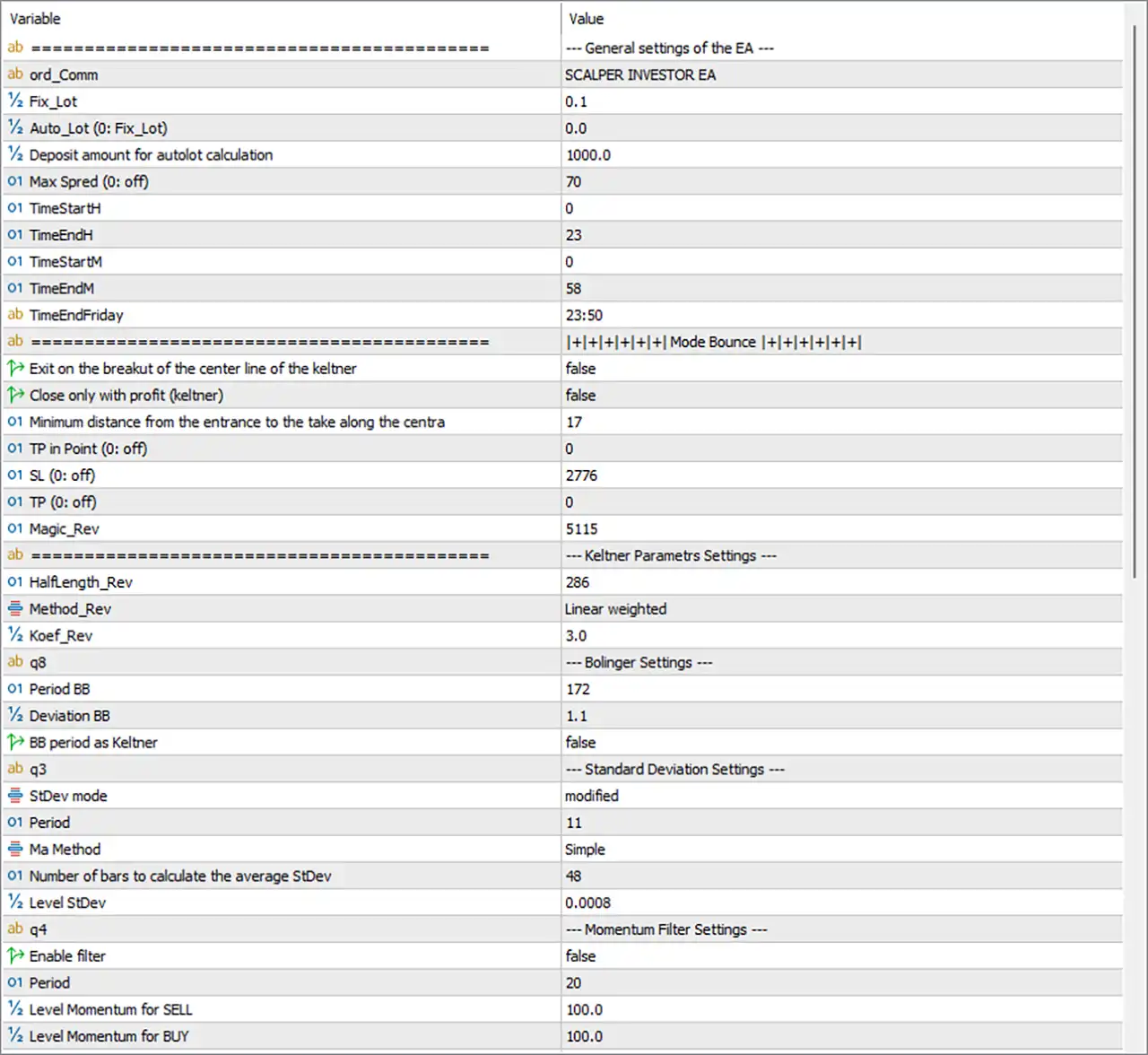
Scalper Investor EA MT5 Settings Panel
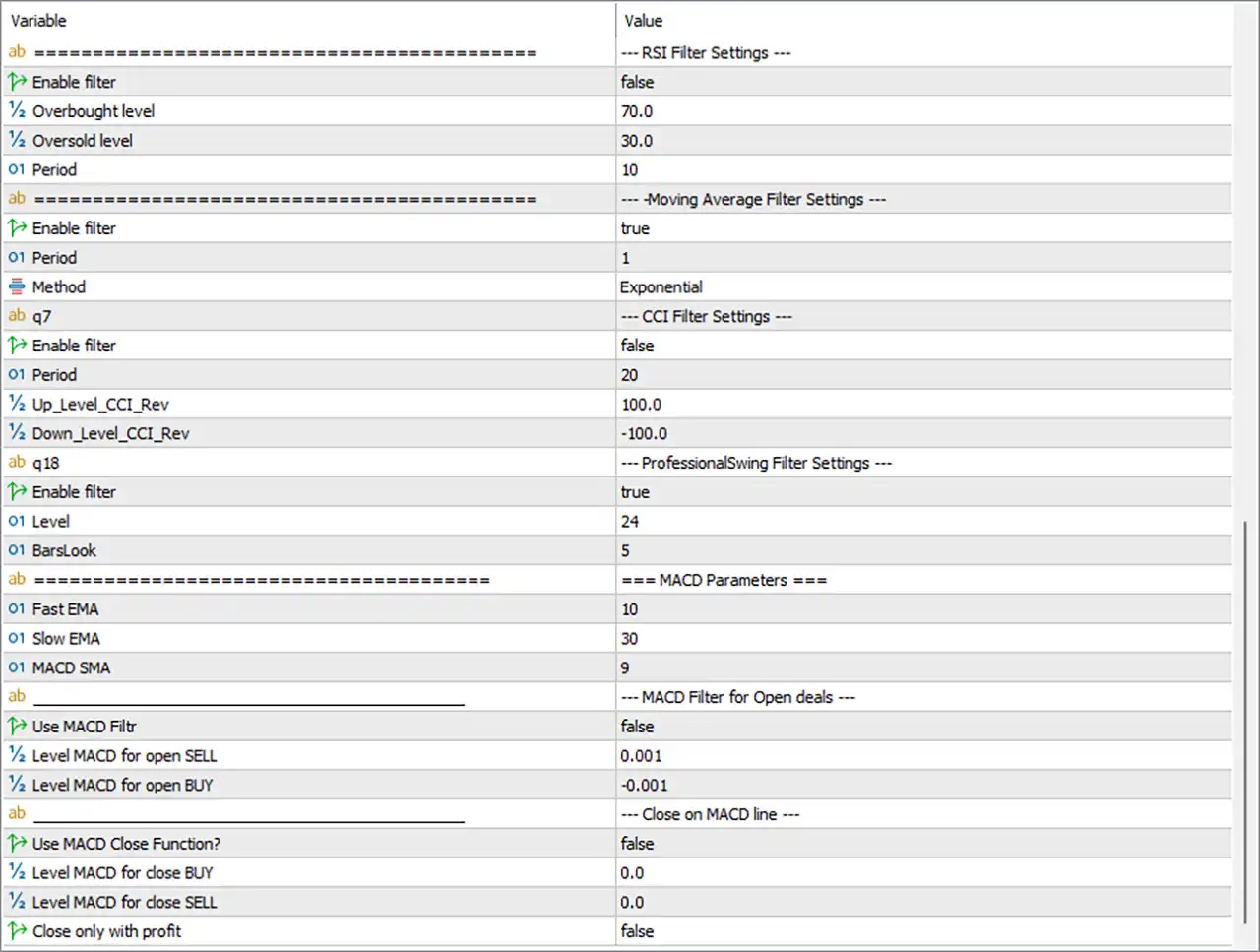
Scalper Investor EA Settings Panel
General EA Settings
🔹 ord_Comm = SCALPER INVESTOR EA — Sets the trade comment to SCALPER INVESTOR EA, making EA-generated orders easier to identify.
🔹 Fix_Lot = 0.1 — Sets the fixed lot size to 0.1 lots when fixed-lot trading is used.
🔹 Auto_Lot (0: Fix_Lot) = 0.0 — Sets the automatic lot parameter to 0.0, meaning the EA uses the Fix_Lot setting rather than automatic lot sizing.
🔹 Deposit amount for autolot calculation = 1000.0 — Defines a 1000.0 deposit amount as the reference value for automatic lot-size calculations if Auto Lot is activated.
🔹 Max Spred (0: off) = 70 — Sets the maximum allowed spread to 70 points; a value of 0 would disable the spread restriction.
🔹 TimeStartH = 0 — Sets the trading start hour to 00:00.
🔹 TimeEndH = 23 — Sets the trading end hour to 23:00.
🔹 TimeStartM = 0 — Sets the trading start minute to 00.
🔹 TimeEndM = 58 — Sets the trading end minute to 58.
🔹 TimeEndFriday = 23:50 — Sets the Friday trading end time to 23:50.
Mode Bounce Settings
🔹 Exit on the breakout of the center line of the keltner = false — Disables closing a trade when price breaks through the Keltner Channel center line.
🔹 Close only with profit (keltner) = false — Disables the requirement that a Keltner-based exit must close the trade only when it is profitable.
🔹 Minimum distance from the entrance to the take along the centra = 17 — Sets the minimum distance from the entry point to the Keltner center-line target at 17 according to the EA’s internal calculation.
🔹 TP in Point (0: off) = 0 — Sets the direct Take Profit to 0 points, which disables this fixed TP method.
🔹 SL (0: off) = 2776 — Sets the Stop Loss parameter to 2776 according to the EA’s internal point calculation.
🔹 TP (0: off) = 0 — Sets the additional Take Profit parameter to 0, meaning this specific TP function is disabled.
🔹 Magic_Rev = 5115 — Sets the Magic Number for this strategy/reversal module to 5115.
Keltner Parameters Settings
🔹 Halflength_Rev = 286 — Sets the Keltner/reversal calculation half-length to 286 periods.
🔹 Method_Rev = Linear weighted — Uses the Linear Weighted calculation method for the reversal Keltner component.
🔹 Koef_Rev = 3.0 — Sets the Keltner/reversal coefficient to 3.0, controlling the channel calculation multiplier.
Bollinger Settings
🔹 Period BB = 172 — Sets the Bollinger Bands period to 172.
🔹 Deviation BB = 1.1 — Sets the Bollinger Bands deviation multiplier to 1.1.
🔹 BB period as Keltner = false — Disables using the Bollinger Bands period as the Keltner calculation period.
Standard Deviation Settings
🔹 StDev mode = modified — Selects the modified Standard Deviation calculation mode.
🔹 Period = 11 — Sets the Standard Deviation calculation period to 11.
🔹 Ma Method = Simple — Uses the Simple Moving Average (SMA) method in the Standard Deviation calculation.
🔹 Number of bars to calculate the average StDev = 48 — Uses 48 bars to calculate the average Standard Deviation.
🔹 Level StDev = 0.0008 — Sets the Standard Deviation threshold level to 0.0008.
Momentum Filter Settings
🔹 Enable filter = false — Disables the Momentum filter.
🔹 Period = 20 — Sets the Momentum indicator period to 20.
🔹 Level Momentum for SELL = 100.0 — Sets the Momentum threshold for SELL signals to 100.0.
🔹 Level Momentum for BUY = 100.0 — Sets the Momentum threshold for BUY signals to 100.0.
RSI Filter Settings
🔹 Enable filter = false — Disables the RSI filter.
🔹 Overbought level = 70.0 — Sets the RSI overbought threshold to 70.0.
🔹 Oversold level = 30.0 — Sets the RSI oversold threshold to 30.0.
🔹 Period = 10 — Sets the RSI calculation period to 10.
Moving Average Filter Settings
🔹 Enable filter = true — Enables the Moving Average filter.
🔹 Period = 1 — Sets the Moving Average period to 1.
🔹 Method = Exponential — Selects the Exponential Moving Average (EMA) calculation method.
CCI Filter Settings
🔹 Enable filter = false — Disables the CCI filter.
🔹 Period = 20 — Sets the CCI calculation period to 20.
🔹 Up_Level_CCI_Rev = 100.0 — Sets the upper CCI reversal level to 100.0.
🔹 Down_Level_CCI_Rev = -100.0 — Sets the lower CCI reversal level to -100.0.
ProfessionalSwing Filter Settings
🔹 Enable filter = true — Enables the ProfessionalSwing filter.
🔹 Level = 24 — Sets the ProfessionalSwing filter level to 24.
🔹 BarsLook = 5 — Sets the number of bars examined by the ProfessionalSwing filter to 5.
MACD Parameters
🔹 Fast EMA = 10 — Sets the MACD fast EMA period to 10.
🔹 Slow EMA = 30 — Sets the MACD slow EMA period to 30.
🔹 MACD SMA = 9 — Sets the MACD signal/SMA period to 9.
MACD Filter for Open Deals
🔹 Use MACD Filter = false — Disables the MACD filter for opening new trades.
🔹 Level MACD for open SELL = 0.001 — Sets the MACD threshold for opening SELL positions to 0.001.
🔹 Level MACD for open BUY = -0.001 — Sets the MACD threshold for opening BUY positions to -0.001.
Close on MACD Line Settings
🔹 Use MACD Close Function? = false — Disables the MACD-based trade-closing function.
🔹 Level MACD for close BUY = 0.0 — Sets the MACD closing level for BUY positions to 0.0.
🔹 Level MACD for close SELL = 0.0 — Sets the MACD closing level for SELL positions to 0.0.
🔹 Close only with profit = false — Disables the requirement that MACD-based closing must occur only when the position is profitable.
Current Configuration Summary
🔹 Lot Management: The EA uses Fix_Lot = 0.1, while Auto_Lot = 0.0, so the displayed configuration is based on the fixed lot setting.
🔹 Spread Protection: The maximum spread is set to 70 points and is active because the value is not 0.
🔹 Trading Schedule: Normal trading hours are configured from 00:00 to 23:58, while Friday trading ends at 23:50.
🔹 Keltner Strategy: The Keltner reversal module uses Halflength = 286, Linear weighted calculation, and Koef = 3.0.
🔹 Bollinger Bands: Bollinger Bands use Period = 172 and Deviation = 1.1.
🔹 Standard Deviation: The configuration uses modified StDev mode, Period = 11, 48 bars, and Level StDev = 0.0008.
🔹 Momentum Filter: The Momentum filter is disabled, with Period = 20 and both BUY and SELL levels set to 100.0.
🔹 RSI Filter: The RSI filter is disabled, using Period = 10, Overbought = 70.0, and Oversold = 30.0.
🔹 Moving Average Filter: The MA filter is enabled with Period = 1 and the Exponential method.
🔹 CCI Filter: The CCI filter is disabled, with Period = 20, Up Level = 100.0, and Down Level = -100.0.
🔹 ProfessionalSwing Filter: The ProfessionalSwing filter is enabled with Level = 24 and BarsLook = 5.
🔹 MACD Entry Filter: The MACD filter for opening trades is disabled, although its parameters are configured with Fast EMA = 10, Slow EMA = 30, and MACD SMA = 9.
🔹 MACD Exit Function: The MACD close function is disabled, with both BUY and SELL closing levels set to 0.0.
Important Notes About the Settings
🔹 Fixed Lot vs Auto Lot: Because Auto_Lot = 0.0, the EA uses the configured Fix_Lot = 0.1 rather than automatic lot sizing.
🔹 Spread Limit: The Max Spred = 70 setting is active because the parameter description states that 0 means off.
🔹 Take Profit: Both displayed direct TP parameters are 0, meaning those specific fixed TP functions are disabled.
🔹 Stop Loss: The SL = 2776 setting remains configured and should be interpreted according to the EA’s internal point calculation.
🔹 Keltner Exit: Both Exit on the breakout of the center line = false and Close only with profit (keltner) = false, so those optional Keltner exit restrictions are disabled.
🔹 Moving Average Filter: Unlike several other filters, the MA filter is currently enabled with an EMA Period = 1.
🔹 Multiple Filters: Momentum, RSI, CCI, and MACD entry filtering are disabled, while the Moving Average and ProfessionalSwing filters are enabled.
🔹 MACD Parameters: The MACD periods remain configured even though Use MACD Filter = false, meaning the MACD entry thresholds are not currently being used as an active entry filter.
🔹 ProfessionalSwing: The ProfessionalSwing filter is active with Level = 24 and BarsLook = 5, making it one of the enabled confirmation components in the displayed setup.
Conclusion
Scalper Investor EA MT5 provides a highly configurable scalping framework combining Keltner Channels, Bollinger Bands, Standard Deviation, Moving Average, ProfessionalSwing, Momentum, RSI, CCI, and MACD modules. The EA also provides configurable lot sizing, spread protection, trading schedules, Take Profit, Stop Loss, and strategy-specific exit conditions.
The displayed configuration uses a 0.1 fixed lot, a 70-point maximum spread, trading hours from 00:00 to 23:58, and a Friday cutoff of 23:50. The Keltner module uses 286 half-length and a 3.0 coefficient, while Bollinger Bands use 172 periods and 1.1 deviation.
Among the indicator filters, the Moving Average filter and ProfessionalSwing filter are enabled, while the Momentum, RSI, CCI, and MACD entry filters are disabled. This configuration therefore places greater emphasis on the enabled MA and ProfessionalSwing components while retaining detailed settings for the other optional confirmation modules.
Before using the EA on a live account, traders should verify the EA’s point calculations, especially the SL = 2776, Max Spread = 70, and other distance-based values, against the broker’s symbol specifications.
FAQs
❓ What lot size does Scalper Investor EA MT5 use?
The displayed configuration uses Fix_Lot = 0.1. Auto_Lot = 0.0, so the automatic lot-sizing mode is not active.
❓ What indicators does Scalper Investor EA MT5 use?
The Inputs include Keltner, Bollinger Bands, Standard Deviation, Momentum, RSI, Moving Average, CCI, ProfessionalSwing, and MACD settings.
❓ Which filters are enabled in the current configuration?
The Moving Average filter and ProfessionalSwing filter are enabled. Momentum, RSI, CCI, and MACD entry filters are disabled.
❓ What are the Bollinger Bands settings?
The EA uses Period BB = 172 and Deviation BB = 1.1. The BB period as Keltner option is set to false.
❓ What are the MACD settings in Scalper Investor EA MT5?
The MACD uses Fast EMA = 10, Slow EMA = 30, and MACD SMA = 9. However, Use MACD Filter = false and Use MACD Close Function = false, so the MACD functions are currently disabled.
User Reviews
Only logged in customers who have purchased this product may leave a review.
1. What is Scalper Investor EA MT5 and what makes it unique?
Scalper Investor EA MT5 is a multi-currency automated trading robot for MetaTrader 5 that uses a reversal-based scalping strategy. Unlike high-frequency scalpers, it focuses on high-accuracy, low-risk entries with no grid or martingale, making it prop-firm compatible.
2. Which currency pairs does this Scalper Investor EA support?
It supports 11 forex pairs, including: AUDCAD, AUDSGD, AUDUSD, EURAUD, EURCAD, EURNZD, EURUSD, NZDCAD, NZDUSD, USDSGD, EURGBP.
3. Is this EA suitable for proprietary trading firm challenges like FTMO or MFF?
Yes. Scalper Investor EA is specifically designed to meet prop firm requirements with its low drawdown, no martingale, and one-trade-per-pair logic, making it ideal for passing funded account evaluations.
4. What timeframes does the Scalper Investor EA work best on?
It is optimized for M15 and H1 timeframes, making it suitable for intraday and short-term trading strategies.
5. What strategy does the Scalper Investor EA use?
It uses a Reversal Scalping Strategy based on Keltner Channel pullbacks and advanced entry filters. A Trend-Following strategy module is under development and will be added in future updates.
6. How much capital and leverage are recommended to run this Scalper Investor EA?
The recommended minimum deposit is $500 and minimum leverage is 1:30 or higher. Higher leverage and capital allow for better flexibility and risk management.
7. Does this Scalper Investor EA use grid or martingale strategies?
No. Scalper Investor EA avoids both grid and martingale, relying instead on smart entry filtering and fixed risk per trade for consistent and safe trading.
8. What is the performance history of the Scalper Investor EA?
In live trading, it has shown +5% growth in a few weeks with drawdowns below 2%. In backtesting (2018–2024), it achieved +14,988% profit with an 87.21% win rate, showing long-term consistency.
9. Are future updates and features included with the purchase?
Yes. Buyers will receive all future updates, including the upcoming Trend-Following module, without additional cost, making it a future-proof investment.
10. Can this Scalper Investor EA run on small or large accounts?
Yes. The EA is scalable and works well with both small and large account sizes, thanks to dynamic risk controls and smart lot management.
-
 Original price was: $8,000.00.$249.00Current price is: $249.00.
-
 Original price was: $7,000.00.$249.00Current price is: $249.00.
-
 Original price was: $8,000.00.$249.00Current price is: $249.00.
-
 Original price was: $25,000.00.$249.00Current price is: $249.00.
-
 4Original price was: $499.00.$249.00Current price is: $249.00.
-
 0Original price was: $1,299.00.$249.00Current price is: $249.00.
-
 3Original price was: $199.00.$159.00Current price is: $159.00.
-
 0Original price was: $500.00.$199.00Current price is: $199.00.
There are no reviews yet.