

Introduction
Scalping Forex Robot M5 MT4 is an automated trading Expert Advisor (EA) designed for short-term Forex trading on the MetaTrader 4 platform, with a focus on the 5-minute (M5) timeframe.

The EA features configurable SAR-related strategy parameters, automated Stop Loss management, Trailing Stop functionality, fixed lot sizing, and maximum spread control. These settings allow traders to customize trading sensitivity, define protective exit levels, manage position sizes, and filter trading conditions based on market spreads.
Understanding the Scalping Forex Robot M5 MT4 settings helps traders configure the trading strategy, control trading exposure, and optimize automated execution according to their trading preferences.
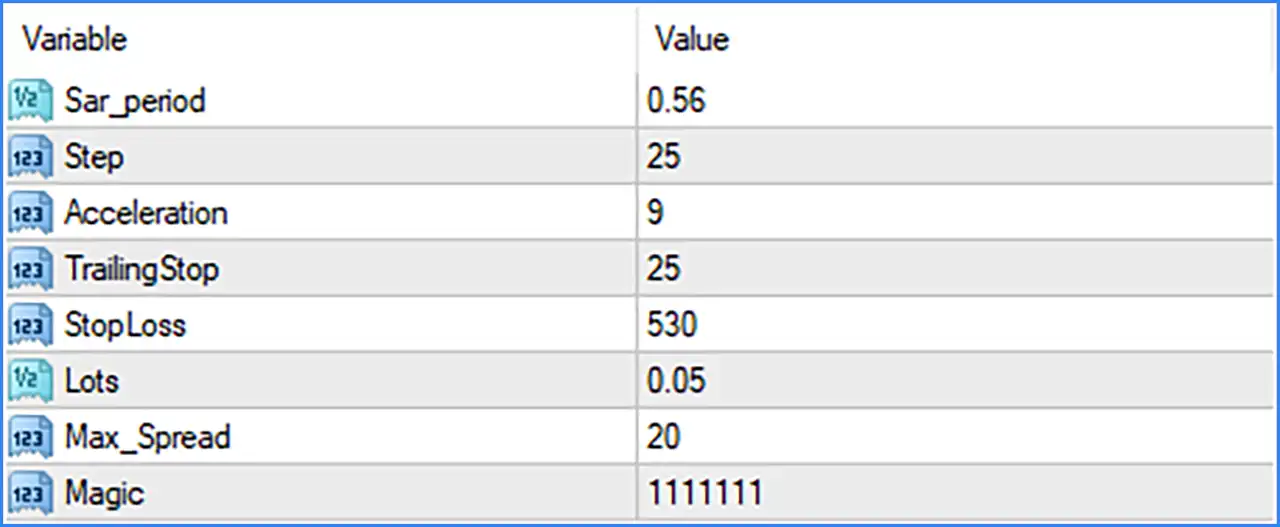
SAR Strategy Settings
🔹 Sar_period = 0.56: Sets the SAR period parameter to 0.56, defining a configurable value used by the EA's SAR-related calculations to identify potential market direction and trading opportunities.
🔹 Step = 25: Sets the Step parameter to 25, controlling the configured step value used in the EA's strategy calculations and potentially influencing its responsiveness to market price movements.
🔹 Acceleration = 9: Sets the Acceleration parameter to 9, defining the acceleration value used by the EA's indicator-related calculations to adjust its trading signal sensitivity.
Stop Loss and Trailing Stop Settings
🔹 TrailingStop = 25: Sets the Trailing Stop distance to 25 points, allowing the EA to adjust the protective Stop Loss as the market moves in a favorable direction and helping protect accumulated profits.
🔹 StopLoss = 530: Sets the Stop Loss distance to 530 points, defining the configured protective price distance used to limit potential losses when the market moves against an open trading position.
Lot Size and Money Management Settings
🔹 Lots = 0.05: Sets the fixed trading volume to 0.05 lots, determining the position size used by Scalping Forex Robot M5 MT4 when opening automated trades.
Spread Filter Settings
🔹 Max_Spread = 20: Sets the maximum allowable spread to 20 points, helping the EA filter trading opportunities when the broker's spread exceeds the configured threshold and avoid entries under unfavorable trading-cost conditions.
Trade Identification Settings
🔹 Magic = 1111111: Assigns Magic Number 1111111 to trades opened by Scalping Forex Robot M5 MT4, allowing the Expert Advisor to identify and manage its own trading positions separately from manual trades or other automated systems.