

Introduction
Hex Pro EA is an automated trading Expert advisor (EA) for MetaTrader 4, featuring configurable order execution, grid trading, lot management, and technical indicator-based trading filters. Its input settings provide traders with control over BUY and SELL operations, Grid configurations, take-profit targets, and automated trade management.
The EA incorporates a Martingale-based grid option with adjustable lot multipliers, step distances, and maximum lot limits. It also includes Moving Average and HILO signal configurations to help define trading conditions and entry filtering.

For trade management, Hex Pro EA MT4 supports Minimum Profit Close, Grid Protection, Trailing Stop, and Break-Even functionality. These features allow traders to customize how positions are opened, managed, and closed according to their preferred trading parameters.
This guide explains all the available Hex Pro EA MT4 settings, including their original input names, default values, and practical functions.
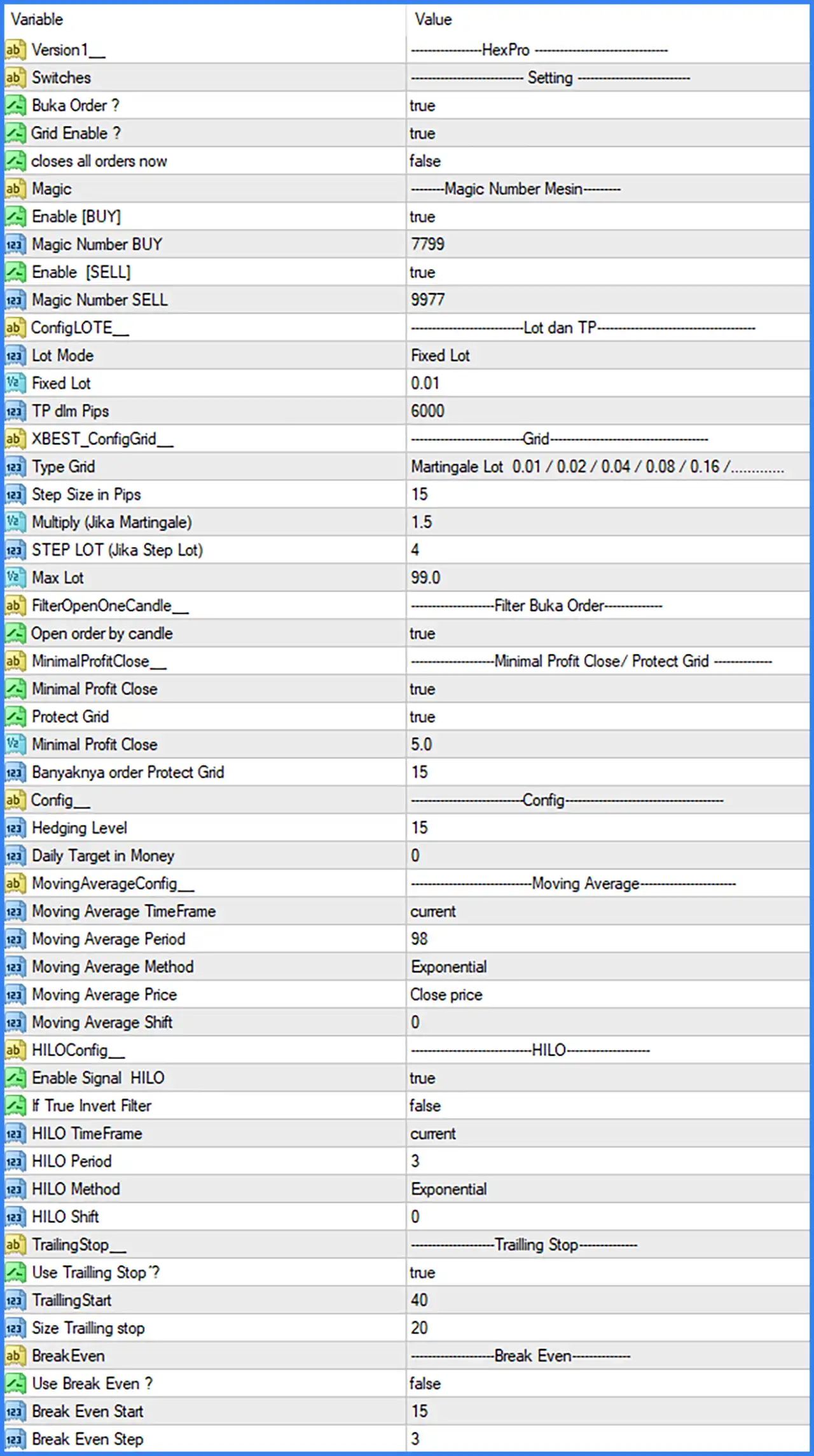
General Settings and Trading Switches
🔹 Version1: HexPro – Identifies the EA version or configuration label, helping users recognize the Hex Pro trading system.
🔹 Switches: Setting – A section heading that organizes the main trading activation and control options.
🔹 Buka Order ?: true – Enables order opening functionality, allowing Hex Pro EA MT4 to open new trading positions when its entry conditions are satisfied.
🔹 Grid Enable ?: true – Activates the grid trading system, allowing the EA to open additional positions according to the configured grid strategy and distance settings.
🔹 closes all orders now: false – Disables the immediate close-all-orders command. When activated, this option is intended to close all orders managed by the EA.
Magic Number Settings
🔹 Magic: Magic Number Mesin – A section heading for configuring the Magic Numbers used to identify BUY and SELL orders.
🔹 Enable [BUY]: true – Enables BUY trading functionality, allowing the EA to open and manage Buy positions when its trading conditions are met.
🔹 Magic Number BUY: 7799 – Assigns the Magic Number 7799 to BUY orders, allowing the EA to identify and manage its Buy positions separately.
🔹 Enable [SELL]: true – Enables SELL trading functionality, allowing the EA to open and manage Sell positions according to its entry conditions.
🔹 Magic Number SELL: 9977 – Assigns the Magic Number 9977 to SELL orders, separating Sell order identification from BUY orders.
Lot Size and Take Profit Settings
🔹 ConfigLOTE__: Lot dan TP – A section heading for configuring trading volume and take-profit parameters.
🔹 Lot Mode: Fixed Lot – Selects Fixed Lot mode, meaning the EA uses a predefined lot size instead of automatically calculating the initial position volume.
🔹 Fixed Lot: 0.01 – Sets the fixed trading volume to 0.01 lots for the EA's initial or standard order sizing.
🔹 TP dlm Pips: 6000 – Sets the take-profit target to 6000 pips, defining the configured profit distance used by the EA's take-profit management.
Grid Trading Settings
🔹 XBEST_ConfigGrid__: Grid – A section heading containing the grid trading configuration parameters.
🔹 Type Grid: Martingale Lot 0.01 / 0.02 / 0.04 / 0.08 / 0.16 / ... – Selects the Martingale Lot grid configuration, showing a progressive lot sequence of 0.01, 0.02, 0.04, 0.08, 0.16, and subsequent increasing volumes. This configuration increases position size as additional grid orders are placed.
🔹 Step Size in Pips: 15 – Sets the distance between grid trading levels to 15 pips, determining how far the market must move before the EA considers opening another grid position.
🔹 Multiply (Jika Martingale): 1.5 – Sets the Martingale lot multiplier to 1.5, controlling the progressive increase in trading volume when the Martingale grid method is used.
🔹 STEP LOT (Jika Step Lot): 4 – Sets the lot step parameter to 4 for the Step Lot configuration, controlling the configured progression interval when this lot management method is selected.
🔹 Max Lot: 99.0 – Sets the maximum permitted lot size to 99.0 lots, defining the upper position-volume limit for the EA's lot management system.
Order Entry Filter Settings
🔹 FilterOpenOneCandle__: Filter Buka Order – A section heading for configuring the candle-based order entry filter.
🔹 Open order by candle: true – Enables candle-based order opening conditions, allowing the EA to use its candle-related entry filter when evaluating new trading opportunities.
Minimum Profit Close and Grid Protection
🔹 MinimalProfitClose__: Minimal Profit Close / Protect Grid – A section heading for configuring minimum-profit closing and grid protection functionality.
🔹 Minimal Profit Close: true – Enables the Minimum Profit Close function, allowing the EA to use its configured minimum-profit condition when managing trade closures.
🔹 Protect Grid: true – Activates Grid Protection, enabling the EA's internal grid protection mechanism to manage accumulated grid positions according to its configured conditions.
🔹 Minimal Profit Close: 5.0 – Sets the minimum profit closing threshold to 5.0, defining the configured profit requirement for the Minimum Profit Close function.
🔹 Banyaknya order Protect Grid: 15 – Sets the number of orders for Grid Protection to 15, defining the order-count parameter used by the EA's grid protection mechanism.
General Configuration Settings
🔹 Config__: Config – A section heading for additional EA configuration parameters.
🔹 Hedging Level: 15 – Sets the Hedging Level parameter to 15, defining the configured level used by the EA's hedging-related management logic. Its exact execution behavior depends on the internal strategy implementation.
🔹 Daily Target in Money: 0 – Sets the daily monetary profit target to 0. A value of 0 commonly indicates that a numerical daily profit target is not specified, although the EA's exact handling should be verified.
Moving Average Settings
🔹 MovingAverageConfig__: Moving Average – A section heading for configuring the Moving Average indicator used by the EA's trading logic.
🔹 Moving Average TimeFrame: current – Uses the current chart timeframe for Moving Average calculations, allowing the indicator to operate according to the timeframe selected in MetaTrader 4.
🔹 Moving Average Period: 98 – Sets the Moving Average calculation period to 98, determining the number of price bars used to calculate the indicator.
🔹 Moving Average Method: Exponential – Selects the Exponential Moving Average (EMA) calculation method, giving greater weighting to recent price movements than older prices.
🔹 Moving Average Price: Close price – Uses closing prices as the input data for the Moving Average calculation.
🔹 Moving Average Shift: 0 – Sets the Moving Average horizontal shift to 0, meaning the indicator is not shifted forward or backward on the chart.
HILO Indicator Settings
🔹 HILOConfig__: HILO – A section heading for configuring the HILO indicator and its signal filtering options.
🔹 Enable Signal HILO: true – Enables HILO signal functionality, allowing the EA to use HILO indicator signals as part of its trading entry conditions.
🔹 If True Invert Filter: false – Disables signal inversion, meaning the EA uses the normal HILO filter direction instead of reversing its signal interpretation.
🔹 HILO TimeFrame: current – Uses the current chart timeframe for HILO indicator calculations, aligning the indicator with the active trading chart.
🔹 HILO Period: 3 – Sets the HILO indicator period to 3, defining the number of bars used in its calculation.
🔹 HILO Method: Exponential – Selects the Exponential calculation method for the HILO indicator, giving greater weighting to recent price data.
🔹 HILO Shift: 0 – Sets the HILO indicator shift to 0, keeping its calculated values aligned with their normal chart positions.
Trailing Stop Settings
🔹 TrailingStop__: Trailing Stop – A section heading for configuring the EA's automatic trailing stop functionality.
🔹 Use Trailing Stop ?: true – Enables Trailing Stop functionality, allowing the EA to adjust stop-loss levels as trades move into favorable profit territory according to its trailing conditions.
🔹 TraillingStart: 40 – Sets the trailing activation threshold to 40, defining the profit distance at which the EA begins applying its trailing stop mechanism.
🔹 Size Trailling stop: 20 – Sets the trailing stop distance to 20, defining the configured distance maintained between the market price and the trailing stop level.
Break-Even Settings
🔹 BreakEven: Break Even – A section heading for configuring the automatic break-even functionality.
🔹 Use Break Even ?: false – Disables the Break-Even function, meaning the EA will not activate its configured automatic break-even management under the default settings.
🔹 Break Even Start: 15 – Sets the break-even activation threshold to 15, defining the profit distance at which the EA can move a trade's stop-loss toward its entry price when break-even functionality is enabled.
🔹 Break Even Step: 3 – Sets the break-even adjustment step to 3, defining the configured step interval used by the EA when managing break-even adjustments.
Conclusion
Hex Pro EA MT4 provides a configurable automated trading system combining grid trading, Martingale lot management, technical indicator filters, and automated position management.
Its default configuration enables both BUY and SELL trading, activates grid trading, and uses a fixed initial lot size of 0.01. The grid system is configured with a 15-pip step distance, a 1.5 Martingale multiplier, and a maximum lot parameter of 99.0.
For technical analysis, Hex Pro EA MT4 uses a 98-period Exponential Moving Average and an enabled HILO indicator with a period of 3. These indicators provide configurable components for the EA's trading signal and entry filtering logic.
The EA also includes Minimum Profit Close, Grid Protection, and Trailing Stop functionality. The trailing stop is enabled with a starting threshold of 40 and a trailing distance of 20, while Break-Even remains disabled by default.
Overall, Hex Pro EA MT4 offers multiple trading and risk-management customization options. However, traders should carefully evaluate its Martingale and grid settings, particularly the progressive lot sequence, 15-pip grid spacing, and maximum lot limit of 99.0.