

Introduction
Weltrix EA is an automated trading Expert Advisor (EA) designed for MetaTrader 5, featuring a multi-engine trading architecture with configurable risk management, position sizing, trade exposure limits, and account protection controls. Its settings allow traders to customize execution parameters, manage daily losses, control maximum open positions, and configure Prop Firm protection rules.
Weltrix EA also includes optional high-impact news filtering and chart customization features, providing flexibility for different trading environments and risk preferences.

GENERAL SETTINGS
This section contains the basic configuration parameters that identify the EA, manage order tracking, and synchronize trading operations with the broker's server time.
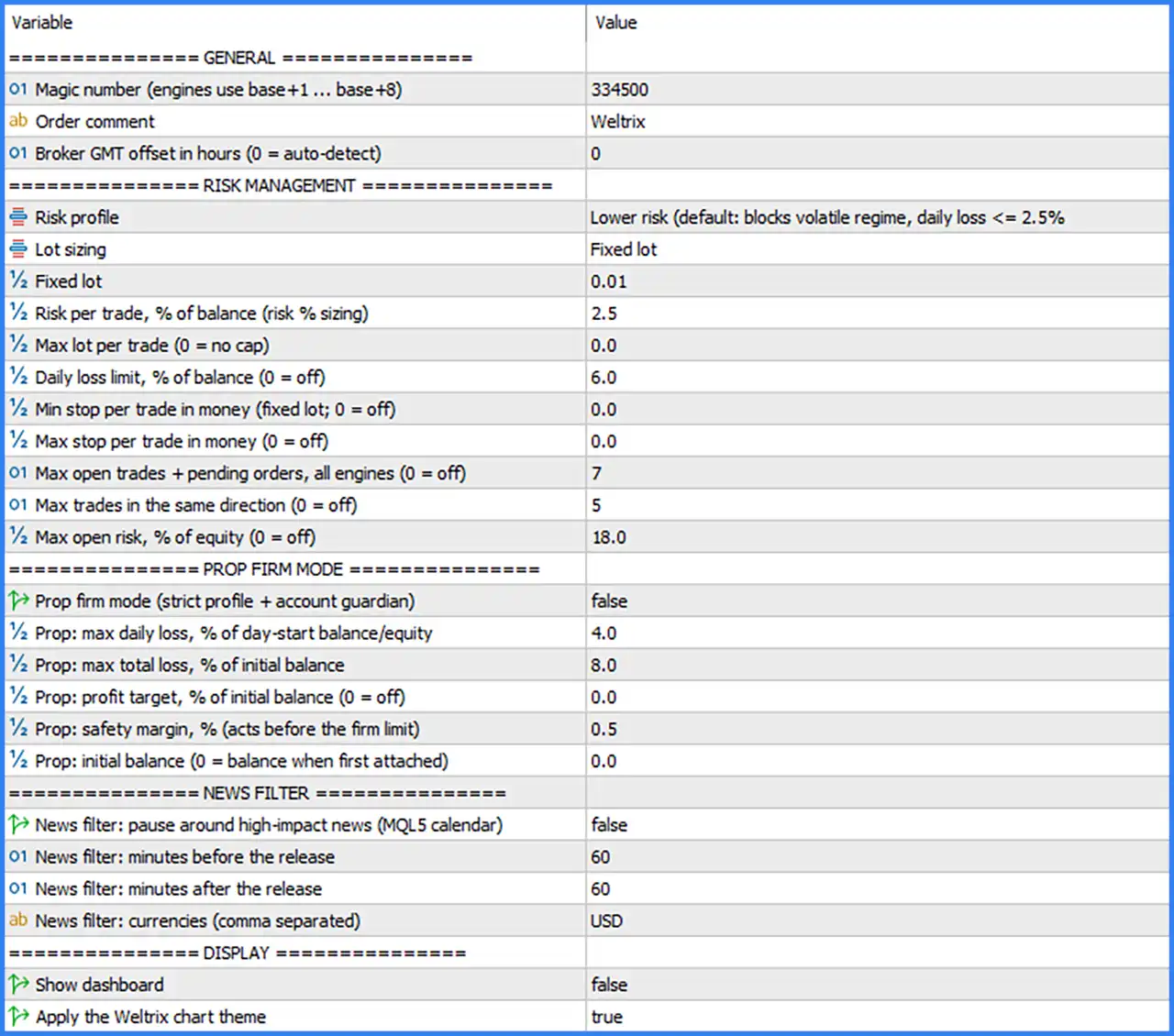
🔹 Magic Number: Set to 334500. This is the EA's unique identifier used to distinguish its trades from other Expert Advisors or manually placed orders. The trading engines use additional identifiers from base +1 to base +8 for individual engine identification.
🔹 Order Comment: Set to Weltrix. Defines the comment attached to orders opened by the EA, making it easier to identify Weltrix trading positions in the MT5 terminal.
🔹 Broker GMT Offset in Hours: Set to 0. Configures the broker's GMT time difference, with 0 enabling automatic detection of the broker's GMT offset to support time synchronization.
RISK MANAGEMENT SETTINGS
This section provides comprehensive controls for position sizing, trading exposure, daily loss limits, and maximum trade activity. These parameters help traders manage account risk and limit excessive market exposure.
🔹 Risk Profile: Set to Lower risk (default: blocks volatile regime, daily loss <= 2.5%). Selects the lower-risk trading configuration, which is designed to block trading during volatile market regimes and applies a default daily loss threshold of up to 2.5%.
🔹 Lot Sizing: Set to Fixed lot. Determines how the EA calculates trading volume. Fixed lot mode uses a predefined position size instead of dynamically calculating lot sizes based on account balance or risk percentage.
🔹 Fixed Lot: Set to 0.01. Defines the default trading volume for each position when Fixed Lot mode is selected, allowing the EA to execute trades using a fixed size of 0.01 lots.
🔹 Risk per Trade, % of Balance (Risk % Sizing): Set to 2.5. Defines the percentage of account balance allocated as risk for each trade when percentage-based risk sizing is used. This parameter is relevant when the corresponding risk-based lot sizing method is selected.
🔹 Max Lot per Trade: Set to 0.0. Establishes the maximum permitted lot size for an individual trade. A value of 0.0 disables this restriction, meaning no additional maximum lot cap is specified by this parameter.
🔹 Daily Loss Limit, % of Balance: Set to 6.0. Defines the maximum daily loss threshold as a percentage of account balance. A value of 6.0 represents a 6% daily loss limit, while 0 disables this particular restriction.
🔹 Min Stop per Trade in Money (Fixed Lot): Set to 0.0. Specifies the minimum monetary stop-loss amount for an individual trade when fixed lot sizing is used. A value of 0.0 disables this minimum stop restriction.
🔹 Max Stop per Trade in Money: Set to 0.0. Defines the maximum monetary stop-loss amount permitted for an individual position. A value of 0.0 disables this maximum stop restriction.
🔹 Max Open Trades + Pending Orders, All Engines: Set to 7. Limits the combined number of active trading positions and pending orders across all Weltrix trading engines to a maximum of 7.
🔹 Max Trades in the Same Direction: Set to 5. Restricts the number of simultaneous trades placed in the same market direction to a maximum of 5, helping control directional exposure.
🔹 Max Open Risk, % of Equity: Set to 18.0. Establishes an overall open-risk limit of 18% of account equity across active trading exposure. A value of 0 disables this restriction.
PROP FIRM MODE SETTINGS
The Prop Firm Mode section contains account protection parameters designed to help traders configure daily drawdown limits, maximum overall losses, profit targets, and safety margins according to proprietary trading firm requirements.
🔹 Prop Firm Mode (Strict Profile + Account Guardian): Set to false. Enables or disables the dedicated Prop Firm protection mode. The current configuration disables this feature, meaning the strict Prop Firm profile and account guardian are not activated through this switch.
🔹 Prop: Max Daily Loss, % of Day-Start Balance/Equity: Set to 4.0. Defines the maximum permitted daily loss at 4% of the balance or equity recorded at the beginning of the trading day.
🔹 Prop: Max Total Loss, % of Initial Balance: Set to 8.0. Establishes an overall loss threshold of 8% relative to the initial account balance, providing a configurable limit for cumulative account drawdown.
🔹 Prop: Profit Target, % of Initial Balance: Set to 0.0. Specifies the profit target as a percentage of the initial account balance. A value of 0.0 disables the profit target restriction.
🔹 Prop: Safety Margin, % (Acts Before the Firm Limit): Set to 0.5. Defines an additional safety margin of 0.5% that allows the EA's protection mechanism to act before reaching the configured Prop Firm loss limit.
🔹 Prop: Initial Balance: Set to 0.0. Specifies the initial account balance used for Prop Firm calculations. A value of 0.0 indicates that the EA uses the account balance when it is first attached.
NEWS FILTER SETTINGS
The News Filter section provides controls for pausing automated trading around important economic announcements using the MQL5 economic calendar. Traders can configure the time window surrounding news releases and select the currencies they want to monitor.
🔹 News Filter: Pause Around High-Impact News (MQL5 Calendar): Set to false. Enables or disables the high-impact news filter. The current setting disables automatic trading pauses around major economic announcements.
🔹 News Filter: Minutes Before the Release: Set to 60. Specifies the number of minutes before a high-impact economic announcement during which the EA should pause trading when the news filter is enabled.
🔹 News Filter: Minutes After the Release: Set to 60. Defines the waiting period after a high-impact news announcement. When enabled, the EA is configured to resume trading after the 60-minute post-release period.
🔹 News Filter: Currencies (Comma Separated): Set to USD. Specifies the currencies monitored by the news filter. The current configuration focuses on USD-related economic announcements.
DISPLAY SETTINGS
This section controls the visual presentation of Weltrix EA MT5 on the MetaTrader 5 chart, including its dashboard and custom chart appearance.
🔹 Show Dashboard: Set to false. Determines whether the EA displays its trading dashboard on the chart. The current setting hides the dashboard interface.
🔹 Apply the Weltrix Chart Theme: Set to true. Enables the custom Weltrix chart theme, allowing the EA to apply its predefined chart appearance when attached to a trading chart.
Conclusion
The Weltrix EA MT5 settings provide a flexible configuration covering general execution parameters, fixed-lot position sizing, daily loss protection, maximum trade exposure, and optional Prop Firm safeguards. The current configuration uses a lower-risk profile with a fixed lot size of 0.01, a maximum of 7 combined open trades and pending orders, and an 18% maximum open-risk setting.
However, Prop Firm Mode and the high-impact news filter are currently disabled. Traders should review these options before using the EA in a funded account or during major economic announcements. It is also important to distinguish the lower-risk profile's stated 2.5% daily loss threshold from the separately configured 6.0% daily loss limit, as their exact interaction depends on the EA's internal protection logic.
For better risk control, traders should test the configuration on a demo account, verify broker execution conditions, and adjust the protection parameters according to their account size and trading objectives.