

Introduction
Gegatrade Advanced EA is an automated trading Expert Advisor (EA) featuring multiple technical indicator filters, support and resistance detection, moving average confirmation, and configurable trade management. Its trading configuration includes separate Long and Short strategies, allowing traders to customize entry conditions, lot multipliers, trading levels, and position management independently.

The EA provides several technical filters, including RSI, Stochastic, Bollinger Bands, and Moving Average indicators. It also incorporates trailing stop functionality, Take Profit settings, optional Stop Loss protection, Martingale-style lot multipliers, economic news filtering, and hedge counter-trading options.
With customizable trading schedules, spread limitations, drawdown monitoring, and directional controls, Gegatrade Advanced EA offers a flexible environment for automated trading and strategy optimization.
RSI FILTER SETTINGS
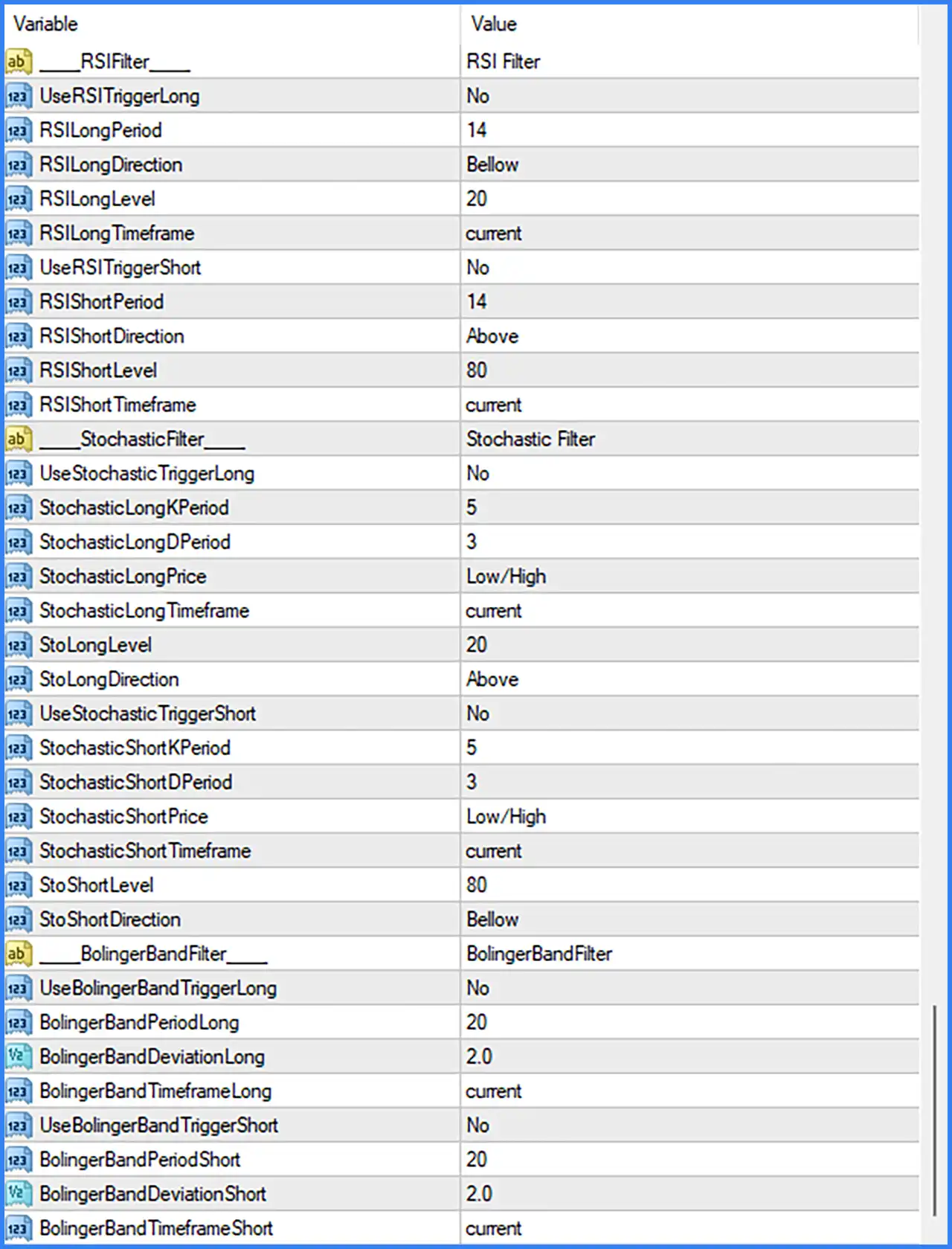
This section configures the Relative Strength Index (RSI) indicator to identify overbought and oversold market conditions. Long and Short RSI triggers can be configured independently.
🔹 RSI Filter: Identifies the RSI filter configuration section and contains parameters for Long and Short RSI entry conditions.
🔹 UseRSITriggerLong: Set to No. Disables the RSI confirmation trigger for Long trades.
🔹 RSILongPeriod: Set to 14. Defines the RSI calculation period using 14 price candles.
🔹 RSILongDirection: Set to Below. Specifies that the Long RSI condition is evaluated when the indicator is below the configured threshold.
🔹 RSILongLevel: Set to 20. Defines the RSI threshold at 20 for the Long trading condition.
🔹 RSILongTimeframe: Set to current. Uses the current chart timeframe to calculate the Long RSI signal.
🔹 UseRSITriggerShort: Set to No. Disables the RSI confirmation trigger for Short trades.
🔹 RSIShortPeriod: Set to 14. Defines the RSI calculation period for Short trading conditions using 14 candles.
🔹 RSIShortDirection: Set to Above. Specifies that the Short RSI condition is evaluated when the indicator is above the configured threshold.
🔹 RSIShortLevel: Set to 80. Defines the RSI threshold at 80 for the Short trading condition.
🔹 RSIShortTimeframe: Set to current. Uses the current chart timeframe for Short RSI calculations.
STOCHASTIC FILTER SETTINGS
The Stochastic Filter provides additional momentum-based trading conditions. It uses %K and %D periods to evaluate market momentum and potential reversal zones for Long and Short positions.
🔹 Stochastic Filter: Identifies the Stochastic indicator configuration section for both trading directions.
🔹 UseStochasticTriggerLong: Set to No. Disables Stochastic confirmation for Long entries.
🔹 StochasticLongKPeriod: Set to 5. Defines the %K calculation period using 5 candles for Long trading signals.
🔹 StochasticLongDPeriod: Set to 3. Defines the %D smoothing period using 3 candles for the Long Stochastic calculation.
🔹 StochasticLongPrice: Set to Low/High. Uses the Low and High price range as the basis for calculating the Long Stochastic indicator.
🔹 StochasticLongTimeframe: Set to current. Calculates the Long Stochastic signal using the current chart timeframe.
🔹 StoLongLevel: Set to 20. Defines the Stochastic threshold at 20, commonly associated with the oversold market region.
🔹 StoLongDirection: Set to Above. Specifies that the Long Stochastic condition is evaluated when the indicator moves above the configured level.
🔹 UseStochasticTriggerShort: Set to No. Disables Stochastic confirmation for Short entries.
🔹 StochasticShortKPeriod: Set to 5. Defines the %K calculation period using 5 candles for Short trading signals.
🔹 StochasticShortDPeriod: Set to 3. Sets the %D smoothing period to 3 candles for the Short Stochastic calculation.
🔹 StochasticShortPrice: Set to Low/High. Uses the Low and High price range to calculate the Short Stochastic indicator.
🔹 StochasticShortTimeframe: Set to current. Uses the current chart timeframe for Short Stochastic calculations.
🔹 StoShortLevel: Set to 80. Defines the Stochastic threshold at 80, commonly associated with the overbought market region.
🔹 StoShortDirection: Set to Below. Specifies that the Short Stochastic condition is evaluated when the indicator moves below the configured level.
BOLLINGER BANDS FILTER SETTINGS
The Bollinger Bands Filter provides volatility-based market analysis using configurable periods and standard deviation values. Separate settings are available for Long and Short trading signals.
🔹 BollingerBandFilter: Identifies the Bollinger Bands configuration section for both trading directions.
🔹 UseBollingerBandTriggerLong: Set to No. Disables Bollinger Bands confirmation for Long entries.
🔹 BollingerBandPeriodLong: Set to 20. Defines the Bollinger Bands calculation period using 20 candles for Long trading conditions.
🔹 BollingerBandDeviationLong: Set to 2.0. Sets the upper and lower band deviation to 2.0 standard deviations for Long signal analysis.
🔹 BollingerBandTimeframeLong: Set to current. Uses the current chart timeframe to calculate Long Bollinger Bands signals.
🔹 UseBollingerBandTriggerShort: Set to No. Disables Bollinger Bands confirmation for Short entries.
🔹 BollingerBandPeriodShort: Set to 20. Defines the Bollinger Bands calculation period using 20 candles for Short trading conditions.
🔹 BollingerBandDeviationShort: Set to 2.0. Sets the standard deviation to 2.0 for Short Bollinger Bands calculations.
🔹 BollingerBandTimeframeShort: Set to current. Uses the current chart timeframe for Short Bollinger Bands analysis.
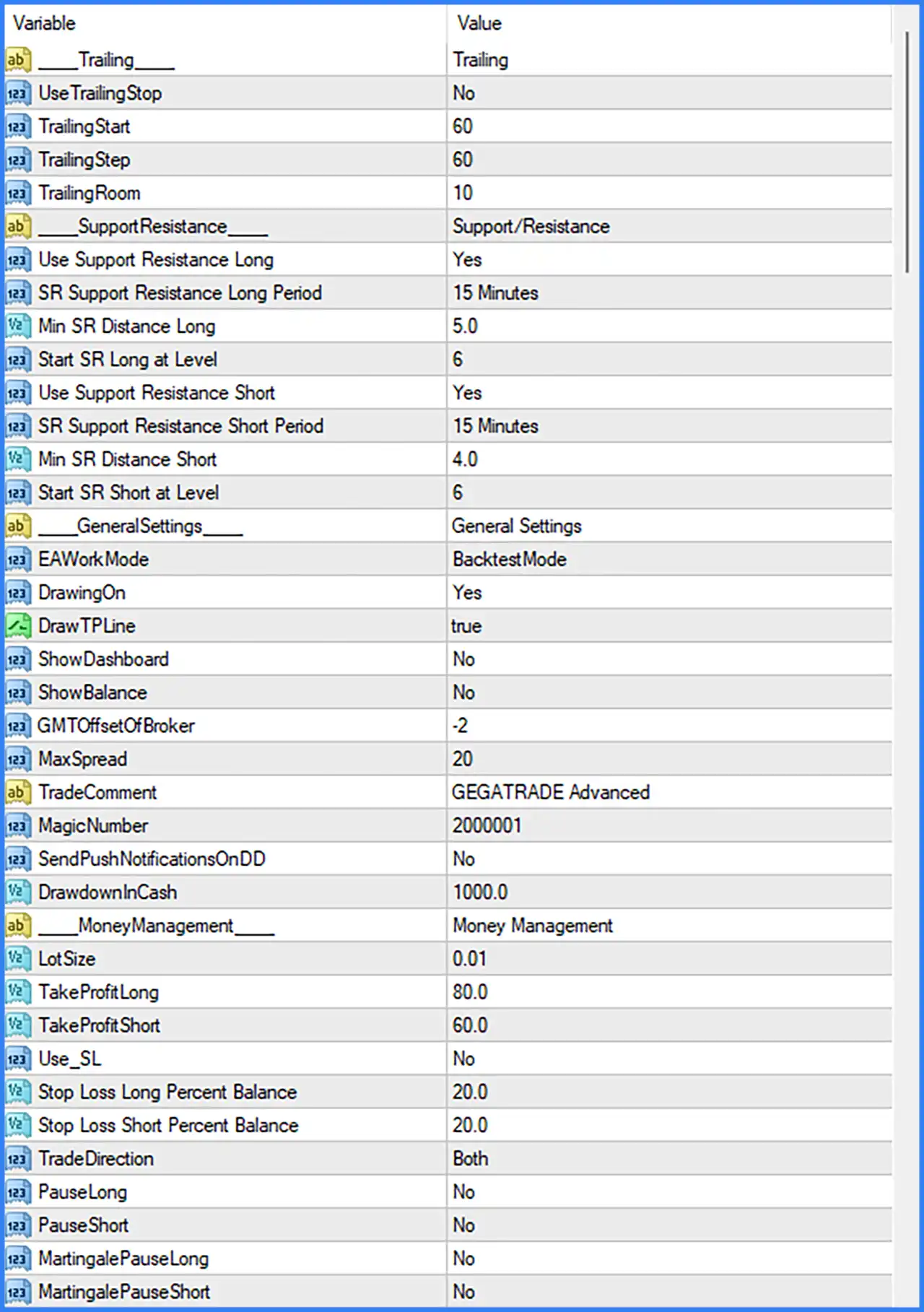
TRAILING STOP SETTINGS
This section controls how the EA manages open positions through trailing stop functionality. Traders can configure the activation distance, adjustment step, and trailing room.
🔹 Trailing: Identifies the trailing stop configuration section.
🔹 UseTrailingStop: Set to No. Disables the trailing stop mechanism in the current configuration.
🔹 TrailingStart: Set to 60. Defines the profit distance required before the trailing stop mechanism begins operating, according to the EA's internal distance calculation.
🔹 TrailingStep: Set to 60. Specifies the distance or increment used when adjusting the trailing stop after activation.
🔹 TrailingRoom: Set to 10. Defines the trailing room parameter, which controls the additional distance maintained by the trailing stop mechanism.
SUPPORT AND RESISTANCE SETTINGS
The Support and Resistance section enables the EA to use important price levels when evaluating Long and Short trading opportunities. Traders can configure the analysis timeframe, minimum distance, and starting level separately.
🔹 Support/Resistance: Identifies the support and resistance configuration section.
🔹 Use Support Resistance Long: Set to Yes. Enables support and resistance analysis for Long trading conditions.
🔹 SR Support Resistance Long Period: Set to 15 Minutes. Uses the 15-minute timeframe to identify support and resistance levels for Long trades.
🔹 Min SR Distance Long: Set to 5.0. Defines the minimum required distance for Long support and resistance calculations.
🔹 Start SR Long at Level: Set to 6. Specifies level 6 as the starting support and resistance level for Long trading conditions.
🔹 Use Support Resistance Short: Set to Yes. Enables support and resistance analysis for Short trading conditions.
🔹 SR Support Resistance Short Period: Set to 15 Minutes. Uses the 15-minute timeframe to identify support and resistance levels for Short trades.
🔹 Min SR Distance Short: Set to 4.0. Defines the minimum required distance for Short support and resistance calculations.
🔹 Start SR Short at Level: Set to 6. Specifies level 6 as the starting support and resistance level for Short trading conditions.
GENERAL SETTINGS
This section contains the EA's primary operating configuration, including trading mode, chart display, broker time offset, spread control, order identification, and drawdown monitoring.
🔹 EAWorkMode: Set to BacktestMode. Configures the EA to operate in Backtest Mode for historical strategy testing and performance evaluation.
🔹 DrawingOn: Set to Yes. Enables the drawing of the EA's visual trading elements and chart information.
🔹 DrawTPLine: Set to true. Enables the display of Take Profit lines on the trading chart to help visualize target price levels.
🔹 ShowDashboard: Set to No. Disables the on-chart trading dashboard.
🔹 ShowBalance: Set to No. Hides the account balance information from the EA's chart display.
🔹 GMTOffsetOfBroker: Set to -2. Defines the broker's GMT offset as -2 hours for time-related trading calculations.
🔹 MaxSpread: Set to 20. Establishes a maximum spread threshold of 20 points for the EA's trading conditions.
🔹 TradeComment: Set to GEGATRADE Advanced. Defines the comment attached to orders opened by the EA for easier trade identification.
🔹 MagicNumber: Set to 2000001. Assigns a unique identifier to the EA's trading orders, allowing MetaTrader 4 to distinguish its positions from other trading systems.
🔹 SendPushNotificationsOnDD: Set to No. Disables push notifications when the configured drawdown condition is reached.
🔹 DrawdownInCash: Set to 1000.0. Defines the drawdown threshold in account currency as 1,000.0 for drawdown monitoring.
MONEY MANAGEMENT SETTINGS
The Money Management section controls position sizing, profit targets, stop-loss configuration, trading direction, and pause options for Long and Short strategies.
🔹 Money Management: Identifies the main configuration section for lot sizing and trade management.
🔹 LotSize: Set to 0.01. Defines the initial trading volume at 0.01 lots for opening positions.
🔹 TakeProfitLong: Set to 80.0. Sets the Take Profit target for Long positions at 80.0 distance units according to the EA's internal calculation.
🔹 TakeProfitShort: Set to 60.0. Sets the Take Profit target for Short positions at 60.0 distance units according to the EA's internal calculation.
🔹 Use_SL: Set to No. Disables the Stop Loss function in the current configuration.
🔹 Stop Loss Long Percent Balance: Set to 20.0. Defines the Long-side stop-loss threshold as 20.0% of the account balance when the corresponding Stop Loss functionality is enabled.
🔹 Stop Loss Short Percent Balance: Set to 20.0. Defines the Short-side stop-loss threshold as 20.0% of the account balance when Stop Loss functionality is enabled.
🔹 TradeDirection: Set to Both. Allows the EA to trade in both market directions, including Long (Buy) and Short (Sell) positions.
🔹 PauseLong: Set to No. Keeps Long trading active rather than manually pausing the Long strategy.
🔹 PauseShort: Set to No. Keeps Short trading active rather than manually pausing the Short strategy.
🔹 MartingalePauseLong: Set to No. Disables the manual pause option for the Long-side Martingale trading sequence.
🔹 MartingalePauseShort: Set to No. Disables the manual pause option for the Short-side Martingale trading sequence.
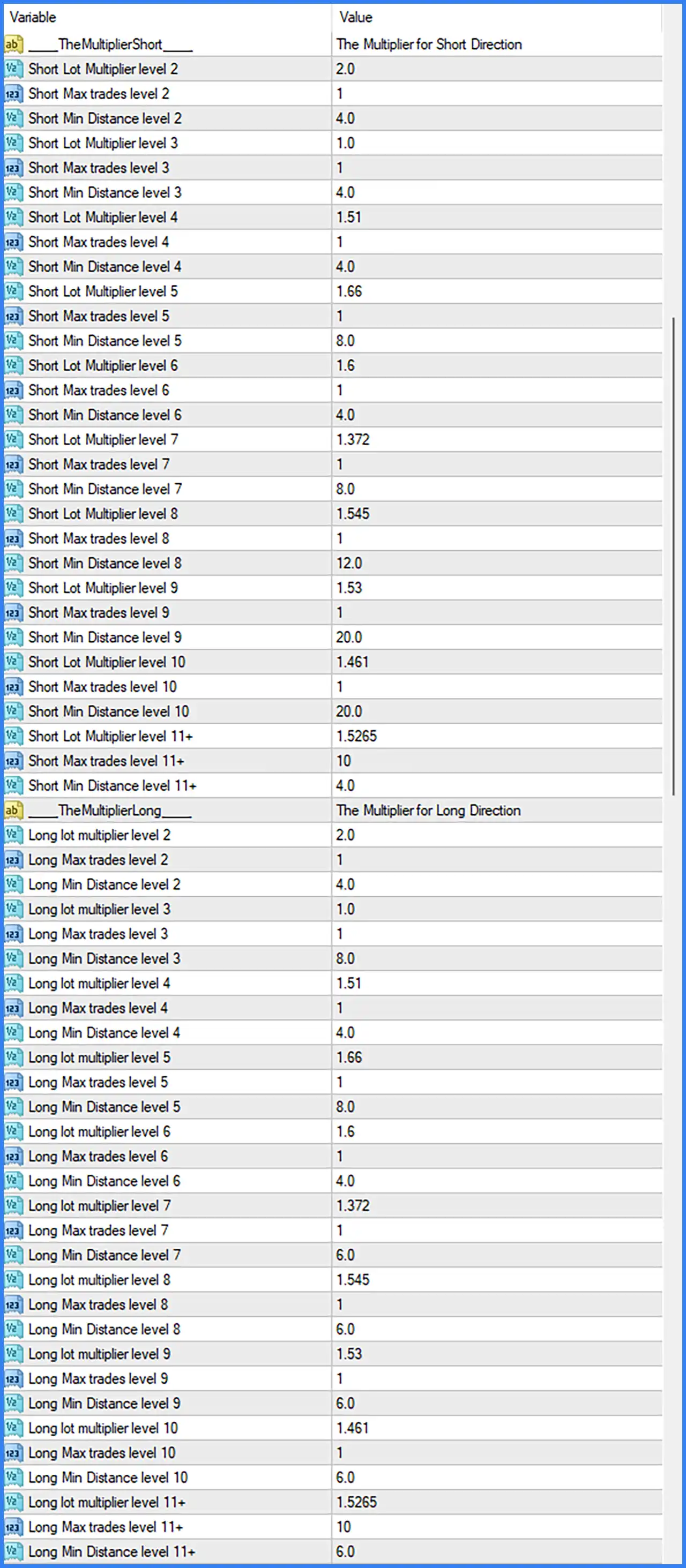
SHORT DIRECTION MULTIPLIER SETTINGS
This section configures the lot multipliers, maximum trades, and minimum entry distances for each Short trading level. These parameters determine how position sizes and trading intervals are managed as the Short trading sequence progresses.
🔹 TheMultiplierShort: Identifies the multiplier configuration section for Short trading positions.
🔹 Short Lot Multiplier Level 2: Set to 2.0. Applies a lot multiplier of 2.0 at Short trading level 2, increasing the position size relative to the preceding base lot calculation.
🔹 Short Max Trades Level 2: Set to 1. Allows a maximum of 1 trade at Short trading level 2.
🔹 Short Min Distance Level 2: Set to 4.0. Defines the minimum entry distance of 4.0 for opening the next Short position at level 2.
🔹 Short Lot Multiplier Level 3: Set to 1.0. Applies a lot multiplier of 1.0 at Short trading level 3.
🔹 Short Max Trades Level 3: Set to 1. Limits the number of trades at Short trading level 3 to 1.
🔹 Short Min Distance Level 3: Set to 4.0. Sets the minimum required distance to 4.0 for Short entries at level 3.
🔹 Short Lot Multiplier Level 4: Set to 1.51. Applies a lot multiplier of 1.51 at Short trading level 4.
🔹 Short Max Trades Level 4: Set to 1. Allows a maximum of 1 trade at Short trading level 4.
🔹 Short Min Distance Level 4: Set to 4.0. Defines the minimum entry distance of 4.0 for Short trading level 4.
🔹 Short Lot Multiplier Level 5: Set to 1.66. Applies a lot multiplier of 1.66 at Short trading level 5.
🔹 Short Max Trades Level 5: Set to 1. Limits Short trading level 5 to a maximum of 1 trade.
🔹 Short Min Distance Level 5: Set to 8.0. Requires a minimum distance of 8.0 before another Short position can be opened at level 5.
🔹 Short Lot Multiplier Level 6: Set to 1.6. Applies a lot multiplier of 1.6 at Short trading level 6.
🔹 Short Max Trades Level 6: Set to 1. Allows a maximum of 1 trade at Short trading level 6.
🔹 Short Min Distance Level 6: Set to 4.0. Defines the minimum distance of 4.0 for additional Short entries at level 6.
🔹 Short Lot Multiplier Level 7: Set to 1.372. Applies a lot multiplier of 1.372 at Short trading level 7.
🔹 Short Max Trades Level 7: Set to 1. Restricts Short trading level 7 to a maximum of 1 trade.
🔹 Short Min Distance Level 7: Set to 8.0. Sets the minimum entry distance to 8.0 for Short positions at level 7.
🔹 Short Lot Multiplier Level 8: Set to 1.545. Applies a lot multiplier of 1.545 at Short trading level 8.
🔹 Short Max Trades Level 8: Set to 1. Limits the number of Short trades at level 8 to 1.
🔹 Short Min Distance Level 8: Set to 12.0. Defines a minimum entry distance of 12.0 for Short trading level 8.
🔹 Short Lot Multiplier Level 9: Set to 1.53. Applies a lot multiplier of 1.53 at Short trading level 9.
🔹 Short Max Trades Level 9: Set to 1. Allows a maximum of 1 trade at Short trading level 9.
🔹 Short Min Distance Level 9: Set to 20.0. Requires a minimum distance of 20.0 for additional Short entries at level 9.
🔹 Short Lot Multiplier Level 10: Set to 1.461. Applies a lot multiplier of 1.461 at Short trading level 10.
🔹 Short Max Trades Level 10: Set to 1. Limits Short trading level 10 to a maximum of 1 trade.
🔹 Short Min Distance Level 10: Set to 20.0. Defines the minimum entry distance of 20.0 for Short positions at level 10.
🔹 Short Lot Multiplier Level 11+: Set to 1.5265. Applies a lot multiplier of 1.5265 to Short trading level 11 and subsequent levels.
🔹 Short Max Trades Level 11+: Set to 10. Allows a maximum of 10 trades at Short trading level 11 and subsequent levels.
🔹 Short Min Distance Level 11+: Set to 4.0. Defines the minimum entry distance of 4.0 for Short trading level 11 and subsequent levels.
LONG DIRECTION MULTIPLIER SETTINGS
This section provides independent position-sizing parameters for Long trades. Each level has its own lot multiplier, maximum trade count, and minimum entry distance.
🔹 TheMultiplierLong: Identifies the multiplier configuration section for Long trading positions.
🔹 Long Lot Multiplier Level 2: Set to 2.0. Applies a lot multiplier of 2.0 at Long trading level 2, increasing the position size relative to the preceding base lot calculation.
🔹 Long Max Trades Level 2: Set to 1. Allows a maximum of 1 trade at Long trading level 2.
🔹 Long Min Distance Level 2: Set to 4.0. Defines the minimum entry distance of 4.0 for additional Long positions at level 2.
🔹 Long Lot Multiplier Level 3: Set to 1.0. Applies a lot multiplier of 1.0 at Long trading level 3.
🔹 Long Max Trades Level 3: Set to 1. Limits the number of trades at Long trading level 3 to 1.
🔹 Long Min Distance Level 3: Set to 8.0. Sets the minimum entry distance to 8.0 for Long trading level 3.
🔹 Long Lot Multiplier Level 4: Set to 1.51. Applies a lot multiplier of 1.51 at Long trading level 4.
🔹 Long Max Trades Level 4: Set to 1. Allows a maximum of 1 trade at Long trading level 4.
🔹 Long Min Distance Level 4: Set to 4.0. Defines the minimum entry distance of 4.0 for Long positions at level 4.
🔹 Long Lot Multiplier Level 5: Set to 1.66. Applies a lot multiplier of 1.66 at Long trading level 5.
🔹 Long Max Trades Level 5: Set to 1. Limits the number of Long trades at level 5 to 1.
🔹 Long Min Distance Level 5: Set to 8.0. Requires a minimum distance of 8.0 before another Long position can be opened at level 5.
🔹 Long Lot Multiplier Level 6: Set to 1.6. Applies a lot multiplier of 1.6 at Long trading level 6.
🔹 Long Max Trades Level 6: Set to 1. Allows a maximum of 1 trade at Long trading level 6.
🔹 Long Min Distance Level 6: Set to 4.0. Defines the minimum entry distance of 4.0 for Long positions at level 6.
🔹 Long Lot Multiplier Level 7: Set to 1.372. Applies a lot multiplier of 1.372 at Long trading level 7.
🔹 Long Max Trades Level 7: Set to 1. Restricts Long trading level 7 to a maximum of 1 trade.
🔹 Long Min Distance Level 7: Set to 6.0. Sets the minimum entry distance to 6.0 for Long trading level 7.
🔹 Long Lot Multiplier Level 8: Set to 1.545. Applies a lot multiplier of 1.545 at Long trading level 8.
🔹 Long Max Trades Level 8: Set to 1. Limits the number of Long trades at level 8 to 1.
🔹 Long Min Distance Level 8: Set to 6.0. Defines the minimum entry distance of 6.0 for Long positions at level 8.
🔹 Long Lot Multiplier Level 9: Set to 1.53. Applies a lot multiplier of 1.53 at Long trading level 9.
🔹 Long Max Trades Level 9: Set to 1. Allows a maximum of 1 trade at Long trading level 9.
🔹 Long Min Distance Level 9: Set to 6.0. Requires a minimum distance of 6.0 for additional Long entries at level 9.
🔹 Long Lot Multiplier Level 10: Set to 1.461. Applies a lot multiplier of 1.461 at Long trading level 10.
🔹 Long Max Trades Level 10: Set to 1. Limits Long trading level 10 to a maximum of 1 trade.
🔹 Long Min Distance Level 10: Set to 6.0. Defines the minimum entry distance of 6.0 for Long positions at level 10.
🔹 Long Lot Multiplier Level 11+: Set to 1.5265. Applies a lot multiplier of 1.5265 to Long trading level 11 and all subsequent levels.
🔹 Long Max Trades Level 11+: Set to 10. Allows a maximum of 10 trades at Long trading level 11 and subsequent levels.
🔹 Long Min Distance Level 11+: Set to 6.0. Defines the minimum entry distance of 6.0 for Long trading level 11 and subsequent levels.
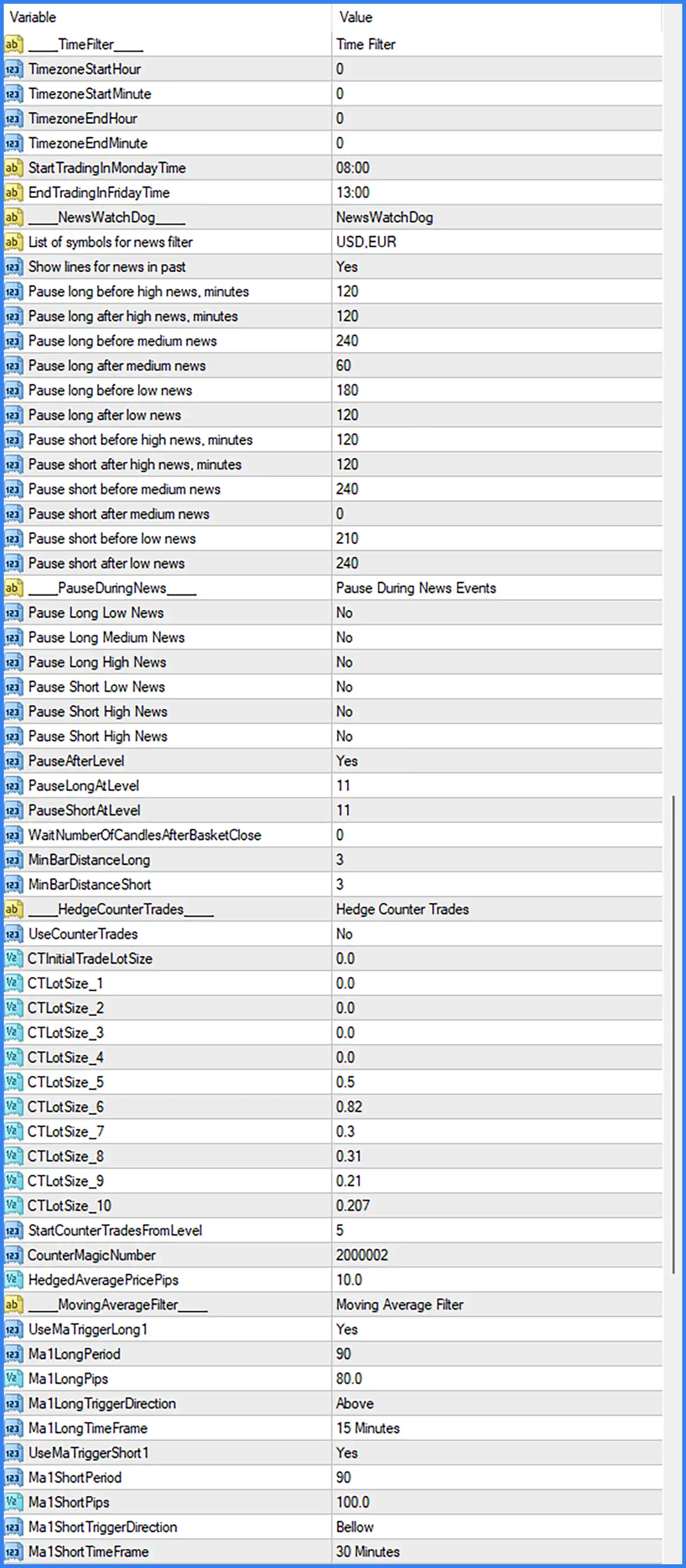
TIME FILTER SETTINGS
The Time Filter controls when the EA is permitted to execute trades. It includes timezone configuration and specific weekly trading schedule parameters.
🔹 Time Filter: Identifies the trading schedule configuration section.
🔹 TimezoneStartHour: Set to 0. Defines the starting hour of the configured timezone trading window.
🔹 TimezoneStartMinute: Set to 0. Defines the starting minute of the timezone trading window.
🔹 TimezoneEndHour: Set to 0. Defines the ending hour of the configured timezone trading window.
🔹 TimezoneEndMinute: Set to 0. Defines the ending minute of the timezone trading window.
🔹 StartTradingInMondayTime: Set to 08:00. Specifies the time when the EA starts trading on Monday.
🔹 EndTradingInFridayTime: Set to 13:00. Specifies the Friday trading end time, allowing the EA to stop opening new trades according to its trading schedule.
NEWS WATCHDOG SETTINGS
The NewsWatchDog section manages trading restrictions around economic announcements. It provides separate waiting periods for Long and Short positions based on high-, medium-, and low-impact news events.
🔹 NewsWatchDog: Identifies the economic news monitoring and trading protection configuration section.
🔹 List of Symbols for News Filter: Set to USD,EUR. Specifies the currencies monitored by the news filter, covering US Dollar and Euro economic announcements.
🔹 Show Lines for News in Past: Set to Yes. Enables the display of historical economic news lines on the chart for visual reference.
🔹 Pause Long Before High News, Minutes: Set to 120. Defines a 120-minute pause period before high-impact news events for Long trading activity.
🔹 Pause Long After High News, Minutes: Set to 120. Defines a 120-minute waiting period after high-impact news events before Long trading activity can resume.
🔹 Pause Long Before Medium News: Set to 240. Configures a 240-minute pre-news pause period for Long trading around medium-impact announcements.
🔹 Pause Long After Medium News: Set to 60. Defines a 60-minute waiting period after medium-impact news events for Long trading activity.
🔹 Pause Long Before Low News: Set to 180. Configures a 180-minute pause period before low-impact news events for Long trading.
🔹 Pause Long After Low News: Set to 120. Defines a 120-minute waiting period after low-impact announcements for Long trading activity.
🔹 Pause Short Before High News, Minutes: Set to 120. Defines a 120-minute pre-news pause period for Short trading before high-impact economic announcements.
🔹 Pause Short After High News, Minutes: Set to 120. Defines a 120-minute waiting period after high-impact news events before Short trading can resume.
🔹 Pause Short Before Medium News: Set to 240. Configures a 240-minute pause period before medium-impact economic announcements for Short trading.
🔹 Pause Short After Medium News: Set to 0. Sets the post-news waiting period for medium-impact events to 0 minutes for Short trading.
🔹 Pause Short Before Low News: Set to 210. Defines a 210-minute pause period before low-impact economic announcements for Short trading.
🔹 Pause Short After Low News: Set to 240. Establishes a 240-minute waiting period after low-impact news events for Short trading activity.
PAUSE DURING NEWS SETTINGS
This section determines whether the EA actually pauses Long and Short trading during different economic news categories. The individual pause switches are currently disabled.
🔹 Pause During News Events: Identifies the configuration section for enabling or disabling trading pauses around economic announcements.
🔹 Pause Long Low News: Set to No. Disables the Long trading pause specifically for low-impact economic news.
🔹 Pause Long Medium News: Set to No. Disables the Long trading pause around medium-impact economic announcements.
🔹 Pause Long High News: Set to No. Disables the Long trading pause around high-impact economic announcements.
🔹 Pause Short Low News: Set to No. Disables the Short trading pause around low-impact news events.
🔹 Pause Short High News: Set to No. Disables the Short trading pause for the first displayed high-impact news setting.
🔹 Pause Short High News (Second Displayed Entry): Set to No. The screenshot displays a second entry with the same label and value; it is reproduced without assuming a different parameter name.
🔹 PauseAfterLevel: Set to Yes. Enables the additional pause-after-level functionality, allowing the EA to apply a pause after reaching a configured trading level.
🔹 PauseLongAtLevel: Set to 11. Specifies Long trading level 11 as the level associated with the pause mechanism.
🔹 PauseShortAtLevel: Set to 11. Specifies Short trading level 11 as the level associated with the pause mechanism.
🔹 WaitNumberOfCandlesAfterBasketClose: Set to 0. Defines the number of candles the EA waits after closing a basket of positions before considering further trading activity. A value of 0 means no additional candle waiting period is configured.
🔹 MinBarDistanceLong: Set to 3. Defines a minimum distance of 3 bars for Long trading conditions, helping control the spacing between entry opportunities.
🔹 MinBarDistanceShort: Set to 3. Defines a minimum distance of 3 bars for Short trading conditions, helping control the spacing between entry opportunities.
HEDGE COUNTER TRADES SETTINGS
The Hedge Counter Trades section contains optional counter-position functionality. It includes independent lot-size parameters, activation levels, and a separate Magic Number for identifying counter-trading orders.
🔹 Hedge Counter Trades: Identifies the configuration section for counter-trading and hedging parameters.
🔹 UseCounterTrades: Set to No. Disables the counter-trading mechanism in the current configuration.
🔹 CTInitialTradeLotSize: Set to 0.0. Defines the initial lot size for counter-trading positions. The current value of 0.0 does not specify an active initial lot size.
🔹 CTLotSize_1: Set to 0.0. Defines the counter-trading lot size for level 1.
🔹 CTLotSize_2: Set to 0.0. Defines the counter-trading lot size for level 2.
🔹 CTLotSize_3: Set to 0.0. Defines the counter-trading lot size for level 3.
🔹 CTLotSize_4: Set to 0.0. Defines the counter-trading lot size for level 4.
🔹 CTLotSize_5: Set to 0.5. Configures the counter-trading position size at level 5 to 0.5 lots.
🔹 CTLotSize_6: Set to 0.82. Configures the counter-trading position size at level 6 to 0.82 lots.
🔹 CTLotSize_7: Set to 0.3. Configures the counter-trading position size at level 7 to 0.3 lots.
🔹 CTLotSize_8: Set to 0.31. Configures the counter-trading position size at level 8 to 0.31 lots.
🔹 CTLotSize_9: Set to 0.21. Configures the counter-trading position size at level 9 to 0.21 lots.
🔹 CTLotSize_10: Set to 0.207. Configures the counter-trading position size at level 10 to 0.207 lots.
🔹 StartCounterTradesFromLevel: Set to 5. Specifies that counter-trading is configured to begin from trading level 5.
🔹 CounterMagicNumber: Set to 2000002. Assigns a separate Magic Number to counter-trading positions, allowing them to be distinguished from the EA's primary trades.
🔹 HedgedAveragePricePips: Set to 10.0. Defines the 10.0-pip price-distance parameter used in the hedged average price calculation.
MOVING AVERAGE FILTER SETTINGS
The Moving Average Filter uses moving average calculations to provide additional trend confirmation for Long and Short trading conditions. Each direction has independent periods, price distances, trigger directions, and timeframes.
🔹 Moving Average Filter: Identifies the moving average configuration section for directional trading signals.
🔹 UseMaTriggerLong1: Set to Yes. Enables the first Moving Average trigger for Long trading conditions.
🔹 Ma1LongPeriod: Set to 90. Defines the Long moving average calculation period using 90 candles.
🔹 Ma1LongPips: Set to 80.0. Defines an 80.0-pip distance parameter for the Long moving average trigger.
🔹 Ma1LongTriggerDirection: Set to Above. Requires the Long moving average trigger condition to be evaluated above the configured reference level.
🔹 Ma1LongTimeFrame: Set to 15 Minutes. Uses the 15-minute timeframe for Long moving average calculations and signal confirmation.
🔹 UseMaTriggerShort1: Set to Yes. Enables the first Moving Average trigger for Short trading conditions.
🔹 Ma1ShortPeriod: Set to 90. Defines the Short moving average calculation period using 90 candles.
🔹 Ma1ShortPips: Set to 100.0. Defines a 100.0-pip distance parameter for the Short moving average trigger.
🔹 Ma1ShortTriggerDirection: Set to Below. Requires the Short moving average trigger condition to be evaluated below the configured reference level.
🔹 Ma1ShortTimeFrame: Set to 30 Minutes. Uses the 30-minute timeframe for Short moving average calculations and signal confirmation.