
🔶 What is Wisdom EA for MT4?
Wisdom EA MT4 is an advanced automated trading system designed for the MetaTrader 4 (MT4) platform. This Expert Advisor (EA) focuses on pending order strategies, volatility-based entries, and multi-zone trade execution, making it suitable for traders who want to capture structured price movements across different market conditions.
📌📌📌 Buy this Wisdom EA MT4 product here 📌📌📌
The EA integrates key features such as time-based trading, trailing stop management, zone-based pending orders, volatility filters, and money management controls. With its layered approach, Wisdom EA aims to optimize both entry precision and risk distribution.
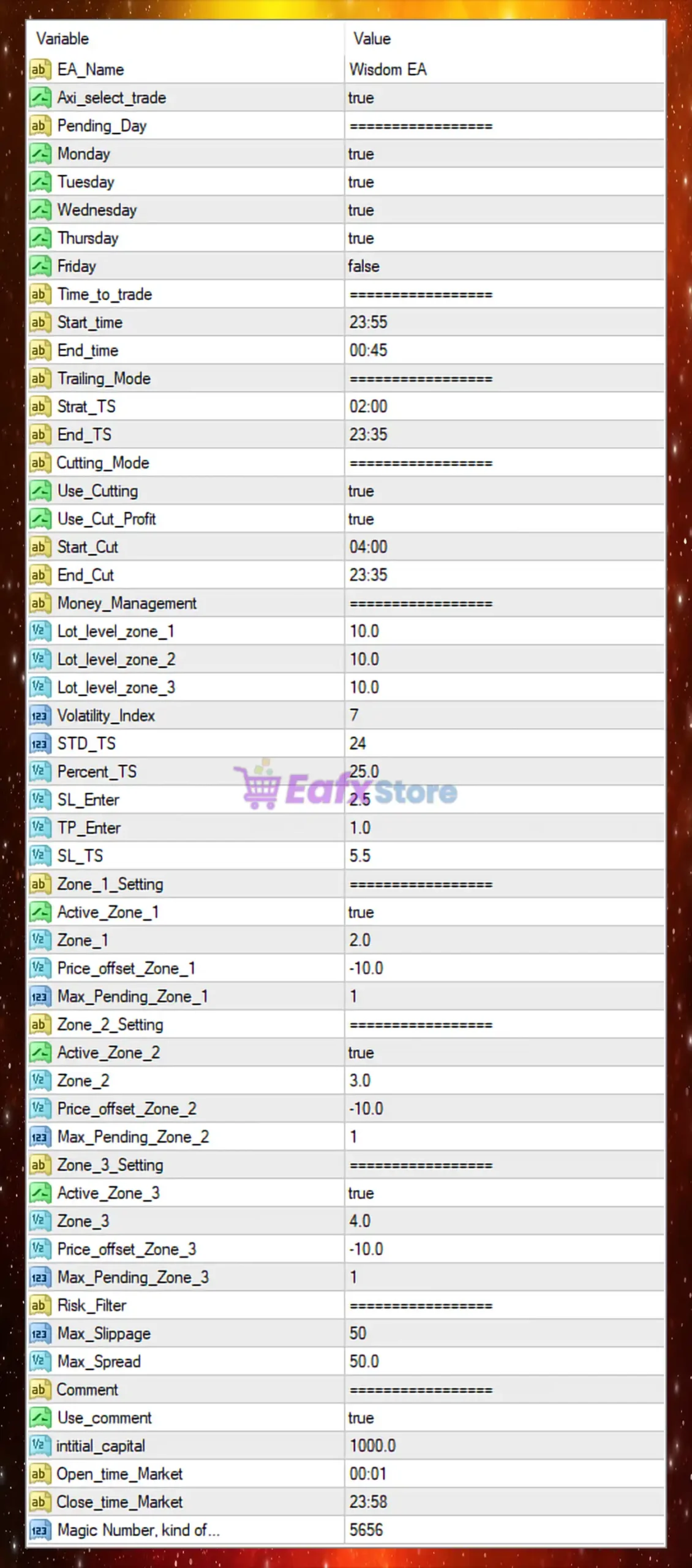
🔶 General Settings
These parameters define the EA’s identity and core behavior.
| Parameter | Value | Description |
|---|---|---|
| EA Name | Wisdom EA | Name of the Expert Advisor. |
| Axi_select_trade | true | Enables trade selection logic (likely broker-specific optimization). |
➡️ Analysis
The EA is fully activated and configured for automated trading with custom internal logic.
🔶 Trading Days Settings
These settings control which days the EA is allowed to trade.
| Parameter | Value | Description |
|---|---|---|
| Monday | true | Trading enabled. |
| Tuesday | true | Trading enabled. |
| Wednesday | true | Trading enabled. |
| Thursday | true | Trading enabled. |
| Friday | false | Trading disabled. |
➡️ Analysis
The EA avoids trading on Fridays, which is a common strategy to reduce exposure to:
- High volatility before market close
- Unexpected news events
- Weekend gaps
🔶 Trading Time Settings
Defines when trades are executed during the day.
| Parameter | Value | Description |
|---|---|---|
| Start Time | 23:55 | Trading begins late at night. |
| End Time | 00:45 | Trading ends shortly after midnight. |
➡️ Analysis
This configuration targets a specific low-liquidity window, likely aiming to capture price inefficiencies during session transitions (New York close / Asian open).
🔶 Trailing Stop Settings
Controls how profits are protected.
| Parameter | Value | Description |
|---|---|---|
| Start_TS | 02:00 | Time to start trailing stop logic. |
| End_TS | 23:35 | End time for trailing stop. |
➡️ Analysis
Trailing is active for most of the day, allowing trades to be managed dynamically after entry.
🔶 Cutting Mode (Profit/Loss Control)
These parameters manage trade exits based on time and profit conditions.
| Parameter | Value | Description |
|---|---|---|
| Use_Cutting | true | Enables cutting logic. |
| Use_Cut_Profit | true | Allows closing trades in profit. |
| Start_Cut | 04:00 | Start time for cutting trades. |
| End_Cut | 23:35 | End time for cutting trades. |
➡️ Analysis
This feature ensures trades are closed strategically, reducing exposure and locking in profits during optimal periods.
🔶 Money Management Settings
Controls risk allocation and trade sizing.
| Parameter | Value | Description |
|---|---|---|
| Lot_level_zone_1 | 10.0 | Lot scaling factor for zone 1. |
| Lot_level_zone_2 | 10.0 | Lot scaling factor for zone 2. |
| Lot_level_zone_3 | 10.0 | Lot scaling factor for zone 3. |
| Volatility_Index | 7 | Sensitivity to market volatility. |
| STD_TS | 24 | Standard deviation for trailing stop. |
| Percent_TS | 25.0 | Percentage-based trailing stop. |
| SL_Enter | 2.5 | Stop loss multiplier at entry. |
| TP_Enter | 1.0 | Take profit multiplier at entry. |
| Min_LTS | 5.5 | Minimum trailing stop level. |
➡️ Analysis
The EA uses a volatility-based money management system, adjusting behavior based on market conditions. This improves adaptability across different trading environments.
🔶 Zone-Based Trading Settings
The EA uses a multi-zone pending order strategy, which is a key feature.
🧩 Zone 1
| Parameter | Value |
|---|---|
| Active | true |
| Zone Level | 2.0 |
| Price Offset | -10.0 |
| Max Pending Orders | 1 |
🧩 Zone 2
| Parameter | Value |
|---|---|
| Active | true |
| Zone Level | 3.0 |
| Price Offset | -10.0 |
| Max Pending Orders | 1 |
🧩 Zone 3
| Parameter | Value |
|---|---|
| Active | true |
| Zone Level | 4.0 |
| Price Offset | -10.0 |
| Max Pending Orders | 1 |
➡️ Analysis
The EA places pending orders across multiple price zones, allowing:
- Better entry distribution
- Reduced slippage impact
- Improved probability of capturing reversals
Each zone increases in distance, creating a layered entry system.
🔶 Risk Filter Settings
These parameters protect against unfavorable market conditions.
| Parameter | Value | Description |
|---|---|---|
| Max Slippage | 50 | Maximum allowed slippage. |
| Max Spread | 50.0 | Maximum allowed spread. |
➡️ Analysis
These filters prevent trading during poor execution conditions, such as:
- High volatility
- Low liquidity
- News events
🔶 Additional Settings
| Parameter | Value | Description |
|---|---|---|
| Use Comment | true | Enables trade comments. |
| Initial Capital | 1000.0 | Reference account size. |
| Open Time Market | 00:01 | Market open tracking. |
| Close Time Market | 23:58 | Market close tracking. |
| Magic Number | 5656 | Unique EA trade identifier. |
🔶 Key Characteristics of This Configuration
The Wisdom EA setup reflects:
- Short trading window strategy
- Multi-zone pending order system
- Volatility-based trade management
- Time-based profit cutting logic
- No trading on Fridays
🔶 Advantages of the Current Setup
🧩 Precision Entry System
Zone-based pending orders improve entry accuracy.
🧩 Controlled Risk Exposure
Spread and slippage filters protect against bad conditions.
🧩 Smart Time Filtering
Trading only during specific hours reduces noise.
🧩 Adaptive Strategy
Volatility index and dynamic trailing improve flexibility.
🔶 Conclusion
The Wisdom EA MT4 settings showcase a sophisticated trading system that combines time-based execution, zone-based pending orders and volatility-driven risk management. This configuration is designed to capture high-probability price movements while maintaining strict control over trading conditions.
Key highlights include:
- Trading only from 23:55 to 00:45
- Multi-zone pending order strategy (3 zones)
- Volatility-based money management
- Profit cutting and trailing stop systems
- No trading on Fridays to avoid market risk
Overall, Wisdom EA is ideal for traders looking for a structured, low-frequency but high-precision automated strategy. Proper optimization of zone levels, volatility settings and trading time windows can further enhance performance and stability in live market conditions.