
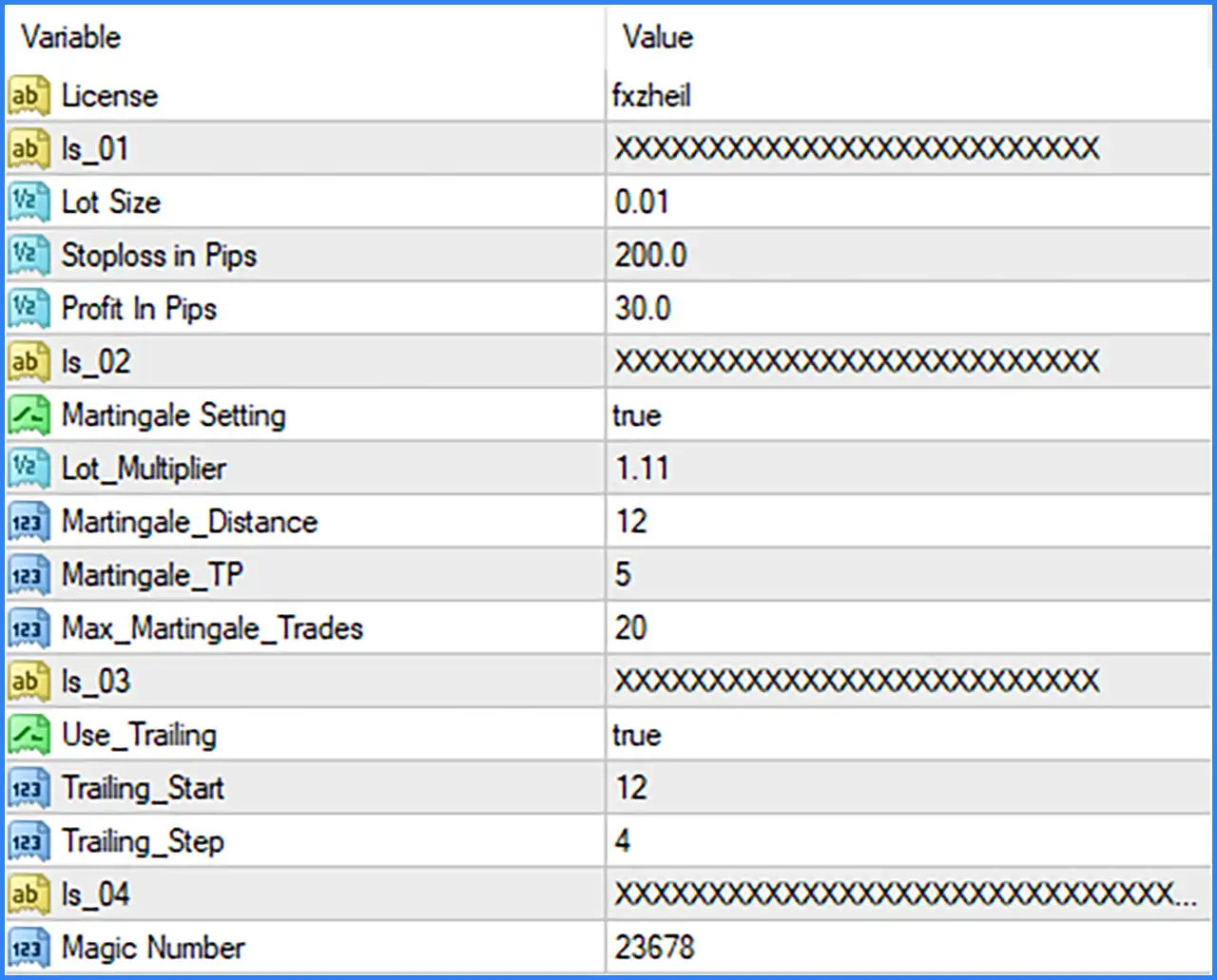
ZHEIL EA is an automated trading Expert Advisor (EA) featuring configurable lot sizing, Stop-Loss and Take-Profit levels, Martingale position management, and trailing-stop protection. Its settings allow traders to adjust the initial trading volume, recovery distance, Martingale multiplier, maximum recovery trades, and trailing-stop activation parameters.

Licence & Identification
🔹 License [License] — Default: fxzheil — Displays the licence identifier entered in the EA settings. This value is shown as fxzheil in the supplied configuration.
🔹 Is_01 [Is_01] — Default: Masked X string — A text input containing a masked character sequence. Its specific purpose is not identified in the supplied Inputs screenshot.
🔹 Is_02 [Is_02] — Default: Masked X string — A second masked text input. The screenshot does not provide enough information to determine its exact function.
🔹 Is_03 [Is_03] — Default: Masked X string — A third masked text input containing an X-character sequence. Its internal purpose is not specified.
🔹 Is_04 [Is_04] — Default: Masked X string — A fourth masked text input. Its value is partially obscured in the screenshot, and its exact function cannot be confirmed.
Lot Size & Initial Trading Settings
🔹 Lot Size [Lot Size] — Default: 0.01 — Defines the initial trading volume used by ZHEIL EA MT4. The default position size is 0.01 lots.
🔹 Stoploss in Pips [Stoploss in Pips] — Default: 200.0 — Sets the Stop-Loss distance in pips. The default value is 200.0 pips.
🔹 Profit in Pips [Profit In Pips] — Default: 30.0 — Defines the Take-Profit target in pips for the EA's trades. The default target is 30.0 pips.
Martingale Settings
🔹 Martingale Setting [Martingale Setting] — Default: true — Enables or disables the Martingale trading function. When set to true, the EA can use its configured Martingale parameters to manage additional positions.
🔹 Lot Multiplier [Lot_Multiplier] — Default: 1.11 — Defines the lot multiplication factor applied by the Martingale system. The default multiplier is 1.11, controlling how position size increases according to the EA's recovery logic.
🔹 Martingale Distance [Martingale_Distance] — Default: 12 — Sets the distance between Martingale trading levels. The screenshot does not explicitly identify the measurement unit, so the value should be interpreted according to the EA's internal calculation.
🔹 Martingale Take Profit [Martingale_TP] — Default: 5 — Defines the Take-Profit parameter associated with Martingale trades or recovery management. Its exact unit and calculation method are not specified in the screenshot.
🔹 Maximum Martingale Trades [Max_Martingale_Trades] — Default: 20 — Sets the maximum number of trades allowed in the Martingale sequence. The default configuration permits up to 20 Martingale trades.
Trailing Stop Settings
🔹 Use Trailing [Use_Trailing] — Default: true — Enables or disables the trailing-stop function. When enabled, the EA can adjust its Stop-Loss according to the configured trailing parameters.
🔹 Trailing Start [Trailing_Start] — Default: 12 — Defines the starting threshold for activating the trailing-stop mechanism. The exact unit and activation calculation are not specified in the supplied screenshot.
🔹 Trailing Step [Trailing_Step] — Default: 4 — Sets the step used when adjusting the trailing Stop-Loss. The default value is 4, defining the configured trailing adjustment interval.
Trade Identification
🔹 Magic Number [Magic Number] — Default: 23678 — Assigns a unique identification number to trades opened by ZHEIL EA MT4. This helps the EA distinguish its positions from manually opened trades and orders managed by other Expert Advisors.
Recommended Starting Configuration
🔹 Initial Lot Size — The displayed default is Lot Size = 0.01, providing the starting position volume for the EA.
🔹 Initial Trade Protection — The default Stoploss in Pips = 200.0 and Profit In Pips = 30.0 define the displayed Stop-Loss and Take-Profit distances.
🔹 Martingale Activation — Martingale Setting = true enables the Martingale function. Review this setting carefully because recovery trading can increase market exposure.
🔹 Lot Multiplication — The default Lot_Multiplier = 1.11 controls position-size multiplication during the Martingale sequence.
🔹 Recovery Distance — The default Martingale_Distance = 12 defines the configured spacing between Martingale levels.
🔹 Martingale Target — The default Martingale_TP = 5 provides the recovery Take-Profit parameter.
🔹 Maximum Recovery Trades — Max_Martingale_Trades = 20 allows up to 20 trades in the Martingale sequence. This limit should be considered carefully when determining account exposure.
🔹 Trailing Protection — The default Use_Trailing = true enables trailing management, with Trailing_Start = 12 and Trailing_Step = 4.
🔹 Trade Identification — Keep Magic Number = 23678 unless a different unique identifier is required for the trading setup.
Conclusion
ZHEIL EA MT4 provides configurable trading parameters for initial position sizing, Stop-Loss, Take-Profit, Martingale recovery, and trailing-stop management. Its Martingale system uses a default lot multiplier of 1.11, a recovery distance of 12, a Martingale Take-Profit value of 5, and a maximum of 20 recovery trades.
The EA also enables trailing-stop management by default, with a starting threshold of 12 and a trailing step of 4. These settings provide several ways to configure trade management, but the combination of Martingale trading and a maximum of 20 recovery positions can significantly increase exposure during adverse market conditions.
Before using ZHEIL EA MT4 on a live account, the Martingale behaviour, parameter units, and masked licence-related inputs should be verified. Demo testing and conservative risk management are recommended.