



AI Trading Bot MT4 Settings Explained – Full Configuration Guide
AI Trading Bot is an automated Forex Expert Advisor (EA) designed for MetaTrader 4 traders who want to combine AI-style logic, EMA trend filtering, RSI confirmation, compounding systems, and smart order management into a single trading solution.
The EA supports both buy and sell trading modes, customizable lot progression, risk management controls, and time-based trading filters, making it suitable for scalping, grid trading and semi-aggressive portfolio management strategies.

AI Trading Bot MT4 Full Settings Explanation
Below are the details of the parameters in the advisor’s trading system settings table:
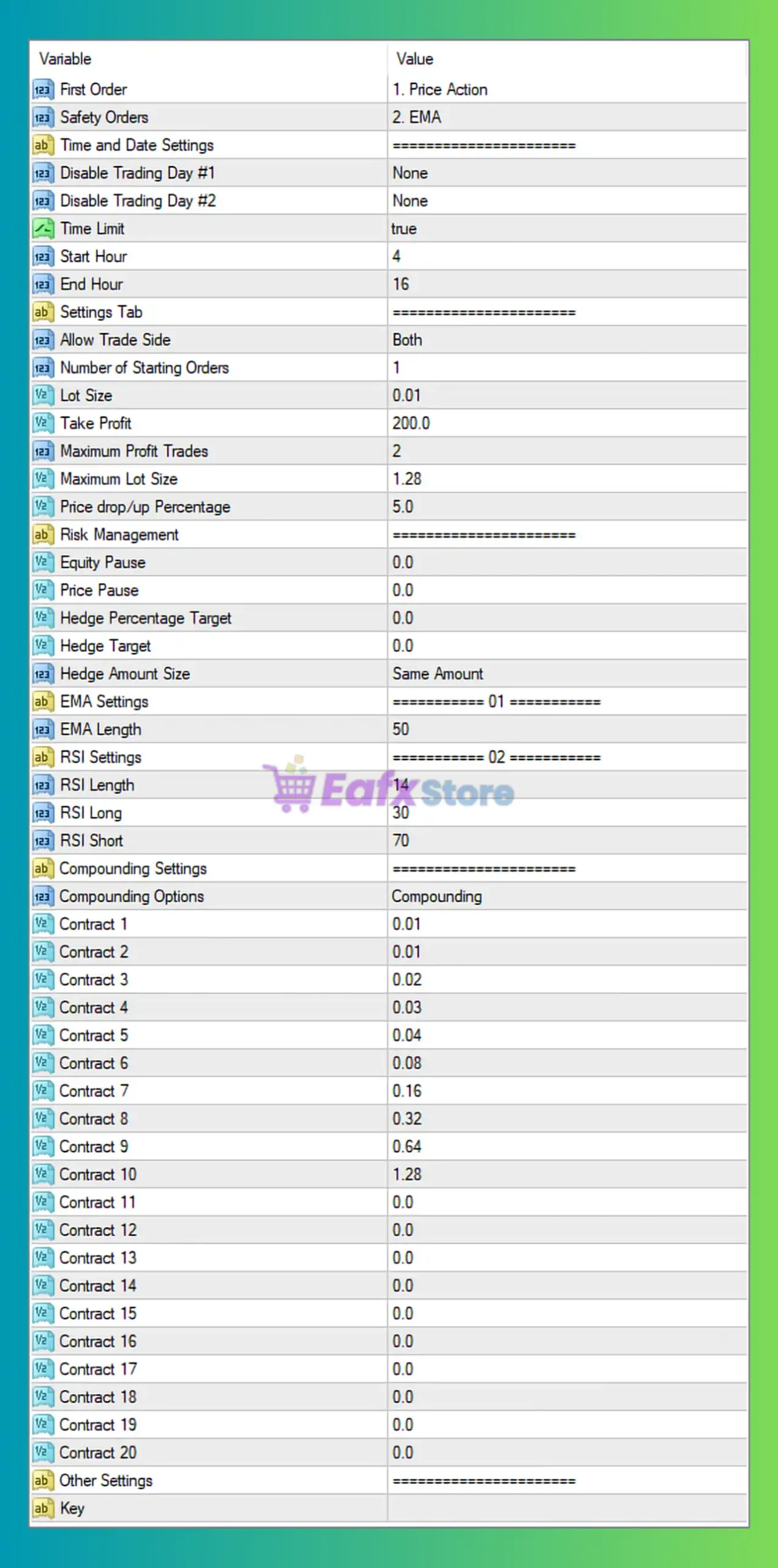
Order Strategy Settings
🔹 First Order = 1. Price Action: The EA uses Price Action logic to open the initial trade.
🔹 Safety Orders = 2. EMA: Safety orders are managed using an EMA-based strategy filter.
Time and Date Settings
🔹 Time and Date Settings: Main section for configuring trading schedules and day filters.
🔹 Disable Trading Day #1 = None: No trading day is disabled in the first filter.
🔹 Disable Trading Day #2 = None: No additional trading day restrictions are applied.
🔹 Time Limit = true: Enables trading session time restrictions.
🔹 Start Hour = 4: Trading starts at hour 04.
🔹 End Hour = 16: Trading stops at hour 16.
Main Trading Settings
🔹 Settings Tab: Main section containing core trade configuration parameters.
🔹 Allow Trade Side = Both: The EA can open both Buy and Sell trades.
🔹 Number of Starting Orders = 1: Opens 1 initial trade when conditions are met.
🔹 Lot Size = 0.01: Starting lot size is set to 0.01.
🔹 Take Profit = 200.0: Sets take profit target to 200.0 points/pips.
🔹 Maximum Profit Trades = 2: Allows a maximum of 2 profitable trades simultaneously.
🔹 Maximum Lot Size = 1.28: Restricts maximum trade size to 1.28 lots.
🔹 Price drop/up Percentage = 5.0: Triggers additional trade logic after a 5.0% market movement.
Risk Management Settings
🔹 Risk Management: Section used for configuring hedge and equity protection systems.
🔹 Equity Pause = 0.0: No equity-based pause is currently activated.
🔹 Price Pause = 0.0: No price movement pause filter is enabled.
🔹 Hedge Percentage Target = 0.0: Hedge activation percentage target is disabled.
🔹 Hedge Target = 0.0: No hedge profit target is configured.
🔹 Hedge Amount Size = Same Amount: Hedge trades use the same lot size as the original positions.
EMA Indicator Settings
🔹 EMA Settings = 01: Section for configuring the EMA trend filter.
🔹 EMA Length = 50: Uses a 50-period EMA for trend analysis and filtering.
RSI Indicator Settings
🔹 RSI Settings = 02: Section for configuring the RSI confirmation filter.
🔹 RSI Length = 14: Uses a 14-period RSI indicator.
🔹 RSI Long = 30: Buy conditions trigger near the RSI level 30.
🔹 RSI Short = 70: Sell conditions trigger near the RSI level 70.
Compounding Settings
🔹 Compounding Settings: Section used for progressive lot scaling management.
🔹 Compounding Options = Compounding: Enables automatic compounding functionality.
🔹 Contract 1 = 0.01: First trade lot size configured at 0.01.
🔹 Contract 2 = 0.01: Second contract lot size configured at 0.01.
🔹 Contract 3 = 0.02: Third contract lot size configured at 0.02.
🔹 Contract 4 = 0.03: Fourth contract lot size configured at 0.03.
🔹 Contract 5 = 0.04: Fifth contract lot size configured at 0.04.
🔹 Contract 6 = 0.08: Sixth contract lot size configured at 0.08.
🔹 Contract 7 = 0.16: Seventh contract lot size configured at 0.16.
🔹 Contract 8 = 0.32: Eighth contract lot size configured at 0.32.
🔹 Contract 9 = 0.64: Ninth contract lot size configured at 0.64.
🔹 Contract 10 = 1.28: Tenth contract lot size configured at 1.28.
🔹 Contract 11 = 0.0: Contract slot 11 is disabled.
🔹 Contract 12 = 0.0: Contract slot 12 is disabled.
🔹 Contract 13 = 0.0: Contract slot 13 is disabled.
🔹 Contract 14 = 0.0: Contract slot 14 is disabled.
🔹 Contract 15 = 0.0: Contract slot 15 is disabled.
🔹 Contract 16 = 0.0: Contract slot 16 is disabled.
🔹 Contract 17 = 0.0: Contract slot 17 is disabled.
🔹 Contract 18 = 0.0: Contract slot 18 is disabled.
🔹 Contract 19 = 0.0: Contract slot 19 is disabled.
🔹 Contract 20 = 0.0: Contract slot 20 is disabled.
Other Settings
🔹 Other Settings: Additional configuration section for EA utilities.
🔹 Key: Reserved field for activation key or authentication information.
Conclusion
AI Trading Bot MT4 provides traders with a flexible automated trading environment that combines price action entries, EMA trend filtering, RSI confirmation and advanced compounding logic. The EA includes customizable risk management tools, trading time filters, and scalable contract sizing, making it suitable for traders looking to automate Forex strategies while maintaining control over exposure and position management.
FAQs
❓ What is AI Trading Bot MT4?
AI Trading Bot MT4 is an automated Forex Expert Advisor for MetaTrader 4 that combines AI-style logic, EMA filters, RSI analysis, and compounding trade management.
❓ Does AI Trading Bot MT4 support both Buy and Sell trading?
Yes, the setting Allow Trade Side = Both enables the EA to trade both long and short positions.
❓ What timeframe is recommended for AI Trading Bot MT4?
The optimal timeframe depends on the strategy, but many traders use H1 or higher timeframes for stable signal generation.
❓ How does the compounding system work in AI Trading Bot MT4?
The EA increases lot sizes progressively using predefined contract levels from 0.01 up to 1.28.
❓ Can I control trading hours in AI Trading Bot MT4?
Yes, the EA includes a Time Limit feature with configurable Start Hour = 4 and End Hour = 16 trading sessions.



