


Bober Lannister MT5 Settings Guide
Bober Lannister MT5 is a fully automated Expert Advisor designed for systematic currency trading, with a particular focus on configurable trading sessions and risk management. The EA provides flexible controls for trading direction, order execution, lot sizing, trading range, time filters, and maximum drawdown protection. The official product information also highlights its use for night-time trading and provides several predefined operating modes.
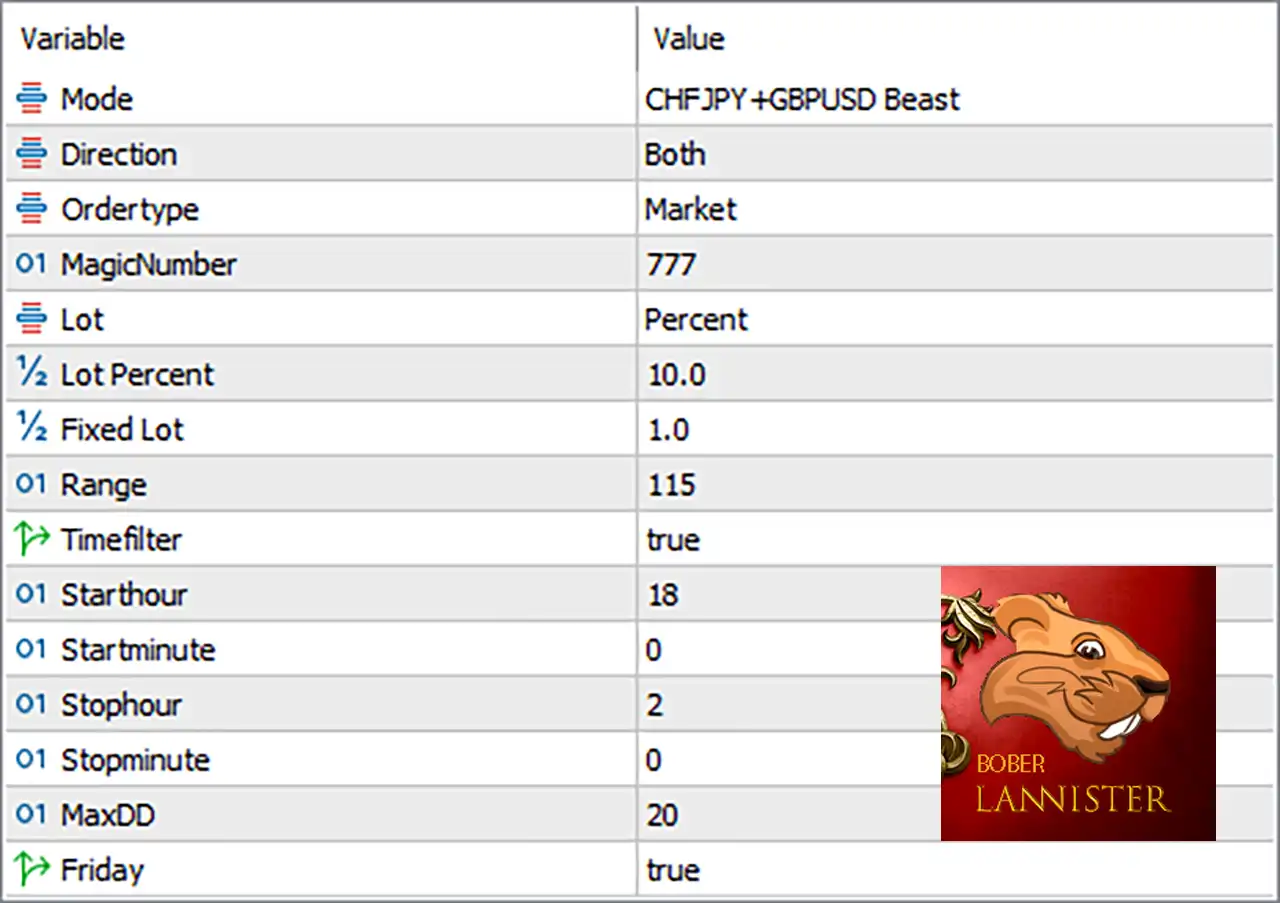
Bober Lannister MT5 Input Settings
Trading Configuration
🔹 Mode = CHFJPY+GBPUSD Beast — Selects the predefined CHFJPY+GBPUSD Beast trading configuration, allowing the EA to operate using its corresponding preset strategy parameters.
🔹 Direction = Both — Allows the EA to open both Buy and Sell positions rather than restricting trading to one market direction.
🔹 Ordertype = Market — Instructs the EA to use market orders for trade execution instead of pending orders.
🔹 MagicNumber = 777 — Assigns the unique trade identifier 777, allowing the EA to distinguish its own positions from trades generated by other EAs or manual trading.
Lot and Position Sizing
🔹 Lot = Percent — Sets the EA to calculate position size using a percentage-based lot calculation rather than relying only on a fixed lot size.
🔹 Lot Percent = 10.0 — Sets the percentage-based lot parameter to 10.0, which determines the position-sizing calculation according to the EA's internal money-management logic.
🔹 Fixed Lot = 1.0 — Sets the fixed lot value to 1.0 when the fixed-lot calculation method is selected; it does not override the current Percent mode.
Trading Range
🔹 Range = 115 — Sets the EA's Range parameter to 115, controlling the configured trading range used by the strategy's internal calculation.
Trading Time Filter
🔹 TimeFilter = true — Activates the trading-time filter, restricting the EA to its configured operating hours.
🔹 Starthour = 18 — Sets the trading start hour to 18:00.
🔹 Startminute = 0 — Sets the trading start minute to 00, making the configured start time 18:00.
🔹 Stophour = 2 — Sets the trading stop hour to 02:00.
🔹 Stopminute = 0 — Sets the trading stop minute to 00, making the configured end time 02:00.
🔹 Trading Session = 18:00–02:00 — With the TimeFilter enabled, the displayed configuration defines an overnight trading window from 18:00 through 02:00.
Drawdown Protection
🔹 MaxDD = 20 — Sets the maximum drawdown protection parameter to 20; according to the product documentation, MaxDD is designed to close all positions after the configured drawdown threshold is reached to help limit further losses.
Friday Trading
🔹 Friday = true — Allows the EA to continue operating on Friday instead of disabling Friday trading; the official documentation notes that this option controls whether trades are allowed over the weekend.
Recommended Understanding of This Configuration
This particular Bober Lannister MT5 setup is configured around an overnight trading schedule. The TimeFilter = true setting is especially important because it activates the defined 18:00–02:00 trading period.
The EA is configured with Direction = Both, meaning it is not restricted to Buy-only or Sell-only positions. The Market order type also indicates that trades are intended to be executed at market prices.
For money management, the current configuration uses Lot = Percent with Lot Percent = 10.0, while Fixed Lot = 1.0 remains available as an alternative parameter if the lot calculation mode is changed.
The MaxDD = 20 setting is an important risk-control parameter because the product documentation states that the EA can close positions after the specified MaxDD threshold is reached.
Key Features of the Bober Lannister MT5 Settings
🔹 Preset Trading Mode — The configuration uses CHFJPY+GBPUSD Beast for a predefined trading setup.
🔹 Two-Way Trading — Direction = Both allows the EA to consider both Buy and Sell opportunities.
🔹 Market Execution — Ordertype = Market enables direct market-order execution.
🔹 Percentage-Based Lot Sizing — Lot = Percent with Lot Percent = 10.0 activates percentage-based position sizing.
🔹 Overnight Trading Window — The active session is configured from 18:00 to 02:00.
🔹 Range Configuration — Range = 115 provides the configured range value used by the EA.
🔹 Drawdown Protection — MaxDD = 20 provides a defined maximum-drawdown control.
🔹 Friday Trading Enabled — Friday = true permits the EA to trade during Friday according to the other active conditions.
Conclusion
The displayed Bober Lannister MT5 configuration is designed around a predefined CHFJPY+GBPUSD Beast mode with two-way trading, market execution, percentage-based lot sizing, and an overnight trading schedule. The most important parameters to understand are Lot Percent = 10.0, Range = 115, TimeFilter = true, the 18:00–02:00 trading window, and MaxDD = 20.
Before using these settings on a live account, traders should verify how the EA calculates the percentage-based lot size and how the MaxDD = 20 value is interpreted by the specific EA version and broker environment. Backtesting and forward testing on a demo account can help determine whether the configuration is appropriate for the intended account size, leverage, spread, and trading conditions.





