

🔢 AI Quantum Trading EA MT5 Settings Explained – Complete Parameter Guide
AI Quantum Trading EA is an automated MetaTrader 5 Expert Advisor designed to combine intelligent money management, trend-following execution and integrated news protection.
The EA features automatic lot sizing, customizable trading parameters, trailing stop management, and an economic news filter, allowing traders to optimize performance while maintaining flexible risk control.
🔢 AI Quantum Trading EA MT5 Settings
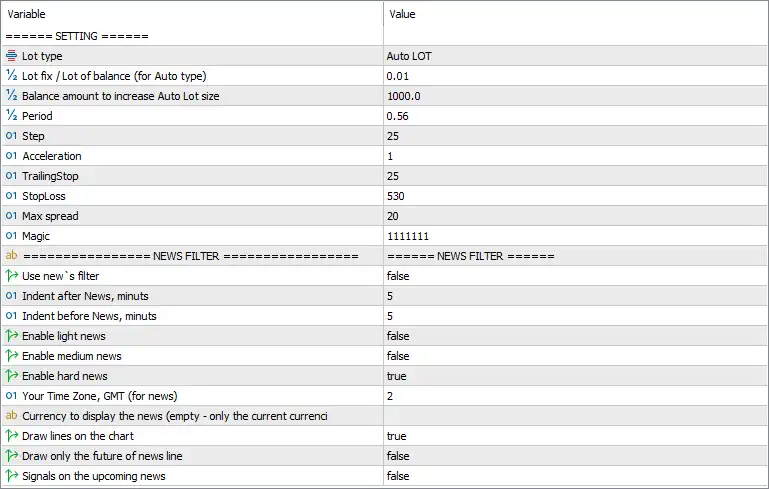
Below are the details of the parameters in the advisor’s trading system settings table:
🔶 Main Settings
🔹 Lot type = Auto LOT – Enables automatic lot sizing based on the account balance instead of using a permanently fixed trading volume.
🔹 Lot fix / Lot of balance (for Auto type) = 0.01 – Uses 0.01 lots as the fixed lot size or as the base lot calculation value when Auto LOT mode is active.
🔹 Balance amount to increase Auto Lot size = 1000.0 – Increases the automatically calculated lot size for every 1000.0 units of account balance.
🔹 Period = 0.56 – Sets the strategy calculation period or internal indicator coefficient to 0.56, affecting signal generation.
🔹 Step = 25 – Defines the trading or grid step distance as 25 points.
🔹 Acceleration = 1 – Sets the acceleration factor to 1, controlling the sensitivity or progression speed of the trading algorithm.
🔹 TrailingStop = 25 – Enables a trailing stop distance of 25 points to protect profitable positions.
🔹 StopLoss = 530 – Sets the Stop Loss distance to 530 points for each trade.
🔹 Max spread = 20 – Allows new trades only when the market spread is 20 points or lower.
🔹 Magic = 1111111 – Assigns the unique Magic Number 1111111 so the EA can identify and manage only its own trades.
🔶 News Filter Settings
🔹 Use news filter = false – Disables automatic news filtering during live trading.
🔹 Indent after News, minutes = 5 – Waits 5 minutes after a scheduled news event before allowing new trades.
🔹 Indent before News, minutes = 5 – Stops opening new trades 5 minutes before important economic news.
🔹 Enable light news = false – Ignores low-impact economic news events.
🔹 Enable medium news = false – Ignores medium-impact economic news events.
🔹 Enable hard news = true – Monitors and filters trading around high-impact news releases.
🔹 Your Time Zone, GMT (for news) = 2 – Uses GMT+2 when synchronizing economic news events.
🔹 Currency to display the news (empty - only the current currency) – Specifies which currency's economic news should be displayed; leaving this field empty monitors only the current trading symbol's currency.
🔹 Draw lines on the chart = true – Displays vertical news event markers directly on the chart.
🔹 Draw only the future of news line = false – Shows both historical and upcoming news event lines instead of future events only.
🔹 Signals on the upcoming news = false – Disables advance chart notifications before scheduled news releases.
🔢 Conclusion
AI Quantum Trading EA MT5 offers a streamlined yet highly configurable trading environment for MetaTrader 5 users. With automatic lot sizing, adjustable Stop Loss and Trailing Stop settings, spread protection, intelligent trade identification through Magic Numbers, and an integrated high-impact news filter, the EA provides traders with the flexibility to adapt to different market conditions while maintaining disciplined risk management. Optimizing these settings according to your broker and trading style can help maximize the EA's overall performance.
🔢 FAQs
❓ What lot sizing method does AI Quantum Trading EA MT5 use?
The EA is configured with Auto LOT, automatically calculating position size based on the account balance, using 0.01 as the base lot value.
❓ Can I limit trading during high spreads?
Yes. The Max spread = 20 setting prevents the EA from opening new trades when the spread exceeds 20 points.
❓ Does AI Quantum Trading EA MT5 include a news filter?
Yes. The EA includes a configurable economic news filter with customizable pre-news and post-news waiting periods, although it is currently disabled (Use news filter = false).
❓ How does the trailing stop work?
The EA uses a 25-point Trailing Stop, allowing profitable trades to be protected automatically as the market moves in your favor.
❓ Why is the Magic Number important?
The Magic Number (1111111) uniquely identifies trades opened by AI Quantum Trading EA MT5, ensuring they are managed independently from manual trades or other Expert Advisors running on the same MetaTrader 5 account.