





Bober Real MT5 + SetFiles (Latest version) - Unlimited

Subscriptions for Special Plan
- 30 EA package is more economical!
- Special package with 99%
- Download 1 EA/Day

Subscriptions for Premium Membership
- Download Unlimited in 1 Year
- Get 100% Discount
- Get free access to all

Subscriptions for Gold Membership
- 1 Year Membership
- Get 100% Discount
- Access EA+Indicator+Course
Frequently bought together 🎁
Add these products to enhance your purchase




What is Bober Real MT5?
Bober Real MT5 is a professional Expert Advisor (EA) built for automated trading with a focus on stability, adaptability and disciplined risk management. Using advanced Indicators, ATR filters, RSI-based entries, dynamic take-profit logic, and news filtering, it helps traders maintain consistent execution across changing market conditions.
 Vendor Wedsite: Click here
About the author
This product is compiled by Arnold Bobrinskii. This author has more than +14 years of experience working on MQL5 with many famous products such as Bober Real MT5, Bober Crypto MT5, Bober Lannister MT5, Bober Lazer MT5, Gold Beaver MT5 and other advisors. Among them, Bober Real MT5 is his best performing products.
Delivery time 24h-48h after payment.
Refund if not delivered.
You will receive the current version without any limitations (ID+Time).
Bober Real MT5 Overview
Key Features of Bober Real MT5
🔹 Fully Automated Trading: Executes trades automatically using advanced filters and adaptive market logic.
🔹 Dynamic Take-Profit System: Adjusts profit targets using channel analysis for flexible trade management.
🔹 Integrated News Protection: Avoids high-impact economic events through automated calendar filtering.
🔹 Advanced Risk Controls: Supports fixed lots, percentage risk sizing, spread filters and SL protection.
🔹 Multi-Pair Compatibility: Optimized for GBPUSD, EURGBP and EURUSD with stable live execution.
Why Choose Bober Real MT5?
🔹 Long-Term Stability Focus: Designed for controlled growth rather than aggressive overtrading behavior.
🔹 Strong Risk Management: Every trade operates with predefined Stop Loss (SL) and Take Profit (TP) controls.
🔹 Adaptive Market Response: Adjusts to volatility, liquidity and changing trading environments.
🔹 Low Maintenance Solution: Setup-and-forget design reduces manual intervention requirements.
🔹 Marketplace Ready EA: Suitable for traders seeking reliable automation and sustainable performance.
Bober Real MT5 Review
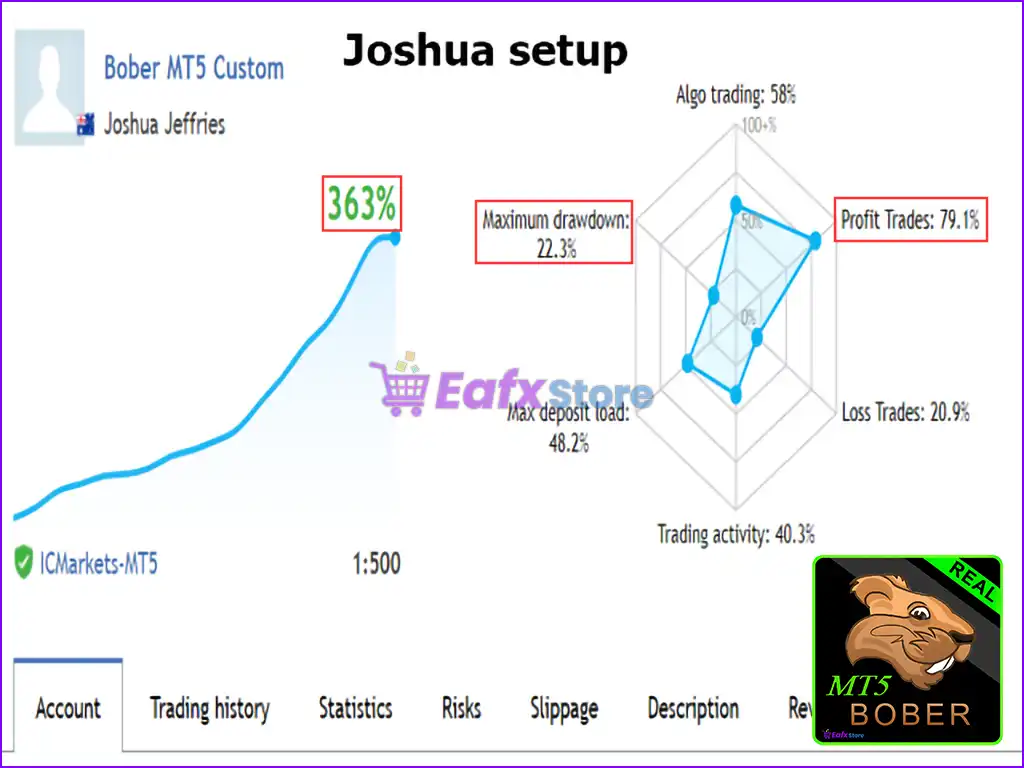
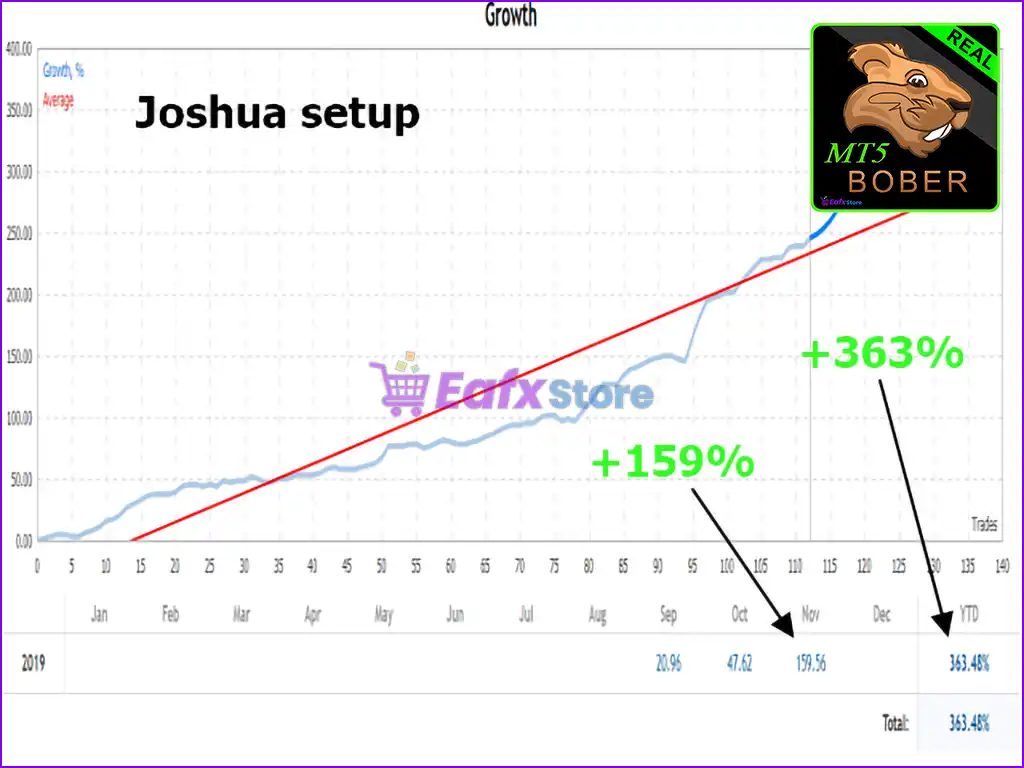
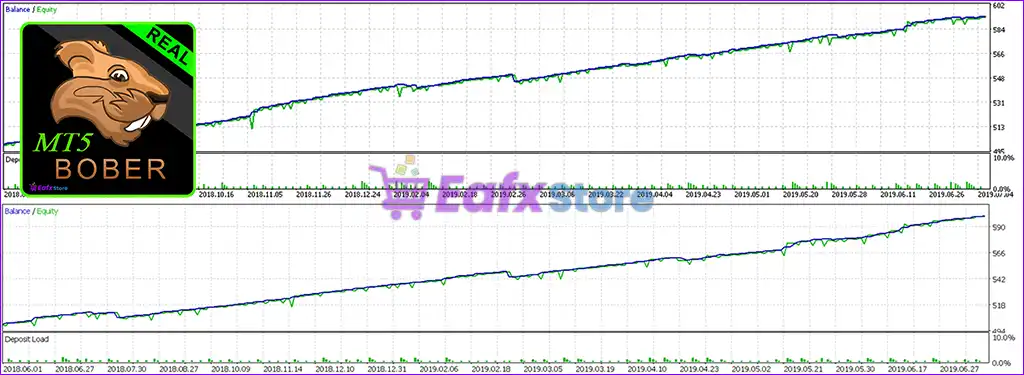
🔶 Bober Real MT5 is an impressive automated trading system with impressive profit performance. The advisor has demonstrated strong profit growth with controlled risk, making it a promising expert advisor for traders looking for stable profits with moderate drawdowns.
✅ Total Profit (Growth): +363%
✅ Win Rate (% of total): 79.1%
✅ Maximum Drawdown: 22.3%
Bober Real EA MT5 Live Results
Bober Real MT5 Live Results
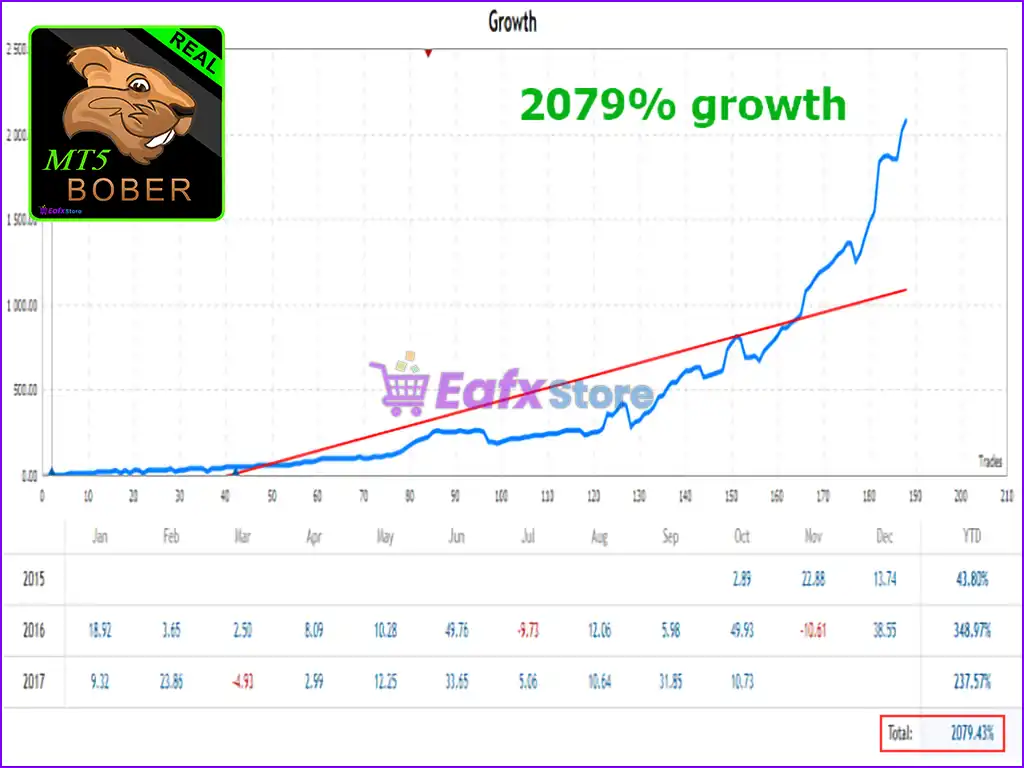
🔶 Bober Real MT5 achieved impressive profit performance in the years 2015 – 2017. With a staggering 2079% total growth.
Bober Real EA Live Results
What is the Bober Real MT5 Trading Strategy?
🔹 RSI-Based Entry Logic: Uses optional RSI confirmation to improve entry timing and signal quality.
🔹 ATR Volatility Filtering: Evaluates market activity through ATR ranges before opening positions.
🔹 Adaptive Profit Management: Dynamic TP follows channel highs and lows to capture market movement.
🔹 Time Session Optimization: Trades only during selected hours to avoid unfavorable conditions.
🔹 News-Aware Execution: Filters major economic releases to reduce volatility-related trading risks.
Is Bober Real MT5 safe?
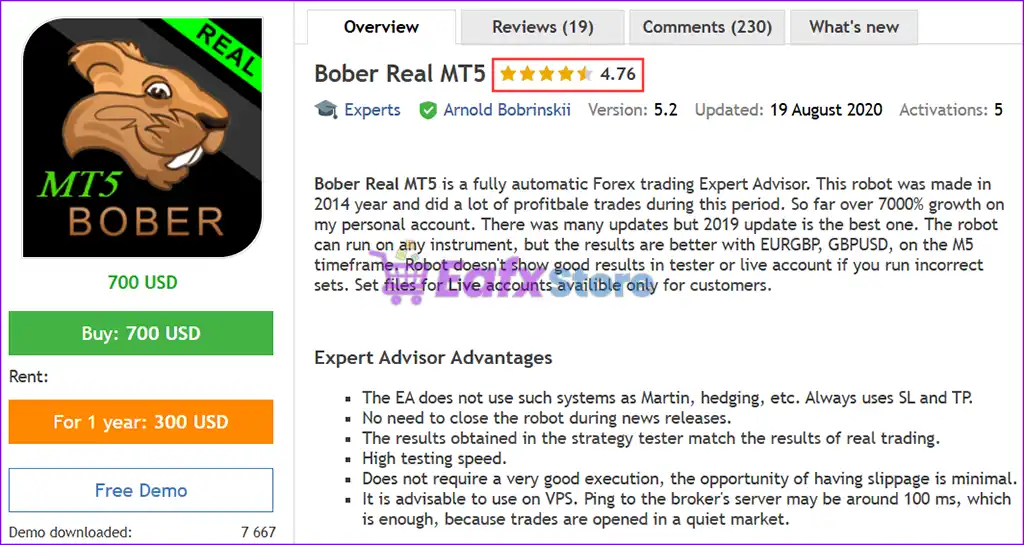
Bober Real MT5 demonstrates remarkable potential in delivering stable and reliable profits, making it a reliable tool in the forex market. Bober Real MT5 is highly regarded by the MQL5 community in many aspects and has gained the trust of its users.
⭐⭐⭐⭐⭐ Riddick82 (2020.08.31): “Very very nice good reactions in RT acc, don’t think to much, buy it.”
⭐⭐⭐⭐⭐ Muman0508 (2019.07.17): “Very Good EA, Very profitabel.”
⭐⭐⭐⭐⭐ Dimitre ivanov (2018.09.29): “I like the robot although I have had losses with the configuration of Arnold. I have 8 pairs configured and at the moment very well. I want another opinion within a few months.”
Trading Specifications
Recommended settings and parameters to pay attention to from developers and experts:
| Features | Type |
|---|---|
| Trading platform | MetaTrader 5 (MT5) |
| Time frames | M15 (15 minute chart) |
| Currency pairs | GBPUSD, EURGBP and EURUSD |
| Minimum / Recommended deposit | $100+ |
| Minimum / Recommended leverage | 1:30+ |
| Additional services | Unlock and Decompile |
| Recommended brokers | Exness Broker, Icmarkets Broker |
| Recommended VPS | MyfxVPS.com (Blue VPS, Golden VPS). Lowest Latency, 2 week Free Trial, 100% Free for 12-18 Months. |
Product Download Package?
The download package of the product suite includes:
Experts
✅ Bober Real MT5.ex5
SetFiles
✅ Optimization_example_M2.set
✅ EURUSD_M5_2018.06.18-2019.06.18_v2.set
✅ EURUSD_M5_2018.06.01-2019.07.05_v3.set
➡️ Reviewed by David Easton
Conclusion
Bober Real MT5 is a powerful, fully automated Forex trading Expert Advisor (EA) designed for traders seeking consistent profitability with minimal intervention. With a proven track record of impressive profit growth—achieving over 7000% on personal trading accounts—this EA stands out as one of the most reliable automated trading systems in the markets.
Bober Real MT5 Settings Guide
Bober Real MT5 is a fully automated Forex Expert Advisor designed for systematic trading with configurable entry tools, volatility filters, position sizing, Stop Loss/Take Profit management, dynamic Take Profit, time controls, and an integrated economic-calendar filter.
The configuration shown in your screenshot is particularly focused on RSI-based entries, ATR filtering, percentage-based risk, dynamic Take Profit, a defined trading session, and a built-in calendar/news filter. Below is a complete explanation of every visible input and value.
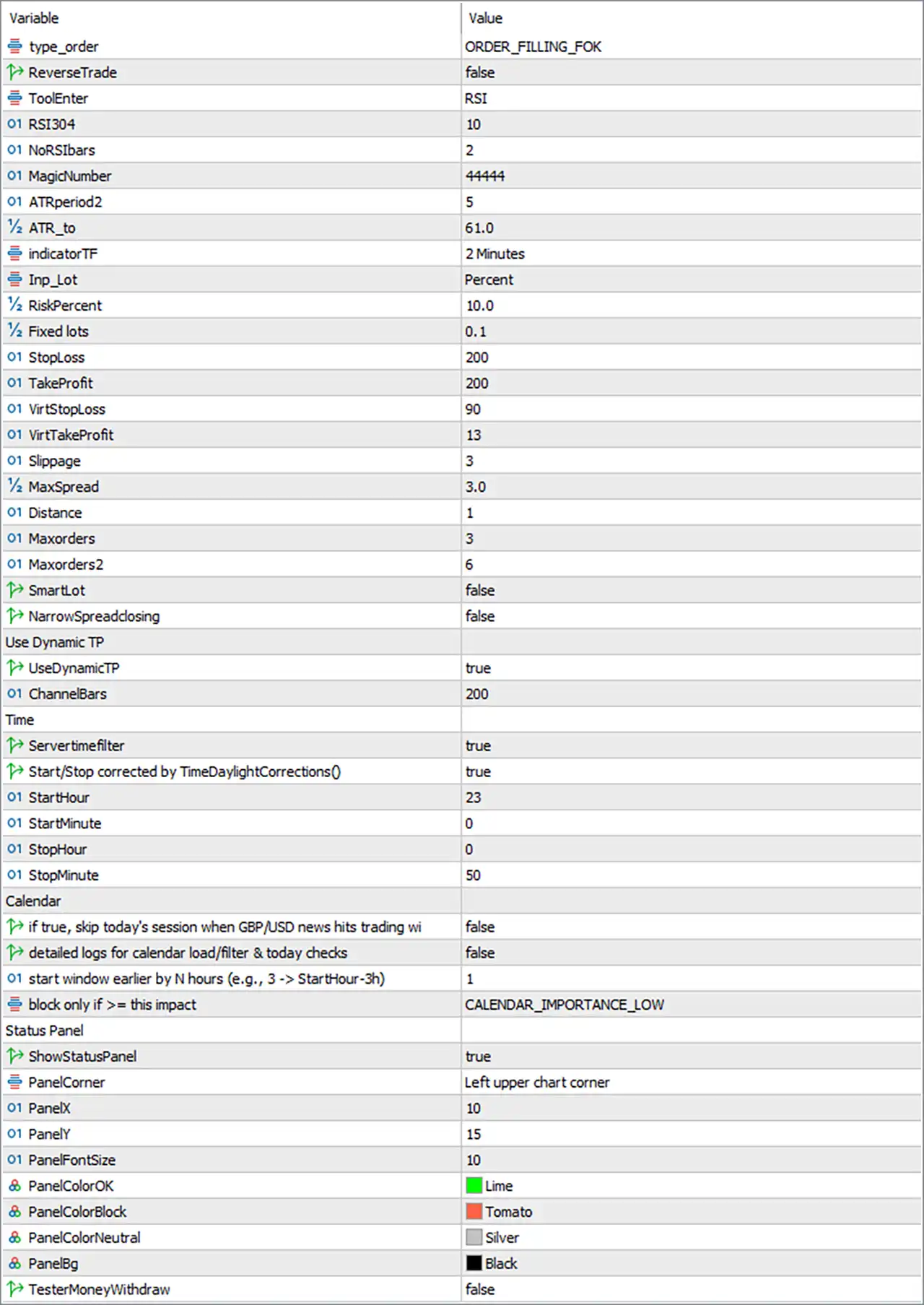
Bober Real MT5 Settings Panel
Bober Real MT5 Input Settings
Core Trading Settings
🔹 type_order = ORDER_FILLING_FOK — Sets the order filling method to ORDER_FILLING_FOK (Fill or Kill), requiring the requested order volume to be filled according to the broker’s supported execution rules.
🔹 ReverseTrade = false — Keeps the EA’s normal trade direction active and does not reverse generated Buy or Sell signals.
🔹 ToolEnter = RSI — Selects RSI as the active entry tool used by the EA for its trading-entry conditions.
🔹 RSI304 = 10 — Sets the RSI-related period parameter to 10, determining the RSI calculation period used by the selected entry tool.
🔹 NoRSIbars = 2 — Sets the RSI bar-related parameter to 2, controlling the number of bars considered by the EA in its RSI entry logic.
🔹 MagicNumber = 44444 — Assigns 44444 as the EA’s unique Magic Number, allowing its trades to be identified separately from other automated or manual positions.
🔹 ATRperiod2 = 5 — Sets the second ATR calculation period to 5, controlling the volatility measurement used by the EA’s ATR filter.
🔹 ATR_to = 61.0 — Sets the upper ATR filter value to 61.0, defining the displayed upper boundary for the ATR-based trading condition.
🔹 indicatorTF = 2 Minutes — Sets the indicator calculation timeframe to 2 Minutes, meaning the configured technical indicators are evaluated using the 2-minute timeframe.
Lot and Risk Management
🔹 Inp_Lot = Percent — Selects Percent as the active lot-sizing method, meaning the EA uses percentage-based position sizing rather than relying exclusively on the Fixed lots value.
🔹 RiskPercent = 10.0 — Sets the configured risk percentage parameter to 10.0, which is used by the EA’s percentage-based money-management calculation.
🔹 Fixed lots = 0.1 — Sets the alternative fixed position size to 0.1 lots when a fixed-lot calculation mode is selected.
Stop Loss and Take Profit
🔹 StopLoss = 200 — Sets the standard Stop Loss parameter to 200, with the exact monetary/price-point interpretation determined by the EA and symbol’s trading specifications.
🔹 TakeProfit = 200 — Sets the standard Take Profit parameter to 200, establishing the configured fixed profit-target distance.
🔹 VirtStopLoss = 90 — Sets the Virtual Stop Loss parameter to 90, providing the EA with a separate virtual loss-management distance.
🔹 VirtTakeProfit = 13 — Sets the Virtual Take Profit parameter to 13, defining the configured virtual profit-target value.
🔹 Slippage = 3 — Sets the permitted slippage parameter to 3, controlling the acceptable execution-price deviation according to the EA’s internal implementation.
🔹 MaxSpread = 3.0 — Limits the configured maximum spread to 3.0, helping prevent new trades when the available spread exceeds the specified threshold.
Order Management
🔹 Distance = 1 — Sets the order-distance parameter to 1, controlling the minimum configured spacing used by the EA’s order-management logic.
🔹 Maxorders = 3 — Limits the first order group or trading sequence to a maximum of 3 orders according to the EA’s internal order-management rules.
🔹 Maxorders2 = 6 — Sets the second maximum-order parameter to 6, providing an additional order limit for the EA’s internal trade-management logic.
🔹 Smartlot = false — Disables the Smart Lot function, so the EA does not use its Smart Lot mechanism under this configuration.
🔹 NarrowSpreadclosing = false — Disables Narrow Spread Closing, meaning the EA’s special narrow-spread closing function is not active.
Dynamic Take Profit
🔹 UseDynamicTP = true — Enables the Dynamic Take Profit function, allowing the EA to use its adaptive Take Profit logic instead of relying exclusively on a static target.
🔹 ChannelBars = 200 — Sets the channel calculation lookback to 200 bars, providing the number of bars used for the channel-based Dynamic TP calculation.
The official Bober Real MT5 documentation describes Dynamic TP as an optional feature that adapts Take Profit using channel highs and lows.
Time Settings
🔹 Servertimefilter = true — Enables the server-time trading filter, allowing the EA to restrict trading according to the configured broker/server time window.
🔹 Start/Stop corrected by TimeDaylightCorrections() = true — Enables automatic correction of the Start/Stop schedule through the EA’s TimeDaylightCorrections() function.
🔹 StartHour = 23 — Sets the trading-session start hour to 23.
🔹 StartMinute = 0 — Sets the trading-session start minute to 0, creating a configured start time of 23:00.
🔹 StopHour = 0 — Sets the trading-session stop hour to 0.
🔹 StopMinute = 50 — Sets the trading-session stop minute to 50, creating a configured stop time of 00:50.
🔹 Trading Session = 23:00–00:50 — With the server-time filter enabled, the displayed settings define an overnight trading window from 23:00 through 00:50.
The official product parameters identify the StartHour, StartMinute, StopHour, and StopMinute inputs as the EA’s daily trading-window controls.
Calendar and News Filter
🔹 if true, skip today’s session when GBP/USD news hits trading window = false — Disables the option to automatically skip the entire day’s trading session when GBP/USD news occurs during the configured trading window.
🔹 detailed logs for calendar load/filter & today checks = false — Disables detailed diagnostic logging for the economic-calendar loading, filtering, and daily-news checks.
🔹 start window for earlier by N hours (e.g., 3 -> StartHour-3h) = 1 — Sets the earlier news-filter window adjustment to 1 hour, allowing the calendar filter to begin checking from the configured session start minus 1 hour.
🔹 block only if >= this impact = CALENDAR_IMPORTANCE_LOW — Sets the minimum economic-calendar importance level to CALENDAR_IMPORTANCE_LOW, meaning events at or above the configured Low importance threshold can be considered by the news filter.
The official Bober Real MT5 description confirms that the EA includes an automated built-in news-calendar filter for avoiding significant economic events.
Status Panel Settings
🔹 ShowStatusPanel = true — Enables the on-chart Status Panel so the EA’s current status and information can be displayed on the trading chart.
🔹 PanelCorner = Left upper chart corner — Positions the Status Panel in the upper-left corner of the chart.
🔹 PanelX = 10 — Sets the horizontal panel offset to 10 pixels/points according to the EA’s panel positioning system.
🔹 PanelY = 15 — Sets the vertical panel offset to 15 pixels/points according to the EA’s panel positioning system.
🔹 PanelFontSize = 10 — Sets the Status Panel font size to 10.
🔹 PanelColorOK = Lime — Uses Lime as the display color for normal/OK status information.
🔹 PanelColorBlock = Tomato — Uses Tomato as the display color for blocked or restricted status information.
🔹 PanelColorNeutral = Silver — Uses Silver as the display color for neutral status information.
🔹 PanelBg = Black — Sets the Status Panel background color to Black.
Testing Setting
🔹 TesterMoneyWithdraw = false — Disables the Tester Money Withdraw function, so simulated withdrawals are not enabled under this configuration.
Key Features of This Bober Real MT5 Configuration
🔹 RSI Entry System — ToolEnter = RSI with RSI304 = 10 and NoRSIbars = 2 configures the displayed RSI entry parameters.
🔹 ATR Volatility Filter — ATRperiod2 = 5 and ATR_to = 61.0 define the visible ATR filtering parameters.
🔹 Percentage Risk Mode — Inp_Lot = Percent with RiskPercent = 10.0 activates percentage-based position sizing.
🔹 Defined Trade Protection — StopLoss = 200, TakeProfit = 200, VirtStopLoss = 90, and VirtTakeProfit = 13 provide multiple configured trade-management levels.
🔹 Dynamic Take Profit — UseDynamicTP = true enables adaptive Take Profit, while ChannelBars = 200 defines its channel lookback.
🔹 Spread Control — MaxSpread = 3.0 helps restrict trading when the available spread exceeds the configured threshold.
🔹 Overnight Trading Window — The server-time filter is enabled with a configured session from 23:00 to 00:50.
🔹 Economic Calendar Filter — The configuration includes a GBP/USD news-session option, calendar diagnostics, a 1-hour pre-window adjustment, and CALENDAR_IMPORTANCE_LOW as the impact threshold.
🔹 On-Chart Status Panel — ShowStatusPanel = true displays the panel in the upper-left corner with PanelX = 10, PanelY = 15, and PanelFontSize = 10.
Conclusion
The displayed Bober Real MT5 configuration combines RSI entry logic, ATR filtering, percentage-based money management, static and virtual SL/TP parameters, Dynamic Take Profit, spread protection, time filtering, and an economic-calendar module.
The active configuration uses ToolEnter = RSI, RSI304 = 10, NoRSIbars = 2, ATRperiod2 = 5, and ATR_to = 61.0. Position sizing is set to Percent with RiskPercent = 10.0, while the alternative Fixed lots = 0.1 remains available.
For trade management, the displayed values are StopLoss = 200, TakeProfit = 200, VirtStopLoss = 90, VirtTakeProfit = 13, Slippage = 3, MaxSpread = 3.0, Distance = 1, Maxorders = 3, and Maxorders2 = 6.
The configuration also enables Dynamic TP with ChannelBars = 200, while the trading schedule is controlled by Servertimefilter = true for the 23:00–00:50 session. The calendar module uses a 1-hour earlier checking window and CALENDAR_IMPORTANCE_LOW as its displayed impact threshold.
According to the official product page, Bober Real MT5 is designed as a fully automated Forex EA and includes RSI/ATR entry parameters, Dynamic TP, time filtering, and news-calendar filtering. The developer also notes that results can depend significantly on using appropriate settings, so the values shown here should be tested against the intended symbol, broker, spread, and account conditions before live deployment.
User Reviews
Only logged in customers who have purchased this product may leave a review.
1. What is Bober Real MT5?
Bober Real MT5 is a fully automated Forex trading Expert Advisor (EA) designed for MetaTrader 5 (MT5). It executes trades 24/7 without manual intervention, focusing on safety, profitability, and efficiency.
2. Which currency pairs and timeframes does Bober Real MT5 work best on?
Bober Real MT5 works on EURGBP and GBPUSD, with optimal performance on the M5 timeframe. However, it can be adapted to other instruments.
3. Does Bober Real MT5 use risky trading strategies like Martingale or Hedging?
No, Bober Real MT5 does not use Martingale or Hedging. It follows a risk-controlled approach with built-in Stop Loss (SL) and Take Profit (TP) for each trade.
4. What is the minimum deposit required to use Bober Real MT5?
The minimum recommended deposit is $100, making it accessible for traders with different capital levels.
5. How profitable is Bober Real MT5?
Live trading results show:
✔ Total Profit (Growth): +363%
✔ Profit Trades: 79.1%
✔ Maximum Drawdown: 22.3%
Historical performance (2015-2017) also shows an impressive 2079% total growth.
6. Does Bober Real MT5 work during news events?
Yes, the EA includes a News Filter to ensure trading continues safely even during high-impact economic events.
7. How does Bober Real MT5 minimize risks?
The EA has built-in Stop Loss (SL) and Take Profit (TP) settings to limit losses and secure profits, along with optimized risk management tools to maintain trading stability.
8. Can I track the live trading performance of Bober Real MT5?
Yes, Live Signal results are available, allowing traders to monitor real-time trading performance before making a purchase.
-
 Original price was: $999.00.$249.00Current price is: $249.00.
 -
 Original price was: $1,200.00.$249.00Current price is: $249.00.
 -
 Original price was: $2,620.00.$249.00Current price is: $249.00.
 -
 Original price was: $1,000.00.$249.00Current price is: $249.00.
-
 0Original price was: $1,299.00.$249.00Current price is: $249.00.
 -
 0Original price was: $290.00.$179.00Current price is: $179.00.
 -
 3Original price was: $199.00.$159.00Current price is: $159.00.
 -
 0Original price was: $778.00.$249.00Current price is: $249.00.
There are no reviews yet.