


Bober Crypto MT5 Settings Guide
Bober Crypto MT5 is an automated cryptocurrency trading Expert Advisor designed to provide flexible control over exchange connectivity, cryptocurrency pairs, order execution, position sizing, risk management, and trading schedules. The displayed configuration is set up for Binance, using BTC and ETH with Standard MT5 mode and Logic 1. It also includes adjustable parameters for split steps, maximum drawdown, trading range, lot allocation, API authentication, Magic Number, and time filtering.
This configuration provides a useful example of how Bober Crypto MT5 can be customized for cryptocurrency trading while giving traders direct control over important execution and risk-related parameters.
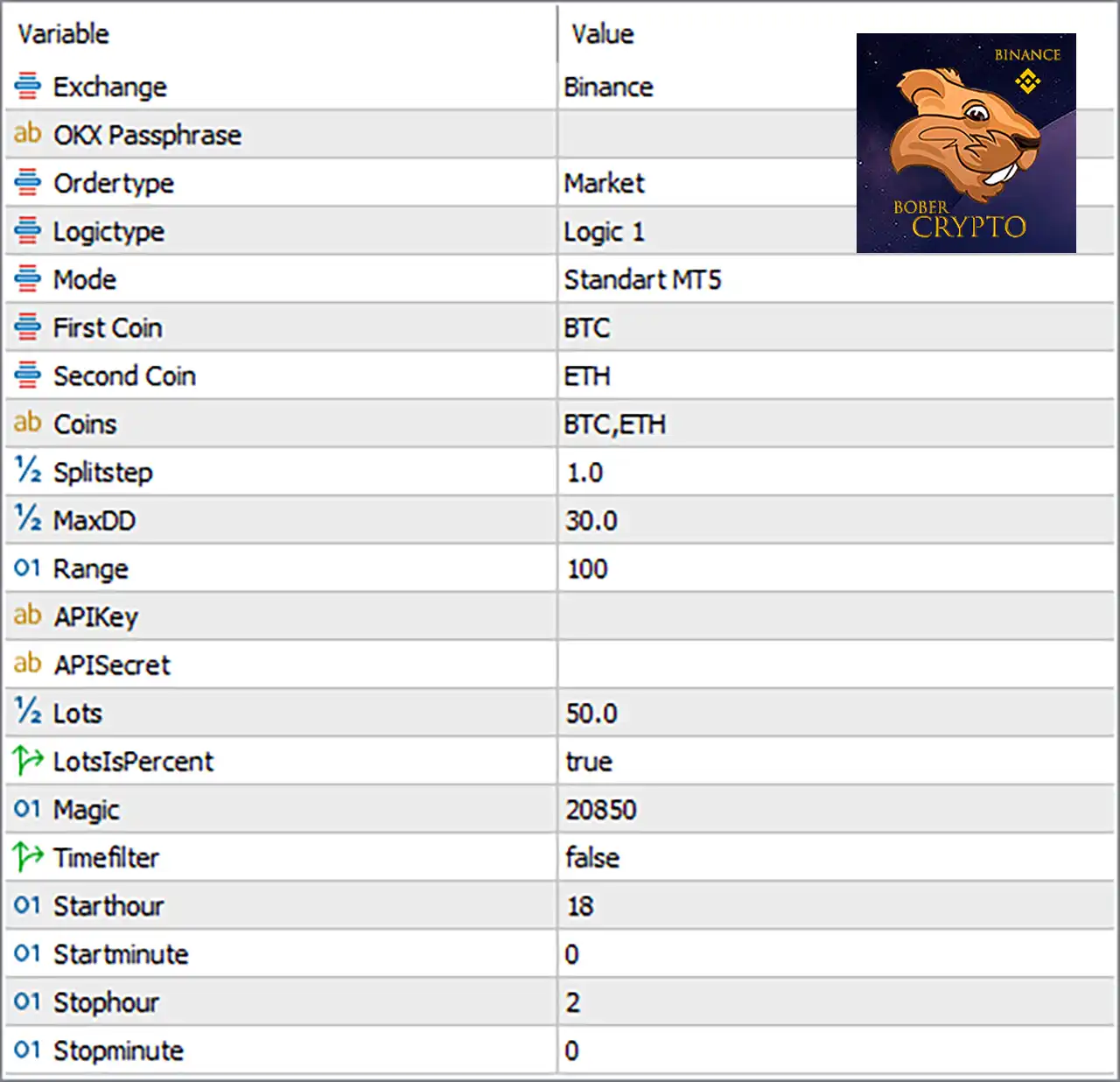
Bober Crypto MT5 Input Settings
Exchange and API Configuration
🔹 Exchange = Binance — Selects Binance as the cryptocurrency exchange used by the EA for its configured trading environment.
🔹 OXX Passphrase = [Blank] — This field is currently left blank and is intended for the configured exchange passphrase or authentication information required by the EA.
🔹 APIKey = [Blank] — The API Key field is currently empty; enter the appropriate API credential only when required by the EA's exchange connection setup.
🔹 APISecret = [Blank] — The API Secret field is currently empty and should contain the corresponding private API credential when exchange authentication requires it.
Order and Strategy Configuration
🔹 Ordertype = Market — Sets the EA to use Market orders, meaning trades are executed using the available market price rather than a pending-order price.
🔹 Logictype = Logic 1 — Selects Logic 1 as the active trading logic, determining which internal trading logic the EA uses.
🔹 Mode = Standart MT5 — Selects Standart MT5 as the operating mode for the EA.
Cryptocurrency Selection
🔹 First Coin = BTC — Sets BTC as the first cryptocurrency used by the configured trading strategy.
🔹 Second Coin = ETH — Sets ETH as the second cryptocurrency used by the configured trading strategy.
🔹 Coins = BTC,ETH — Defines the configured cryptocurrency list as BTC,ETH, allowing the EA to work with Bitcoin and Ethereum within the selected setup.
Trading Parameters
🔹 Splitstep = 1.0 — Sets the split-step parameter to 1.0, controlling the configured step value used by the EA's internal trading or position-management logic.
🔹 MaxDD = 30.0 — Sets the maximum drawdown parameter to 30.0, providing a defined drawdown threshold within the EA's risk-management configuration.
🔹 Range = 100 — Sets the trading Range parameter to 100, which is used by the EA's internal strategy calculations.
Lot and Money Management
🔹 Lots = 50.0 — Sets the lot or position-sizing value to 50.0 according to the EA's configured lot calculation system.
🔹 LotsIsPercent = true — Enables percentage-based lot sizing, meaning the Lots = 50.0 value is treated according to the EA's percentage-based position-sizing logic rather than simply as a fixed lot value.
Trade Identification
🔹 Magic = 20850 — Assigns the Magic Number 20850 to the EA's trades, allowing its positions to be identified separately from trades generated by other EAs or manual trading.
Trading Time Filter
🔹 Timefilter = false — Disables the trading-time filter, meaning the configured start and stop times are not currently being used to restrict trading.
🔹 Starthour = 18 — Sets the configured trading start hour to 18:00.
🔹 Startminute = 0 — Sets the configured trading start minute to 00, creating a start time of 18:00 when the time filter is enabled.
🔹 Stophour = 2 — Sets the configured trading stop hour to 02:00.
🔹 Stopminute = 0 — Sets the configured trading stop minute to 00, creating a stop time of 02:00 when the time filter is enabled.
Understanding the Current Bober Crypto MT5 Configuration
The displayed setup is configured for Binance and focuses on BTC and ETH. The EA uses Market execution, with Logic 1 selected under the Standart MT5 operating mode.
The cryptocurrency configuration is clearly defined through First Coin = BTC, Second Coin = ETH, and Coins = BTC,ETH. This provides the EA with Bitcoin and Ethereum as the configured coins for this setup.
For position management, Lots = 50.0 is combined with LotsIsPercent = true, so the lot parameter operates within the EA's percentage-based sizing system. The configuration also specifies Splitstep = 1.0, Range = 100, and MaxDD = 30.0.
The Timefilter = false setting is particularly important. Although the EA contains Starthour = 18, Startminute = 0, Stophour = 2, and Stopminute = 0, these time parameters are not currently active while the time filter remains disabled.
The Magic = 20850 value provides a unique identifier for trades associated with this configuration. Meanwhile, the APIKey, APISecret, and OXX Passphrase fields shown in the image are blank and should be configured only according to the EA's required exchange-authentication procedure.
Key Bober Crypto MT5 Settings
🔹 Binance Exchange — The selected exchange is Binance, providing the configured cryptocurrency trading environment.
🔹 BTC and ETH — The setup uses BTC as the First Coin and ETH as the Second Coin.
🔹 Market Execution — Ordertype = Market enables market-order execution.
🔹 Logic 1 — The EA is configured to operate using Logic 1.
🔹 Standard MT5 Mode — Mode = Standart MT5 selects the displayed MT5 operating mode.
🔹 Percentage Position Sizing — LotsIsPercent = true enables percentage-based interpretation of Lots = 50.0.
🔹 Drawdown Control — MaxDD = 30.0 establishes the configured maximum drawdown parameter.
🔹 Trading Range — Range = 100 defines the displayed range value used by the EA.
🔹 Unique Trade Identifier — Magic = 20850 identifies trades generated under this EA configuration.
🔹 Time Filter Disabled — Timefilter = false means the configured 18:00–02:00 schedule is currently inactive.
Conclusion
The displayed Bober Crypto MT5 configuration is structured for automated cryptocurrency trading through Binance, with BTC and ETH selected as the primary coins. The EA is configured to use Market execution, Logic 1, and Standart MT5 mode.
The main position-management settings are Splitstep = 1.0, MaxDD = 30.0, Range = 100, and Lots = 50.0 with LotsIsPercent = true. The configuration also uses Magic = 20850 for trade identification.
Although the time schedule is configured as 18:00–02:00, Timefilter = false means this schedule is currently disabled. The API authentication fields shown in the image—OXX Passphrase, APIKey, and APISecret—are also blank.
Before running Bober Crypto MT5 on a live account, traders should verify the EA's exchange-connection requirements, position-sizing calculation, drawdown interpretation, and API permissions. Testing the configuration in an appropriate environment before live deployment can help confirm that the EA behaves as expected under the selected settings.


