

🔢 Bonnitta Gold MT5 – Complete Settings & Parameters Guide
Bonnitta Gold MT5 is a fully automated MetaTrader 5 Expert Advisor designed for Gold trading with advanced money management, layered position scaling, trailing profit protection, news filtering and risk control features.
The EA combines automatic lot sizing, dynamic trade layering, and economic calendar integration to help traders manage market volatility while maintaining consistent exposure.

🔢 Bonnitta Gold MT5 Settings Explained
Below are the details of the parameters in the advisor’s trading system settings table:
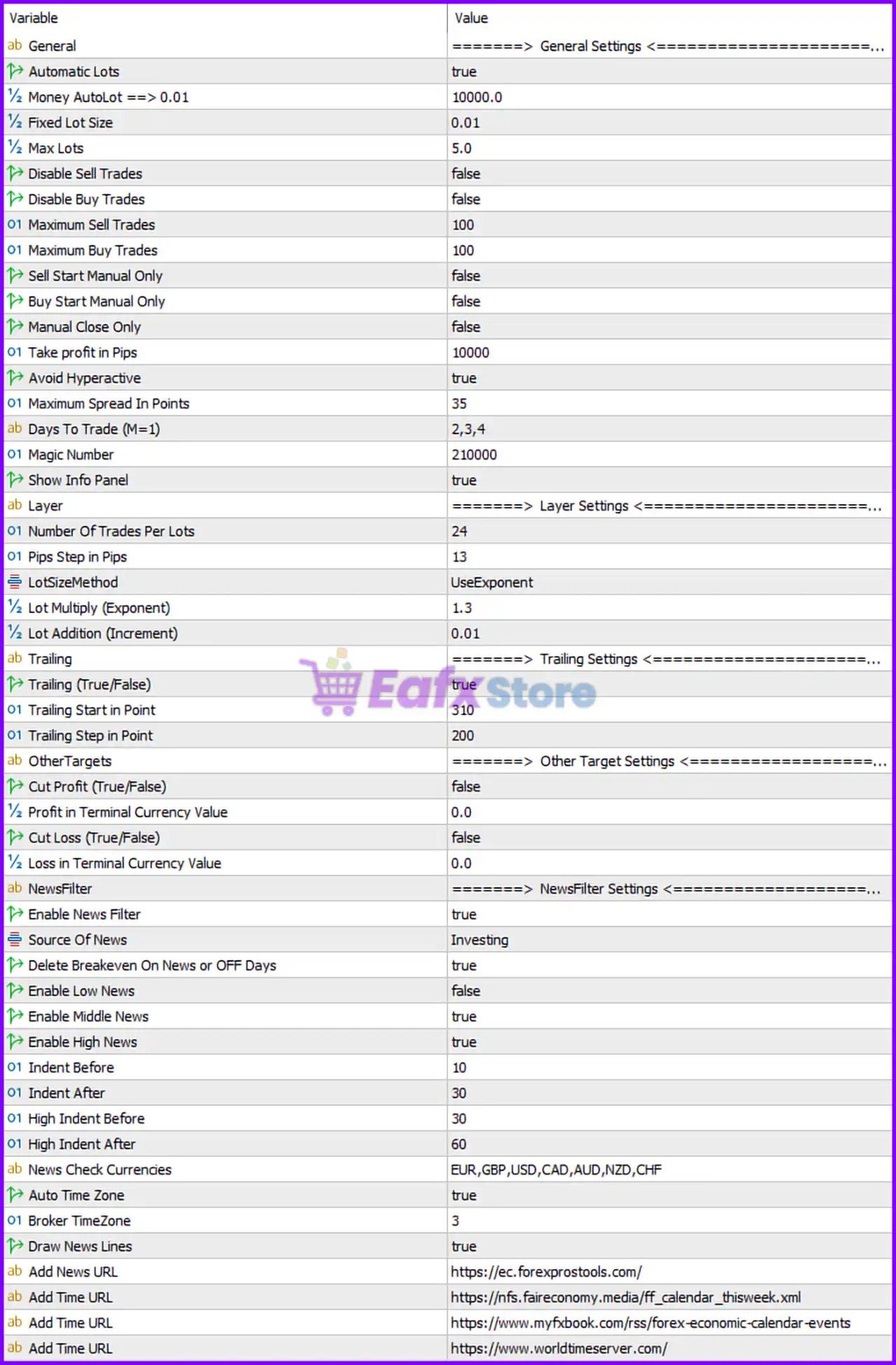
🔶 General Settings
🔹 Automatic Lots = true — Enables automatic lot size calculation based on account balance and predefined money management rules.
🔹 Money AutoLot ==> 0.01 = 10000.0 — Uses 0.01 lots for every $10,000.0 of account balance when Auto Lot is enabled.
🔹 Fixed Lot Size = 0.01 — Uses a fixed trading volume of 0.01 lots when Auto Lot is disabled.
🔹 Max Lots = 5.0 — Limits the maximum trading volume to 5.0 lots.
🔹 Disable Sell Trades = false — Sell trading is enabled.
🔹 Disable Buy Trades = false — Buy trading is enabled.
🔹 Maximum Sell Trades = 100 — Allows up to 100 simultaneous Sell positions.
🔹 Maximum Buy Trades = 100 — Allows up to 100 simultaneous Buy positions.
🔹 Sell Start Manual Only = false — Sell trades can be opened automatically by the EA.
🔹 Buy Start Manual Only = false — Buy trades can be opened automatically by the EA.
🔹 Manual Close Only = false — Positions can be closed automatically according to EA logic.
🔹 Take profit in Pips = 10000 — Sets the basket or trade Take Profit target at 10,000 pips.
🔹 Avoid Hyperactive = true — Prevents excessive trade activity and overtrading during volatile market conditions.
🔹 Maximum Spread In Points = 35 — Blocks new entries when spread exceeds 35 points.
🔹 Days To Trade (M=1) = 2,3,4 — Trading is allowed only on Tuesday (2), Wednesday (3), and Thursday (4).
🔹 Magic Number = 210000 — Unique identifier used to manage the EA’s positions.
🔹 Show Info Panel = true — Displays the EA information panel on the chart.
🔶 Layer Settings
🔹 Number Of Trades Per Lots = 24 — Allows up to 24 layered positions per lot-sizing sequence.
🔹 Pips Step in Pips = 13 — Distance between layered trades is 13 pips.
🔹 LotSizeMethod = UseExponent — Uses exponential lot progression for subsequent positions.
🔹 Lot Multiply (Exponent) = 1.3 — Each new layer increases lot size by a factor of 1.3.
🔹 Lot Addition (Increment) = 0.01 — Adds 0.01 lots as the incremental lot growth value.
🔶 Trailing Settings
🔹 Trailing (True/False) = true — Enables the trailing stop system.
🔹 Trailing Start in Point = 310 — Trailing begins once profit reaches 310 points.
🔹 Trailing Step in Point = 200 — Stop Loss moves every 200 points as profit increases.
🔶 Other Target Settings
🔹 Cut Profit (True/False) = false — Basket profit closure by terminal currency value is disabled.
🔹 Profit in Terminal Currency Value = 0.0 — No terminal currency profit target is applied.
🔹 Cut Loss (True/False) = false — Basket loss closure by terminal currency value is disabled.
🔹 Loss in Terminal Currency Value = 0.0 — No terminal currency loss threshold is configured.
🔶 News Filter Settings
🔹 Enable News Filter = true — Activates economic news protection.
🔹 Source Of News = Investing — Uses Investing.com economic calendar data.
🔹 Delete Breakeven On News or OFF Days = true — Removes breakeven orders during news events or non-trading days.
🔹 Enable Low News = false — Low-impact news events are ignored.
🔹 Enable Middle News = true — Medium-impact news events are filtered.
🔹 Enable High News = true — High-impact news events are filtered.
🔹 Indent Before = 10 — Trading restrictions begin 10 minutes before medium-impact news.
🔹 Indent After = 30 — Trading resumes 30 minutes after medium-impact news.
🔹 High Indent Before = 30 — Trading restrictions begin 30 minutes before high-impact news.
🔹 High Indent After = 60 — Trading resumes 60 minutes after high-impact news.
🔹 News Check Currencies = EUR,GBP,USD,CAD,AUD,NZD,CHF — Monitors economic events for these currencies.
🔹 Auto Time Zone = true — Automatically detects and adjusts for broker time.
🔹 Broker TimeZone = 3 — Broker server time is configured as GMT+3.
🔹 Draw News Lines = true — Displays upcoming news events directly on the chart.
🔹 Add News URL = https://ec.forexprostools.com/ — Source URL for economic calendar data.
🔹 Add Time URL = https://nfs.faireconomy.media/ff_calendar_thisweek.xml — Additional economic calendar feed.
🔹 Add Time URL = https://www.myfxbook.com/rss/forex-economic-calendar-events — Alternative economic calendar source.
🔹 Add Time URL = https://www.worldtimeserver.com/ — Time synchronization source.
🔢 Conclusion
Bonnitta Gold MT5 is a sophisticated Gold trading EA that combines aggressive position layering with structured risk controls. Its automatic lot sizing, exponential trade scaling, trailing profit management, and comprehensive news filtering system make it suitable for traders seeking a highly automated approach to Gold trading. Proper configuration of lot progression, layer spacing, and news filters is essential for balancing profitability and risk exposure.
🔢 FAQs
❓ What is the default Magic Number of Bonnitta Gold MT5?
The default Magic Number is 210000.
❓ Does Bonnitta Gold MT5 use automatic lot sizing?
Yes, Automatic Lots = true, using 0.01 lots per $10,000.0 balance.
❓ How many positions can the EA open?
The EA allows up to 100 Buy trades and 100 Sell trades simultaneously.
❓ When does the trailing stop activate?
The trailing system starts at 310 points profit and moves in 200-point increments.
❓ Which economic events are filtered by default?
The EA filters medium-impact and high-impact news events affecting EUR, GBP, USD, CAD, AUD, NZD, and CHF currencies.



