



🔢 Finvesting EA MT5 – Complete Settings & Parameters Guide
Finvesting EA is an automated Forex trading Expert Advisor (EA) designed with dynamic money management, smart grid trading, hedging support, news filtering and advanced risk control features.
The EA combines flexible lot sizing, customizable trade multipliers, and economic news protection to help traders manage positions efficiently across multiple currency pairs.
🔢 Finvesting EA Settings Explained
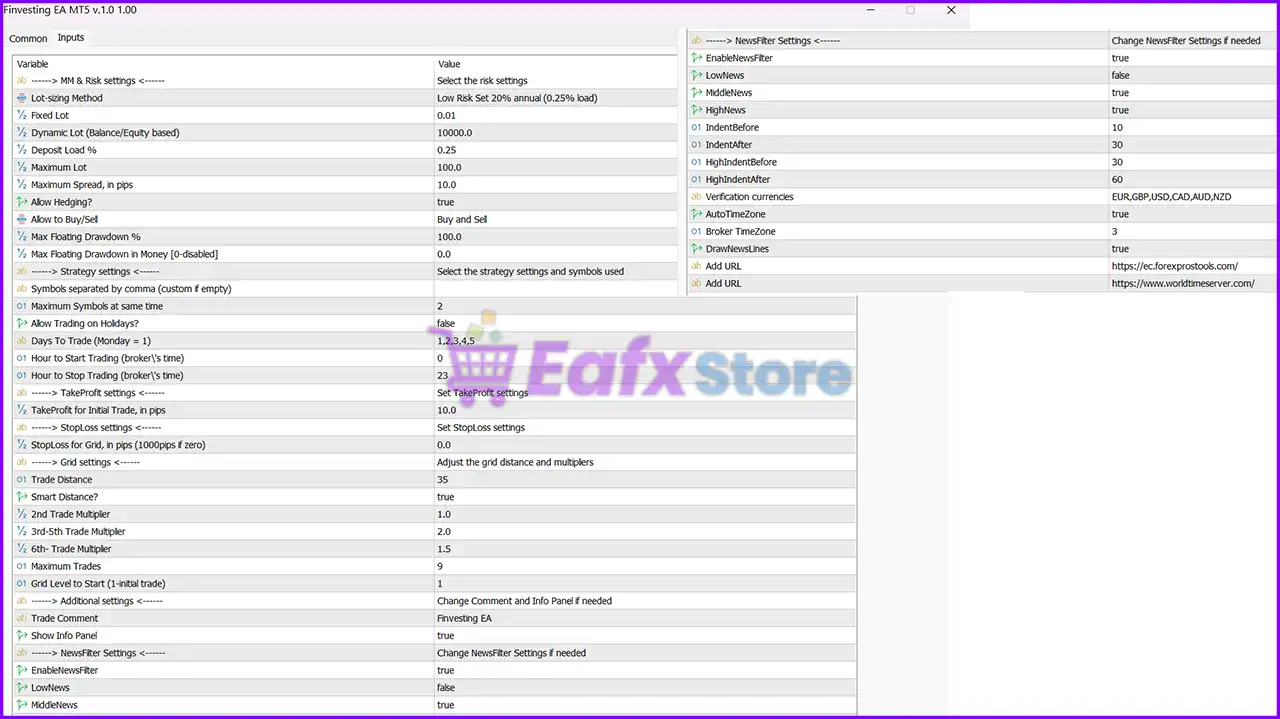
Below are the details of the parameters in the advisor’s trading system settings table:
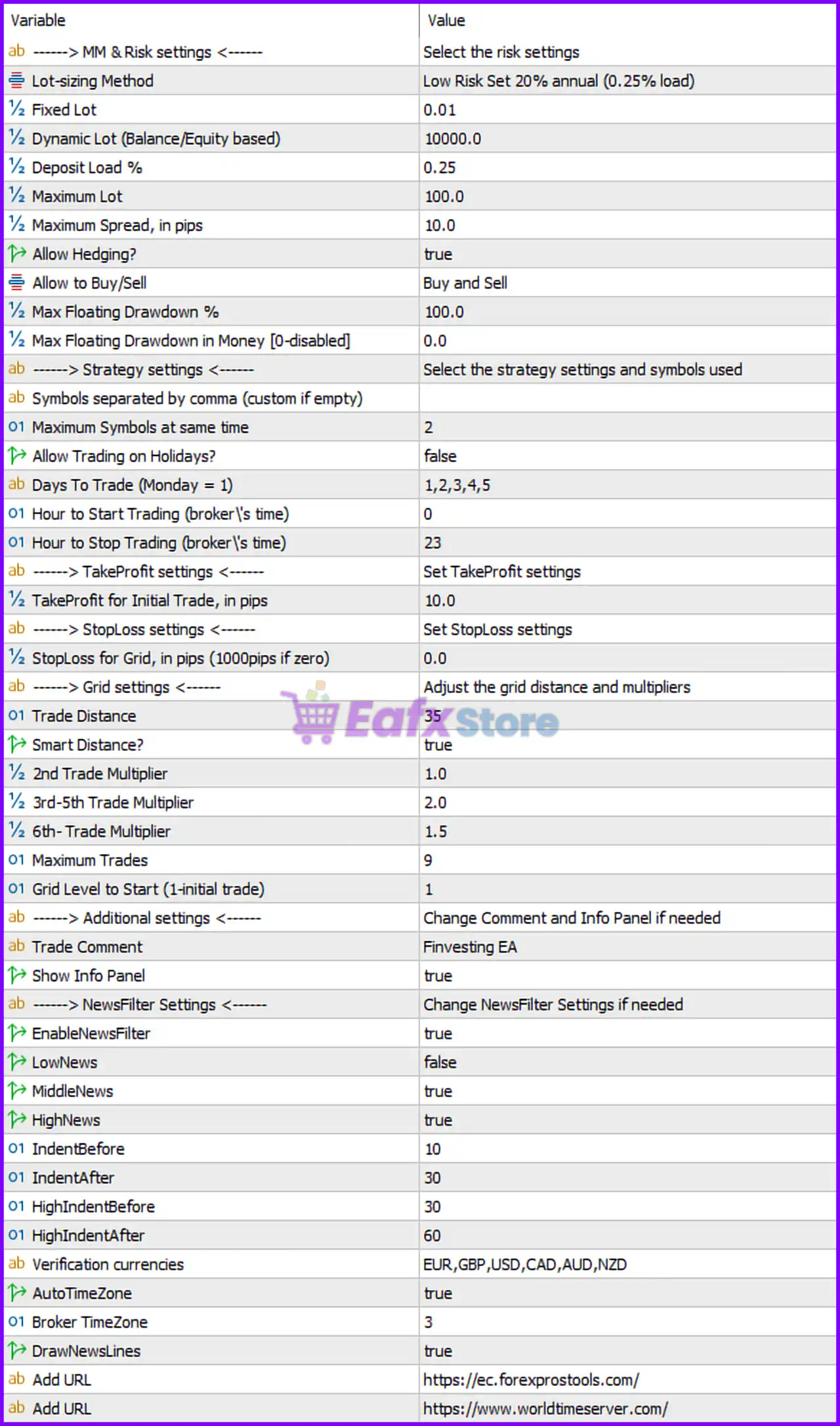
🔶 MM & Risk Settings
🔹 Lot-sizing Method = Low Risk Set 20% annual (0.25% load) — Uses a conservative money management profile targeting approximately 20% annual growth with 0.25% risk load.
🔹 Fixed Lot = 0.01 — Fixed trading volume set to 0.01 lots when fixed lot sizing is used.
🔹 Dynamic Lot (Balance/Equity based) = 10000.0 — Dynamic lot sizing is calculated using a reference balance/equity of 10,000.0.
🔹 Deposit Load % = 0.25 — The EA uses 0.25% deposit load for position sizing calculations.
🔹 Maximum Lot = 100.0 — Maximum allowed trading volume is 100.0 lots.
🔹 Maximum Spread, in pips = 10.0 — Prevents trade entries when spread exceeds 10.0 pips.
🔹 Allow Hedging? = true — Enables simultaneous Buy and Sell positions on the same symbol.
🔹 Allow to Buy/Sell = Buy and Sell — Both Buy and Sell trading directions are permitted.
🔹 Max Floating Drawdown % = 100.0 — Floating drawdown protection threshold is set to 100.0%.
🔹 Max Floating Drawdown in Money [0-disabled] = 0.0 — Monetary drawdown protection is disabled because the value is 0.0.
🔶 Strategy Settings
🔹 Symbols separated by comma (custom if empty) — Allows traders to specify custom trading symbols if required.
🔹 Maximum Symbols at same time = 2 — The EA can trade a maximum of 2 symbols simultaneously.
🔹 Allow Trading on Holidays? = false — Trading is disabled during configured holiday periods.
🔹 Days To Trade (Monday = 1) = 1,2,3,4,5 — Trading is allowed from Monday through Friday.
🔹 Hour to Start Trading (broker's time) = 0 — Trading starts at 00:00 broker server time.
🔹 Hour to Stop Trading (broker's time) = 23 — Trading stops at 23:00 broker server time.
🔶 Take Profit Settings
🔹 TakeProfit for Initial Trade, in pips = 10.0 — Initial trade Take Profit target is 10.0 pips.
🔶 Stop Loss Settings
🔹 StopLoss for Grid, in pips (10000pips if zero) = 0.0 — A value of 0.0 disables the grid Stop Loss and effectively uses the default large limit of 10,000 pips.
🔶 Grid Settings
🔹 Trade Distance = 35 — Distance between grid entries is 35 pips.
🔹 Smart Distance? = true — Enables automatic adjustment of grid spacing based on market conditions.
🔹 2nd Trade Multiplier = 1.0 — The second trade uses a multiplier of 1.0.
🔹 3rd-5th Trade Multiplier = 2.0 — Trades three through five use a lot multiplier of 2.0.
🔹 6th- Trade Multiplier = 1.5 — Trades from the sixth level onward use a multiplier of 1.5.
🔹 Maximum Trades = 9 — Allows a maximum of 9 grid positions.
🔹 Grid Level to Start (1-initial trade) = 1 — Grid management starts from the first trade level.
🔶 Additional Settings
🔹 Trade Comment = Finvesting EA — Custom comment attached to all EA-generated trades.
🔹 Show Info Panel = true — Displays the information panel directly on the trading chart.
🔶 News Filter Settings
🔹 EnableNewsFilter = true — Activates the built-in economic news protection system.
🔹 LowNews = false — Low-impact news events are ignored.
🔹 MiddleNews = true — Medium-impact news events are filtered.
🔹 HighNews = true — High-impact news events are filtered.
🔹 IndentBefore = 10 — Trading restrictions begin 10 minutes before medium-impact news releases.
🔹 IndentAfter = 30 — Trading resumes 30 minutes after medium-impact news releases.
🔹 HighIndentBefore = 30 — Trading restrictions begin 30 minutes before high-impact news events.
🔹 HighIndentAfter = 60 — Trading resumes 60 minutes after high-impact news events.
🔹 Verification currencies = EUR,GBP,USD,CAD,AUD,NZD — News events are monitored for EUR, GBP, USD, CAD, AUD, and NZD currencies.
🔹 AutoTimeZone = true — Automatically detects broker time zone settings.
🔹 Broker TimeZone = 3 — Broker server operates on GMT+3.
🔹 DrawNewsLines = true — Displays economic news markers directly on the chart.
🔹 Add URL = https://ec.forexprostools.com/ — Economic calendar data source.
🔹 Add URL = https://www.worldtimeserver.com/ — Time synchronization source.
🔢 Conclusion
Finvesting EA is a versatile automated trading system that combines conservative risk management, smart grid functionality, hedging support and comprehensive news filtering.
With features such as dynamic lot sizing, adaptive trade spacing, multi-symbol support, and economic event protection, the EA provides traders with a structured framework for managing risk while seeking trading opportunities across multiple market conditions.
🔢 FAQs
❓ What lot sizing method does Finvesting EA use by default?
The EA uses Low Risk Set 20% annual (0.25% load) as its default lot-sizing profile.
❓ How many symbols can Finvesting EA trade simultaneously?
The EA can trade up to 2 symbols at the same time.
❓ Does Finvesting EA support hedging?
Yes, Allow Hedging = true, enabling both Buy and Sell positions on the same instrument.
❓ What is the default Take Profit for the initial trade?
The initial Take Profit target is 10.0 pips.
❓ Which economic news events are filtered by default?
The EA filters medium-impact and high-impact news events related to EUR, GBP, USD, CAD, AUD, and NZD currencies.


