









Vega Bot MT5 with SetFiles (Latest version) - Unlimited

Subscriptions for Special Plan
- 30 EA package is more economical!
- Special package with 99%
- Download 1 EA/Day

Subscriptions for Premium Membership
- Download Unlimited in 1 Year
- Get 100% Discount
- Get free access to all

Subscriptions for Gold Membership
- 1 Year Membership
- Get 100% Discount
- Access EA+Indicator+Course
Frequently bought together 🎁
Add these products to enhance your purchase


Quick Verdict
Vega Bot MT5 is a professional automated Gold trading system built for traders seeking long-term consistency rather than short-term speculation. Combining disciplined trend analysis, intelligent position management, and robust risk controls, the EA delivers a balanced approach designed to navigate different market conditions while maintaining stable capital growth.
Best For
✅ XAUUSD (Gold) traders
✅ Medium to long-term automated trading
✅ MT5 users seeking disciplined risk management
✅ Traders preferring systematic strategies
✅ ECN and VPS trading environments
Overall Rating
⭐⭐⭐⭐⭐ 9.6/10
| Category | Score |
|---|---|
| Profitability | 9.6/10 |
| Risk Management | 9.4/10 |
| Stability | 9.7/10 |
| Ease of Use | 9.5/10 |
| Overall Value | 9.6/10 |
What is Vega Bot MT5?
Vega Bot MT5 is a professional multi-strategy Expert Advisor (EA) designed to combine advanced trend-following techniques into one powerful and fully customizable trading system. It allows traders to create, modify, and deploy their own strategies without coding, while maintaining strict risk control. Vega Bot works across Forex, Gold, Indices, and Crypto, making it suitable for both beginners and professional traders seeking long-term stability and adaptability.
 Vendor Website: View here
About the Author
This product is compiled by Lo Thi Mai Loan. This author has more than +4 years of experience working on MQL5 with many famous products such as Vega Bot MT5, AI Aurum Pivot MT5, Titan Breaker EA MT5, AI Gold Prime MT5, Golden Blitz MT5, EA Forex Scalping MT5 and others. Among them, Vega Bot is his best performing products.
Delivery time 24h-48h after payment.
Refund if not delivered.
You will receive the current version without any limitations (ID+Time).
Key Features of Vega Bot MT5
Fully Automated Trading
Executes trades automatically on MetaTrader 5 without manual monitoring.
Gold Market Optimization
Developed specifically for XAUUSD market behavior.
Smart Entry Filtering
Filters weaker market conditions before opening positions.
Disciplined Trade Management
Automatically manages open positions according to predefined strategy rules.
Stable Equity Growth
Designed to generate consistent capital appreciation over extended trading periods.
Optimized Risk Control
Balances profitability with controlled drawdown.
Long-Term Strategy
Suitable for traders focused on sustainable portfolio growth.
How Does Vega Bot MT5 Work?
Trend Identification
The EA continuously evaluates market direction before initiating new positions, helping align trades with prevailing momentum.
Intelligent Entry Filtering
Only high-quality trading opportunities that satisfy predefined market conditions are executed, reducing unnecessary exposure.
Adaptive Position Management
Open trades are managed dynamically, allowing the EA to react to changing market volatility while protecting accumulated profits.
Automatic Trade Execution
Once the required conditions are satisfied, the system executes and manages trades automatically without manual intervention.
Long-Term Portfolio Logic
The strategy is designed to maintain steady account growth through disciplined execution instead of relying on excessive trading frequency.
Vega Bot MT5 Review
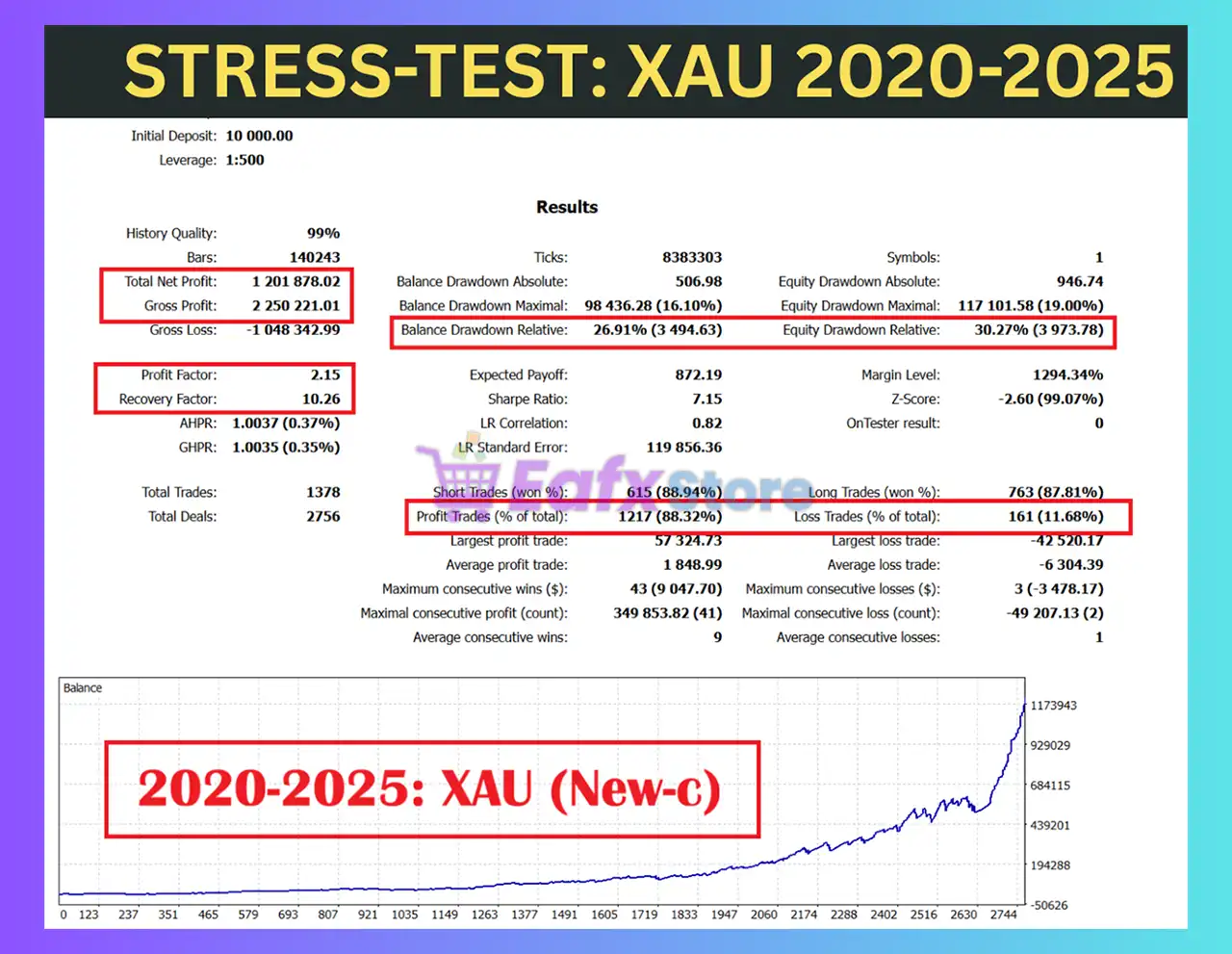
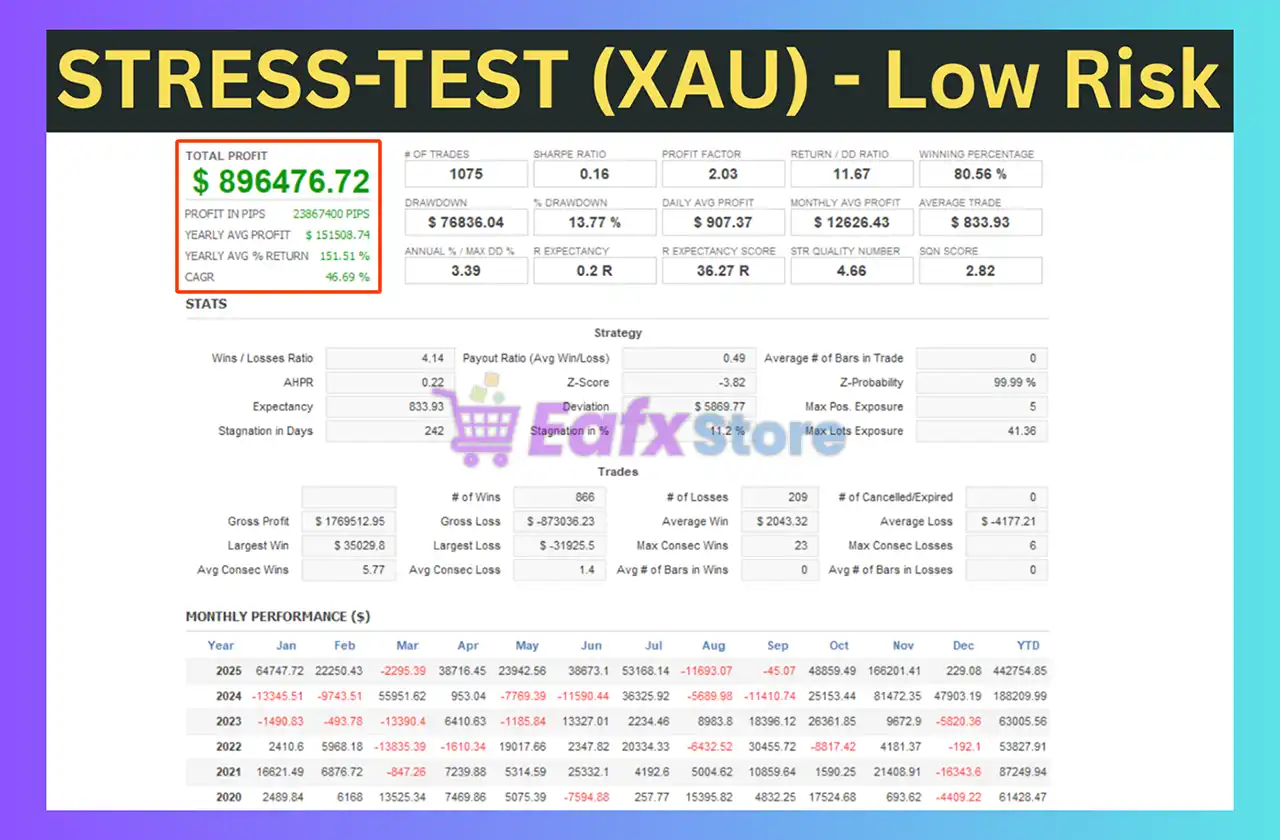
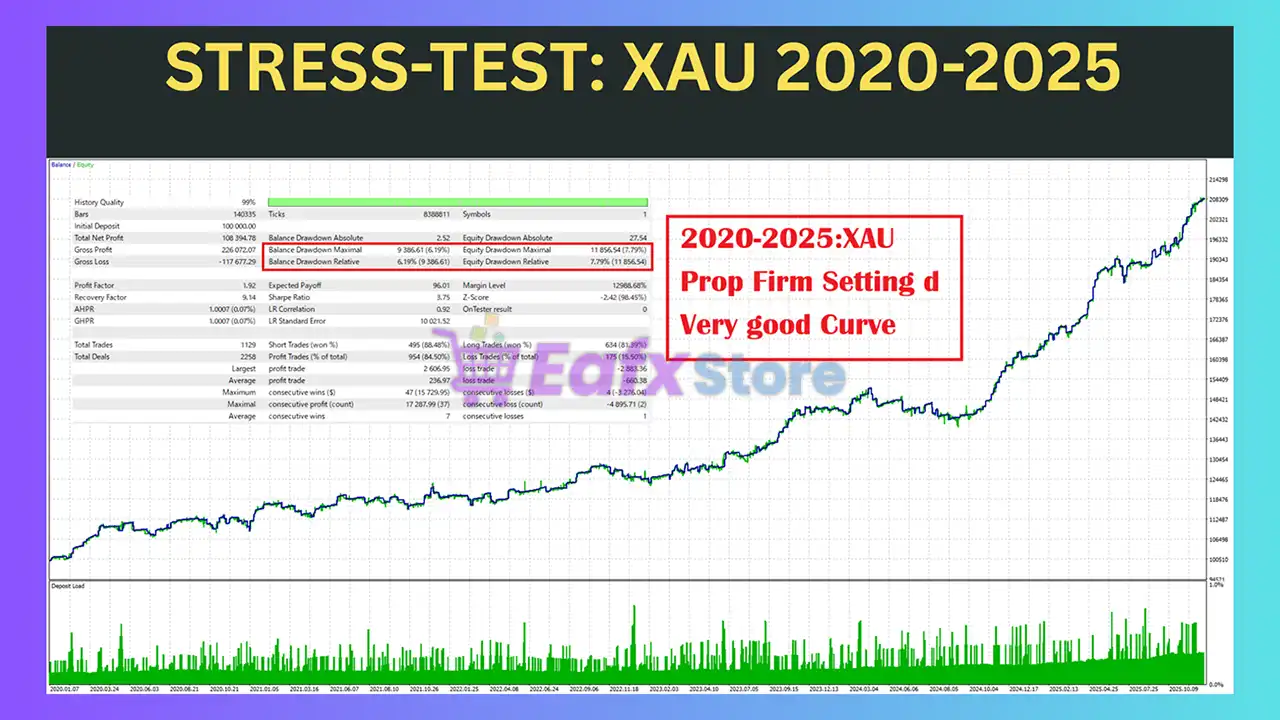
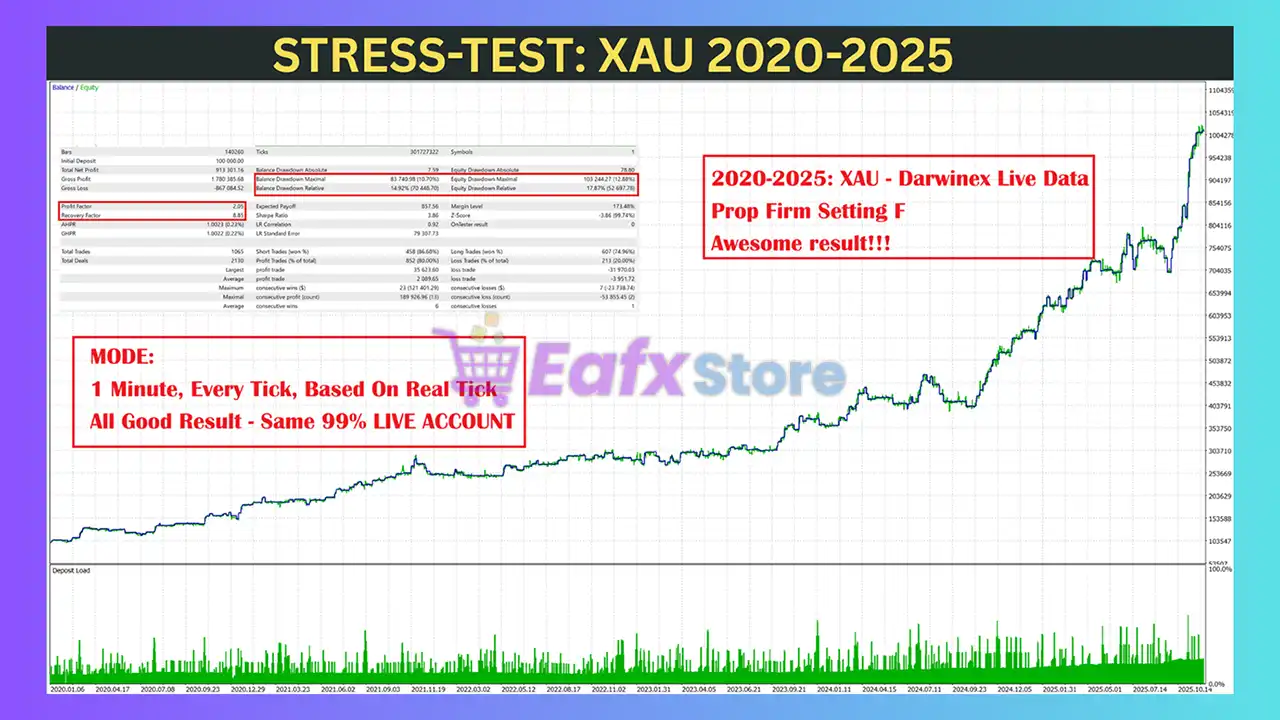
The Vega Bot backtest trading results achieved impressive profit performance for 5 years on the XAUUSD (Gold) pair.
✅ Initial Deposit: $10,000
✅ Total Net Profit: $1.2 million
✅ Win Rate (% of total): 88.32%
✅ Maximum Drawdown: 16.10%
Vega Bot MT5 Backtest
Vega Bot MT5 Backtests
Vega Bot MT5 Backtest results
Why Vega Bot MT5 Stands Out
Long-Term Stress Testing
The strategy has been evaluated over multiple years of historical Gold market data.
High Winning Percentage
More than 88% winning trades during historical testing.
Strong Recovery Capability
Recovery Factor above 10 demonstrates efficient recovery from drawdown periods.
Controlled Risk
Drawdown remains within a manageable range considering the long testing period.
Optimized for Gold
Designed specifically for the unique volatility characteristics of XAUUSD.
What Real Users Are Saying (User Reviews)
Vega Bot shows significant potential in providing stable and reliable profits, making it a reliable tool in the forex market. The advisor is highly appreciated by the MQL5 community in many aspects and has won the trust of users.
⭐⭐⭐⭐⭐ Michael R
“The EA has shown consistent growth over several months. I particularly appreciate the disciplined money management and stable execution.”
⭐⭐⭐⭐⭐ David K
“Easy to install and run. Performance has been smooth on my VPS, and drawdowns have remained within my expectations.”
⭐⭐⭐⭐⭐ Ahmed S
“A well-built Gold trading robot with a balanced strategy. It avoids excessive trading and focuses on quality setups.”
Risk Management Features
Intelligent Position Management
Every trade is managed automatically according to predefined strategy rules.
Controlled Drawdown
The EA prioritizes maintaining reasonable drawdown while pursuing long-term growth.
Disciplined Entry Selection
Only qualifying market conditions trigger new trades.
Automatic Trade Supervision
Positions are continuously monitored without requiring manual intervention.
Capital Preservation Focus
The strategy emphasizes sustainable account growth rather than aggressive short-term returns.
Weaknesses and Risk Warnings
Gold Market Volatility
Although optimized for Gold, XAUUSD remains one of the most volatile financial instruments.
Historical Results Only
Backtests provide valuable information but cannot guarantee future profitability.
Broker Dependency
Execution quality, spreads, commissions, and slippage may affect actual trading results.
Automated Trading Risk
All Expert Advisors experience periods of drawdown, and no trading system can eliminate market risk completely.
Recommended settings
Recommended settings and parameters to pay attention to from developers and experts:
| Features | Type |
|---|---|
| Trading platform | MetaTrader 5 (MT5) |
| Time frames | Any |
| Currency pairs | Forex, Gold, Indices, Crypto |
| Minimum / Recommended deposit | $100 |
| Minimum / Recommended leverage | Any |
| Account type | Standard, Raw, ECN, Pro and Cent accounts |
| Product type | Original version |
| Additional services | Unlock and Decompile |
| Recommended brokers | Exness Broker, Icmarkets Broker |
| Recommended VPS | MyfxVPS.com (Blue VPS, Golden VPS). Lowest Latency, 2 week Free Trial, 100% Free for 12-18 Months. |
Product Download Package?
The download package of the product suite includes:
Experts
✅ Vega Bot.ex5
SetFiles
✅ GB_XAU.set
✅ GTS_XAU.set
✅ MA-New_XAU.set
✅ RSI-New_XAU.set
✅ USTEC_TFM15-d.set
✅ USTEC_TFM15-a.set
✅ USTEC_TFM15-b.set
✅ USTEC_TFM15-c.set
✅ EURUSD_TFM15-a.set
✅ EURUSD_TFM15-b.set
✅ EURUSD_TFM15-c.set
✅ USDJPY_TFM15-a.set
✅ GBPUSD_TFM15-a.set
✅ Prop-Firm_XAUUSD.set
✅ Supertrend-new_XAU.set
➡️ Reviewed by David Easton
Conclusion
In short, Vega Bot MT5 stands out as a powerful all-in-one trading solution, combining multi-strategy intelligence with a no-code strategy builder for maximum flexibility. Backed by long-term backtests, strict risk control, and zero martingale or grid usage, it suits both prop firms and personal accounts. A future-proof EA that turns customization and safety into sustainable profits.
🔢 Vega Bot MT5 – Complete Settings & Parameters Guide
Vega Bot MT5 is an advanced automated trading Expert Advisor for MetaTrader 5 that combines trend-following logic, swing structure analysis, SuperTrend filtering, Moving Average confirmation, RSI filtering and optional AI-assisted trade validation.
The EA includes extensive money management controls, news event protection, trailing stop management, and multi-layer trend confirmation to help traders identify high-probability market opportunities while controlling risk.
🔢 Vega Bot MT5 Settings Explained
Below are the details of the parameters in the advisor’s trading system settings table:
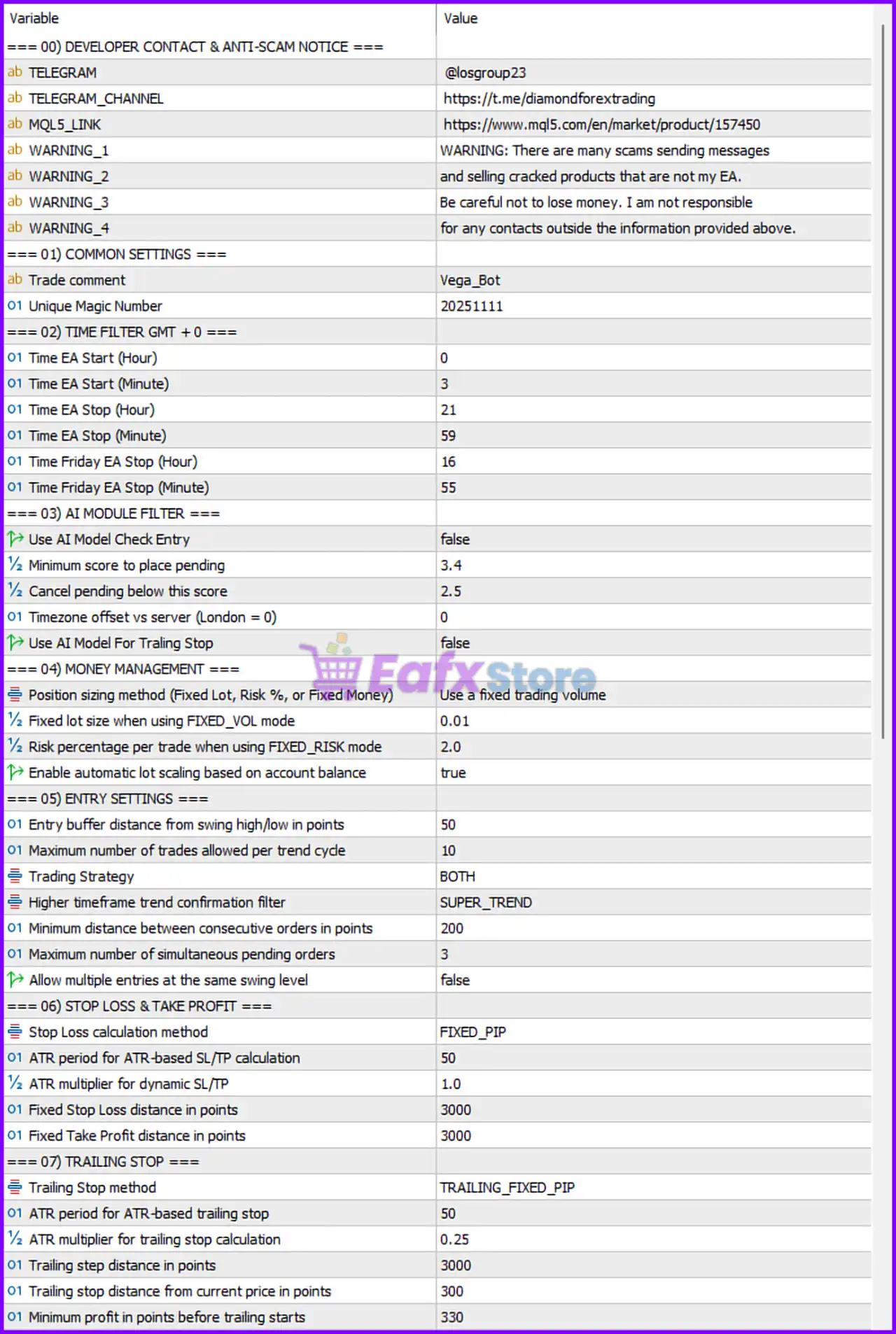
Vega Bot MT5 Settings Panel
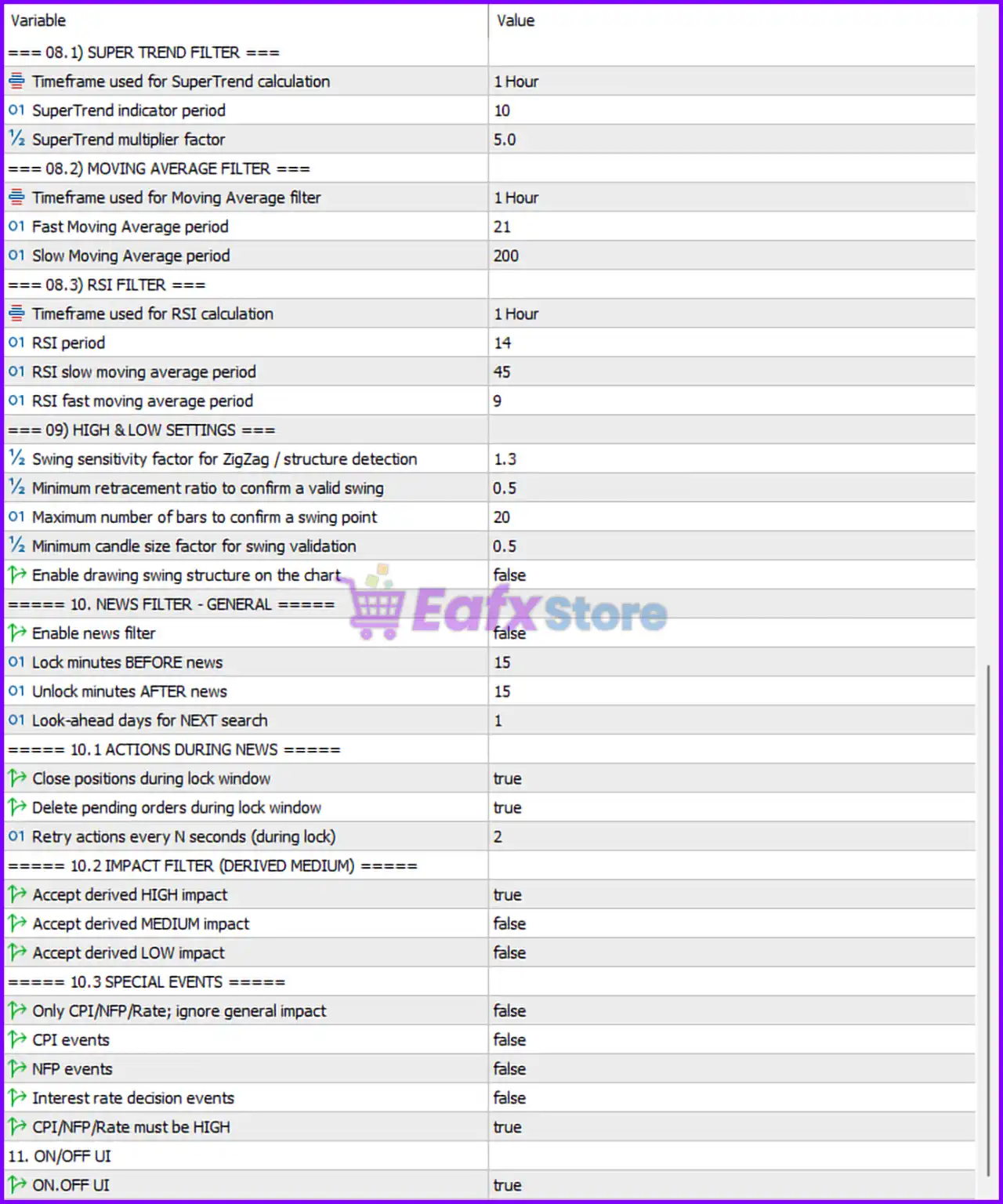
Vega Bot MT5 Setting Panel
🔶 Common Settings
🔹 Trade comment = Vega_Bot — Comment attached to all trades opened by the EA.
🔹 Unique Magic Number = 20251111 — Unique identifier used to manage the EA’s positions.
🔶 Time Filter (GMT+0)
🔹 Time EA Start (Hour) = 0 — Trading begins at 00:00 GMT.
🔹 Time EA Start (Minute) = 3 — Trading starts at minute 03.
🔹 Time EA Stop (Hour) = 21 — Trading stops at 21:00 GMT.
🔹 Time EA Stop (Minute) = 59 — Trading ends at minute 59.
🔹 Time Friday EA Stop (Hour) = 16 — Friday trading stops at 16:00 GMT.
🔹 Time Friday EA Stop (Minute) = 55 — Friday trading ends at 16:55 GMT.
🔶 AI Module Filter
🔹 Use AI Model Check Entry = false — AI entry validation is disabled.
🔹 Minimum score to place pending = 3.4 — Minimum AI score required to allow a pending order.
🔹 Cancel pending below this score = 2.5 — Pending orders are canceled if AI score falls below 2.5.
🔹 Timezone offset vs server (London = 0) = 0 — No offset between configured timezone and London time.
🔹 Use AI Model For Trading Stop = false — AI-based trade exit management is disabled.
🔶 Money Management
🔹 Position sizing method (Fixed Lot, Risk %, or Fixed Money) = Use a fixed trading volume — Fixed lot sizing mode is active.
🔹 Fixed lot size when using FIXED_VOL mode = 0.01 — Each trade opens with 0.01 lots.
🔹 Risk percentage per trade when using FIXED_RISK mode = 2.0 — Risk per trade would be 2.0% if Fixed Risk mode is selected.
🔹 Enable automatic lot scaling based on account balance = true — Lot sizes can scale automatically with account growth.
🔶 Entry Settings
🔹 Entry buffer distance from swing high/low in points = 50 — Orders are placed 50 points from detected swing levels.
🔹 Maximum number of trades allowed per trend cycle = 10 — Up to 10 trades can be opened within one trend cycle.
🔹 Trading Strategy = BOTH — Both long and short trading strategies are enabled.
🔹 Higher timeframe trend confirmation filter = SUPER_TREND — SuperTrend is used for trend confirmation.
🔹 Minimum distance between consecutive orders in points = 200 — Orders must be separated by at least 200 points.
🔹 Maximum number of simultaneous pending orders = 3 — Up to 3 pending orders may exist at once.
🔹 Allow multiple entries at the same swing level = false — Prevents duplicate entries on the same swing structure.
🔶 Stop Loss & Take Profit
🔹 Stop Loss calculation method = FIXED_PIP — Uses a fixed pip-based stop loss.
🔹 ATR period for ATR-based SL/TP calculation = 50 — ATR period used when ATR mode is enabled.
🔹 ATR multiplier for dynamic SL/TP = 1.0 — Multiplier applied to ATR-based stop calculations.
🔹 Fixed Stop Loss distance in points = 3000 — Stop loss is set at 3000 points.
🔹 Fixed Take Profit distance in points = 3000 — Take profit is set at 3000 points.
🔶 Trailing Stop
🔹 Trailing Stop method = TRAILING_FIXED_PIP — Uses fixed-pip trailing stop logic.
🔹 ATR period for ATR-based trailing stop = 50 — ATR period used if ATR trailing is selected.
🔹 ATR multiplier for trailing stop calculation = 0.25 — ATR multiplier for trailing calculations.
🔹 Trailing step distance in points = 3000 — Stop updates every 3000 points of movement.
🔹 Trailing stop distance from current price in points = 300 — Maintains a 300-point trailing distance.
🔹 Minimum profit in points before trailing starts = 330 — Trailing activates after 330 points profit.
🔶 SuperTrend Filter
🔹 Timeframe used for SuperTrend calculation = 1 Hour — SuperTrend calculations use the H1 timeframe.
🔹 SuperTrend indicator period = 10 — SuperTrend period setting is 10.
🔹 SuperTrend multiplier factor = 5.0 — Multiplier value used by SuperTrend.
🎯 Moving Average Filter
🔹 Timeframe used for Moving Average filter = 1 Hour — MA calculations use the H1 timeframe.
🔹 Fast Moving Average period = 21 — Fast MA uses period 21.
🔹 Slow Moving Average period = 200 — Slow MA uses period 200.
🎯 RSI Filter
🔹 Timeframe used for RSI calculation = 1 Hour — RSI is calculated on H1.
🔹 RSI period = 14 — RSI period length is 14.
🔹 RSI slow moving average period = 45 — Slow RSI MA uses period 45.
🔹 RSI fast moving average period = 9 — Fast RSI MA uses period 9.
🔶 High & Low Settings
🔹 Swing sensitivity factor for ZigZag / structure detection = 1.3 — Controls swing detection sensitivity.
🔹 Minimum retracement ratio to confirm a valid swing = 0.5 — Requires a 50% retracement for swing confirmation.
🔹 Maximum number of bars to confirm a swing point = 20 — Swing must be confirmed within 20 candles.
🔹 Minimum candle size factor for swing validation = 0.5 — Minimum candle strength required for swing confirmation.
🔹 Enable drawing swing structure on the chart = false — Swing structures are not displayed.
🔶 News Filter – General
🔹 Enable news filter = false — Economic news filtering is disabled.
🔹 Lock minutes BEFORE news = 15 — Trading pauses 15 minutes before news events.
🔹 Unlock minutes AFTER news = 15 — Trading resumes 15 minutes after events.
🔹 Look-ahead days for NEXT search = 1 — Searches news events one day ahead.
🎯 Actions During News
🔹 Close positions during lock window = true — Open positions are closed during news lock periods.
🔹 Delete pending orders during lock window = true — Pending orders are removed during lock periods.
🔹 Retry actions every N seconds (during lock) = 2 — Rechecks every 2 seconds.
🎯 Impact Filter (Derived Medium)
🔹 Accept derived HIGH impact = true — High-impact events are recognized.
🔹 Accept derived MEDIUM impact = false — Medium-impact events are ignored.
🔹 Accept derived LOW impact = false — Low-impact events are ignored.
🎯 Special Events
🔹 Only CPI/NFP/Rate; ignore general impact = false — General economic events are also considered.
🔹 CPI events = false — CPI-specific filtering disabled.
🔹 NFP events = false — NFP-specific filtering disabled.
🔹 Interest rate decision events = false — Interest rate event filtering disabled.
🔹 CPI/NFP/Rate must be HIGH = true — Only high-impact versions of these events qualify.
🎯 On/Off UI
🔹 ON.OFF UI = true — Enables the EA’s graphical control interface.
🔢 Conclusion
Vega Bot MT5 is a sophisticated trend-following and swing-trading Expert Advisor that integrates SuperTrend, Moving Averages, RSI confirmation, advanced money management, optional AI scoring and robust news-event protection.
Its extensive customization options allow traders to tailor entries, exits, risk controls, and market filters to fit various trading styles and account sizes while maintaining disciplined trade execution.
🔢 FAQs
❓ What timeframe does Vega Bot MT5 use for trend confirmation?
Vega Bot MT5 uses the 1-Hour timeframe for SuperTrend, Moving Average, and RSI calculations.
❓ Is AI entry validation enabled by default?
No. Use AI Model Check Entry = false, meaning AI validation is disabled by default.
❓ What Stop Loss and Take Profit values are configured?
The default configuration uses 3000 points Stop Loss and 3000 points Take Profit.
❓ Does Vega Bot MT5 include a news filter?
Yes. The EA includes a comprehensive news filter, although Enable news filter = false by default.
❓ How many trades can the EA open in a single trend cycle?
The EA allows a maximum of 10 trades per trend cycle according to the current configuration.
User Reviews
Only logged in customers who have purchased this product may leave a review.
❓ What is Vega Bot MT5 and what makes it different from other EAs?
Vega Bot MT5 is a professional multi-strategy Expert Advisor that allows traders to build and customize their own trading strategies without coding, while combining trend, breakout, momentum, scalping, and volatility logic in one system.
❓ Which markets can Vega Bot MT5 trade?
Vega Bot MT5 supports Forex pairs, Gold (XAUUSD), Indices, and Crypto assets, making it a versatile EA suitable for diversified trading portfolios.
❓ Does Vega Bot MT5 use martingale, grid, or hedging strategies?
No. Vega Bot MT5 completely avoids martingale, grid, and hedging techniques, focusing instead on structured risk-based execution and capital protection.
❓ Is Vega Bot MT5 suitable for beginners with no coding experience?
Yes. Vega Bot includes a built-in strategy builder that lets users customize entry rules, filters, exits, and risk management directly from the EA interface without writing code.
❓ Can advanced traders fully customize Vega Bot MT5 strategies?
Absolutely. Professional traders can fine-tune multi-timeframe confirmation, filters, position sizing, and exit logic to match their preferred trading style and risk tolerance.
❓ What risk management features does Vega Bot MT5 offer?
The EA uses predefined stop loss, dynamic position sizing, and strict exposure control to maintain consistent drawdown levels and long-term account stability.
❓ What timeframe and account types does Vega Bot MT5 support?
Vega Bot MT5 works on any timeframe and supports Standard, Raw, ECN, Pro, and Cent accounts on the MetaTrader 5 platform.
❓ Are there proven backtest results for Vega Bot MT5?
Yes. Vega Bot MT5 has demonstrated strong backtest performance, including a 5-year XAUUSD test with high win rate and controlled drawdown, indicating long-term robustness.
❓ What is the recommended minimum deposit to use Vega Bot MT5?
The recommended minimum deposit for stable performance is $100, depending on the selected strategy and risk settings.
-
 Original price was: $30,000.00.$599.00Current price is: $599.00.
 -
 Original price was: $3,750.00.$599.00Current price is: $599.00.
 -
 Original price was: $30,000.00.$599.00Current price is: $599.00.
 -
 Original price was: $999.00.$89.00Current price is: $89.00.
-
 0Original price was: $290.00.$179.00Current price is: $179.00.
 -
 0Original price was: $500.00.$199.00Current price is: $199.00.
 -
 1Original price was: $699.00.$249.00Current price is: $249.00.
 -
 27Original price was: $60,000.00.$239.00Current price is: $239.00.
There are no reviews yet.