






Nano Machine EA MT5 (Latest version) – GroupBuy
Nano Machine EA is a trading robot for AUDUSD, AUDNZD, AUDCAD, USDCAD, EURNZD, USDJPY. Performance has been verified on a real accounts.
Select a variant to see availability.
What is Nano Machine EA?
Nano Machine EA is an advanced Expert Advisor (EA) powered by AI-driven logic for automated trading, focusing on pullback precision, adaptability and stability. Using intelligent indicators and structured risk management, it learns from market behavior to refine execution and deliver consistent performance in dynamic trading environments.
🔶 Vendor Website: View here
🔶 This is GroupBuy ==> How to Join
About the Author
This product is compiled by William Brandon Autry. This author has more than +4 years of experience working on MQL5 with many famous products such as Nano Machine MT5, Syna EA MT5, AiQ EA MT5, Mean Machine EA MT5, Byrdi EA MT5 and other advisors. Among them, Nano Machine EA is his best performing products.
Key Features of Nano Machine EA for MT5
🔹 Persistent AI Intelligence: Learns from past trades and market reactions to continuously refine strategy accuracy.
🔹 Machine Symmetry System: Advanced position management balances trades with structured and adaptive logic.
🔹 Flexible Execution Modes: Supports fixed, AI-based or dynamic trade management for different trading styles.
🔹 Multi-Market Adaptability: Operates across pairs and conditions with real-time AI-driven adjustments.
🔹 Autonomous Trading Engine: Fully automated system requiring minimal input with continuous optimization.
What is the Nano Machine EA trading strategy?
🔹 AI Pullback Trading: Focuses on high-probability pullback entries based on adaptive market analysis.
🔹 Dynamic Market Learning: Continuously updates logic using real trade outcomes and price behavior.
🔹 Symmetry-Based Management: Uses structured basket logic to balance entries and exits effectively.
🔹 Selective Trade Execution: Trades only when precise conditions align for higher probability setups.
🔹 Adaptive Exit Strategy: Adjusts Stop Loss (SL) and Take Profit (TP) dynamically based on evolving market conditions.
Nano Machine EA MT5 Review
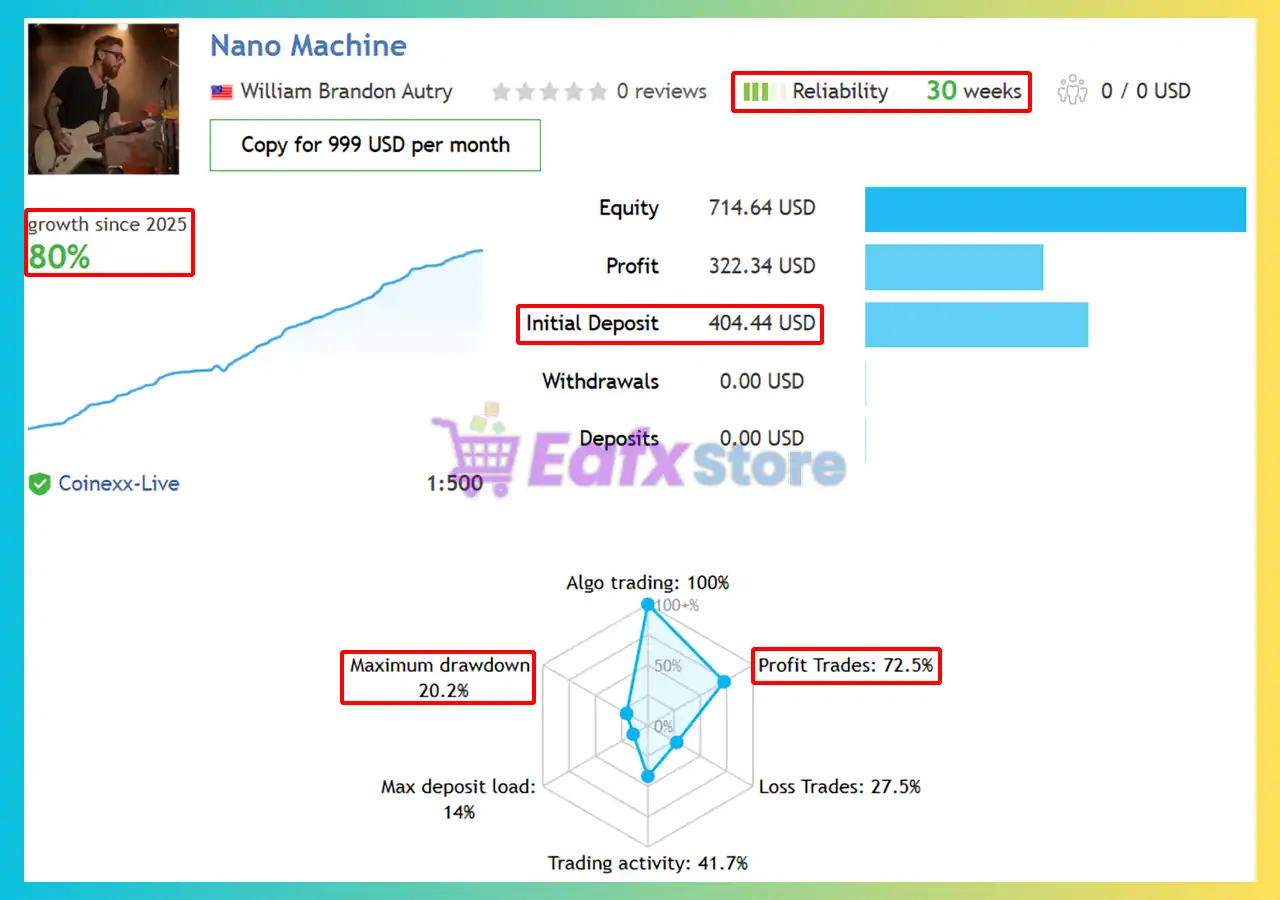
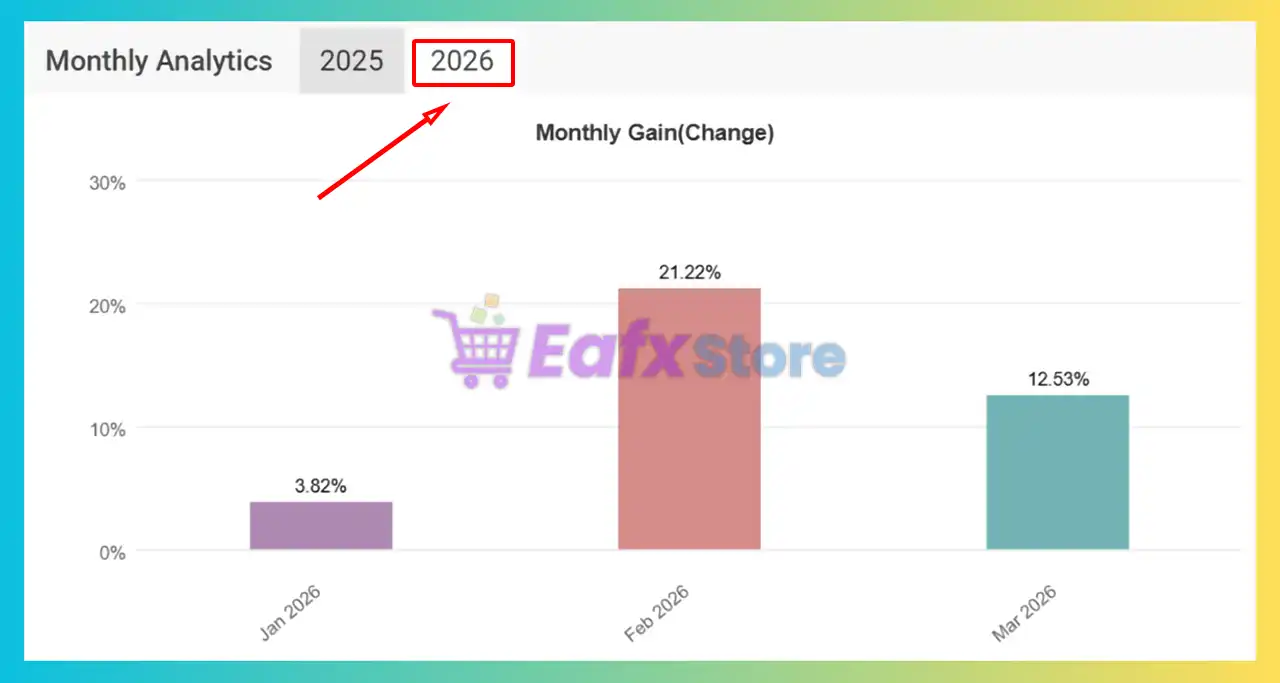
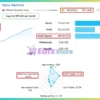
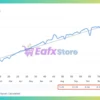
The Nano Machine EA achieved impressive profit performance when trading. Trading results on real account for 30 consecutive weeks of trading:
✅ Initial Deposit: $404.44
✅ Growth Rate: +80%
✅ Win Rate (% of total): 72.5%
✅ Maximum Drawdown: 20.2%
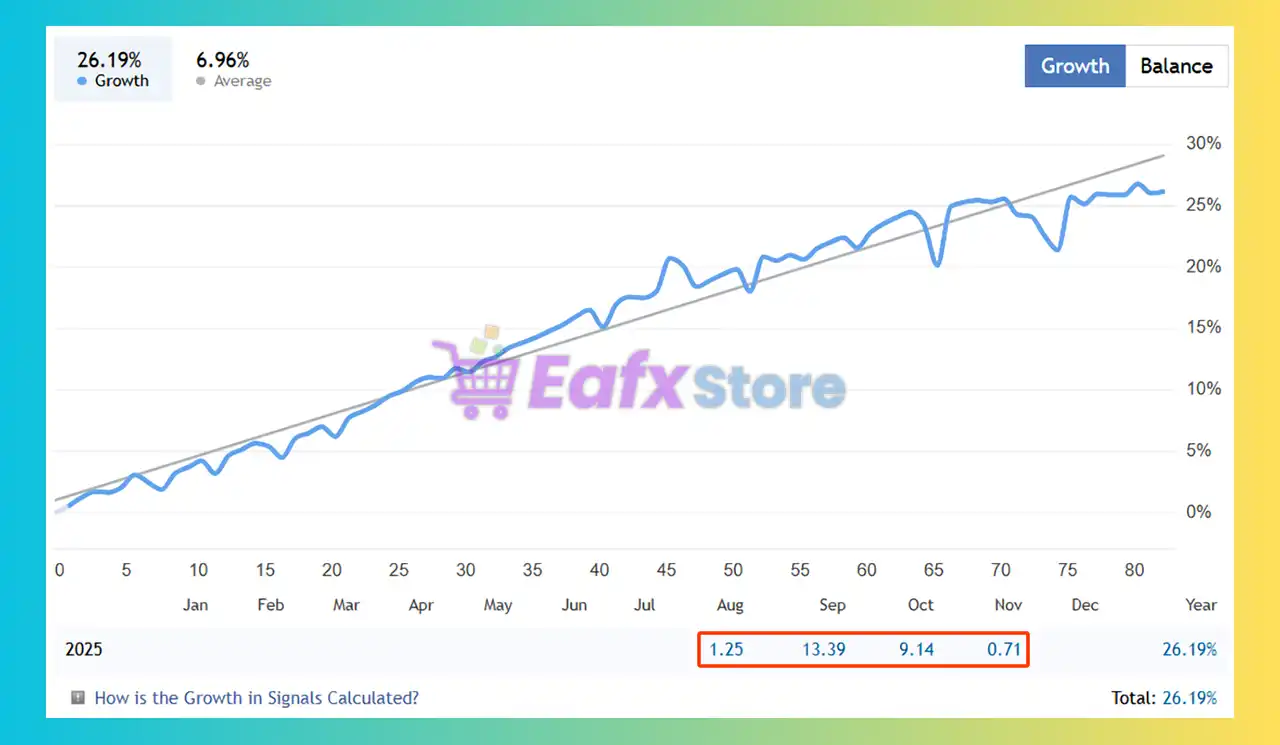
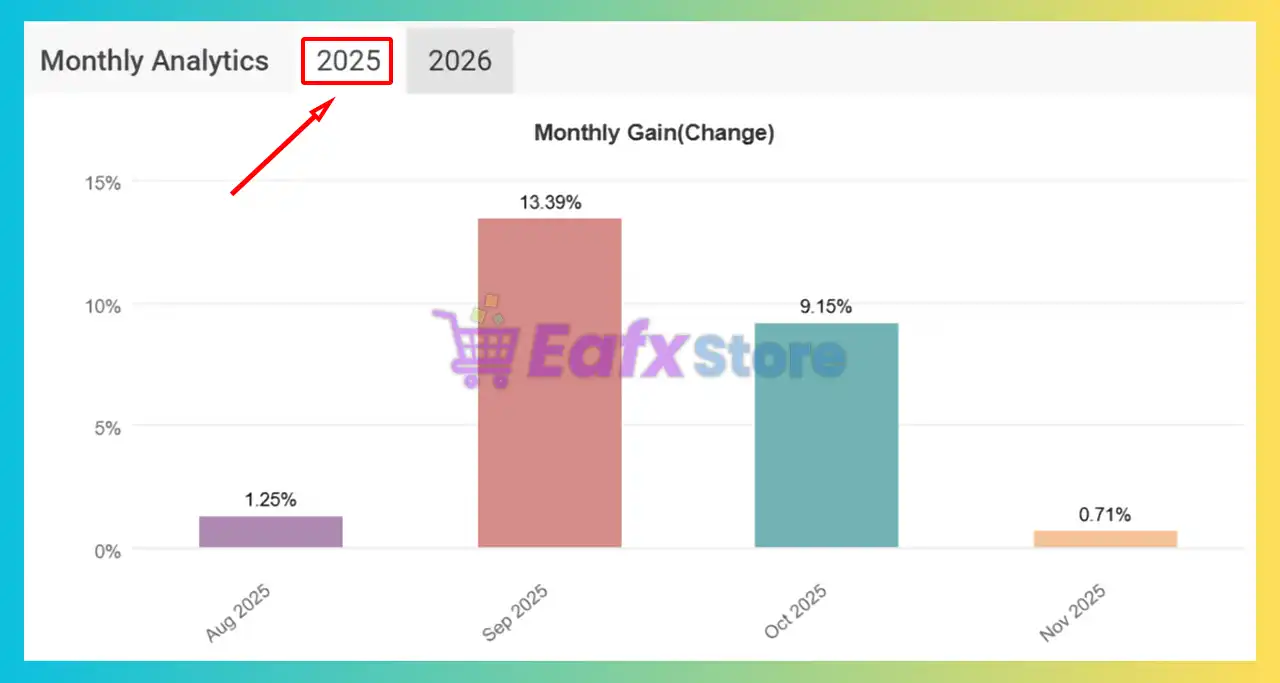
Nano Machine EA Signal Results
Why choose & use Nano Machine EA?
🔹 Continuous Learning System: Improves performance over time using persistent AI-based intelligence.
🔹 High Stability Focus: Designed for consistent execution with controlled exposure and reduced noise.
🔹 Advanced Risk Control: Integrates structured protection and adaptive management across trades.
🔹 Flexible Deployment Options: Works as standalone EA or integrates into multi-strategy ecosystems.
🔹 Future-Ready Technology: Built with modern AI frameworks for long-term adaptability and resilience.
Is Nano Machine EA Safe?
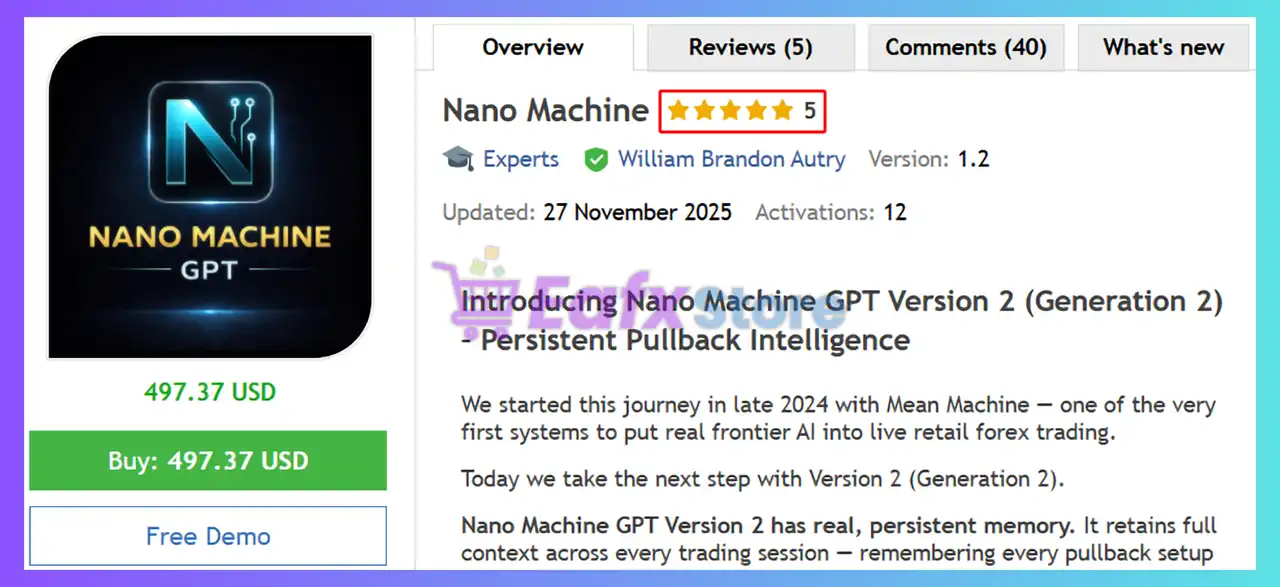
Nano Machine EA shows significant potential in providing stable and reliable profits, making it a reliable tool in the forex market. The advisor is highly appreciated by the MQL5 community in many aspects and has won the trust of users.
➡️ Awatson (2025.12.11): “Great EA, perfect pullback trader. A nice compliment to the other products I have, Syna and AIQ. I can confidently let all three run and trade without my intervention and make nice gains. I recommend to anyone.”
➡️ LUIS ALBERTO (2025.12.01): “I’ve consistently made profits, exceeding my token spending by 70% when combined with Syna and Mean Machine. I’ve already made a profit today with Nano Machine. I think these Expert Advisors (EAs) are really good.”
➡️ Konrad Mieszkowski (2025.11.27): “All of his EAs are of the highest quality. I won’t participate in the lottery because I always buy all of Brandon’s EAs, so I’ll leave that opportunity for new customers. It’s an investment like buying gold bars. It always pays off. I couldn’t wait for this EA to be released.”
Recommended settings
Recommended settings and parameters to pay attention to from developers and experts:
| Features | Type |
|---|---|
| Trading platform | MetaTrader 5 (MT5) |
| Time frames | Any |
| Currency pairs | AUDCAD, AUDUSD, NZDUSD, AUDNZD, NZDCAD, GBPUSD, EURUSD, EURNZD, USDCAD, USDJPY, XAUUSD |
| Minimum / Recommended deposit | $100 |
| Minimum / Recommended leverage | Any |
| Account type | Any |
| Product type | Original version |
| Additional services | Unlock and Decompile |
| Recommended brokers | Exness Broker, Icmarkets Broker |
| Recommended VPS | MyfxVPS.com (Blue VPS, Golden VPS). Lowest Latency, 2 week Free Trial, 100% Free for 12-18 Months. |
➡️ Reviewed by David Easton
Product Download Package?
The download package of the product suite includes:
✅ Setting (If Any).docx
✅ Installation Guide.docx
Conclusion
In short, Nano Machine for MT5 stands out as a next-generation Artificial Intelligence (AI) trading solution built for consistency, transparency and prop-firm compliance. By combining institutional-grade AI models, pullback-focused logic, and equity-based risk control, it delivers stable real-account performance across multiple market regimes. A smart, scalable AI EA designed for traders who value precision, safety and long-term confidence.
Nano Machine EA MT5 Settings Explained – Complete Configuration Guide
Nano Machine EA is an advanced AI-powered Expert Advisor (EA) for MetaTrader 5 that combines machine learning, news filtering, volatility analysis, web grounding and multi-API intelligence systems.
The EA integrates modern AI technologies such as ChatGPT, Claude, Gemini, Grok, DeepSeek, and XGBoost to optimize market analysis and automated trade execution.
With extensive risk management, strategy customization, and AI-enhanced decision-making features, Nano Machine is designed for professional forex traders and Prop Firm users.
- Nano Machine EA MT5 Setting
Nano Machine EA MT5 Full Settings Explanation
Below are the details of the parameters in the advisor’s trading system settings table:
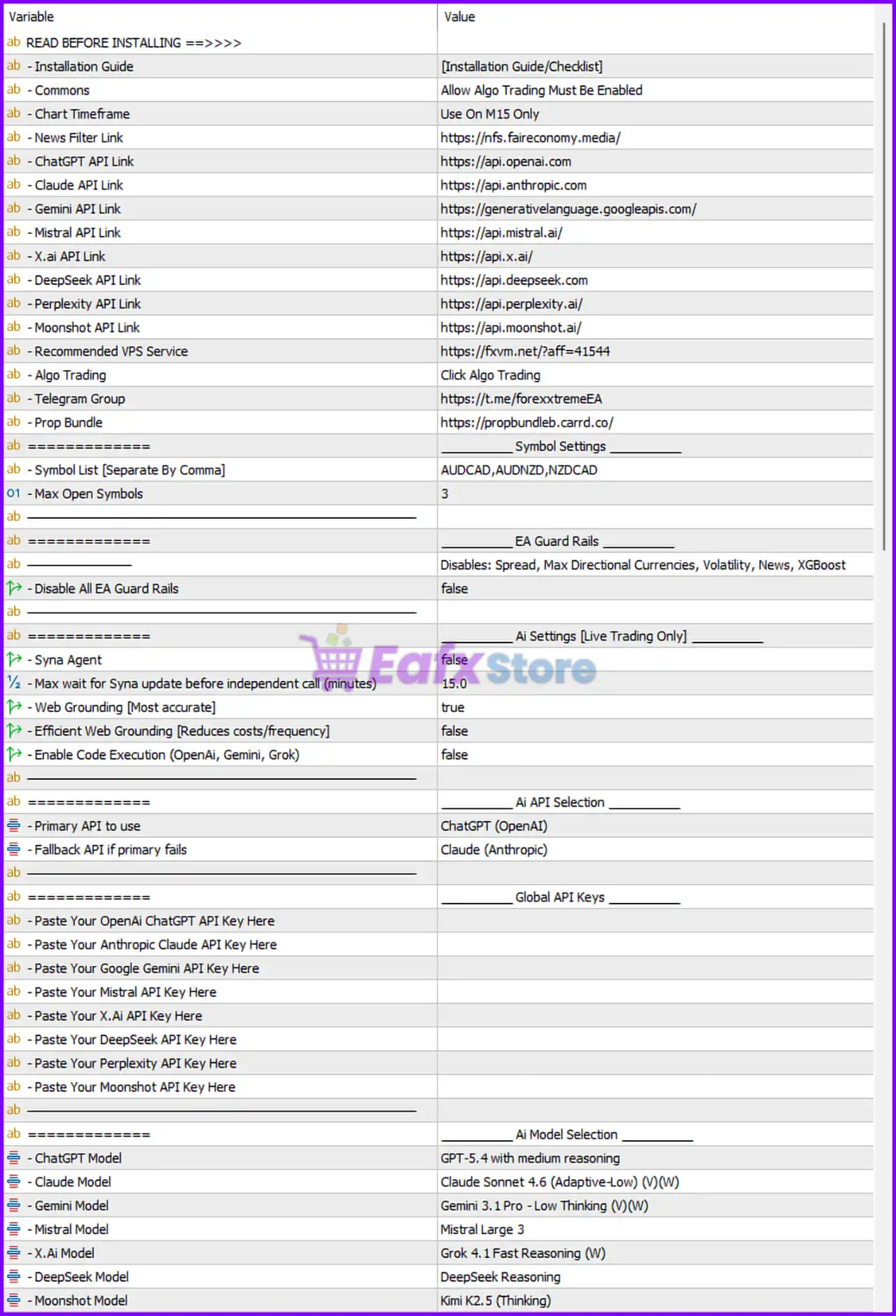
- Nano Machine EA MT5 Setting Panel
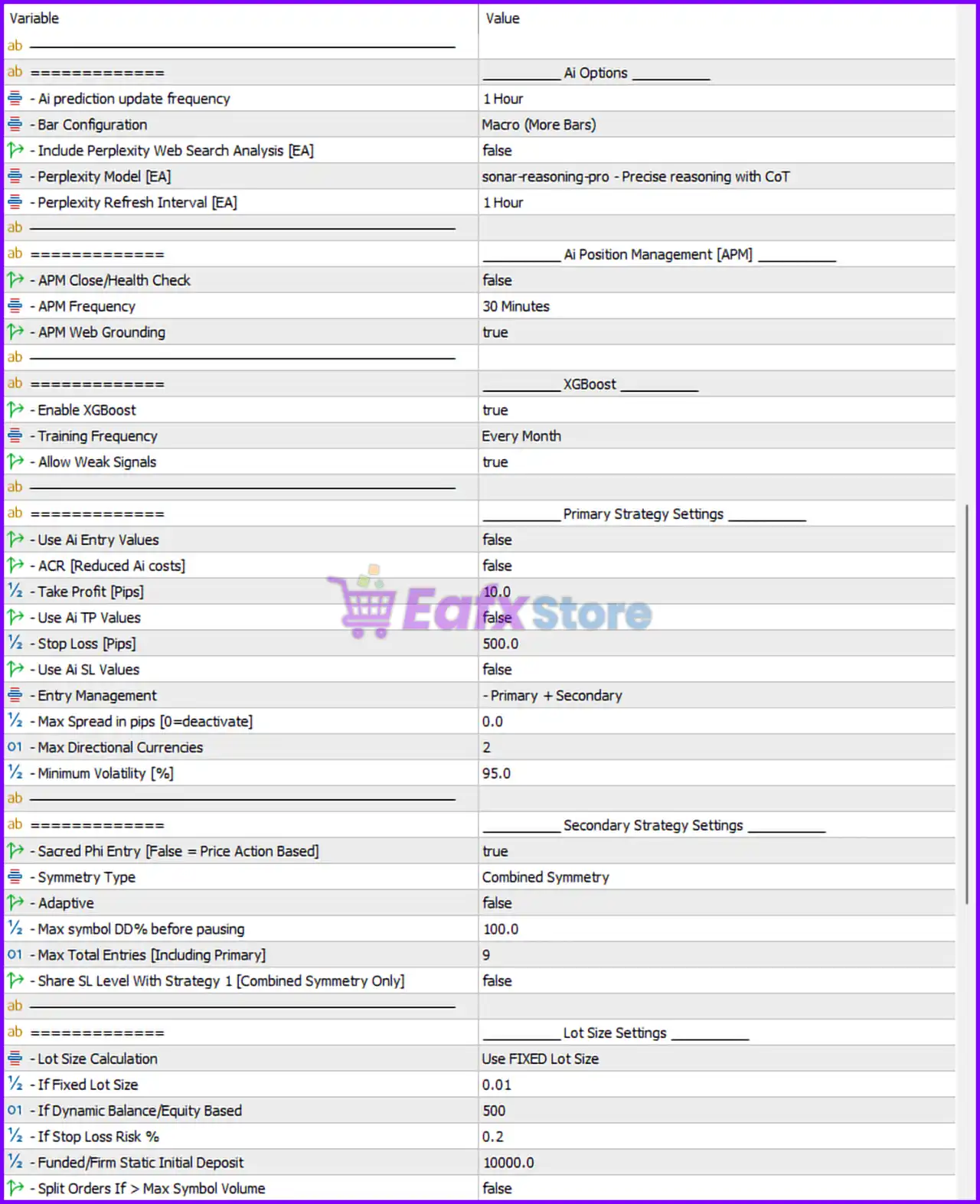
- Nano Machine EA Setting Panel
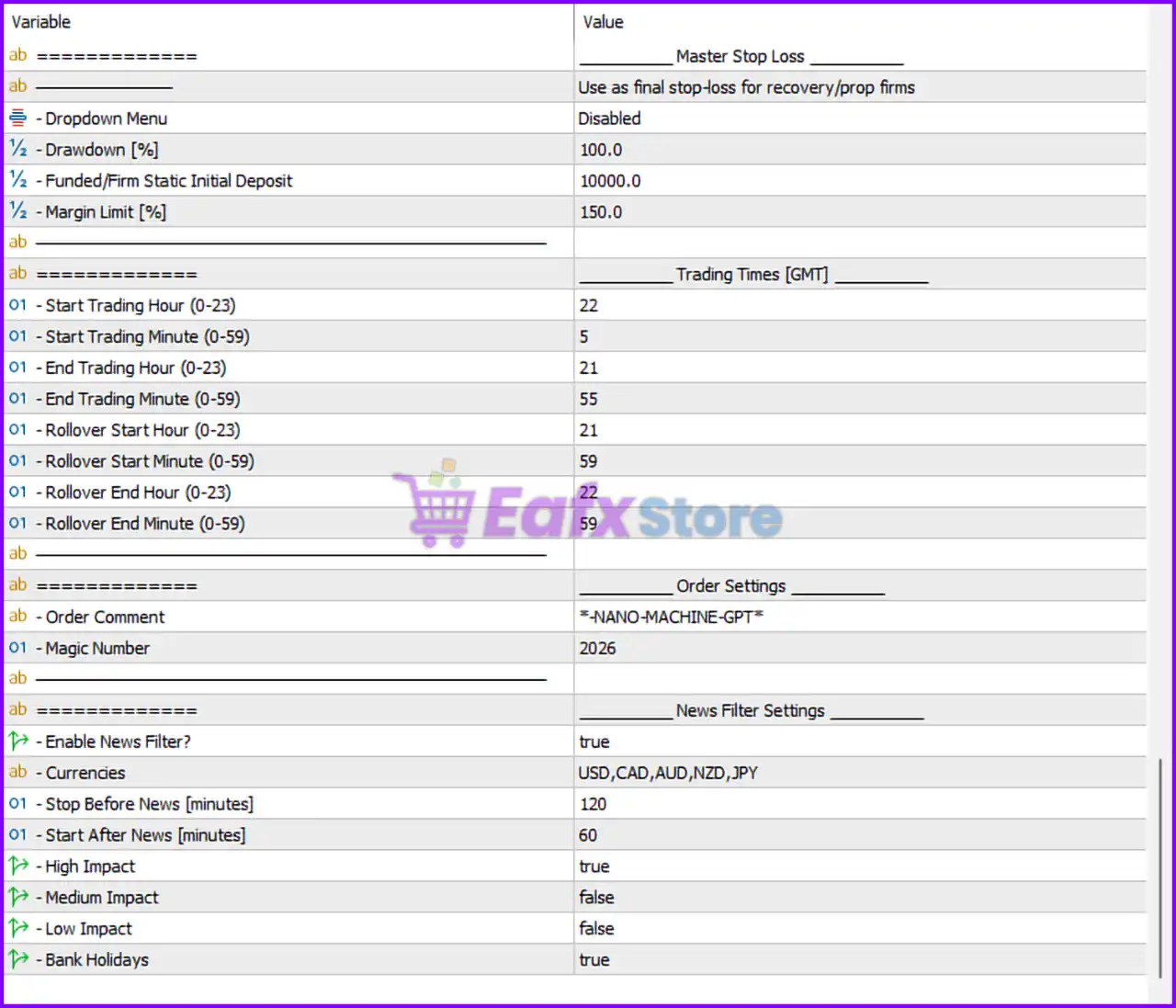
- Nano Machine MT5 Setting Panel
Master Stop Loss Settings
🔹 Dropdown Menu = Disabled: Disables the master stop-loss dropdown menu configuration.
🔹 Drawdown [%] = 100.0: Sets the maximum allowed account drawdown to 100.0%.
🔹 Funded/Firm Static Initial Deposit = 10000.0: Defines the reference initial funded account balance as 10000.0.
🔹 Margin Limit [%] = 150.0: Sets the minimum margin level protection to 150.0%.
Trading Times [GMT]
🔹 Start Trading Hour (0-23) = 22: Trading begins at hour 22 GMT.
🔹 Start Trading Minute (0-59) = 5: Trading starts at minute 05.
🔹 End Trading Hour (0-23) = 21: Trading stops at hour 21 GMT.
🔹 End Trading Minute (0-59) = 55: Trading ends at minute 55.
🔹 Rollover Start Hour (0-23) = 21: Rollover protection starts at 21 GMT.
🔹 Rollover Start Minute (0-59) = 59: Rollover protection starts at minute 59.
🔹 Rollover End Hour (0-23) = 22: Rollover protection ends at 22 GMT.
🔹 Rollover End Minute (0-59) = 59: Rollover protection ends at minute 59.
Order Settings
🔹 Order Comment = -NANO-MACHINE-GPT: Adds the custom trade comment *-NANO-MACHINE-GPT* to all EA trades.
🔹 MagicNumber = 2026: Unique identifier used by the EA to manage its own orders.
News Filter Settings
🔹 Enable News Filter = true: Activates the built-in economic news filter.
🔹 Currencies = USD,CAD,AUD,NZD,JPY: Monitors high-impact news for USD, CAD, AUD, NZD, and JPY.
🔹 Stop Before News [minutes] = 120: Stops trading 120 minutes before news releases.
🔹 Start After News [minutes] = 60: Resumes trading 60 minutes after news events.
🔹 High Impact = true: Filters high-impact economic events.
🔹 Medium Impact = false: Disables medium-impact news filtering.
🔹 Low Impact = false: Disables low-impact news filtering.
🔹 Bank Holidays = true: Avoids trading during bank holidays.
Installation & Platform Settings
🔹 Commons = Allow Algo Trading Must Be Enabled: Requires MT5 Algo Trading to remain enabled.
🔹 Chart Timeframe = Use On M15 Only: Recommended timeframe is M15.
🔹 News Filter Link = https://nfs.faireconomy.media/: Uses FairEconomy as the economic news source.
🔹 ChatGPT API Link = https://api.openai.com: OpenAI API endpoint for ChatGPT integration.
🔹 Claude API Link = https://api.anthropic.com: Anthropic API endpoint for Claude integration.
🔹 Gemini API Link = https://generativelanguage.googleapis.com/: Google Gemini API endpoint.
🔹 Mistral API Link = https://api.mistral.ai/: Mistral AI API endpoint.
🔹 X.ai API Link = https://api.x.ai/: X.ai API integration endpoint.
🔹 DeepSeek API Link = https://api.deepseek.com: DeepSeek API integration endpoint.
🔹 Perplexity API Link = https://api.perplexity.ai/: Perplexity AI endpoint.
🔹 Moonshot API Link = https://api.moonshot.ai/: Moonshot AI endpoint.
🔹 Prop Bundle = https://propbundle.carrd.co/: External prop firm resource link.
Symbol Settings
🔹 Symbol List [Separate By Comma] = AUDCAD,AUDNZD,NZDCAD: Configures the active trading pairs.
🔹 Max Open Symbols = 3: Allows a maximum of 3 simultaneously traded symbols.
EA Guard Rails
🔹 Disable All EA Guard Rails = false: Keeps all protective trading filters enabled.
AI Settings [Live Trading Only]
🔹 Syna Agent = false: Disables the Syna AI Agent system.
🔹 Max wait for Syna update before independent call [minutes] = 15.0: Waits 15 minutes before fallback execution.
🔹 Web Grounding [Most accurate] = true: Enables live web-grounded AI analysis.
🔹 Efficient Web Grounding [Reduces costs/frequency] = false: Disables cost-saving web grounding mode.
🔹 Enable Code Execution (OpenAi, Gemini, Grok) = false: Disables AI code execution features.
AI API Selection
🔹 Primary API to use = ChatGPT (OpenAI): Main AI provider used for market analysis.
🔹 Fallback API if primary fails = Claude (Anthropic): Backup AI provider if OpenAI fails.
AI Model Selection
🔹 ChatGPT Model = GPT-5.4 with medium reasoning: Selected OpenAI model version.
🔹 Claude Model = Claude Sonnet 4.6 (Adaptive-Low) (V)(W): Selected Claude model.
🔹 Gemini Model = Gemini 3.1 Pro – Low Thinking (V)(W): Selected Google Gemini model.
🔹 Mistral Model = Mistral Large 3: Selected Mistral AI model.
🔹 X.AI Model = Grok 4.1 Fast Reasoning (W): Selected Grok AI model.
🔹 DeepSeek Model = DeepSeek Reasoning: Selected DeepSeek model.
🔹 Moonshot Model = Kimi K2.5 (Thinking): Selected Moonshot AI model.
AI Options
🔹 AI prediction update frequency = 1 Hour: AI market predictions refresh every 1 hour.
🔹 Bar Configuration = Macro (More Bars): Uses macro-level bar analysis with more candles.
🔹 Include Perplexity Web Search Analysis [EA] = false: Disables Perplexity web search integration.
🔹 Perplexity Model [EA] = sonar-reasoning-pro – Precise reasoning with CoT: Selected Perplexity AI reasoning model.
🔹 Perplexity Refresh Interval [EA] = 1 Hour: Refresh interval for Perplexity analysis.
AI Position Management [APM]
🔹 APM Close/Health Check = false: Disables AI trade health monitoring.
🔹 APM Frequency = 30 Minutes: AI position management checks every 30 minutes.
🔹 APM Web Grounding = true: Uses live web data for AI position management.
XGBoost Settings
🔹 Enable XGBoost = true: Activates XGBoost machine learning analysis.
🔹 Training Frequency = Every Month: Retrains the XGBoost model monthly.
🔹 Allow Weak Signals = true: Allows weaker AI trade signals.
Primary Strategy Settings
🔹 Use AI Entry Values = false: Disables AI-generated entry levels.
🔹 ACR [Reduced AI costs] = false: Disables AI cost reduction mode.
🔹 Take Profit [Pips] = 10.0: Sets fixed take profit to 10.0 pips.
🔹 Use AI TP Values = false: Disables AI-generated take profit levels.
🔹 Stop Loss [Pips] = 500.0: Sets stop loss to 500.0 pips.
🔹 Use AI SL Values = false: Disables AI-generated stop loss values.
🔹 Entry Management = Primary + Secondary: Uses both primary and secondary entry systems.
🔹 Max Spread in pips [0=deactivate] = 0.0: No spread limit applied.
🔹 Max Directional Currencies = 2: Limits exposure to 2 correlated currencies.
🔹 Minimum Volatility [%] = 95.0: Requires minimum volatility level of 95.0%.
Secondary Strategy Settings
🔹 Sacred Phi Entry [False = Price Action Based] = true: Enables Phi-based mathematical entry logic.
🔹 Symmetry Type = Combined Symmetry: Uses combined symmetry calculations.
🔹 Adaptive = false: Disables adaptive symmetry logic.
🔹 Max symbol DD % before pausing = 100.0: Pauses trading after 100% symbol drawdown.
🔹 Max Total Entries [Including Primary] = 9: Allows a maximum of 9 total entries.
🔹 Share SL Level With Strategy 1 [Combined Symmetry Only] = false: Disables shared stop loss with Strategy 1.
Lot Size Settings
🔹 Lot Size Calculation = Use FIXED Lot Size: Uses fixed lot sizing mode.
🔹 If Fixed Lot Size = 0.01: Fixed lot size set to 0.01.
🔹 If Dynamic Balance/Equity Based = 500: Dynamic balance scaling reference value.
🔹 If Stop Loss Risk % = 0.2: Risk percentage set to 0.2%.
🔹 Funded/Firm Static Initial Deposit = 10000.0: Static account reference balance.
🔹 Split Orders If > Max Symbol Volume = false: Disables automatic order splitting.
Conclusion
Nano Machine EA MT5 is one of the most sophisticated AI-integrated Expert Advisors available for MetaTrader 5 traders. It combines advanced machine learning, web-grounded AI analysis, XGBoost prediction systems, and multi-model AI integration for highly adaptive market execution. With extensive risk controls, news filters, volatility management, and customizable strategy modules, Nano Machine EA MT5 is especially suitable for professional traders, prop firm users, and advanced algorithmic trading environments.
FAQs
❓ What is Nano Machine EA MT5?
Nano Machine EA MT5 is an AI-powered automated trading robot for MetaTrader 5 that uses machine learning and multiple AI APIs for market analysis.
❓ Does Nano Machine EA MT5 support ChatGPT integration?
Yes, the EA supports ChatGPT, Claude, Gemini, Grok, DeepSeek, Perplexity, and several other AI providers.
❓ Which timeframe is recommended for Nano Machine EA MT5?
The recommended trading timeframe is M15.
❓ Can Nano Machine EA MT5 trade multiple currency pairs?
Yes, the EA supports multi-symbol trading with configurable symbol lists and exposure limits.
❓ Is Nano Machine EA MT5 suitable for prop firm trading?
Yes, the EA includes prop firm protections such as drawdown controls, margin limits, and advanced news filtering.
User Reviews
Only logged in customers who have purchased this product may leave a review.
❓ What is Nano Machine EA and how does it trade the Forex market?
Nano Machine EA is an AI-powered Expert Advisor for MT5 that focuses on pullback trading. It uses institutional-grade AI models to analyze market regime, momentum, volatility, and risk context, executing disciplined trades instead of chasing breakouts.
❓ Which trading strategy does Nano Machine EA use?
The EA applies AI-assisted pullback entries combined with regime and momentum filtering. It trades retracements within existing trends and manages positions using structured basket logic with intelligent exits.
❓ Does Nano Machine EA use Martingale or Grid strategies?
No. Nano Machine EA does not rely on classic Martingale or risky grid averaging. It uses a Machine Symmetry Engine with Fibonacci-based position building and controlled basket management to balance exposure safely.
❓ Is Nano Machine EA suitable for prop firm accounts?
Yes. Nano Machine EA includes prop-firm-aware risk control, such as equity-based drawdown limits and rule-aligned risk profiles, making it suitable for funded and evaluation accounts.
❓ What currency pairs does Nano Machine EA support?
Nano Machine EA is optimized for AUDUSD, AUDNZD, AUDCAD, USDCAD, EURNZD, USDJPY, and NZDUSD, but it can be scaled across multiple pairs within a diversified portfolio.
❓ What timeframes work best with Nano Machine EA?
The EA is designed to operate on any timeframe. Its AI models adapt dynamically to different market conditions, making it flexible for both intraday and swing trading styles.
❓ What is the minimum deposit required to use Nano Machine EA?
The recommended minimum deposit is $100, making Nano Machine EA accessible to both beginner and experienced traders while still maintaining structured risk management.
❓ How does Nano Machine EA manage risk and drawdown?
Risk is managed through AI-validated stop-loss and take-profit logic, equity-based drawdown controls, and symmetrical basket closing. This helps limit losses and maintain stable account growth.
❓ Can Nano Machine EA run alongside other EAs?
Yes. Nano Machine EA can operate as a standalone system or as an agent within a broader AI trading portfolio, making it ideal for traders running multiple non-correlated strategies.
❓ Is Nano Machine EA beginner-friendly and fully automated?
Absolutely. Nano Machine EA is fully automated, requires no manual trade intervention, and features transparent logic, making it suitable for beginners while still powerful enough for professional traders.
-
 Price range: $89.00 through $599.00
 -
 Price range: $89.00 through $599.00
 -
 Price range: $70.00 through $599.00
 -
 Price range: $65.00 through $599.00
-
 5Price range: $89.00 through $599.00
 -
 3Price range: $89.00 through $599.00
 -
 0Price range: $89.00 through $599.00
 -
 2
2
There are no reviews yet.