


🔢 Dracko MT5 Bot Settings Explained – Complete Parameter Guide
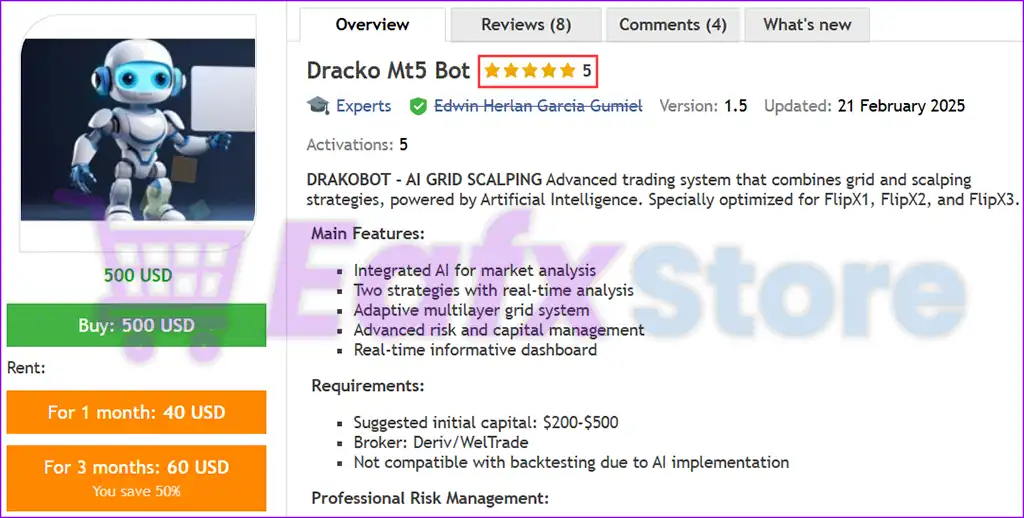
Dracko MT5 Bot is a fully automated Expert Advisor (EA) for MetaTrader 5 designed with advanced grid trading, multi-timeframe analysis, AI preset support, capital protection, dynamic trading schedules and intelligent position management.
The EA provides extensive customization options, allowing traders to optimize risk management, trading frequency, and strategy behavior across different market conditions.

🔢 Installation Panel Parameters
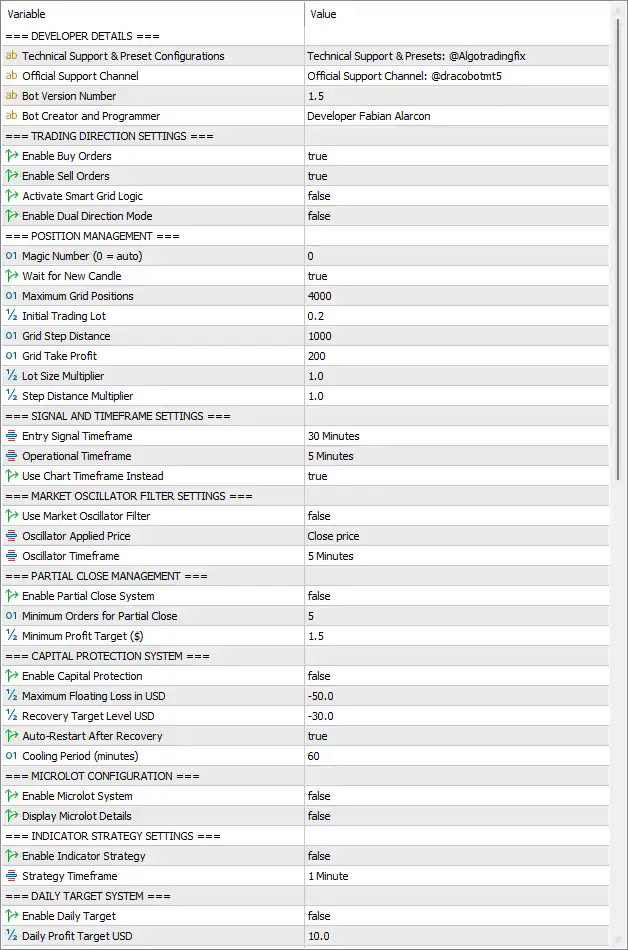
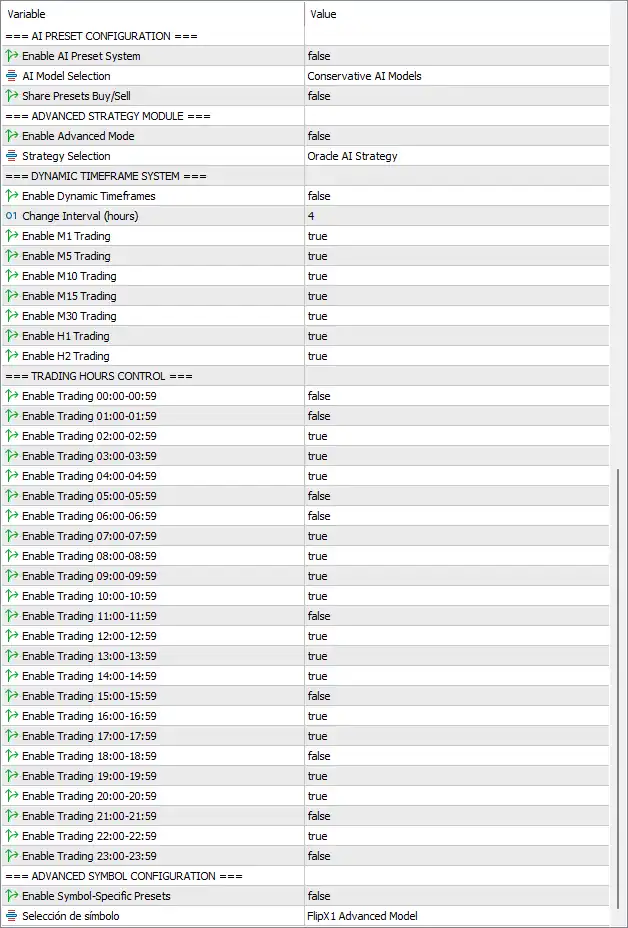
Below are the details of the parameters in the advisor’s trading system settings table:
🔶 Trading Direction Settings
🔹 Enable Buy Orders = true – Allows the EA to open Buy positions.
🔹 Enable Sell Orders = true – Allows the EA to open Sell positions.
🔹 Activate Smart Grid Logic = false – Disables the intelligent Smart Grid management algorithm.
🔹 Enable Dual Direction Mode = false – Prevents simultaneous independent Buy and Sell strategy execution.
🔶 Position Management
🔹 Magic Number (0 = auto) = 0 – Uses automatic Magic Number generation for trade identification.
🔹 Wait for New Candle = true – Opens new trades only after a new candle forms.
🔹 Maximum Grid Positions = 4000 – Allows up to 4000 grid positions.
🔹 Initial Trading Lot = 0.2 – Sets the initial trade size to 0.20 lots.
🔹 Grid Step Distance = 1000 – Distance between consecutive grid orders is 1000 points.
🔹 Grid Take Profit = 200 – Sets the grid profit target to 200 points.
🔹 Lot Size Multiplier = 1.0 – Uses a 1.0 multiplier, keeping lot sizes constant.
🔹 Step Distance Multiplier = 1.0 – Keeps grid spacing unchanged with a multiplier of 1.0.
🔶 Signal and Timeframe Settings
🔹 Entry Signal Timeframe = 30 Minutes – Entry signals are generated using the M30 timeframe.
🔹 Operational Timeframe = 5 Minutes – Trade execution operates on the M5 timeframe.
🔹 Use Chart Timeframe Instead = true – Uses the current chart timeframe instead of predefined settings.
🔶 Market Oscillator Filter Settings
🔹 Use Market Oscillator Filter = false – Disables oscillator-based trade filtering.
🔹 Oscillator Applied Price = Close price – Uses the candle closing price for oscillator calculations.
🔹 Oscillator Timeframe = 5 Minutes – Oscillator calculations use the M5 timeframe.
🔶 Partial Close Management
🔹 Enable Partial Close System = false – Disables automatic partial position closing.
🔹 Minimum Orders For Partial Close = 5 – Requires at least 5 positions before partial closing becomes available.
🔹 Minimum Profit Target ($) = 1.5 – Minimum floating profit required is $1.50.
🔶 Capital Protection System
🔹 Enable Capital Protection = false – Disables automated capital protection.
🔹 Maximum Floating Loss in USD = -50.0 – Maximum floating loss threshold is -$50.00.
🔹 Recovery Target Level USD = -30.0 – Recovery monitoring continues until losses improve to -$30.00.
🔹 Auto-Restart After Recovery = true – Automatically resumes trading after recovery conditions are met.
🔹 Cooling Period (minutes) = 60 – Waits 60 minutes before restarting trading.
🔶 Microlot Configuration
🔹 Enable Microlot System = false – Disables micro-lot trading mode.
🔹 Display Microlot Details = false – Hides micro-lot information on the chart.
🔶 Indicator Strategy Settings
🔹 Enable Indicator Strategy = false – Disables indicator-based trading logic.
🔹 Strategy Timeframe = 1 Minute – Indicator strategy uses the M1 timeframe.
🔶 Daily Target System
🔹 Enable Daily Target = false – Disables the daily profit target feature.
🔹 Daily Profit Target USD = 10.0 – Daily target is configured at $10.00.
🔶 AI Preset Configuration
🔹 Enable AI Preset System = false – Disables AI-generated preset optimization.
🔹 AI Model Selection = Conservative AI Models – Selects the Conservative AI Models profile.
🔹 Share Presets Buy/Sell = false – Buy and Sell strategies use independent preset configurations.
🔶 Advanced Strategy Module
🔹 Enable Advanced Mode = false – Disables advanced strategy functionality.
🔹 Strategy Selection = Oracle AI Strategy – Selects the Oracle AI Strategy profile.
🔶 Dynamic Timeframe System
🔹 Enable Dynamic Timeframes = false – Disables automatic timeframe switching.
🔹 Change Interval (hours) = 4 – Dynamic timeframe evaluation interval is 4 hours.
🔹 Enable M1 Trading = true – Allows trading on the M1 timeframe.
🔹 Enable M5 Trading = true – Allows trading on the M5 timeframe.
🔹 Enable M10 Trading = true – Allows trading on the M10 timeframe.
🔹 Enable M15 Trading = true – Allows trading on the M15 timeframe.
🔹 Enable M30 Trading = true – Allows trading on the M30 timeframe.
🔹 Enable H1 Trading = true – Allows trading on the H1 timeframe.
🔹 Enable H2 Trading = true – Allows trading on the H2 timeframe.
🔶 Trading Hours Control
🔹 Enable Trading 00:00–00:59 = false – Trading disabled during 00:00–00:59.
🔹 Enable Trading 01:00–01:59 = false – Trading disabled during 01:00–01:59.
🔹 Enable Trading 02:00–02:59 = true – Trading enabled during 02:00–02:59.
🔹 Enable Trading 03:00–03:59 = true – Trading enabled during 03:00–03:59.
🔹 Enable Trading 04:00–04:59 = true – Trading enabled during 04:00–04:59.
🔹 Enable Trading 05:00–05:59 = false – Trading disabled during 05:00–05:59.
🔹 Enable Trading 06:00–06:59 = false – Trading disabled during 06:00–06:59.
🔹 Enable Trading 07:00–07:59 = true – Trading enabled during 07:00–07:59.
🔹 Enable Trading 08:00–08:59 = true – Trading enabled during 08:00–08:59.
🔹 Enable Trading 09:00–09:59 = true – Trading enabled during 09:00–09:59.
🔹 Enable Trading 10:00–10:59 = true – Trading enabled during 10:00–10:59.
🔹 Enable Trading 11:00–11:59 = false – Trading disabled during 11:00–11:59.
🔹 Enable Trading 12:00–12:59 = true – Trading enabled during 12:00–12:59.
🔹 Enable Trading 13:00–13:59 = true – Trading enabled during 13:00–13:59.
🔹 Enable Trading 14:00–14:59 = true – Trading enabled during 14:00–14:59.
🔹 Enable Trading 15:00–15:59 = false – Trading disabled during 15:00–15:59.
🔹 Enable Trading 16:00–16:59 = true – Trading enabled during 16:00–16:59.
🔹 Enable Trading 17:00–17:59 = true – Trading enabled during 17:00–17:59.
🔹 Enable Trading 18:00–18:59 = false – Trading disabled during 18:00–18:59.
🔹 Enable Trading 19:00–19:59 = true – Trading enabled during 19:00–19:59.
🔹 Enable Trading 20:00–20:59 = true – Trading enabled during 20:00–20:59.
🔹 Enable Trading 21:00–21:59 = false – Trading disabled during 21:00–21:59.
🔹 Enable Trading 22:00–22:59 = true – Trading enabled during 22:00–22:59.
🔹 Enable Trading 23:00–23:59 = false – Trading disabled during 23:00–23:59.
🔶 Advanced Symbol Configuration
🔹 Enable Symbol-Specific Presets = false – Disables individual preset configurations for each trading symbol.
🔹 Selection = FlipX1 Advanced Model – Uses the FlipX1 Advanced Model as the selected advanced symbol profile.
🔢 Conclusion
Dracko MT5 Bot provides a highly configurable automated trading environment with advanced grid management, AI-ready strategy modules, multi-timeframe analysis, capital protection, and customizable trading schedules.
Whether you prefer conservative trading or advanced strategy deployment, its extensive parameter set allows traders to tailor the EA to different market conditions, broker requirements, and individual risk preferences.
🔢 FAQs
❓ What is the purpose of the Smart Grid Logic in Dracko MT5 Bot?
The Smart Grid Logic enhances traditional grid trading by intelligently managing position spacing and recovery, although it is disabled in this configuration.
❓ Can Dracko MT5 Bot trade on multiple timeframes?
Yes. The bot supports M1, M5, M10, M15, M30, H1, and H2 timeframes, and each can be individually enabled or disabled.
❓ How does the Capital Protection System work?
When enabled, it monitors floating losses, pauses trading if the configured loss threshold is reached, and can automatically resume trading after recovery.
❓ Does Dracko MT5 Bot include AI-based trading models?
Yes. The EA supports AI Preset configurations, including Conservative AI Models and Oracle AI Strategy, although these features are optional.
❓ Can I customize trading hours with Dracko MT5 Bot?
Yes. Every hourly session from 00:00 to 23:59 can be individually enabled or disabled, giving complete control over the EA's trading schedule.


