🔢 First Scalper MT5 Settings Explained – Complete Parameter Guide
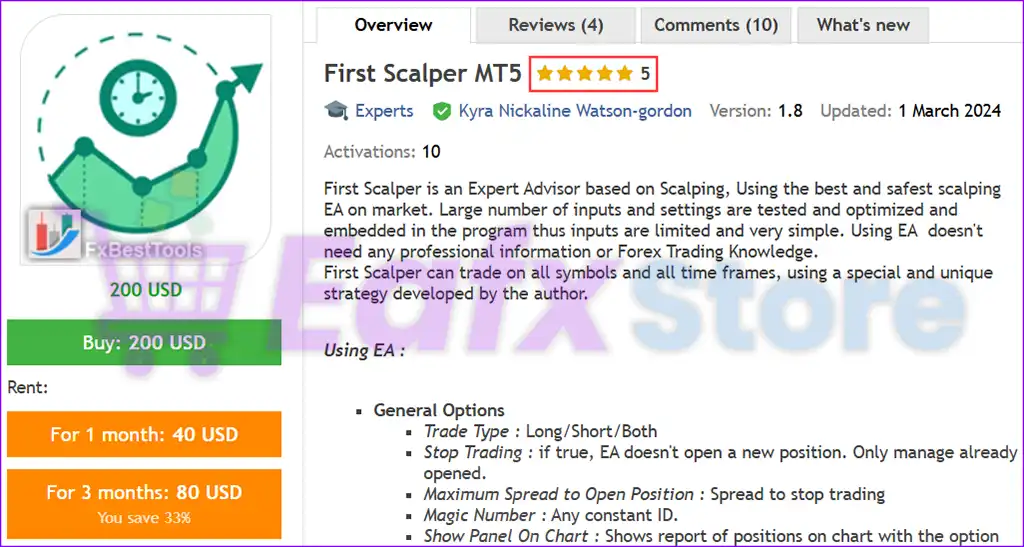
First Scalper MT5 is a fully automated MetaTrader 5 Expert Advisor (EA) designed for scalping and intelligent trade management. It combines flexible position sizing, two-step averaging recovery, customizable trailing stop and breakeven functions, trading session filters, economic news protection, and mobile notification support.
🔢 Installation Panel Parameters
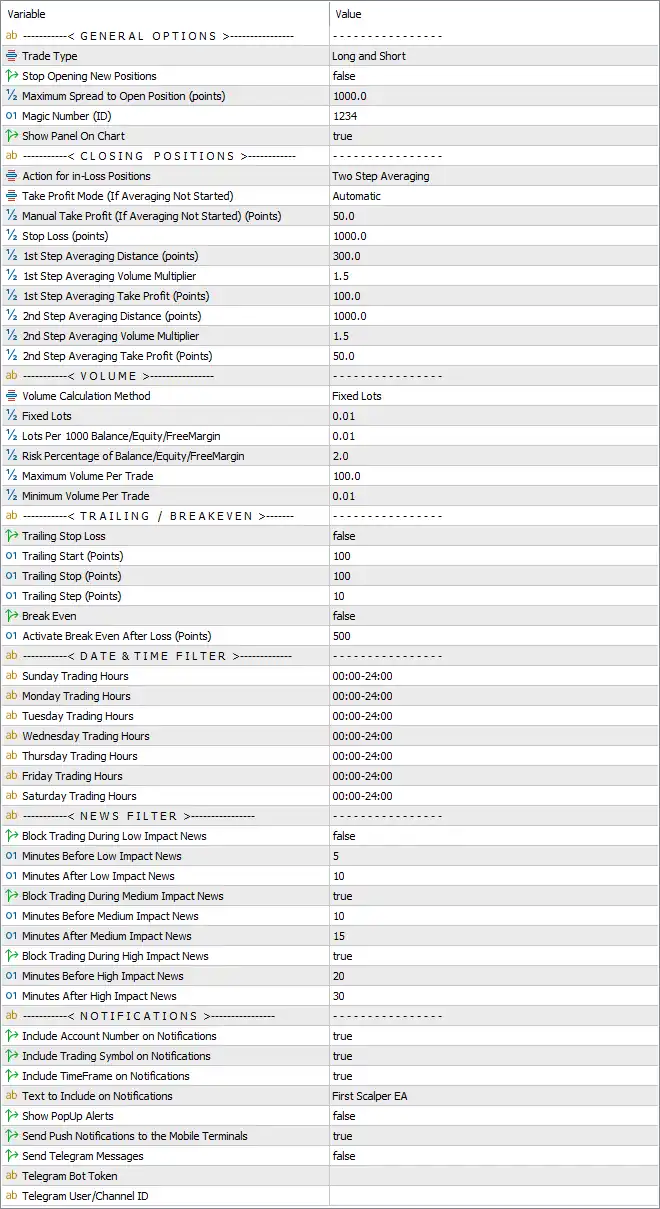
Below are the details of the parameters in the advisor’s trading system settings table:
🔶 General Options
🔹 Trade Type = Long and Short – Allows the EA to open both Buy (Long) and Sell (Short) positions.
🔹 Stop Opening New Positions = false – Keeps the EA active and allows it to continue opening new trades.
🔹 Maximum Spread to Open Position (points) = 1000.0 – The EA will only open new positions if the market spread is 1000.0 points or lower.
🔹 Magic Number (ID) = 1234 – Unique identifier used by the EA to distinguish and manage its own trades.
🔹 Show Panel On Chart = true – Displays the EA's information panel directly on the trading chart.
🔶 Closing Positions
🔹 Action for In-Loss Positions = Two Step Averaging – Uses a two-stage averaging strategy to recover losing positions.
🔹 Take Profit Mode (If Averaging Not Started) = Automatic – Automatically calculates the Take Profit level before averaging begins.
🔹 Manual Take Profit (If Averaging Not Started) (Points) = 50.0 – Sets a manual Take Profit target of 50.0 points when manual TP is used.
🔹 Stop Loss (points) = 1000.0 – Limits the maximum loss per trade to 1000.0 points.
🔹 1st Step Averaging Distance (points) = 300.0 – Opens the first recovery trade after the market moves 300.0 points against the position.
🔹 1st Step Averaging Volume Multiplier = 1.5 – Multiplies the lot size of the first averaging trade by 1.5.
🔹 1st Step Averaging Take Profit (Points) = 100.0 – Sets the Take Profit target for the first averaging cycle to 100.0 points.
🔹 2nd Step Averaging Distance (points) = 1000.0 – Opens the second recovery position after an additional 1000.0-point adverse movement.
🔹 2nd Step Averaging Volume Multiplier = 1.5 – Increases the lot size of the second averaging trade by 1.5 times.
🔹 2nd Step Averaging Take Profit (Points) = 50.0 – Sets the Take Profit target for the second averaging cycle to 50.0 points.
🔶 Volume Settings
🔹 Volume Calculation Method = Fixed Lots – Uses a fixed trading lot instead of dynamic risk-based sizing.
🔹 Fixed Lots = 0.01 – Every new trade opens with 0.01 lots.
🔹 Lots Per 1000 Balance/Equity/FreeMargin = 0.01 – Uses 0.01 lots per 1000 units of balance, equity, or free margin when dynamic sizing is selected.
🔹 Risk Percentage of Balance/Equity/FreeMargin = 2.0 – Risks 2.0% of the selected account metric when percentage-based sizing is enabled.
🔹 Maximum Volume Per Trade = 100.0 – Limits any individual trade to a maximum of 100.0 lots.
🔹 Minimum Volume Per Trade = 0.01 – Prevents trades smaller than 0.01 lots.
🔶 Trailing Stop & Breakeven
🔹 Trailing Stop Loss = false – Disables automatic trailing stop management.
🔹 Trailing Start (Points) = 100 – Begins trailing once the trade reaches 100 points of profit.
🔹 Trailing Stop (Points) = 100 – Maintains a trailing distance of 100 points behind market price.
🔹 Trailing Step (Points) = 10 – Updates the trailing stop every 10 points of favorable movement.
🔹 Break Even = false – Disables automatic breakeven functionality.
🔹 Activate Break Even After Loss (Points) = 500 – Configures breakeven activation after a 500-point recovery when enabled.
🔶 Date & Time Filter
🔹 Sunday Trading Hours = 00:00–24:00 – Trading is permitted throughout Sunday.
🔹 Monday Trading Hours = 00:00–24:00 – Trading is permitted throughout Monday.
🔹 Tuesday Trading Hours = 00:00–24:00 – Trading is permitted throughout Tuesday.
🔹 Wednesday Trading Hours = 00:00–24:00 – Trading is permitted throughout Wednesday.
🔹 Thursday Trading Hours = 00:00–24:00 – Trading is permitted throughout Thursday.
🔹 Friday Trading Hours = 00:00–24:00 – Trading is permitted throughout Friday.
🔹 Saturday Trading Hours = 00:00–24:00 – Trading is permitted throughout Saturday.
🔶 News Filter
🔹 Block Trading During Low Impact News = false – The EA continues trading during low-impact economic news events.
🔹 Minutes Before Low Impact News = 5 – Stops trading 5 minutes before low-impact news if enabled.
🔹 Minutes After Low Impact News = 10 – Resumes trading 10 minutes after low-impact news.
🔹 Block Trading During Medium Impact News = true – Prevents opening trades during medium-impact news events.
🔹 Minutes Before Medium Impact News = 10 – Stops trading 10 minutes before medium-impact news.
🔹 Minutes After Medium Impact News = 15 – Resumes trading 15 minutes after medium-impact news.
🔹 Block Trading During High Impact News = true – Prevents trading during major economic announcements.
🔹 Minutes Before High Impact News = 20 – Stops trading 20 minutes before high-impact news releases.
🔹 Minutes After High Impact News = 30 – Resumes trading 30 minutes after high-impact news.
🔶 Notifications
🔹 Include Account Number on Notifications = true – Adds the trading account number to all notifications.
🔹 Include Trading Symbol on Notifications = true – Displays the traded instrument within notification messages.
🔹 Include TimeFrame on Notifications = true – Includes the active chart timeframe in alerts.
🔹 Text to Include on Notifications = First Scalper EA – Uses "First Scalper EA" as the notification title.
🔹 Show PopUp Alerts = false – Disables popup alert windows inside MetaTrader 5.
🔹 Send Push Notifications to the Mobile Terminals = true – Sends trading alerts directly to the MetaTrader mobile application.
🔹 Send Telegram Messages = false – Disables Telegram message notifications.
🔹 Telegram Bot Token – Field used to enter the Telegram Bot API token when Telegram notifications are enabled.
🔹 Telegram User/Channel ID – Field used to specify the destination Telegram user or channel.
🔢 Conclusion
First Scalper MT5 provides a comprehensive set of trading controls suitable for both conservative and aggressive scalping strategies. Its configurable two-step averaging system, flexible money management, advanced news filter, trading session scheduler, trailing stop options, and mobile notification support allow traders to customize the EA according to their risk tolerance and preferred market conditions while maintaining disciplined automated execution.
🔢 FAQs
❓ What trading styles does First Scalper MT5 support?
First Scalper MT5 supports both Buy and Sell trading with automated scalping and a configurable two-step averaging recovery system.
❓ Can I adjust the lot size automatically?
Yes. The EA supports fixed lot sizing, balance-based lot calculation, and percentage risk management depending on your selected volume calculation method.
❓ Does First Scalper MT5 avoid trading during important news events?
Yes. The built-in news filter can automatically pause trading before and after medium- and high-impact economic news releases.
❓ Can I receive mobile trading notifications?
Yes. The EA supports MetaTrader push notifications and also includes optional Telegram integration for trading alerts.
❓ Is the averaging system customizable?
Yes. You can configure the averaging distance, lot multipliers, Take Profit targets, and recovery behavior separately for both averaging steps.