


🔢 Dragons Risk Shield EA MT4 – Complete Settings Guide and Parameter Explanation
Dragons Risk Shield EA is an advanced MetaTrader 4 Expert Advisor designed to combine intelligent risk management, grid trading control, pattern recognition, virtual stop management and dynamic position sizing.
The EA provides traders with extensive customization options for trade execution, risk control, stop-loss management, and signal filtering, making it suitable for both conservative and aggressive trading strategies.

🔢 Installation Panel Parameters
Below are the details of the parameters in the advisor’s trading system settings table:
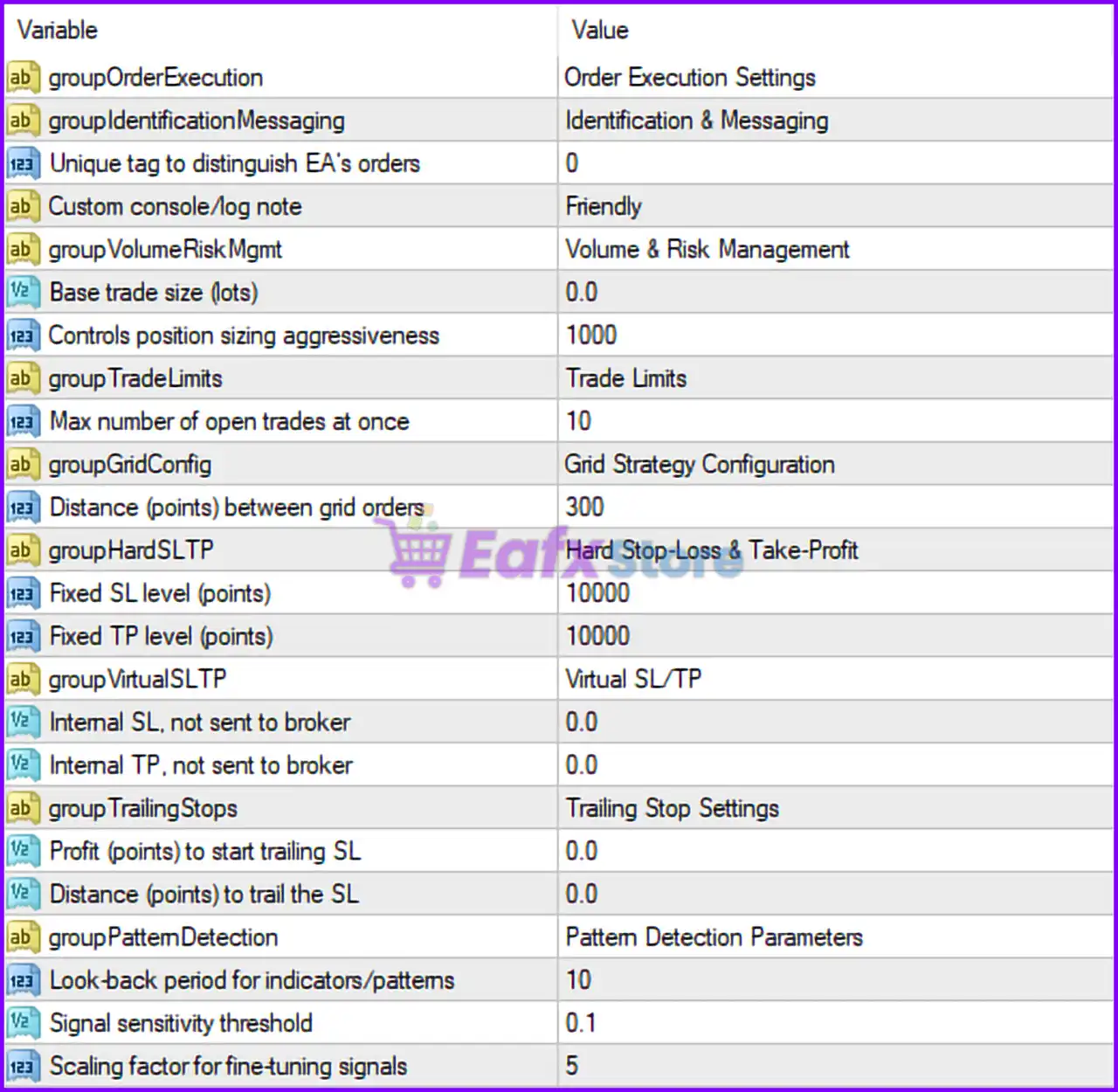
🔶 Order Execution Settings
🔹 groupOrderExecution: Section header labeled "Order Execution Settings", grouping all trade execution parameters.
🔶 Identification & Messaging Settings
🔹 groupIdentificationMessaging: Section header labeled "Identification & Messaging", containing trade identification and logging options.
🔹 Unique Tag to Distinguish EA's Orders: Set to 0, serving as the unique identifier used to separate the EA's trades from other manual or automated trades.
🔹 Custom Console/Log Note: Configured as "Friendly", adding the custom text "Friendly" to logs and console messages generated by the EA.
🔶 Volume & Risk Management Settings
🔹 groupVolumeRiskMgmt: Section header labeled "Volume & Risk Management", grouping money management parameters.
🔹 Base Trade Size (Lots): Set to 0.0 lots, allowing the EA to use its internal position sizing calculations instead of a fixed lot size.
🔹 Controls Position Sizing Aggressiveness: Configured at 1000, defining the aggressiveness level used for dynamic lot size calculations.
🔶 Trade Limits Settings
🔹 groupTradeLimits: Section header labeled "Trade Limits", containing trade quantity restrictions.
🔹 Max Number of Open Trades at Once: Set to 10, limiting the EA to a maximum of ten simultaneously open positions.
🔶 Grid Strategy Configuration
🔹 groupGridConfig: Section header labeled "Grid Strategy Configuration", grouping all grid trading parameters.
🔹 Distance (Points) Between Grid Orders: Configured at 300 points, defining the spacing between consecutive grid positions.
🔶 Hard Stop-Loss & Take-Profit Settings
🔹 groupHardSLTP: Section header labeled "Hard Stop-Loss & Take-Profit", controlling broker-side protection levels.
🔹 Fixed SL Level (Points): Set to 10000 points, defining the broker-side Stop Loss distance.
🔹 Fixed TP Level (Points): Configured at 10000 points, defining the broker-side Take Profit distance.
🔶 Virtual Stop-Loss & Take-Profit Settings
🔹 groupVirtualSLTP: Section header labeled "Virtual SL/TP", controlling internal stop management.
🔹 Internal SL, Not Sent to Broker: Set to 0.0 points, meaning no virtual Stop Loss is currently configured.
🔹 Internal TP, Not Sent to Broker: Configured at 0.0 points, meaning no virtual Take Profit is currently configured.
🔶 Trailing Stop Settings
🔹 groupTrailingStops: Section header labeled "Trailing Stop Settings", grouping profit protection parameters.
🔹 Profit (Points) to Start Trailing SL: Set to 0.0 points, meaning trailing stop activation is currently disabled.
🔹 Distance (Points) to Trail the SL: Configured at 0.0 points, meaning no trailing distance is currently defined.
🔶 Pattern Detection Parameters
🔹 groupPatternDetection: Section header labeled "Pattern Detection Parameters", containing signal generation settings.
🔹 Look-Back Period for Indicators/Patterns: Set to 10, defining the number of historical candles analyzed for pattern detection.
🔹 Signal Sensitivity Threshold: Configured at 0.1, controlling how sensitive the EA is when identifying trading signals.
🔹 Scaling Factor for Fine-Tuning Signals: Set to 5, adjusting the strength and filtering of generated trade signals.
🔢 Conclusion
Dragons Risk Shield EA is a versatile automated trading system that combines risk management, grid trading, virtual stop controls, trade limitation tools and pattern recognition algorithms into a single framework.
With key parameters such as Max Open Trades = 10, Grid Distance = 300 points, Fixed SL = 10000 points, Fixed TP = 10000 points, and Signal Sensitivity = 0.1, the EA offers traders extensive flexibility to customize trading behavior according to their risk tolerance and market conditions.
Proper optimization of these settings can help improve trade quality, risk control, and overall account stability.
🔢 FAQs
❓ What is Dragons Risk Shield EA MT4?
Dragons Risk Shield EA MT4 is an automated MetaTrader 4 Expert Advisor that combines risk management, grid trading techniques, and pattern detection to automate trade execution.
❓ How many trades can Dragons Risk Shield EA MT4 open simultaneously?
The setting Max Number of Open Trades at Once = 10 allows the EA to manage up to ten active positions at the same time.
❓ What is the purpose of the Grid Distance setting?
The Distance Between Grid Orders = 300 points parameter controls the spacing between consecutive grid positions to manage market exposure.
❓ Does Dragons Risk Shield EA MT4 support virtual stop-loss and take-profit levels?
Yes, the EA includes Internal SL and Internal TP settings that can manage exits internally without sending levels to the broker.
❓ How does the Signal Sensitivity Threshold work?
The Signal Sensitivity Threshold = 0.1 determines how easily the EA generates trading signals, with lower values generally allowing more signal opportunities while higher values create stricter filtering.



