



Nexa Aurum EA MT5 (Latest version) - Unlimited

Subscriptions for Special Plan
- 30 EA package is more economical!
- Special package with 99%
- Download 1 EA/Day

Subscriptions for Premium Membership
- Download Unlimited in 1 Year
- Get 100% Discount
- Get free access to all

Subscriptions for Gold Membership
- 1 Year Membership
- Get 100% Discount
- Access EA+Indicator+Course
Frequently bought together 🎁
Add these products to enhance your purchase


Quick Verdict
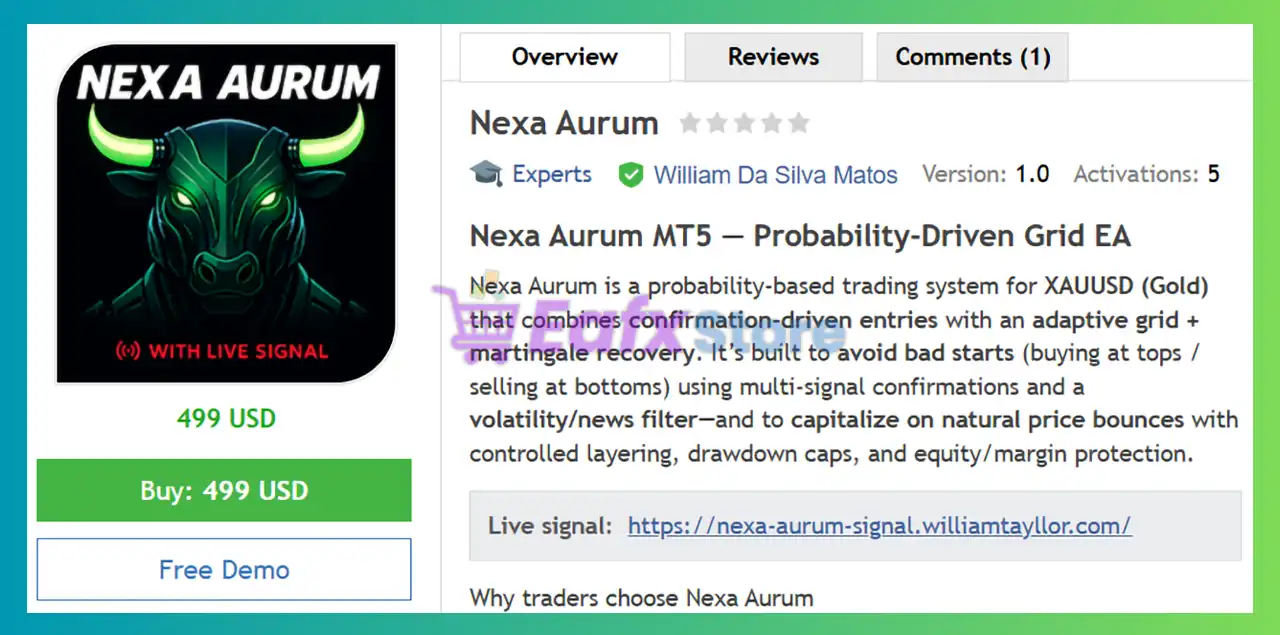
Nexa Aurum EA MT5 is a professional-grade Gold trading robot designed for traders who want the profit potential of grid trading while maintaining strict risk controls. Unlike traditional grid EAs that blindly add positions, Nexa Aurum uses confirmation-driven entries, ATR volatility filters, embedded news protection, dynamic basket management, and multiple account safety layers.
The EA is specifically optimized for XAUUSD and incorporates one of the most advanced risk-control frameworks currently available in a grid-based MT5 system.
Best For
✅ Gold traders focused on XAUUSD.
✅ Traders seeking advanced grid recovery with risk controls.
✅ Medium-to-large account holders ($1,000+ recommended).
✅ Traders who value news filtering and drawdown protection.
✅ Investors looking for semi-passive automated trading.
✅ Users who prefer intelligent basket management over aggressive martingale systems.
Overall Rating
⭐⭐⭐⭐⭐ 9.1/10
| Category | Score |
|---|---|
| Strategy Design | 9.4/10 |
| Risk Management | 9.3/10 |
| News Protection | 9.7/10 |
| Trade Management | 9.2/10 |
| Ease of Use | 8.8/10 |
| Long-Term Potential | 9.1/10 |
What is Nexa Aurum EA MT5?
Nexa Aurum EA MT5 is an advanced automated trading system for MetaTrader 5 that combines:
🔹 Probability-based entries.
🔹 Adaptive Grid trading.
🔹 Martingale recovery logic.
🔹 ATR volatility filtering.
🔹 Economic news protection.
🔹 Dynamic basket profit management.
🔹 Multi-level Trailing stop systems.
The EA is designed exclusively for Gold (XAUUSD) and focuses on entering trades only after confirmation signals indicate a higher probability reversal or continuation opportunity.
Rather than blindly averaging positions, Nexa Aurum attempts to avoid poor entries through a sophisticated filtering framework that evaluates volatility, session timing, market structure, and major economic events before allowing a grid to start.
 Vendor Website: View here
Delivery time 24h-48h after payment.
Refund if not delivered.
You will receive the current version without any limitations (ID+Time).
Nexa Aurum MT5 Review
How Does Nexa Aurum EA MT5 Work?
Probability-Based Entry Engine
The EA does not randomly start grids.
Every trade sequence must pass through multiple confirmation layers before activation.
These include:
🔹 FLUX signal validation.
🔹 ATR volatility filtering.
🔹 Session timing filters.
🔹 News event analysis.
🔹 Directional trade permissions.
This significantly reduces unnecessary grid deployment during unstable conditions.
Adaptive Grid Expansion
When market conditions move against the initial position, Nexa Aurum can deploy additional layers using its adaptive grid structure.
Key settings include:
🔹 Max Rows: 10
🔹 Multiplier: 2.0
🔹 Max Exposure Controls
🔹 Dynamic Basket Targets
The objective is to capitalize on natural market retracements while maintaining predefined exposure limits.
ATR Volatility Gate
One of Nexa Aurum’s strongest features is its ATR-based volatility protection.
The EA blocks new grid starts when volatility exceeds predefined thresholds.
Default setting:
🔹 ATR Window: 7
🔹 ATR Maximum Threshold: 300 pips
This helps avoid entering during highly unstable Gold price movements.
News-Aware Trading Logic
Unlike most grid systems, Nexa Aurum includes an embedded news engine.
The EA can:
🔹 Pause trading during GDP events
🔹 Avoid Federal Reserve announcements
🔹 Avoid ECB releases
🔹 Monitor USD and EUR news
🔹 Refresh economic data every 15 minutes
Even more impressive, this functionality is available inside historical backtests.
Key Features of Nexa Aurum MT5
Adaptive Grid Step Technology
Grid spacing dynamically adjusts according to market volatility.
Benefits include:
🔹 Reduced overtrading.
🔹 Better basket positioning.
🔹 Improved recovery efficiency.
Historical News Filter Backtesting
One of the most innovative features of Nexa Aurum.
The EA can simulate news-aware behavior during historical testing from 2020 onward.
This provides more realistic performance expectations.
FLUX Entry Confirmation
The proprietary FLUX filter validates entry conditions before allowing new grid sequences.
Default settings:
🔹 FLUX Period: 21
🔹 FLUX TF: M5
🔹 Long Threshold: -30
🔹 Short Threshold: 70
Dual Trailing Protection System
TSL (Trailing Stop Loss)
Protects single-row positions.
BTSL (Basket Trailing Stop Loss)
Protects multi-row baskets.
This combination allows the EA to lock profits progressively as positions develop.
Fail-Safe Account Protection
Emergency account protection includes:
🔹 Drawdown monitoring.
🔹 Automatic basket liquidation.
🔹 Pending order cancellation.
🔹 Trading lockout after trigger.
Complete Session Control
The EA can:
🔹 Disable Monday starts.
🔹 Disable Friday starts.
🔹 Block month-end trading.
🔹 Restrict trading hours.
Historical Backtest Performance
The developer provides long-term testing results from 2020–2025 using 99% real tick data.
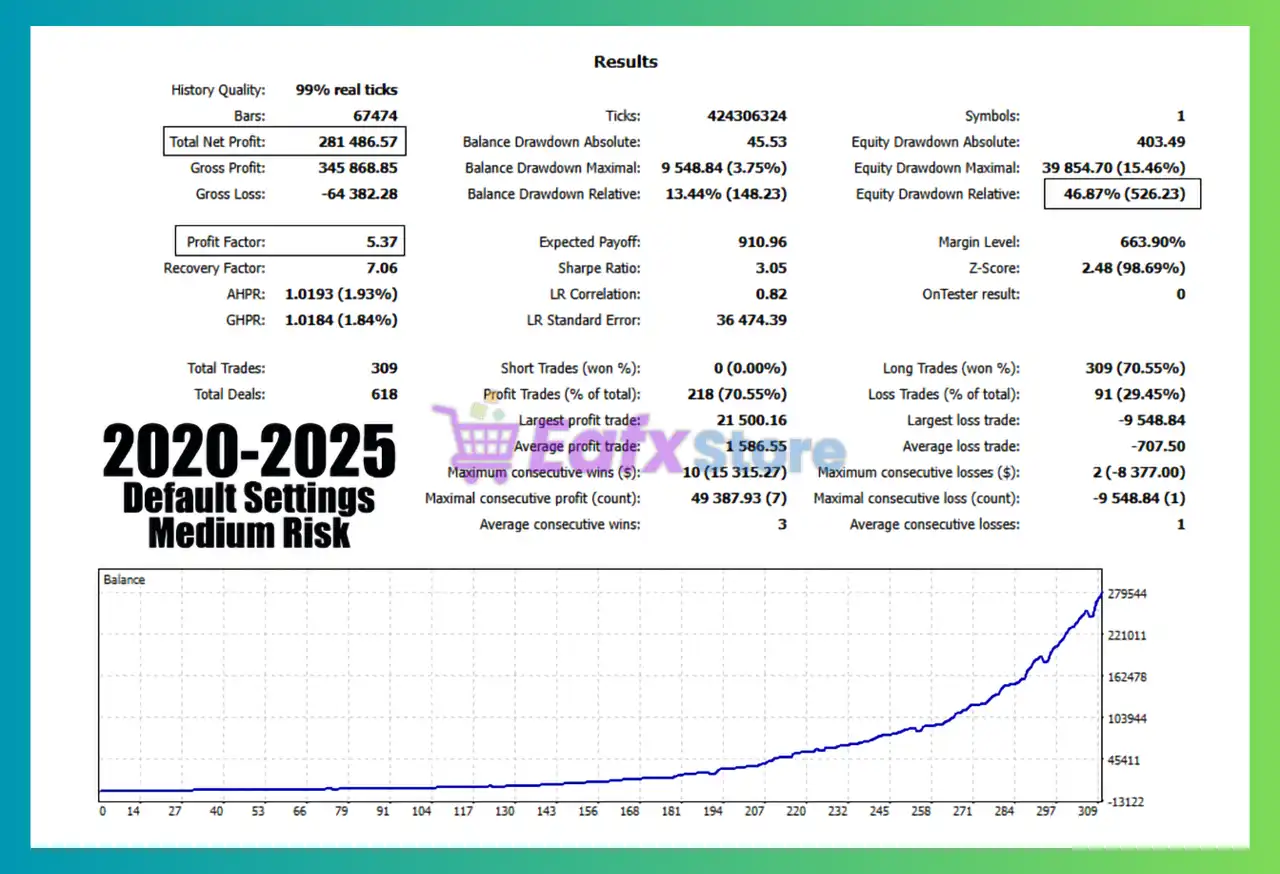
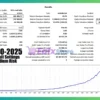
Medium Risk Profile Results
Nexa Aurum MT5 Backtest
Key Statistics
| Metric | Result |
|---|---|
| Total Net Profit | $281,486.57 |
| Profit Factor | 5.37 |
| Recovery Factor | 7.06 |
| Total Trades | 309 |
| Win Rate | 70.55% |
| Max Balance Drawdown | 3.75% |
| Max Equity Drawdown | 15.46% |
| Sharpe Ratio | 3.05 |
Analysis
The medium-risk profile demonstrates a strong balance between profitability and account protection.
The equity curve shows stable growth while maintaining relatively controlled drawdown levels.
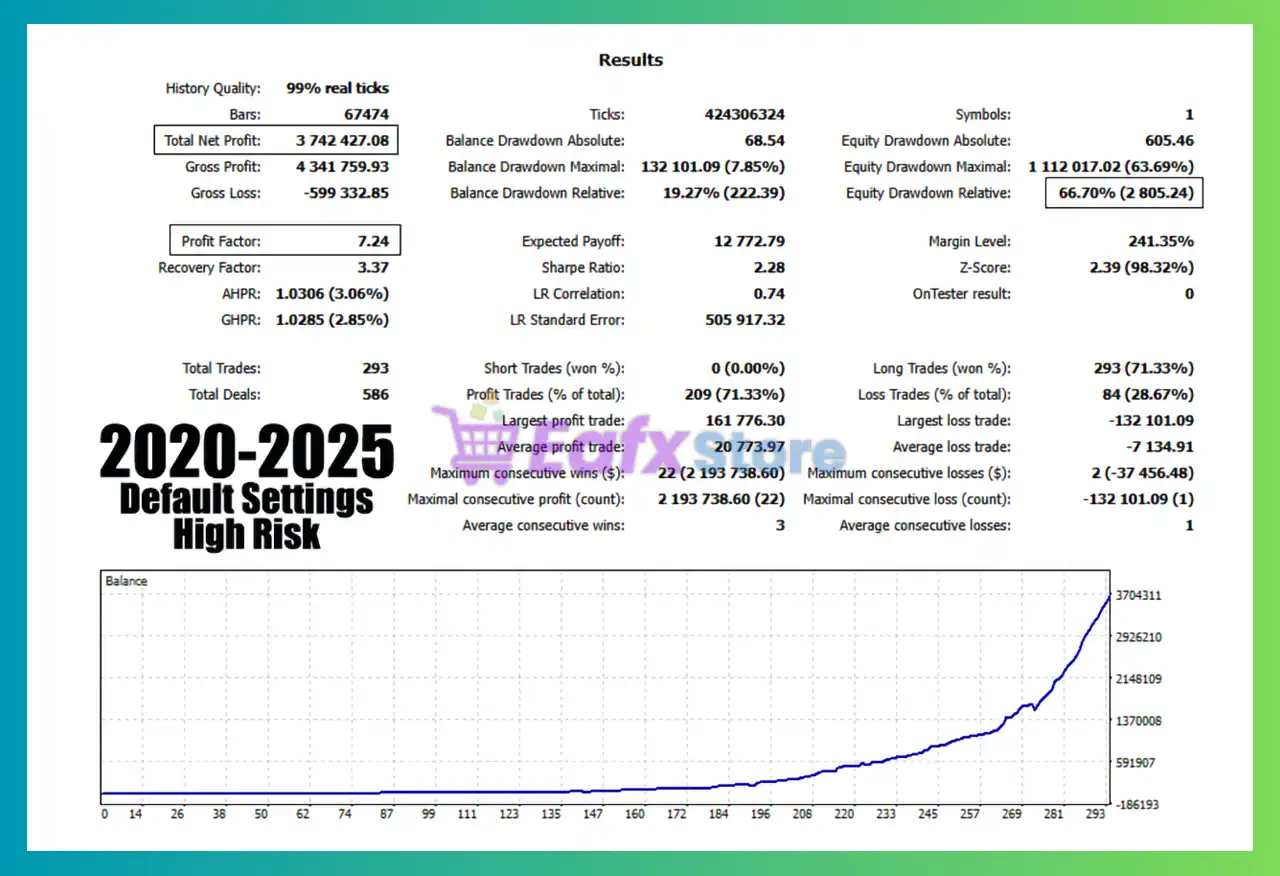
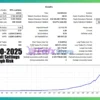
High Risk Profile Results
Nexa Aurum MT5 Backtest Results
Key Statistics
| Metric | Result |
|---|---|
| Total Net Profit | $3,742,427.08 |
| Profit Factor | 7.24 |
| Recovery Factor | 3.37 |
| Total Trades | 293 |
| Win Rate | 71.33% |
| Max Balance Drawdown | 7.85% |
| Max Equity Drawdown | 63.69% |
| Sharpe Ratio | 2.28 |
Analysis
The high-risk profile significantly increases profit potential but also introduces much larger equity drawdowns.
This mode is suitable only for aggressive traders with higher risk tolerance.
Backtest Summary
The results demonstrate that Nexa Aurum can generate substantial returns while maintaining a structured risk framework.
However, traders should carefully choose the risk profile that matches their capital and psychological tolerance.
Why Nexa Aurum EA MT5 Stands Out
News Filtering Inside Backtests
Most EAs ignore news events during historical testing.
Nexa Aurum simulates news avoidance exactly as it would in live trading.
This creates far more realistic testing conditions.
Dual Exit Architecture
The combination of:
🔹 TSL (single positions)
🔹 BTSL (basket positions)
provides superior profit protection compared to traditional grid systems.
Confirmation-Based Grid Entries
The EA attempts to avoid common grid mistakes by requiring multiple confirmations before opening positions.
Transparency
The on-chart dashboard clearly displays:
🔹 Current market status
🔹 News restrictions
🔹 Grid status
🔹 Entry permissions
This eliminates the “black-box” problem found in many automated systems.
Risk Management Features
Automatic Lot Sizing
Default profile:
🔹 RISKMODE AUTO
🔹 Medium Risk Preset
The EA automatically adjusts exposure according to account conditions.
Maximum Grid Rows
Default:
🔹 10 Rows Maximum
Prevents unlimited grid expansion.
Exposure Controls
Max Cumulative Lots Per Side
🔹 100 Lots Maximum
Max Slippage Protection
🔹 20 Points
ATR Volatility Filter
Blocks trading during extreme volatility conditions.
Fail-Safe Protection
The emergency protection framework can:
🔹 Close all positions
🔹 Cancel pending orders
🔹 Stop future trading activity
once risk limits are breached.
Recommended Trading Conditions
| Features | Type |
|---|---|
| Trading platform | MetaTrader 5 (MT5) |
| Time frames | Any |
| Currency pairs | XAUUSD (Gold) |
| Minimum / Recommended deposit | $500+ |
| Minimum / Recommended leverage | 1:300+ |
| Account type | ECN/RAW spread |
| Product type | Original version |
| Additional services | Unlock and Decompile |
| Recommended brokers | Exness Broker, Icmarkets Broker |
| Recommended VPS | MyfxVPS.com (Blue VPS, Golden VPS). Lowest Latency, 2 week Free Trial, 100% Free for 12-18 Months. |
Product Download Package?
The download package of the product suite includes:
 Experts: Nexa Aurum EA.ex5
 Reviewed by David Easton
Weaknesses and Risk Warnings
Grid and Martingale Exposure
Although heavily protected, Nexa Aurum remains a grid-based recovery system.
Extended one-directional trends can still create significant floating drawdowns.
High-Risk Mode Can Be Aggressive
Backtests show equity drawdowns exceeding 60% in High Risk mode.
Aggressive settings should only be used by experienced traders.
Gold Market Volatility
XAUUSD can experience extreme movements during:
🔹 FOMC meetings
🔹 CPI releases
🔹 Geopolitical events
No filter can completely eliminate this risk.
Requires Adequate Capital
Running a grid strategy on an underfunded account increases the likelihood of account stress during prolonged adverse movements.
Who Should Use Nexa Aurum EA MT5?
Ideal For
✔ Gold traders focused exclusively on XAUUSD
✔ Traders who understand grid recovery systems
✔ Medium and large account holders
✔ Investors seeking advanced automation
✔ Users wanting strong news protection
✔ Traders who prioritize risk controls
Not Ideal For
✖ Small account traders using excessive leverage
✖ Traders looking for pure scalping systems
✖ Investors uncomfortable with floating drawdown
✖ Beginners who do not understand grid mechanics
Final Verdict
Nexa Aurum EA is one of the most sophisticated Gold grid systems available for MetaTrader 5. By combining probability-based entries, adaptive grid expansion, ATR volatility filters, embedded news awareness, dual trailing-stop technology, and comprehensive fail-safe protection, it addresses many of the weaknesses traditionally associated with grid trading.
The inclusion of historical news filtering during backtesting is particularly impressive and provides traders with a more realistic view of strategy performance. Combined with flexible risk profiles, basket profit management, and advanced account protection mechanisms, Nexa Aurum offers a professional-grade solution for traders seeking automated Gold trading.
🔢 Nexa Aurum EA MT5 – Complete Settings Guide and Parameter Explanation
Nexa Aurum EA is an advanced automated trading system for MetaTrader 5 that combines grid trading, dynamic basket profit management, ATR-based volatility filters, news protection, trailing stop mechanisms and extensive risk controls.
Designed for professional traders, the EA offers flexible lot sizing, multi-row basket management, economic news filtering, and fail-safe account protection to help manage risk while maximizing trading opportunities.
Nexa Aurum MT5 Settings
🔢 Installation Panel Parameters
Below are the details of the parameters in the advisor’s trading system settings table:
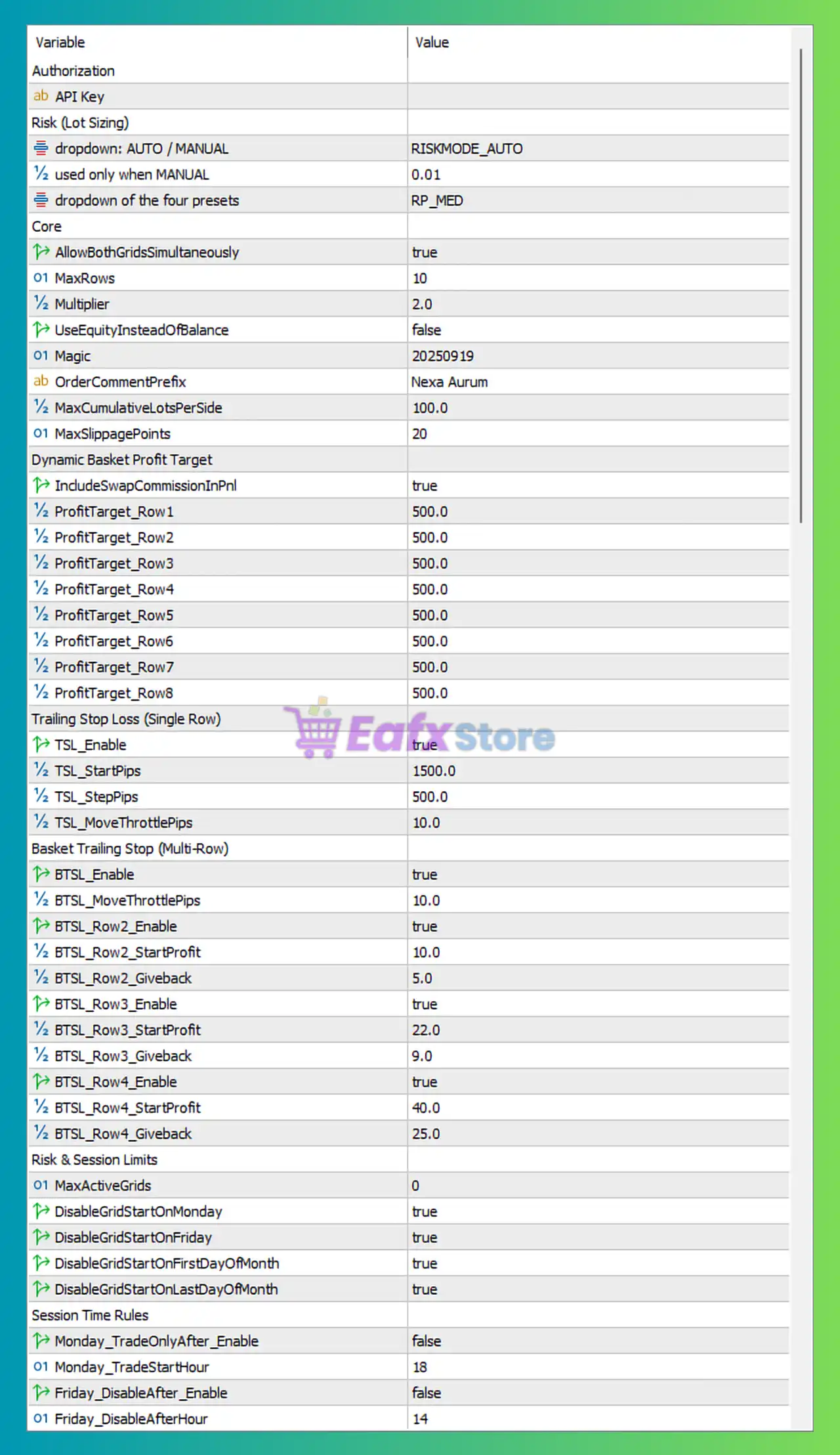
Nexa Aurum MT5 Settings Panel
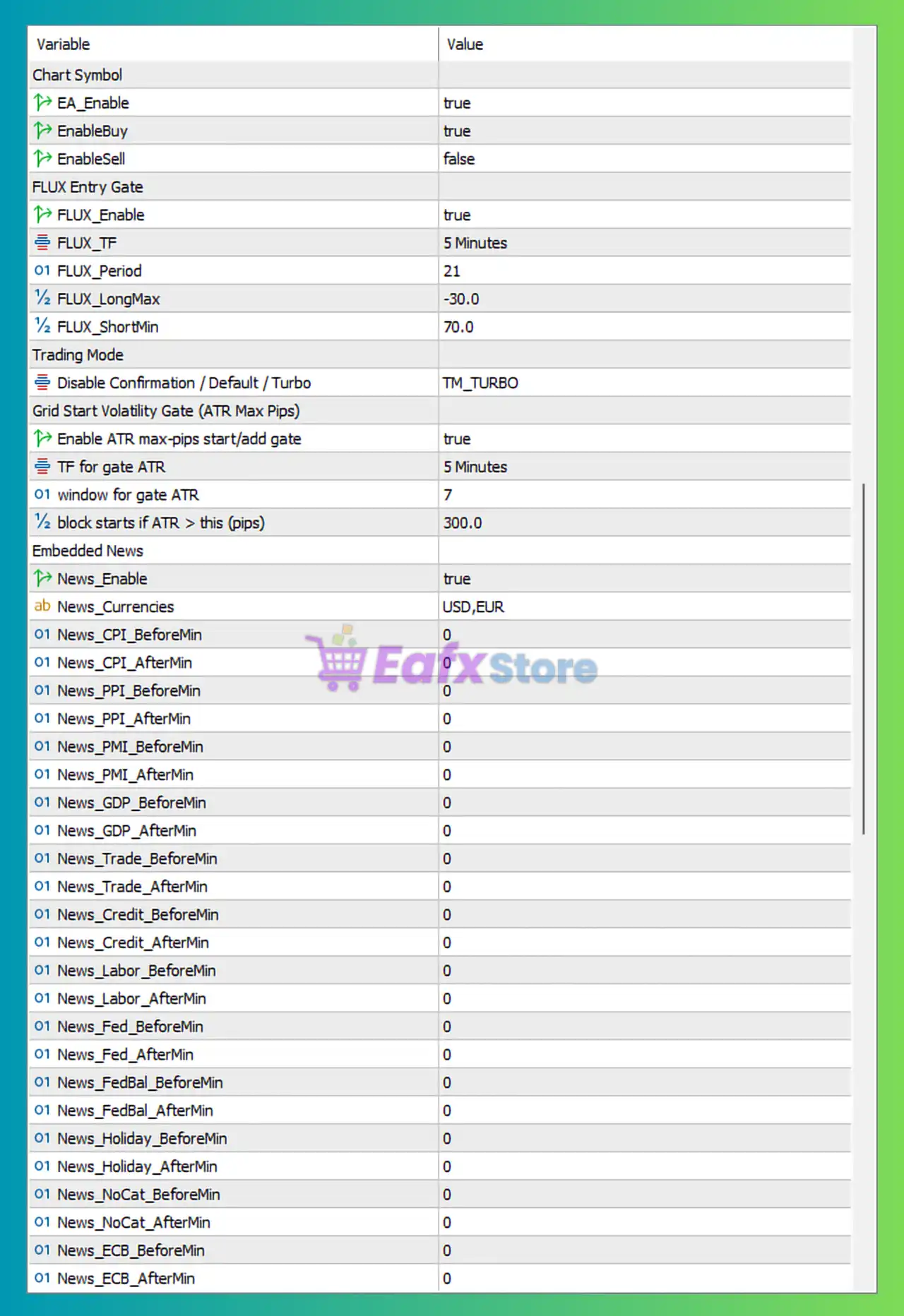
Nexa Aurum EA MT5 Settings Panel
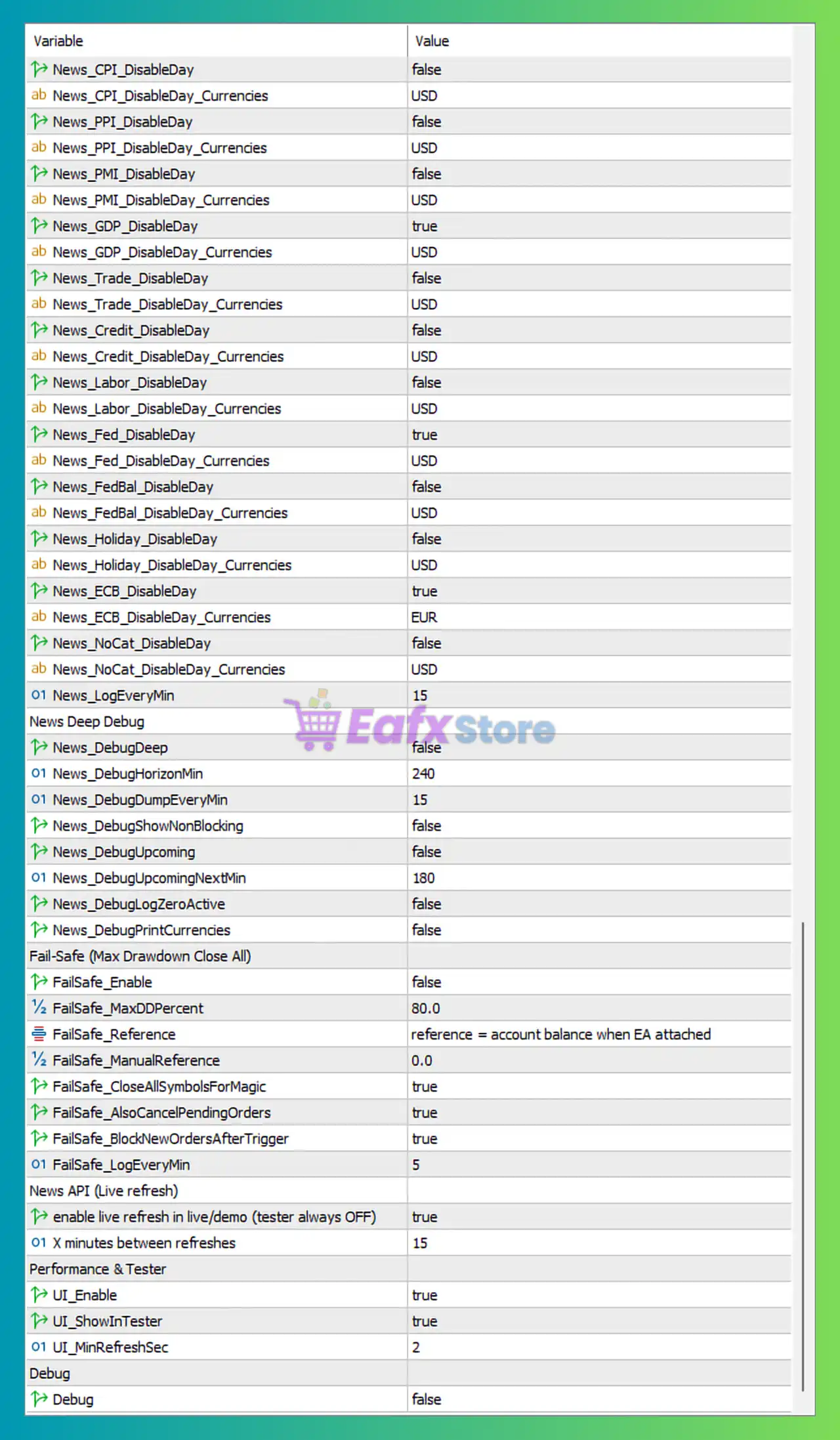
Nexa Aurum EA Settings Panel
🔶 Authorization Settings
🔹 API Key: Authorization key used to activate and validate the Nexa Aurum EA MT5 license.
🔶 Risk (Lot Sizing) Settings
🔹 Dropdown: AUTO / MANUAL: Set to RISKMODE_AUTO, enabling automatic lot-sizing and risk management calculations.
🔹 Used Only When MANUAL: Set to 0.01, defining the fixed lot size when manual mode is selected.
🔹 Dropdown of the Four Presets: Configured as RP_MED, selecting the Medium Risk Profile preset.
🔶 Core Settings
🔹 AllowBothGridsSimultaneously: Set to true, allowing BUY and SELL grid systems to operate simultaneously.
🔹 MaxRows: Configured at 10, defining the maximum number of grid rows that can be opened.
🔹 Multiplier: Set to 2.0, increasing lot size by a factor of 2.0 for each new grid level.
🔹 UseEquityInsteadOfBalance: Set to false, using account balance instead of equity for calculations.
🔹 Magic: Configured at 20250919, serving as the EA’s unique trade identifier.
🔹 OrderCommentPrefix: Set to Nexa Aurum, adding a custom comment to all trades.
🔹 MaxCumulativeLotsPerSide: Configured at 100.0 lots, limiting total exposure per direction.
🔹 MaxSlippagePoints: Set to 20 points, defining the maximum allowed slippage during execution.
🔶 Dynamic Basket Profit Target Settings
🔹 IncludeSwapCommissionInPnL: Set to true, including swaps and commissions in profit calculations.
🔹 ProfitTarget_Row1: Set to 500.0, target basket profit for Row 1.
🔹 ProfitTarget_Row2: Set to 500.0, target basket profit for Row 2.
🔹 ProfitTarget_Row3: Set to 500.0, target basket profit for Row 3.
🔹 ProfitTarget_Row4: Set to 500.0, target basket profit for Row 4.
🔹 ProfitTarget_Row5: Set to 500.0, target basket profit for Row 5.
🔹 ProfitTarget_Row6: Set to 500.0, target basket profit for Row 6.
🔹 ProfitTarget_Row7: Set to 500.0, target basket profit for Row 7.
🔹 ProfitTarget_Row8: Set to 500.0, target basket profit for Row 8.
🔶 Trailing Stop Loss (Single Row)
🔹 TSL_Enable: Set to true, enabling trailing stop management for single-row baskets.
🔹 TSL_StartPips: Configured at 1500.0 pips, activating trailing stop after reaching this profit level.
🔹 TSL_StepPips: Set to 500.0 pips, defining trailing stop movement increments.
🔹 TSL_MoveThrottlePips: Configured at 10.0 pips, limiting trailing stop update frequency.
🔶 Basket Trailing Stop (Multi-Row)
🔹 BTSL_Enable: Set to true, enabling basket-level trailing stop management.
🔹 BTSL_MoveThrottlePips: Configured at 10.0 pips, controlling trailing update frequency.
🔹 BTSL_Row2_Enable: Set to true, enabling BTSL for Row 2 baskets.
🔹 BTSL_Row2_StartProfit: Set to 10.0, starting trailing protection at 10 profit units.
🔹 BTSL_Row2_Giveback: Configured at 5.0, allowing 5 units of retracement before closing.
🔹 BTSL_Row3_Enable: Set to true, enabling BTSL for Row 3 baskets.
🔹 BTSL_Row3_StartProfit: Set to 22.0, activating BTSL after reaching 22 profit units.
🔹 BTSL_Row3_Giveback: Configured at 9.0, allowing a 9-unit retracement.
🔹 BTSL_Row4_Enable: Set to true, enabling BTSL for Row 4 baskets.
🔹 BTSL_Row4_StartProfit: Configured at 40.0, activating trailing at 40 profit units.
🔹 BTSL_Row4_Giveback: Set to 25.0, allowing a 25-unit retracement before closing.
🔶 Risk & Session Limits
🔹 MaxActiveGrids: Set to 0, allowing unlimited active grids.
🔹 DisableGridStartOnMonday: Set to true, preventing new grids from starting on Mondays.
🔹 DisableGridStartOnFriday: Set to true, preventing new grids from starting on Fridays.
🔹 DisableGridStartOnFirstDayOfMonth: Set to true, blocking new grids on the first trading day of the month.
🔹 DisableGridStartOnLastDayOfMonth: Set to true, blocking new grids on the last trading day of the month.
🔶 Session Time Rules
🔹 Monday_TradeOnlyAfter_Enable: Set to false, disabling Monday time restrictions.
🔹 Monday_TradeStartHour: Configured at 18, preferred Monday trading start hour.
🔹 Friday_DisableAfter_Enable: Set to false, disabling Friday shutdown rules.
🔹 Friday_DisableAfterHour: Set to 14, preferred Friday stop hour.
🔶 Economic News Filters
🔹 News_CPI_DisableDay: Set to false, trading remains enabled during CPI days.
🔹 News_CPI_DisableDay_Currencies: Set to USD, currency filter for CPI events.
🔹 News_PPI_DisableDay: Set to false, trading remains enabled during PPI events.
🔹 News_PPI_DisableDay_Currencies: Configured as USD.
🔹 News_PMI_DisableDay: Set to false, trading remains enabled during PMI events.
🔹 News_PMI_DisableDay_Currencies: Configured as USD.
🔹 News_GDP_DisableDay: Set to true, disabling trading on GDP release days.
🔹 News_GDP_DisableDay_Currencies: Set to USD.
🔹 News_Trade_DisableDay: Set to false, allowing trading during trade balance releases.
🔹 News_Credit_DisableDay: Set to false, allowing trading during credit events.
🔹 News_Labor_DisableDay: Set to false, allowing trading during labor data releases.
🔹 News_Fed_DisableDay: Set to true, disabling trading during Federal Reserve events.
🔹 News_FedBal_DisableDay: Set to false, allowing trading during Fed Balance Sheet events.
🔹 News_Holiday_DisableDay: Set to false, allowing trading during holiday periods.
🔹 News_ECB_DisableDay: Set to true, disabling trading during ECB events.
🔹 News_ECB_DisableDay_Currencies: Set to EUR.
🔹 News_NoCat_DisableDay: Set to false, allowing uncategorized news events.
🔹 News_LogEveryMin: Configured at 15, updating news logs every 15 minutes.
🔶 News Debug Settings
🔹 News_DebugDeep: Set to false, disabling advanced news debugging.
🔹 News_DebugHorizonMin: Configured at 240 minutes, defining future event analysis range.
🔹 News_DebugDumpEveryMin: Set to 15, updating debug data every 15 minutes.
🔹 News_DebugShowNonBlocking: Set to false, hiding non-blocking news events.
🔹 News_DebugUpcoming: Set to false, disabling upcoming event display.
🔹 News_DebugUpcomingNextMin: Configured at 180 minutes, future event display window.
🔹 News_DebugLogZeroActive: Set to false, suppressing zero-event logging.
🔹 News_DebugPrintCurrencies: Set to false, disabling currency debug output.
🔶 Fail-Safe Protection
🔹 FailSafe_Enable: Set to false, disabling emergency account protection mode.
🔹 FailSafe_MaxDDPercent: Configured at 80.0%, maximum drawdown threshold.
🔹 FailSafe_ManualReference: Set to 0.0, manual reference value disabled.
🔹 FailSafe_CloseAllSymbolsForMagic: Set to true, closing all EA trades when triggered.
🔹 FailSafe_AlsoCancelPendingOrders: Set to true, cancelling pending orders when activated.
🔹 FailSafe_BlockNewOrdersAfterTrigger: Set to true, preventing new orders after fail-safe activation.
🔹 FailSafe_LogEveryMin: Configured at 5 minutes, logging fail-safe status every 5 minutes.
🔶 News API (Live Refresh)
🔹 Enable Live Refresh in Live/Demo: Set to true, enabling real-time news updates.
🔹 Minutes Between Refreshes: Configured at 15 minutes, refresh interval for news data.
🔶 Performance & Tester Settings
🔹 UI_Enable: Set to true, enabling the on-chart user interface.
🔹 UI_ShowInTester: Set to true, displaying the UI during backtesting.
🔹 UI_MinRefreshSec: Configured at 2 seconds, minimum refresh interval.
🔶 Chart Symbol Controls
🔹 EA_Enable: Set to true, activating the EA.
🔹 EnableBuy: Set to true, allowing BUY trades.
🔹 EnableSell: Set to false, disabling SELL trades.
🔶 FLUX Entry Gate
🔹 FLUX_Enable: Set to true, enabling the FLUX signal filter.
🔹 FLUX_TF: Configured as 5 Minutes, timeframe used by FLUX.
🔹 FLUX_Period: Set to 21, indicator calculation period.
🔹 FLUX_LongMax: Configured at -30.0, maximum threshold for long entries.
🔹 FLUX_ShortMin: Set to 70.0, minimum threshold for short entries.
🔶 Trading Mode
🔹 Disable Confirmation / Default / Turbo: Set to TM_TURBO, enabling aggressive trade execution.
🔶 Grid Start Volatility Gate
🔹 Enable ATR Max-Pips Start/Add Gate: Set to true, enabling ATR volatility filtering.
🔹 TF for Gate ATR: Configured as 5 Minutes.
🔹 Window for Gate ATR: Set to 7, ATR calculation window.
🔹 Block Starts if ATR > This: Configured at 300.0 pips, preventing grid starts during excessive volatility.
🔶 Embedded News Filters
🔹 News_Enable: Set to true, enabling embedded news filtering.
🔹 News_Currencies: Configured as USD, EUR, monitored currencies.
🔹 News_CPI_BeforeMin / AfterMin: Set to 0 / 0, no pause period before or after CPI events.
🔹 News_PPI_BeforeMin / AfterMin: Set to 0 / 0.
🔹 News_PMI_BeforeMin / AfterMin: Set to 0 / 0.
🔹 News_GDP_BeforeMin / AfterMin: Set to 0 / 0.
🔹 News_Trade_BeforeMin / AfterMin: Set to 0 / 0.
🔹 News_Credit_BeforeMin / AfterMin: Set to 0 / 0.
🔹 News_Labor_BeforeMin / AfterMin: Set to 0 / 0.
🔹 News_Fed_BeforeMin / AfterMin: Set to 0 / 0.
🔹 News_FedBal_BeforeMin / AfterMin: Set to 0 / 0.
🔹 News_Holiday_BeforeMin / AfterMin: Set to 0 / 0.
🔹 News_NoCat_BeforeMin / AfterMin: Set to 0 / 0.
🔹 News_ECB_BeforeMin / AfterMin: Set to 0 / 0.
🔢 Conclusion
Nexa Aurum EA MT5 is a highly advanced grid-based trading system featuring automatic risk management, dynamic basket profit targets, multi-level trailing stops, ATR volatility filters, economic news protection, fail-safe account controls, and FLUX-based entry filtering.
With settings such as Multiplier 2.0, MaxRows 10, Profit Targets 500.0, ATR Gate 300.0 pips, and Magic Number 20250919, the EA offers extensive flexibility for traders who require professional-level automation and risk control across changing market conditions.
🔢 FAQs
❓ What is Nexa Aurum EA MT5?
Nexa Aurum EA MT5 is an automated MetaTrader 5 Expert Advisor that combines grid trading, basket management, news filtering, and advanced risk controls.
❓ What does the Multiplier 2.0 setting do?
It doubles the lot size at each new grid level, allowing the EA to recover positions more aggressively.
❓ Why is MaxRows set to 10?
This limits the grid structure to a maximum of 10 levels, helping control total market exposure.
❓ What is the purpose of the FLUX filter?
The FLUX filter evaluates market conditions using a custom signal model to improve trade entry quality.
❓ How does the Fail-Safe system work?
When enabled, the Fail-Safe can close all EA positions, cancel pending orders, and block new trades once a predefined drawdown threshold is reached.
User Reviews
Only logged in customers who have purchased this product may leave a review.
❓ What is Nexa Aurum EA MT5?
Nexa Aurum EA MT5 is a probability-driven Gold trading system that combines confirmation-based entries, adaptive grid recovery, and advanced risk controls.
❓ How does Nexa Aurum EA MT5 avoid poor trade entries?
Nexa Aurum EA MT5 uses reversal confirmations, volatility filters, session controls, and news protection to reduce buying tops or selling bottoms.
❓ What makes the adaptive grid system in Nexa Aurum EA MT5 unique?
Nexa Aurum EA MT5 automatically adjusts grid spacing based on market volatility, helping balance recovery efficiency and drawdown control.
❓ Does Nexa Aurum EA MT5 include news filtering during backtesting?
Nexa Aurum EA MT5 features a historical news filter that works in backtests, making testing conditions more realistic and representative.
❓ How does Nexa Aurum EA MT5 protect trading capital?
Nexa Aurum EA MT5 includes equity guards, margin protection, daily loss limits, drawdown tripwires, and a built-in fail-safe shutdown system.
❓ What is the Dual Stop System in Nexa Aurum EA MT5?
Nexa Aurum EA MT5 combines Trailing Stop Loss for single trades and Basket Trailing Stop Loss for multi-position baskets to secure profits.
❓ Can Nexa Aurum EA MT5 automatically stop trading during risky conditions?
Nexa Aurum EA MT5 can pause trading around major news events, outside trading sessions, or when predefined risk thresholds are exceeded.
❓ What account size is recommended for Nexa Aurum EA MT5?
Nexa Aurum EA MT5 can start from a $500 account, although a balance of around $1,000 is recommended for greater stability and flexibility.
❓ Which market is Nexa Aurum EA MT5 designed for?
Nexa Aurum EA MT5 is built specifically for XAUUSD trading, focusing on Gold price behavior, volatility management, and basket recovery logic.
❓ Why do traders choose Nexa Aurum EA MT5?
Nexa Aurum EA MT5 attracts traders with adaptive grid technology, realistic news-aware testing, dynamic profit locking, and robust risk management.
-
 Original price was: $2,000.00.$199.00Current price is: $199.00.
 -
 Original price was: $30,000.00.$599.00Current price is: $599.00.
 -
 Original price was: $3,750.00.$599.00Current price is: $599.00.
 -
 Original price was: $30,000.00.$599.00Current price is: $599.00.
-
 4Original price was: $499.00.$249.00Current price is: $249.00.
 -
 0Original price was: $1,299.00.$249.00Current price is: $249.00.
 -
 3Original price was: $199.00.$159.00Current price is: $159.00.
 -
 0Original price was: $778.00.$249.00Current price is: $249.00.
There are no reviews yet.