






Forex Engine EA MT4 (Latest version) - Unlimited

Subscriptions for Special Plan
- 30 EA package is more economical!
- Special package with 99%
- Download 1 EA/Day

Subscriptions for Premium Membership
- Download Unlimited in 1 Year
- Get 100% Discount
- Get free access to all

Subscriptions for Gold Membership
- 1 Year Membership
- Get 100% Discount
- Access EA+Indicator+Course
Frequently bought together 🎁
Add these products to enhance your purchase



Quick Verdict
Forex Engine EA MT4 is a professional multi-currency Expert Advisor (EA) designed for traders seeking a structured mean-reversion and recovery-based trading approach. Unlike simple scalping robots, this EA manages complete trading cycles using basket management, drawdown control, volatility filtering and advanced equity protection mechanisms.
Best For
✅ Traders seeking automated multi-currency portfolio management.
✅ Users with medium to large trading capital ($5,000+).
✅ Traders who prefer recovery-based strategies with built-in risk controls.
✅ VPS users looking for fully automated operation.
✅ Investors focused on long-term account preservation rather than aggressive short-term gains.
Overall Rating
⭐⭐⭐⭐⭐ 8.8/10
| Category | Score |
|---|---|
| Strategy Design | 9.0/10 |
| Risk Management | 9.4/10 |
| Multi-Currency Capability | 9.2/10 |
| Ease of Setup | 8.5/10 |
| Long-Term Sustainability | 8.7/10 |
| Aggressive Growth Potential | 8.0/10 |
What is Forex Engine EA MT4?
Forex Engine EA MT4 is a professional automated trading robot developed for MetaTrader 4 that specializes in structured mean-reversion trading across multiple currency pairs.
Unlike conventional EAs that rely on single-entry strategies, Forex Engine EA manages complete trading cycles through:
🔹 Multi-currency monitoring.
🔹 Recovery-based trade management.
🔹 Basket trading logic.
🔹 ATR volatility filtering.
🔹 Drawdown monitoring.
🔹 Equity protection mechanisms.
The system focuses on identifying price overextensions and utilizing controlled recovery techniques while maintaining account protection through its advanced Equity Governor module.
 Vendor Website: View here
Delivery time 24h-48h after payment.
Refund if not delivered.
You will receive the current version without any limitations (ID+Time).
Forex Engine EA MT4 Review
How Does Forex Engine EA MT4 Work?
Mean-Reversion Trading Engine
Forex Engine EA identifies situations where price moves excessively away from its statistical equilibrium.
When the market becomes stretched, the EA looks for opportunities to capitalize on potential reversals.
Multi-Currency Monitoring
A single chart can monitor and trade multiple pairs simultaneously:
🔹 AUDCAD
🔹 AUDNZD
🔹 NZDCAD
This diversification helps distribute risk across several correlated markets.
Recovery-Based Trade Management
When positions enter temporary drawdown, the EA can deploy controlled recovery entries using predefined parameters such as:
🔹 Multiplier 2.5
🔹 Increase Factor 1.7
🔹 Basket monitoring rules
The goal is to recover positions efficiently while maintaining strict exposure control.
ATR Volatility Filter
Before opening trades, the EA evaluates market volatility using ATR calculations.
This helps avoid entering during unsuitable market conditions.
Basket Management
Forex Engine monitors all open positions as a complete basket rather than treating each trade independently.
This allows:
🔹 Basket-level profit management.
🔹 Basket risk control.
🔹 Exposure reduction.
🔹 Intelligent partial closures.
Key Features of Forex Engine EA MT4
Multi-Currency Trading
Manage multiple currency pairs from a single chart setup.
Mean-Reversion Recovery Strategy
Designed specifically for controlled recovery and basket management.
ATR Volatility Filter
Filters low-quality trading conditions.
Equity Governor Protection
One of the most advanced risk-control systems included in an MT4 EA.
Virtual Take Profit Management
Supports advanced profit management functionality.
Basket Pressure Protection
Monitors exposure and limits excessive basket risk.
Selected Partial-Close Technology
Allows strategic reduction of risk during recovery cycles.
Built-In Risk Presets
Three predefined risk profiles:
🔹 High Risk (1000)
🔹 Medium Risk (2000)
🔹 Low Risk (3000)
VPS Friendly
Optimized for continuous 24/7 operation.
Clean Dashboard Interface
Provides easy monitoring of account conditions and EA activity.
Verified Live Signal Performance
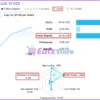
Live Signal Overview
Forex Engine EA trades on a real account and achieves impressive profit performance.
Forex Engine EA Signal
Based on the available live signal data:
| Metric | Result |
|---|---|
| Growth | 10% |
| Profit | $6.54 |
| Equity | $68.62 |
| Initial Deposit | $66.66 |
| Maximum Drawdown | 12.8% |
| Max Deposit Load | 15.4% |
| Winning Trades | 100% |
| Losing Trades | 0% |
| Trading Activity | 53.5% |
| Leverage | 1:500 |
| Trading Style | Fully Automated |
Performance Analysis
The available signal demonstrates:
🔹 Consistent upward equity progression.
🔹 Controlled drawdown profile.
🔹 Moderate account load.
🔹 Fully automated execution.
🔹 Effective basket management.
Although the signal history is still relatively short, the early results indicate disciplined trade management and stable account growth.
Historical Backtest Performance
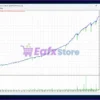
AUDCAD Backtest (2010–2026)
Forex Engine EA MT4 Backtests
Risk Profile: Low Risk (3000)
Highlights:
🔹 Long-term consistent equity growth.
🔹 Smooth upward balance curve.
🔹 Limited equity fluctuations.
🔹 Controlled drawdown periods.
🔹 Stable recovery behavior.
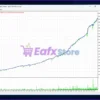
NZDCAD Backtest (2010–2026)
Forex Engine EA MT4 Backtest
The NZDCAD backtest demonstrates:
🔹 Strong long-term profitability.
🔹 Stable account progression.
🔹 Efficient basket recovery.
🔹 Low-risk operational profile.
🔹 Consistent performance across changing market cycles.
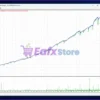
AUDNZD Backtest (2010–2026)
Forex Engine EA MT4 Backtest Results
The AUDNZD results show:
🔹 Gradual and sustainable account growth.
🔹 Controlled risk exposure.
🔹 Effective mean-reversion entries.
🔹 Stable long-term recovery performance.
Backtest Conclusion
Across all three supported currency pairs, Forex Engine EA MT4 demonstrates:
🔹 Consistency over extended periods.
🔹 Robust recovery logic.
🔹 Strong portfolio diversification benefits.
🔹 Effective drawdown control.
🔹 Long-term operational stability.
Why Forex Engine EA MT4 Stands Out
Advanced Equity Governor Technology
Most recovery EAs simply add trades during drawdown.
Forex Engine takes a different approach by actively managing account risk through a dedicated Equity Governor.
Multi-Layer Protection System
Protection levels activate progressively:
🔹 Early Protection: 1%
🔹 Medium Protection: 3%
🔹 Strong Protection: 5%
🔹 Defensive Protection: 8%
🔹 Hard Guard: 25%
Intelligent Recovery Control
Recovery operations can automatically pause when risk becomes excessive.
Basket-Level Decision Making
The EA evaluates entire trade baskets rather than isolated positions.
This creates smarter recovery behavior.
Volatility-Aware Trading
ATR filtering improves entry quality and avoids unfavorable market conditions.
Risk Management Features
Equity Governor
The flagship protection module includes:
🔹 Drawdown monitoring.
🔹 Exposure control.
🔹 Margin pressure analysis.
🔹 Trade cycle suspension.
Basket Risk Budget
Controls maximum acceptable basket exposure.
Margin Protection
Monitors margin utilization continuously.
Recovery Pause Logic
Recovery entries can be suspended during dangerous market conditions.
Drawdown-Based Protection
Protection escalates automatically as account risk increases.
Cooldown Mechanism
The EA uses waiting periods between basket actions to reduce overtrading.
Recommended Trading Conditions
Recommended settings and parameters to pay attention to from developers and experts:
Optimal Setup
| Parameter | Recommendation |
|---|---|
| Platform | MT4 |
| Timeframe | M15 |
| Pairs | AUDCAD, AUDNZD, NZDCAD |
| Deposit | $5,000 – $10,000+ |
| Leverage | 1:500 |
| Account Type | ECN |
| VPS | Strongly Recommended |
| Risk Profile | Low Risk (3000) |
Installation Process
🔹 Install Forex Engine EA MT4.
🔹 Open an M15 chart.
🔹 Attach the EA.
🔹 Load the desired risk profile.
🔹 Enable AutoTrading.
🔹 Run on a VPS.
🔹 Test on demo before going live.
Weaknesses and Risk Warnings
Recovery Trading Risk
Forex Engine uses basket and recovery logic.
Prolonged trends can create temporary floating drawdowns.
Drawdown Can Still Occur
Expected drawdown levels:
🔹 High Risk: Up to 75%
🔹 Low Risk: Up to 25%
Requires Adequate Capital
Undercapitalized accounts may struggle during extended recovery cycles.
VPS Recommended
Continuous operation is important for proper basket management.
Market Conditions Matter
Strong one-directional trends can challenge mean-reversion strategies.
No Guaranteed Profit
As with any Expert Advisor:
🔹 Past performance does not guarantee future results.
🔹 Trading always involves risk.
Who Should Use Forex Engine EA MT4?
Ideal For
✔ Traders seeking advanced automation.
✔ Traders comfortable with recovery-based systems.
✔ Portfolio traders.
✔ Medium to large account holders.
✔ VPS users.
✔ Traders seeking built-in drawdown protection.
Not Ideal For
✘ Small accounts below recommended capital.
✘ Traders seeking ultra-low-risk scalping.
✘ Traders uncomfortable with floating drawdowns.
✘ Traders expecting guaranteed profits.
Final Verdict
Forex Engine EA MT4 is a highly sophisticated multi-currency Expert Advisor that combines mean-reversion trading, basket management, recovery logic, and one of the most comprehensive equity protection systems available in an MT4 robot. Its support for AUDCAD, AUDNZD, and NZDCAD, together with the powerful Equity Governor framework, provides traders with a balanced approach between profitability and account preservation.
The combination of ATR volatility filtering, recovery management, drawdown protection, basket risk budgeting, and multi-layer equity controls makes Forex Engine EA MT4 particularly attractive for traders who prioritize long-term consistency over aggressive speculation.
For users operating recommended account sizes and utilizing the Low Risk (3000) configuration, Forex Engine EA MT4 offers a compelling solution for automated portfolio trading with advanced risk control and sustainable long-term performance.
🔢 Forex Engine EA MT4 – Complete Settings Guide and Parameter Explanation
Forex Engine EA is a sophisticated multi-currency Expert Advisor (EA) designed for MetaTrader 4. The EA combines grid trading, recovery management, volatility filtering, equity protection, intelligent drawdown control and advanced basket management.
With extensive risk management and customization features, Forex Engine EA MT4 is built to provide flexible automated trading while maintaining strict control over account exposure and drawdown.
Forex Engine EA MT4 Settings
🔢 Installation Panel Parameters
Below are the details of the parameters in the advisor’s trading system settings table:
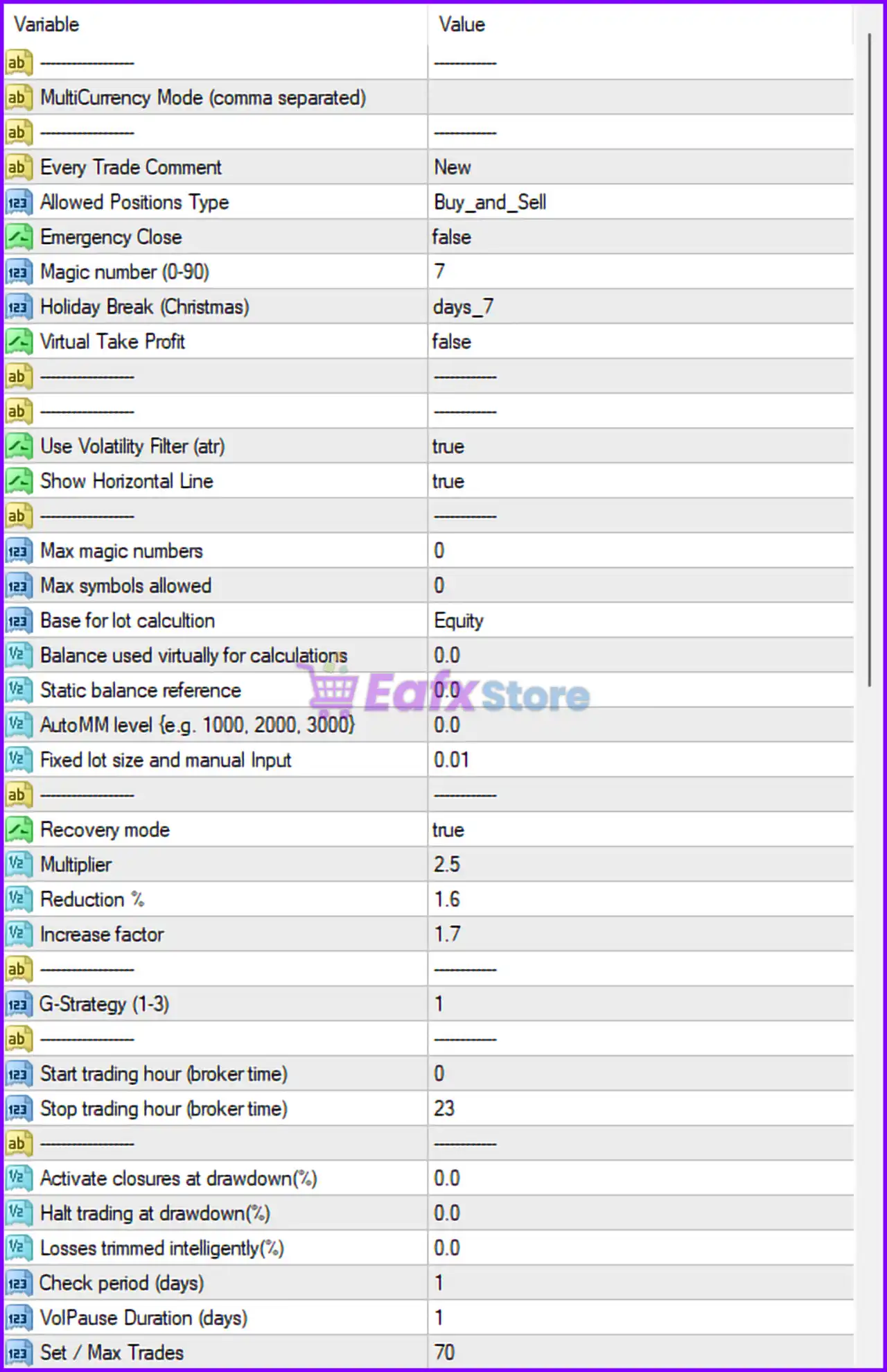
Forex Engine EA MT4 Settings Panel
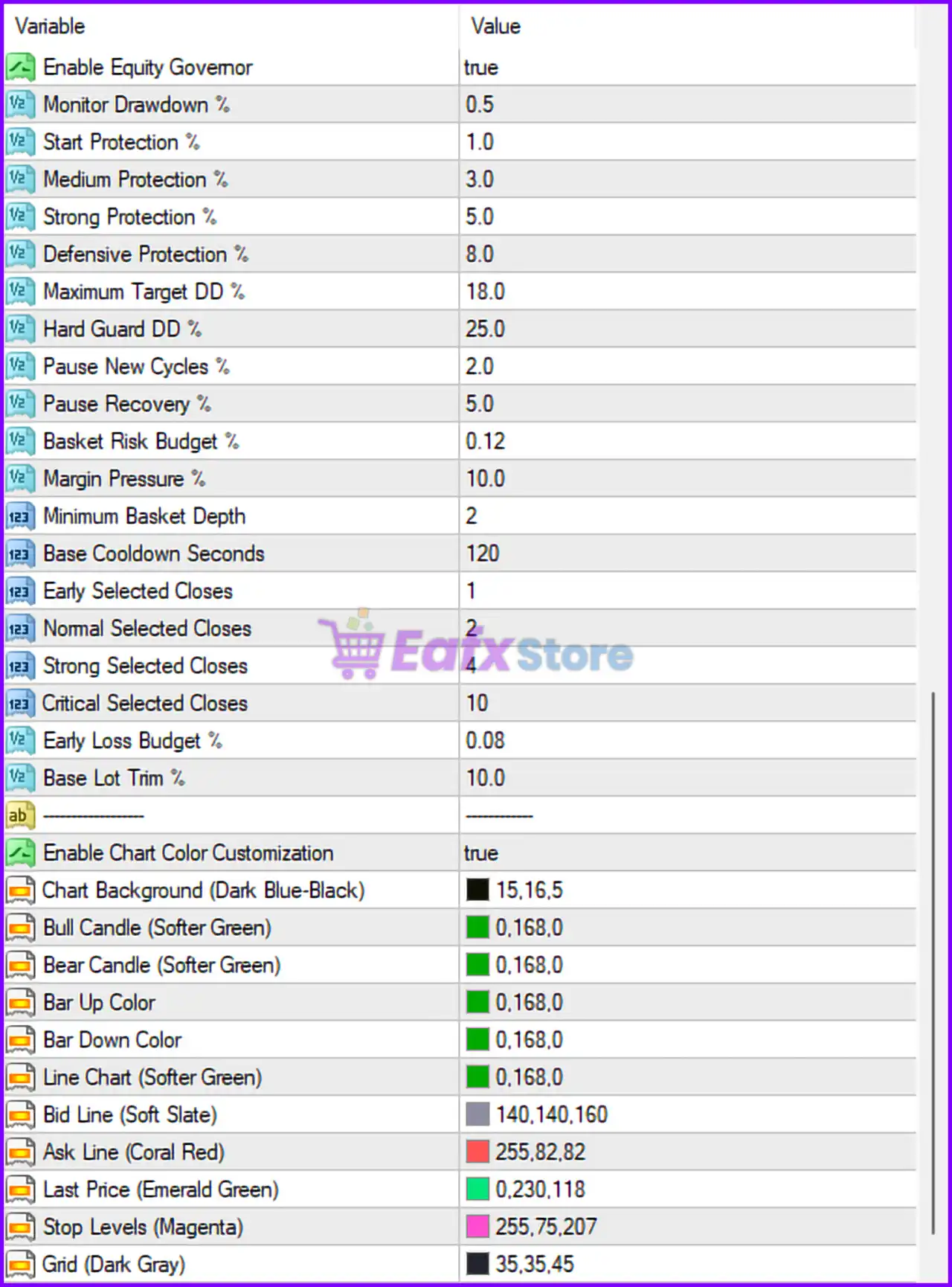
Forex Engine EA Settings Panel
🔶 General Trading Settings
🔹 MultiCurrency Mode (comma separated): Used to specify multiple currency pairs for trading in a single EA instance.
🔹 Every Trade Comment: Configured as New, adding the comment “New” to all EA-generated trades.
🔹 Allowed Positions Type: Set to Buy_and_Sell, allowing both BUY and SELL positions.
🔹 Emergency Close: Configured as false, meaning emergency trade closure is disabled.
🔹 Magic Number (0-90): Set to 7, serving as the unique identifier for all EA trades.
🔹 Holiday Break (Christmas): Configured as days_7, pausing trading activities for 7 days during the Christmas holiday period.
🔹 Virtual Take Profit: Set to false, meaning standard broker-side Take Profit is used instead of virtual TP management.
🔶 Volatility & Display Settings
🔹 Use Volatility Filter (atr): Set to true, enabling ATR-based volatility filtering before opening trades.
🔹 Show Horizontal Line: Configured as true, displaying horizontal trading reference lines on the chart.
🔶 Money Management Settings
🔹 Max Magic Numbers: Set to 0, meaning no specific restriction on managed magic numbers.
🔹 Max Symbols Allowed: Configured at 0, indicating no symbol limitation is applied.
🔹 Base for Lot Calculation: Set to Equity, using account equity as the basis for lot size calculations.
🔹 Balance Used Virtually for Calculations: Configured at 0.0, meaning actual account values are used.
🔹 Static Balance Reference: Set to 0.0, disabling a fixed balance reference.
🔹 AutoMM Level (e.g. 1000, 2000, 3000): Configured at 0.0, meaning automatic money management scaling is disabled.
🔹 Fixed Lot Size and Manual Input: Set to 0.01 lots, defining the fixed starting lot size.
🔶 Recovery System Settings
🔹 Recovery Mode: Configured as true, enabling the recovery and basket management system.
🔹 Multiplier: Set to 2.5, increasing lot size by a factor of 2.5 during recovery cycles.
🔹 Reduction %: Configured at 1.6%, controlling position size reduction logic during recovery.
🔹 Increase Factor: Set to 1.7, determining the scaling factor applied to subsequent recovery trades.
🔶 Strategy Settings
🔹 G-Strategy (1-3): Configured at 1, selecting Strategy Mode 1 from the EA’s internal trading algorithms.
🔶 Trading Schedule Settings
🔹 Start Trading Hour (Broker Time): Set to 0, allowing trading from 00:00 broker time.
🔹 Stop Trading Hour (Broker Time): Configured at 23, allowing trading until 23:00 broker time.
🔶 Drawdown Protection Settings
🔹 Activate Closures at Drawdown (%): Set to 0.0%, disabling automatic closure based on drawdown percentage.
🔹 Halt Trading at Drawdown (%): Configured at 0.0%, disabling trading suspension based on drawdown.
🔹 Losses Trimmed Intelligently (%): Set to 0.0%, disabling intelligent loss trimming.
🔹 Check Period (Days): Configured at 1 day, determining how often the EA evaluates drawdown conditions.
🔹 VolPause Duration (Days): Set to 1 day, defining the volatility pause duration.
🔹 Set / Max Trades: Configured at 70, allowing a maximum of 70 trades.
🔶 Equity Governor Settings
🔹 Enable Equity Governor: Set to true, enabling advanced equity protection management.
🔹 Monitor Drawdown %: Configured at 0.5%, continuously monitoring account drawdown.
🔹 Start Protection %: Set to 1.0%, activating protection mechanisms when drawdown reaches 1.0%.
🔹 Medium Protection %: Configured at 3.0%, applying medium-level protection measures.
🔹 Strong Protection %: Set to 5.0%, activating stronger defensive actions.
🔹 Defensive Protection %: Configured at 8.0%, increasing protective intervention levels.
🔹 Maximum Target DD %: Set to 18.0%, defining the maximum acceptable target drawdown.
🔹 Hard Guard DD %: Configured at 25.0%, triggering the strongest protection mechanism.
🔹 Pause New Cycles %: Set to 2.0%, stopping new trading cycles once this drawdown level is reached.
🔹 Pause Recovery %: Configured at 5.0%, temporarily pausing recovery operations.
🔹 Basket Risk Budget %: Set to 0.12%, allocating risk budget for basket trades.
🔹 Margin Pressure %: Configured at 10.0%, monitoring margin utilization levels.
🔹 Minimum Basket Depth: Set to 2, requiring at least two positions in a basket.
🔹 Base Cooldown Seconds: Configured at 120 seconds, defining the waiting period between basket actions.
🔹 Early Selected Closes: Set to 1, specifying the number of early closure actions.
🔹 Normal Selected Closes: Configured at 2, specifying standard closure actions.
🔹 Strong Selected Closes: Set to 4, specifying aggressive closure actions.
🔹 Critical Selected Closes: Configured at 10, defining emergency closure actions under critical conditions.
🔹 Early Loss Budget %: Set to 0.08%, controlling acceptable early-stage losses.
🔹 Base Lot Trim %: Configured at 10.0%, reducing lot sizes during defensive phases.
🔶 Chart Customization Settings
🔹 Enable Chart Color Customization: Set to true, enabling custom chart color themes.
🔹 Chart Background (Dark Blue-Black): Configured as RGB (15,16,5), defining the chart background color.
🔹 Bull Candle (Softer Green): Set to RGB (0,168,0), displaying bullish candles in green.
🔹 Bear Candle (Softer Green): Configured as RGB (0,168,0), defining bearish candle coloration.
🔹 Bar Up Color: Set to RGB (0,168,0), displaying upward bars in green.
🔹 Bar Down Color: Configured as RGB (0,168,0), displaying downward bars in green.
🔹 Line Chart (Softer Green): Set to RGB (0,168,0), defining line chart color.
🔹 Bid Line (Soft Slate): Configured as RGB (140,140,160), displaying the bid price line.
🔹 Ask Line (Coral Red): Set to RGB (255,82,82), displaying the ask price line.
🔹 Last Price (Emerald Green): Configured as RGB (0,230,118), displaying the latest price level.
🔹 Stop Levels (Magenta): Set to RGB (255,75,207), displaying stop levels in magenta.
🔹 Grid (Dark Gray): Configured as RGB (35,35,45), defining chart grid color.
🔢 Conclusion
Forex Engine EA MT4 is a feature-rich automated trading system that combines multi-currency trading, ATR volatility filtering, recovery management, basket trading, and advanced equity protection into a single solution.
With powerful settings such as Recovery Mode = true, Multiplier = 2.5, Equity Governor enabled, Maximum Target DD = 18.0%, and Max Trades = 70, the EA offers extensive flexibility for traders who require both performance optimization and sophisticated risk control. Proper configuration of these parameters is essential to achieve a balance between profitability and long-term account stability.
🔢 FAQs
❓ What is Forex Engine EA MT4?
Forex Engine EA MT4 is an automated MetaTrader 4 Expert Advisor that combines grid trading, recovery systems, volatility filters, and equity protection mechanisms.
❓ How does the Recovery Mode work?
When Recovery Mode = true, the EA can use basket management and lot scaling techniques to recover from adverse market movements.
❓ What is the purpose of the Equity Governor?
The Equity Governor monitors drawdown levels and automatically applies protective measures to reduce trading risk during unfavorable market conditions.
❓ Why does Forex Engine EA MT4 use ATR volatility filtering?
The Use Volatility Filter (ATR) = true setting helps prevent trading during periods of insufficient market volatility, improving trade quality.
❓ How many trades can Forex Engine EA MT4 manage simultaneously?
The parameter Set / Max Trades = 70 allows the EA to manage up to 70 active positions at the same time.
User Reviews
Only logged in customers who have purchased this product may leave a review.
❓ What is Forex Engine EA?
Forex Engine EA is an automated MT4 trading system that combines mean-reversion logic, recovery management, basket trading, and advanced equity protection tools.
❓ Which currency pairs are recommended for Forex Engine EA?
Forex Engine EA is optimized for AUDCAD, AUDNZD, and NZDCAD, allowing traders to diversify trading opportunities across multiple currency pairs.
❓ How does Forex Engine EA manage trading risk?
Forex Engine EA uses volatility filters, basket monitoring, drawdown protection, margin control, and an Equity Governor to manage account exposure.
❓ Does Forex Engine EA support multiple currency pairs on one chart?
Forex Engine EA supports multi-currency trading from a single chart, making it easier to manage several pairs through one EA instance.
❓ What timeframe is recommended for Forex Engine EA?
Forex Engine EA is designed to run on the M15 timeframe, where its mean-reversion and recovery algorithms are optimized for performance.
❓ What is the Equity Governor in Forex Engine EA?
Forex Engine EA includes an Equity Governor that monitors drawdown, controls basket pressure, pauses risky cycles, and activates protection measures.
❓ Can Forex Engine EA automatically recover losing positions?
Forex Engine EA features a recovery system that manages basket trades and position scaling while maintaining predefined risk management rules.
❓ What account size is recommended for Forex Engine EA?
Forex Engine EA is recommended for accounts between $5,000 and $10,000, providing sufficient capital for basket management and recovery operations.
❓ What risk levels are available in Forex Engine EA?
Forex Engine EA offers High, Medium, and Low Risk presets, allowing traders to select configurations that match their risk tolerance and goals.
❓ Why do traders choose Forex Engine EA?
Forex Engine EA attracts traders with multi-currency support, advanced drawdown protection, recovery management, and flexible risk control settings.
-
 Original price was: $9,999.00.$249.00Current price is: $249.00.
 -
 Original price was: $30,000.00.$249.00Current price is: $249.00.
 -
 Original price was: $30,000.00.$249.00Current price is: $249.00.
 -
 Original price was: $5,000.00.$249.00Current price is: $249.00.
-
 0Original price was: $1,299.00.$249.00Current price is: $249.00.
 -
 1Original price was: $500.00.$249.00Current price is: $249.00.
 -
 0Original price was: $199.00.$179.00Current price is: $179.00.
 -
 0Original price was: $430.00.$249.00Current price is: $249.00.
There are no reviews yet.