


🔢 Friday Pro EA – Complete Settings Guide
Friday Pro EA is an automated trading system focused on disciplined trade execution and configurable money management. Its settings provide direct control over trade identification, profit targets, stop-loss levels and position-sizing parameters.
With dedicated money management controls, including a 5.0 risk percentage and a 0.01 fallback lot size, Friday Pro EA gives traders flexibility to configure their preferred risk and trade-management approach.
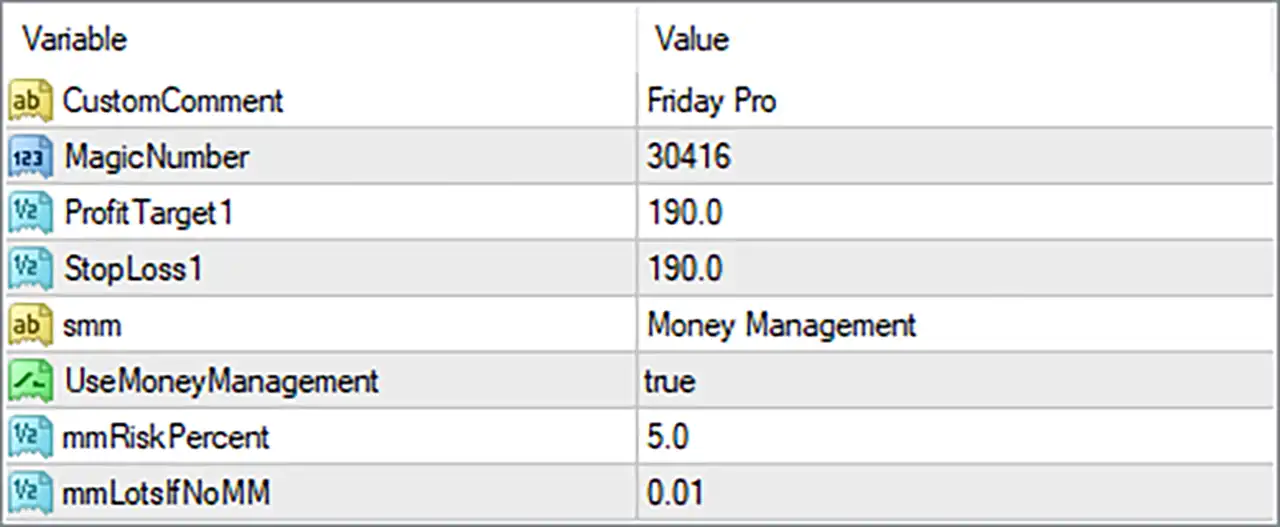
🔢 Friday Pro EA Settings Explained
🔄 General Trade Settings
🔹 CustomComment = Friday Pro — Sets the custom trade comment to “Friday Pro”, making positions generated by the EA easier to identify in the MetaTrader trading terminal.
🔹 MagicNumber = 30416 — Uses the unique Magic Number 30416 to identify trades opened and managed by Friday Pro EA separately from other EAs or manual positions.
🔄 Profit & Stop Loss Settings
🔹 ProfitTarget1 = 190.0 — Sets the first profit target parameter to 190.0, defining the configured target level for the EA's trade-management logic.
🔹 StopLoss1 = 190.0 — Sets the first Stop Loss parameter to 190.0, providing a predefined loss-control level for trades managed by the EA.
🔄 Money Management Settings
🔹 smm = Money Management — Selects Money Management as the applicable position-sizing or risk-management configuration.
🔹 UseMoneyManagement = true — Enables the EA's built-in Money Management function, allowing position sizing to be determined by the configured money-management parameters.
🔹 mmRiskPercent = 5.0 — Sets the Money Management risk parameter to 5.0, representing the configured risk percentage used by the EA when calculating position size.
🔹 mmLotsIfNoMM = 0.01 — Sets the fallback lot size to 0.01 when the Money Management calculation is not used or cannot be applied.
🔢 Conclusion
Friday Pro EA provides a compact but clearly defined set of trading and money-management parameters. The configuration uses MagicNumber 30416 and the trade comment “Friday Pro” for reliable trade identification, while ProfitTarget1 = 190.0 and StopLoss1 = 190.0 establish the primary profit and loss parameters.
Money Management is enabled with UseMoneyManagement = true, a configured mmRiskPercent of 5.0, and a fallback lot size of 0.01 through mmLotsIfNoMM. Traders should always verify how the EA interprets the target and stop-loss units on their specific symbol and broker, and test the configuration under realistic market conditions before deploying it on a live account.
🔢 FAQs
❓ What is the Magic Number of Friday Pro EA?
The Magic Number is 30416, which is used to distinguish Friday Pro EA trades from positions opened by other systems or manually.
❓ What is the Custom Comment used by Friday Pro EA?
The CustomComment is set to “Friday Pro”, allowing the EA's positions to be easily recognized in the trading terminal.
❓ Is Money Management enabled in Friday Pro EA?
Yes. UseMoneyManagement = true, meaning the EA's built-in Money Management function is enabled.
❓ What is the configured Money Management risk percentage?
The mmRiskPercent parameter is set to 5.0, which is the configured risk percentage used by the EA's money-management calculation.
❓ What is the fallback lot size of Friday Pro EA?
The mmLotsIfNoMM parameter is set to 0.01, providing a fallback lot size when the Money Management calculation is not used or cannot be applied.


