

Quantum Trade MT4 Settings Explained – Full Configuration Guide
Quantum Trade MT4 is a professional automated trading Expert Advisor designed for MetaTrader 4 traders who want to trade breakout strategies with advanced recovery systems, smart risk management, pending order control and trading session filters.
The EA combines auto lot sizing, recovery trading logic, DST synchronization, and additional trade management features to help optimize performance in volatile forex and gold markets. Quantum Trade MT4 is suitable for both beginners and experienced traders seeking automated breakout trading solutions.
Quantum Trade MT4 Full Settings Explanation
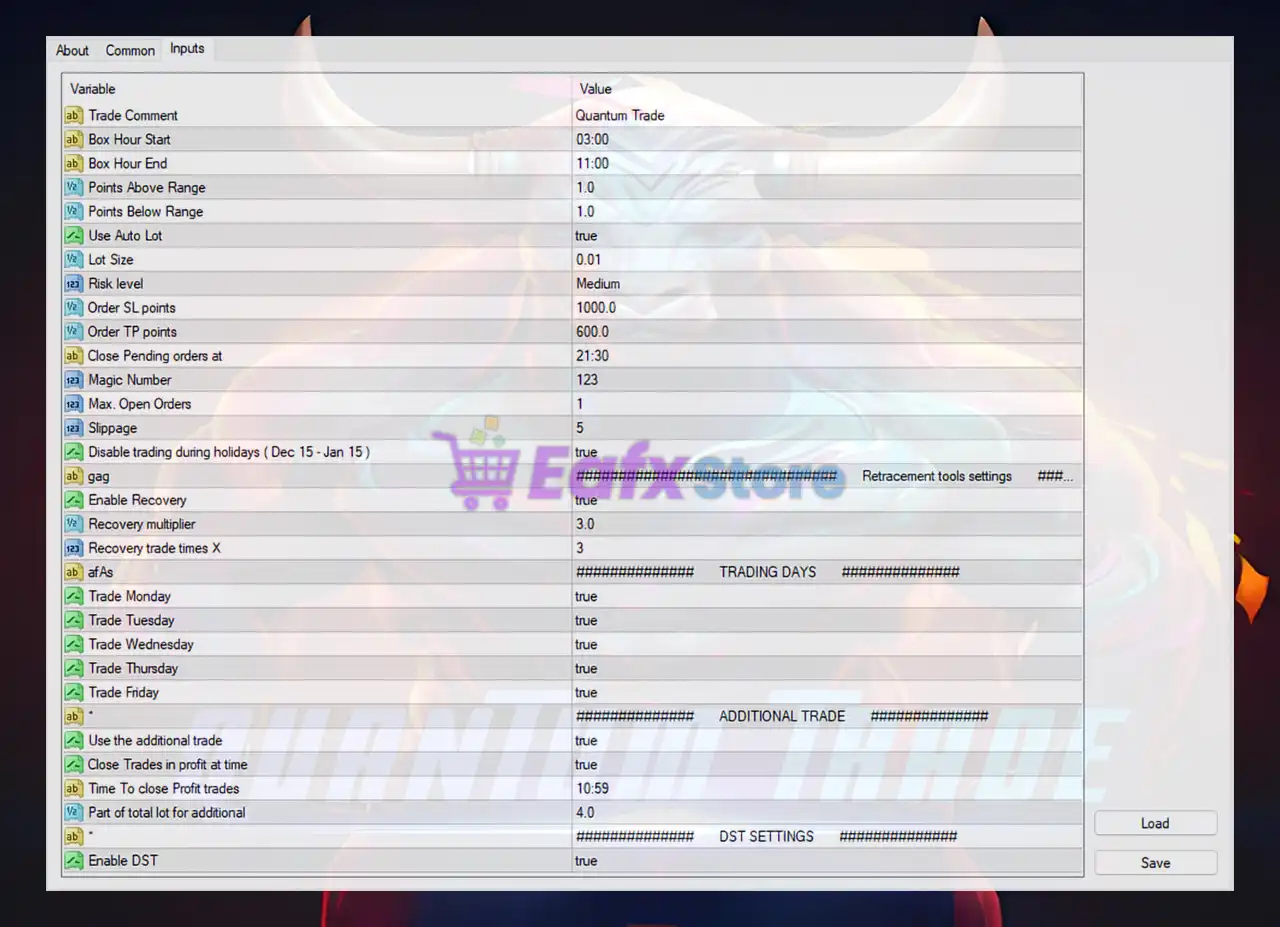
Below are the details of the parameters in the advisor’s trading system settings table:
General Trading Settings
🔹 Trade Comment = Quantum Trade: Sets the custom trade comment label as Quantum Trade.
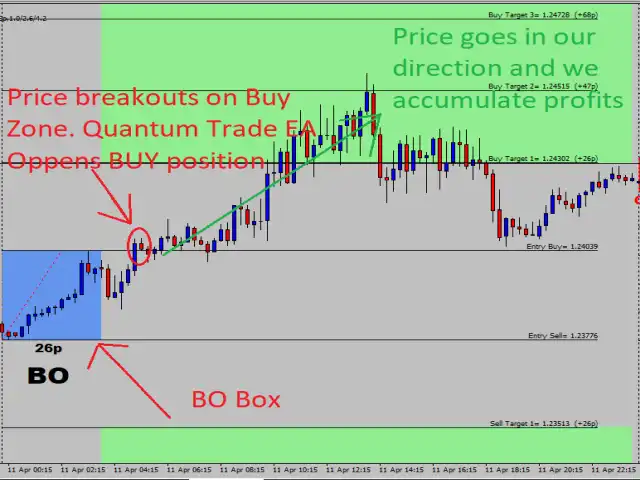
🔹 Box Hour Start = 03:00: Defines the starting hour of the breakout trading box at 03:00.
🔹 Box Hour End = 11:00: Defines the ending hour of the breakout trading box at 11:00.
🔹 Points Above Range = 1.0: Places pending orders 1.0 point above the trading range.
🔹 Points Below Range = 1.0: Places pending orders 1.0 point below the trading range.
🔹 Use Auto Lot = true: Enables automatic lot size calculation.
🔹 Lot Size = 0.01: Sets the default manual lot size to 0.01.
🔹 Risk level = Medium: Uses the Medium predefined risk profile.
🔹 Order SL points = 1000.0: Sets the stop loss distance to 1000.0 points.
🔹 Order TP points = 600.0: Sets the take profit distance to 600.0 points.
🔹 Close Pending orders at = 21:30: Automatically closes pending orders at 21:30.
🔹 Magic Number = 123: Unique magic number identifier set to 123.
🔹 Max. Open Orders = 1: Limits the maximum simultaneous open orders to 1.
🔹 Slippage = 5: Maximum allowed slippage set to 5.
🔹 Disable trading during holidays (Dec 15 - Jan 15) = true: Disables trading between December 15 and January 15.
Recovery Tools Settings
🔹 Enable Recovery = true: Activates the recovery trading system.
🔹 Recovery multiplier = 3.0: Uses a recovery lot multiplier of 3.0.
🔹 Recovery trade times X = 3: Allows recovery trades up to 3 times.
Trading Days Settings
🔹 Trade Monday = true: Enables trading on Monday.
🔹 Trade Tuesday = true: Enables trading on Tuesday.
🔹 Trade Wednesday = true: Enables trading on Wednesday.
🔹 Trade Thursday = true: Enables trading on Thursday.
🔹 Trade Friday = true: Enables trading on Friday.
Additional Trade Settings
🔹 Use the additional trade = true: Enables the additional trade feature.
🔹 Close Trades in profit at time = true: Closes profitable trades at a specified time.
🔹 Time To close Profit trades = 10:59: Closes profitable trades automatically at 10:59.
🔹 Part of total lot for additional = 4.0: Uses 4.0 as the additional trade lot portion factor.
DST Settings
🔹 Enable DST = true: Enables Daylight Saving Time synchronization.
Conclusion
Quantum Trade MT4 is a robust breakout trading Expert Advisor (EA) equipped with intelligent recovery systems, automated lot sizing, pending order management, and trading session controls. The EA is designed to help traders automate breakout strategies while maintaining disciplined risk management.
With recovery tools, DST support, trading day filters, and configurable stop loss/take profit settings, Quantum Trade MT4 provides a flexible and professional trading environment for forex and gold traders.
FAQs
❓ What is Quantum Trade MT4?
Quantum Trade MT4 is an automated breakout trading Expert Advisor developed for MetaTrader 4.
❓ Does Quantum Trade MT4 support auto lot sizing?
Yes, the EA includes automatic lot size calculation through the Use Auto Lot feature.
❓ Can Quantum Trade MT4 trade only on selected days?
Yes, traders can enable or disable trading individually for Monday through Friday.
❓ Does Quantum Trade MT4 include a recovery system?
Yes, the EA includes a built-in recovery trading feature with configurable multiplier settings.
❓ Is Quantum Trade MT4 suitable for gold trading?
Yes, Quantum Trade MT4 can be configured for gold trading as well as forex currency pairs.