



FVG EA Pro MT5 with SetFiles (Latest version) - Unlimited

Subscriptions for Special Plan
- 30 EA package is more economical!
- Special package with 99%
- Download 1 EA/Day

Subscriptions for Premium Membership
- Download Unlimited in 1 Year
- Get 100% Discount
- Get free access to all

Subscriptions for Gold Membership
- 1 Year Membership
- Get 100% Discount
- Access EA+Indicator+Course
Frequently bought together 🎁
Add these products to enhance your purchase



What is FVG EA Pro MT5?
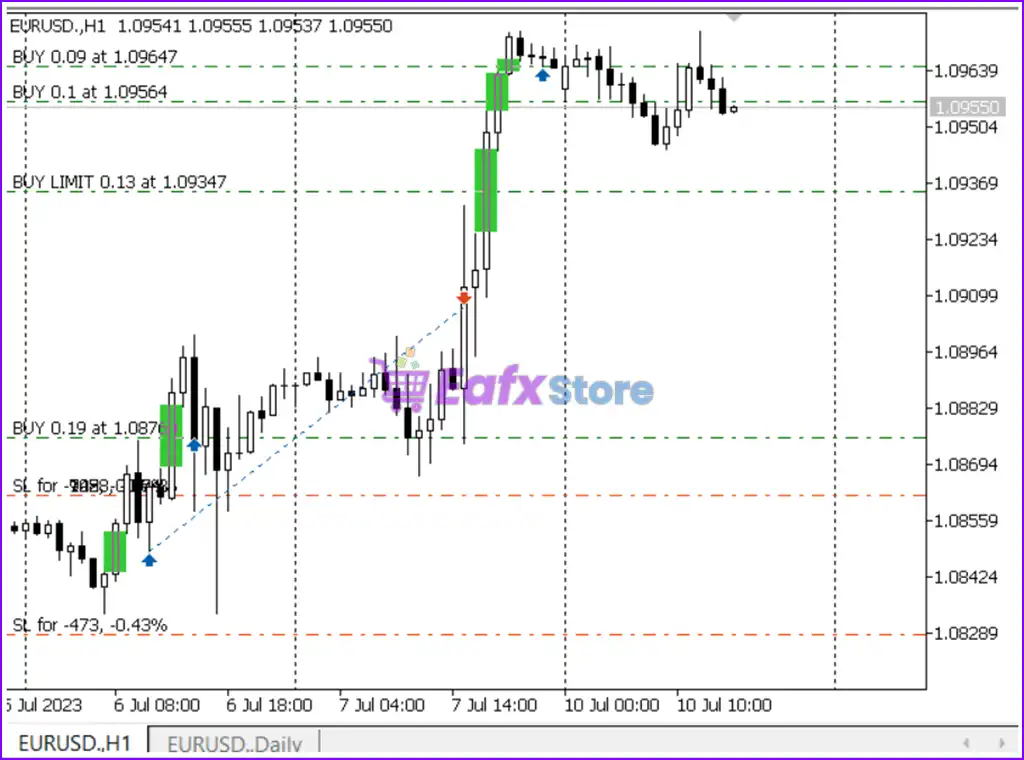
FVG EA Pro is a highly customizable and intelligent trading robot designed around the Smart Money Concept (SMC) and Fair Value Gap (FVG) strategy. This advanced automated trading system leverages market structure and price imbalances to execute high-probability trades with precision.
Unlike traditional EAs, FVG EA Pro allows traders to build unique trading strategies by configuring entry rules based on market structure, kill zones, and silver bullet windows. Whether you are a scalper, day trader, or swing trader, this EA offers complete flexibility and automation for ICT and SMC-based strategies.
 Vendor Website: View here
About the Author
This product is compiled by Lionel Haj Ali. This author has more than +5 years of experience working on MQL5 with many famous products such as FVG EA Pro MT5, FVG EA Pro MT4, Ultimate SMC MT5 and other advisors. Among them, FVG EA Pro is his best performing products.
Delivery time 24h-48h after payment.
Refund if not delivered.
You will receive the current version without any limitations (ID+Time).
Key Features of FVG EA Pro for MT5
🔹Smart Money Concept-Based Trading: Utilizes Fair Value Gap (FVG) and market structure to identify high-probability trade setups.
🔹Highly Customizable Entry Criteria: Allows traders to configure various strategies based on ICT concepts, market structure, and timeframe filters.
🔹Supports Kill Zones & Silver Bullet Windows: Optimized for precise entries during key market timeframes.
🔹Multiple Order Types: Choose between limit, stop, or market orders for flexible execution.
🔹Advanced Time-Based Exit Strategies: Ensures trade closures are strategically aligned with price action.
🔹Volume-Based Risk Management: Configure lot size as a fixed value or percentage of balance/equity.
🔹Break-Even & Trailing Stop: Protects profits by automatically adjusting stop-loss levels as trades move in your favor.
🔹Built-in Drawdown & Profit Control: Stops trading when the daily profit target or drawdown limit is reached.
Key Benefits of Using FVG EA Pro
🔹Precision Trading with ICT & SMC Concepts: Trades based on institutional-level price action and market structure.
🔹Automation for Professional Traders: Designed for traders who understand backtesting and optimization for fine-tuned execution.
🔹Enhanced Risk & Profit Management: Offers multiple ways to set Stop-loss (SL), Take-profit (TP), and manage drawdowns effectively.
🔹Flexible for Any Account Size: Works with all account sizes when using percentage-based risk management.
🔹Time-Sensitive Execution: Capitalizes on optimal market conditions through time-based entry and exit strategies.
FVG EA Pro EA MT5 Review
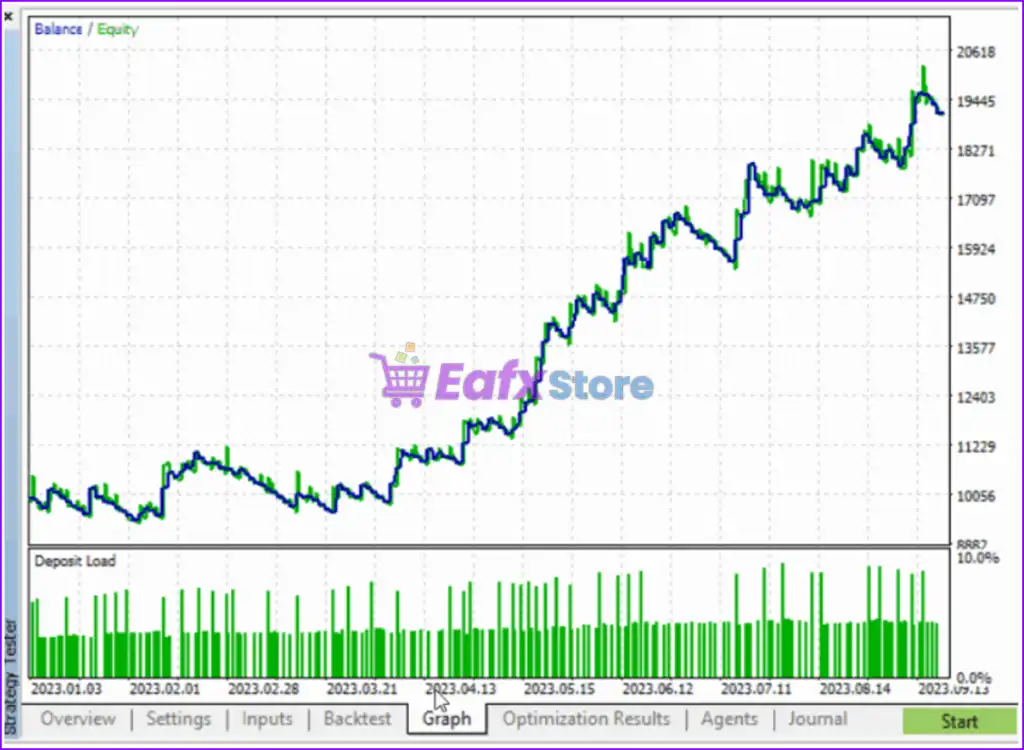
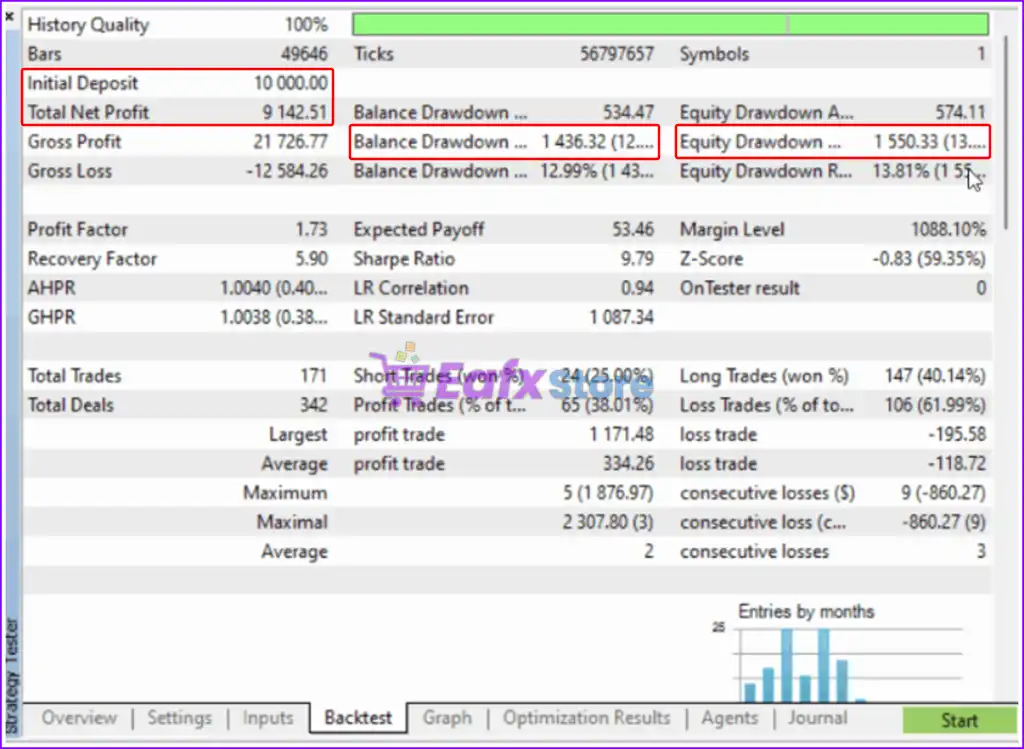
The FVG EA Pro underwent a rigorous backtest with 100% historical data quality to evaluate its performance, profitability, and risk management.
This analysis provides a detailed breakdown of key metrics, including profitability, drawdown, trade execution, and overall strategy performance.
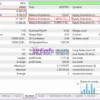
✅ Initial Deposit: $10,000
✅ Total Net Profit: $9,142.51
✅ Balance Drawdown: 12.99%
✅ Equity Drawdown: 13.81%
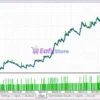
FVG EA Pro EA Backtest Results
FVG EA Pro MT5 Backtest Results
FVG EA Pro EA Review
Is the FVG EA Pro MT5 safe?
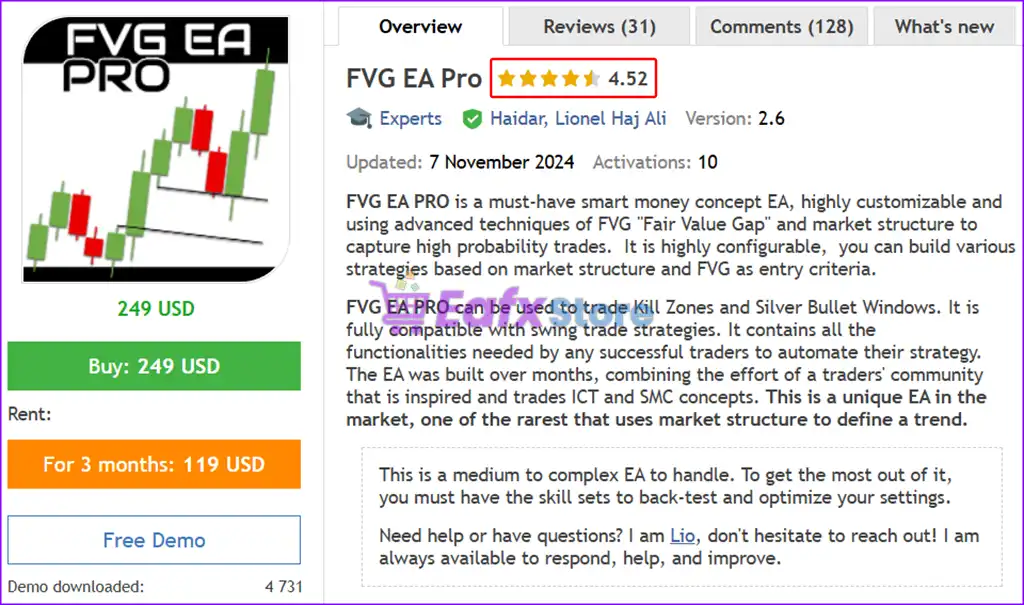
FVG EA PRO delivers outstanding trading performance, especially when optimized for currency pairs GOLD, EURUSD, GBPUSD, USDJPY, GBPNZD, US30 and others, showcasing its potential to generate consistent profits. Highly rated and trusted by the MQL5 community, this expert advisor combines advanced strategies with reliable results, making it a top choice for traders seeking efficiency and profitability in the forex market. Here are 5 star user reviews:
⭐⭐⭐⭐⭐ ltbenny (2024.07.12): “Ea is one of the best once ive taken the time to learn and optimized Ea to my brokers conditions.”
⭐⭐⭐⭐⭐ Furkancka (2024.04.19): “Really good working EA and always fast response and support from the dev.”
⭐⭐⭐⭐⭐ Max (2024.06.25): “Nice EA with a lot of flexible settings, that are professionally coded and quite unique to the MQL market, including some very useful functions. Sets look promising and personally also use it as tool to trade in my own plan.”
⭐⭐⭐⭐⭐ Willie Sternfeldt (2023.11.26): “FVG EA Pro truly stands out! Ever since integrating it, I’ve witnessed a significant advancement in my experience with expert advisors. The anticipation for an EA like this has finally paid off. Its unique features are unrivaled — a must-have for serious traders.”
Trading Specifications
Recommended settings and parameters to pay attention to from developers and experts:
| Features | Type |
|---|---|
| Trading platform | MetaTrader 5 (MT5) |
| Time frames | M5, M15, M30, H1, H4 |
| Minimum / Recommended deposit | $500 |
| Minimum / Recommended leverage | Any |
| Currency pairs | GOLD, EURUSD, GBPUSD, USDJPY, GBPNZD, US30 and others |
| Setup files | Available |
| Product type | NoDLL / Fix |
| Additional services | Unlock and Decompile |
| Recommended brokers | Exness Broker, Icmarkets Broker |
| Recommended VPS | MyfxVPS.com ( Blue VPS, Golden VPS). Lowest Latency, 2 week Free Trial, 100% Free for 12-18 Months. |
Product Download Package?
The download package of the product suite includes:
Experts
 FVG EA Pro.ex5
SetFiles
✅ FVG EA PRO – GBPUSD – 5 Min – 2023 Low DD.set
✅ FVG EA PRO – TESLA – 15 Min – StopOrder_Trend.set
✅ FVG EA PRO – GOLD – 15 Min – 3 Years Optimization.set
✅ FVG EA PRO – USTEC – 15 Min – StopOrder – CounterTrend.set
✅ FVG EA PRO – USTEC NY OPEN – 5 Min – 2023 Best.set
✅ FVG EA PRO – APPLE – 15 Min – StopOrder_Trend.set
✅ FVG EA PRO – EURUSD SWING – 4 Hours – 5 Years_v2.set
✅ Set 1_FVG EA PRO_EURUSD_4 Hours.set
✅ Set 2_FVG EA PRO_APPLE_15 Min.set
✅ Set 3_FVG EA PRO_GBPUSD_5 Min.set
✅ Set 4_FVG EA PRO_GOLD_15 Min.set
✅ Set 5_FVG EA PRO_TESLA_15 Min.set
✅ Set 6_FVG EA PRO_USTEC_15 Min.set
✅ Set 7_FVG EA PRO_USTEC_5 Min.set
✅ Set 9 – GBPUSD 15MIN Counter Trend London Open.set
✅ Set 10_FVG EA PRO_GBPUSD_1H Counter Trend_Low Frequency.set
✅ Set 11 – GBPUSD 1H Breaker.set
✅ Set 12 – USDJPY 1H HFT.set
✅ Set 13 – USDJPY 5MIN FVG Breakout.set
✅ Set 14 – DAX 15Min Tue to Frid trend.set
✅ Set 15 – GBPNZD and EURJPY 1H.set
➡️ Reviewed by David Easton
Conclusion: Elevate Your Trading with FVG EA Pro
In short, FVG EA Pro is the ultimate trading solution for traders seeking precision, automation, and flexibility. Built on Smart Money Concept (SMC) and Fair Value Gap (FVG) strategies, this Expert advisor (EA) empowers traders with institutional-grade tools to capitalize on market inefficiencies and price imbalances. Whether you’re a scalper, day trader, or swing trader, its customizable entry criteria, kill zone optimization, and advanced risk management ensure a tailored trading experience.
🔢 FVG EA Pro MT5 Settings Explained – Complete Parameter Guide
FVG EA Pro MT5 is a professional MetaTrader 5 Expert Advisor that automates trading based on Fair Value Gap (FVG) concepts combined with Smart Money Concepts (SMC), market structure analysis, trend confirmation, advanced risk management, news filtering, break-even, trailing stop, partial profit taking, and flexible trading session controls.
FVG EA Pro MT5 Settings
🔢 Installation Panel Parameters
Below are the details of the parameters in the advisor’s trading system settings table:
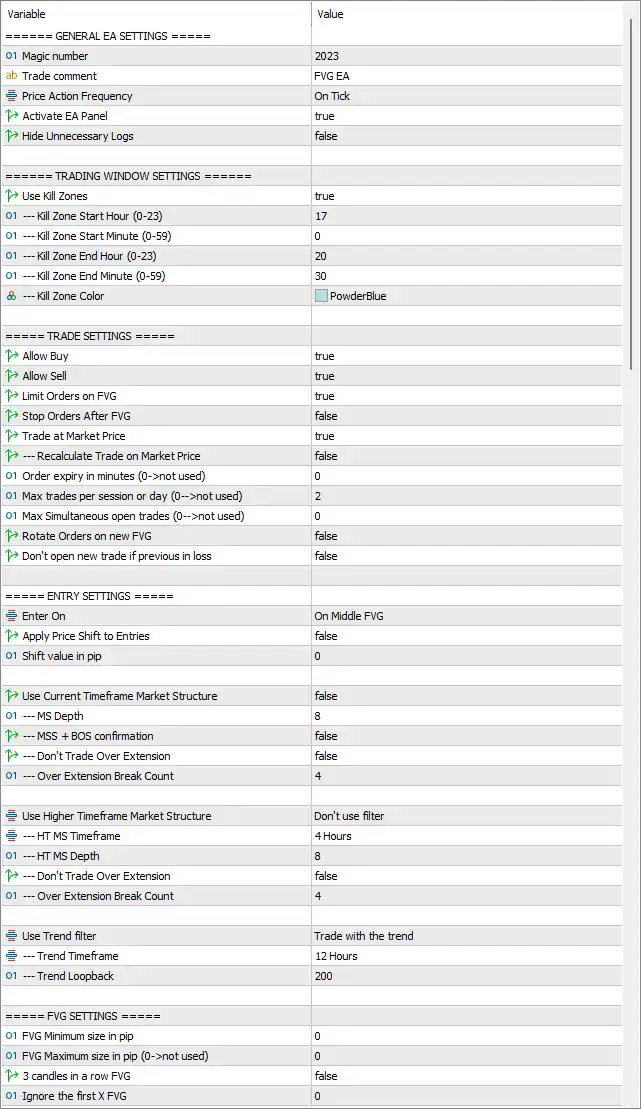
FVG EA Pro MT5 Settings Panel
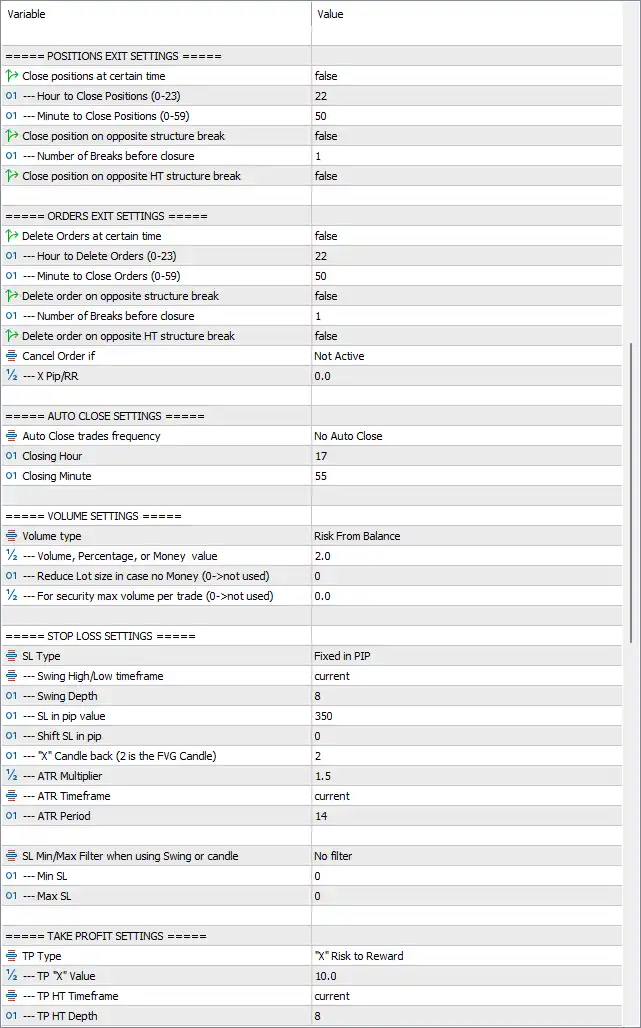
FVG EA Pro Settings Panel
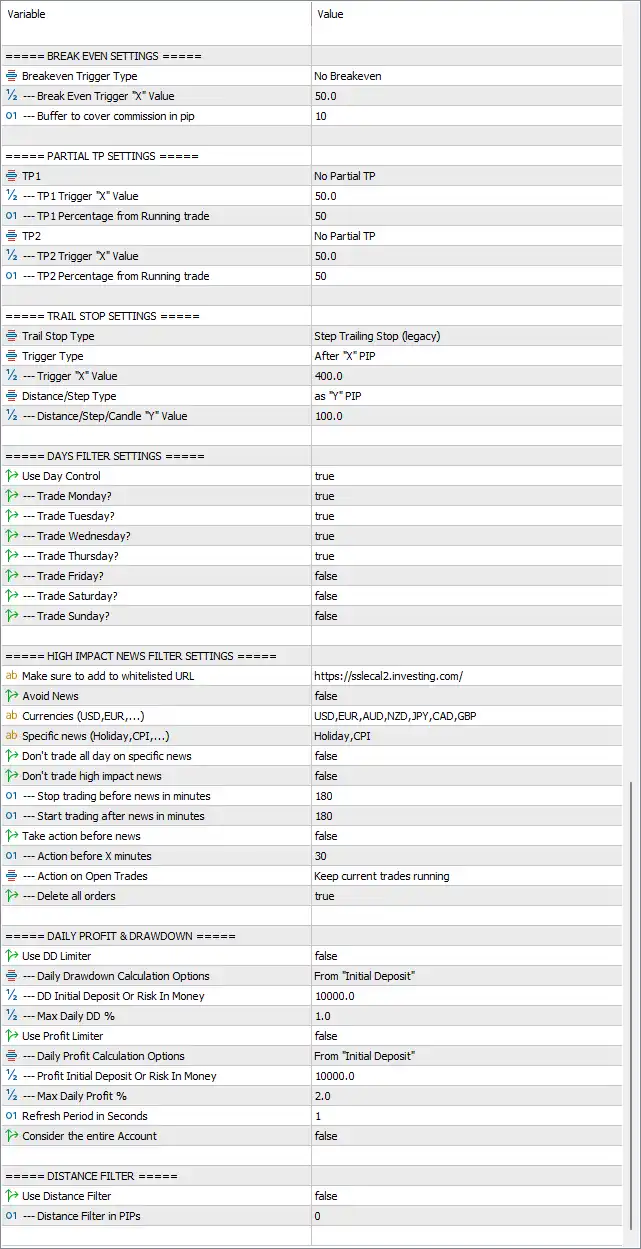
FVG EA Pro MT5 Setting Panel
🔶 General EA Settings
🔹 Magic number = 2023 – Assigns the unique Magic Number 2023 so the EA manages only its own positions.
🔹 Trade comment = FVG EA – Adds “FVG EA” as the comment to every order opened by the EA.
🔹 Price Action Frequency = On Tick – Executes all trading calculations on every incoming market tick.
🔹 Activate EA Panel = true – Displays the EA control panel directly on the chart.
🔹 Hide Unnecessary Logs = false – Keeps all system log messages visible in the Experts log.
🔶 Trading Window Settings
🔹 Use Kill Zones = true – Restricts trading to predefined Smart Money “Kill Zone” sessions.
🔹 Kill Zone Start Hour (0-23) = 17 – Starts the Kill Zone at 17:00.
🔹 Kill Zone Start Minute (0-59) = 0 – Kill Zone begins exactly at 17:00.
🔹 Kill Zone End Hour (0-23) = 20 – Ends the Kill Zone at 20:00.
🔹 Kill Zone End Minute (0-59) = 30 – Kill Zone ends at 20:30.
🔹 Kill Zone Color = PowderBlue – Displays the Kill Zone area using the PowderBlue chart color.
🔶 Trade Settings
🔹 Allow Buy = true – Enables Buy trade entries.
🔹 Allow Sell = true – Enables Sell trade entries.
🔹 Limit Orders on FVG = true – Places pending Limit Orders directly on detected Fair Value Gaps.
🔹 Stop Orders After FVG = false – Disables Stop Orders after Fair Value Gap detection.
🔹 Trade at Market Price = true – Allows instant Market Orders when entry conditions are satisfied.
🔹 Recalculate Trade on Market Price = false – Prevents recalculation of entry levels after Market Orders.
🔹 Order expiry in minutes (0->not used) = 0 – Pending Orders never expire automatically.
🔹 Max trades per session or day (0->not used) = 2 – Limits trading to 2 trades per session/day.
🔹 Max Simultaneous open trades (0->not used) = 0 – No simultaneous trade limitation.
🔹 Rotate Orders on new FVG = false – Existing pending orders remain unchanged after new FVG formation.
🔹 Don’t open new trade if previous in loss = false – Continues opening new trades regardless of previous losing trades.
🔶 Entry Settings
🔹 Enter On = On Middle FVG – Opens positions at the midpoint of the Fair Value Gap.
🔹 Apply Price Shift to Entries = false – Entry price adjustment is disabled.
🔹 Shift value in pip = 0 – No additional pip offset is applied.
🔶 Current Timeframe Market Structure
🔹 Use Current Timeframe Market Structure = false – Disables current timeframe market structure filtering.
🔹 MS Depth = 8 – Uses a Market Structure depth of 8 candles.
🔹 MSS + BOS confirmation = false – Market Structure Shift and Break of Structure confirmation are disabled.
🔹 Don’t Trade Over Extension = false – Allows trading even after strong market extensions.
🔹 Over Extension Break Count = 4 – Uses 4 structure breaks when evaluating over-extension.
🔶 Higher Timeframe Market Structure
🔹 Use Higher Timeframe Market Structure = Don’t use filter – Higher timeframe confirmation is disabled.
🔹 HT MS Timeframe = 4 Hours – Higher timeframe is configured as H4.
🔹 HT MS Depth = 8 – Uses 8 candles for higher timeframe structure calculations.
🔹 Don’t Trade Over Extension = false – Higher timeframe extension filter is disabled.
🔹 Over Extension Break Count = 4 – Uses 4 breaks for higher timeframe over-extension analysis.
🔶 Trend Filter
🔹 Use Trend filter = Trade with the trend – Trades only in the primary trend direction.
🔹 Trend Timeframe = 12 Hours – Uses the 12-Hour timeframe for trend analysis.
🔹 Trend Lookback = 200 – Uses the previous 200 candles for trend calculation.
🔶 FVG Settings
🔹 FVG Minimum size in pip = 0 – No minimum Fair Value Gap size requirement.
🔹 FVG Maximum size in pip (0->not used) = 0 – No maximum Fair Value Gap size restriction.
🔹 3 candles in a row FVG = false – Does not require three consecutive FVG candles.
🔹 Ignore the first X FVG = 0 – Uses the first detected Fair Value Gap immediately.
🔶 Position Exit Settings
🔹 Close positions at certain time = false – Time-based position closing is disabled.
🔹 Hour to Close Positions (0-23) = 22 – Scheduled closing hour is 22:00 if enabled.
🔹 Minute to Close Positions (0-59) = 50 – Scheduled closing minute is 22:50.
🔹 Close position on opposite structure break = false – Opposite structure breaks will not close positions.
🔹 Number of Breaks before closure = 1 – Requires 1 structure break if enabled.
🔹 Close position on opposite HT structure break = false – Higher timeframe opposite structure breaks are ignored.
🔶 Orders Exit Settings
🔹 Delete Orders at certain time = false – Time-based pending order deletion is disabled.
🔹 Hour to Delete Orders (0-23) = 22 – Scheduled deletion hour is 22:00.
🔹 Minute to Delete Orders (0-59) = 50 – Scheduled deletion minute is 22:50.
🔹 Delete order on opposite structure break = false – Pending Orders remain active after opposite structure breaks.
🔹 Number of Breaks before closure = 1 – Uses 1 break before deleting orders if enabled.
🔹 Delete order on opposite HT structure break = false – Ignores higher timeframe structure changes.
🔹 Cancel Order if = Not Active – Automatic order cancellation conditions are disabled.
🔹 X Pip/RR = 0.0 – No Risk-Reward cancellation threshold is applied.
🔶 Auto Close Settings
🔹 Auto Close trades frequency = No Auto Close – Automatic position closing is disabled.
🔹 Closing Hour = 17 – Default auto-close hour is 17:00.
🔹 Closing Minute = 55 – Default auto-close minute is 17:55.
🔶 Volume Settings
🔹 Volume type = Risk From Balance – Calculates lot size using account balance risk.
🔹 Volume, Percentage, or Money value = 2.0 – Risks 2.0% (or equivalent value depending on selected volume mode).
🔹 Reduce Lot size in case no Money (0->not used) = 0 – Automatic lot reduction is disabled.
🔹 For security max volume per trade (0->not used) = 0.0 – No maximum lot size limitation is applied.
🔶 Stop Loss Settings
🔹 SL Type = Fixed in PIP – Uses a fixed pip Stop Loss.
🔹 Swing High/Low timeframe = current – Uses the current timeframe for swing calculations.
🔹 Swing Depth = 8 – Uses 8 candles when identifying swing highs/lows.
🔹 SL in pip value = 350 – Places Stop Loss 350 pips away from entry.
🔹 Shift SL in pip = 0 – No Stop Loss offset is added.
🔹 X candle back (2 is the FVG Candle) = 2 – References candle 2 when calculating Stop Loss.
🔹 ATR Multiplier = 1.5 – Uses 1.5× ATR when ATR calculations are enabled.
🔹 ATR Timeframe = current – ATR uses the current chart timeframe.
🔹 ATR Period = 14 – ATR is calculated over 14 periods.
🔹 SL Min/Max Filter when using Swing or candle = No filter – No minimum or maximum Stop Loss restriction is applied.
🔹 Min SL = 0 – Minimum Stop Loss distance is unrestricted.
🔹 Max SL = 0 – Maximum Stop Loss distance is unrestricted.
🔶 Take Profit Settings
🔹 TP Type = X Risk to Reward – Calculates Take Profit using a Risk-to-Reward ratio.
🔹 TP X Value = 10.0 – Uses a 10:1 Risk-to-Reward ratio.
🔹 TP HT Timeframe = current – Uses the current timeframe for higher timeframe Take Profit calculations.
🔹 TP HT Depth = 8 – Uses 8 candles for higher timeframe Take Profit analysis.
🔶 Break Even Settings
🔹 Breakeven Trigger Type = No Breakeven – Break-even functionality is disabled.
🔹 Break-Even Trigger “X” Value = 50.0 – Would activate after 50.0 pips if enabled.
🔹 Buffer to cover commission in pip = 10 – Adds a 10-pip safety buffer to cover trading costs.
🔶 Partial Take Profit Settings
🔹 TP1 = No Partial TP – First partial profit-taking is disabled.
🔹 TP1 Trigger “X” Value = 50.0 – First partial TP would trigger after 50.0 pips.
🔹 TP1 Percentage from Running trade = 50 – Would close 50% of the position.
🔹 TP2 = No Partial TP – Second partial Take Profit is disabled.
🔹 TP2 Trigger “X” Value = 50.0 – Second TP trigger is 50.0 pips.
🔹 TP2 Percentage from Running trade = 50 – Would close the remaining 50%.
🔶 Trail Stop Settings
🔹 Trail Stop Type = Step Trailing Stop (legacy) – Uses the classic step-based trailing stop algorithm.
🔹 Trigger Type = After “X” PIP – Trailing begins after a predefined profit level.
🔹 Trigger “X” Value = 400.0 – Starts trailing after 400.0 pips of profit.
🔹 Distance/Step Type = as “Y” PIP – Uses pip-based trailing increments.
🔹 Distance/Step/Candle “Y” Value = 100.0 – Moves the Stop Loss every 100.0 pips.
🔶 Days Filter Settings
🔹 Use Day Control = true – Enables weekday trading restrictions.
🔹 Trade Monday = true – Trading is allowed on Monday.
🔹 Trade Tuesday = true – Trading is allowed on Tuesday.
🔹 Trade Wednesday = true – Trading is allowed on Wednesday.
🔹 Trade Thursday = true – Trading is allowed on Thursday.
🔹 Trade Friday = false – Trading is disabled on Friday.
🔹 Trade Saturday = false – Trading is disabled on Saturday.
🔹 Trade Sunday = false – Trading is disabled on Sunday.
🔶 High Impact News Filter Settings
🔹 Make sure to add to whitelisted URL = https://sslecal2.investing.com/ – URL required for downloading economic news.
🔹 Avoid News = false – Global news avoidance is disabled.
🔹 Currencies (USD,EUR,…) = USD,EUR,AUD,NZD,JPY,CAD,GBP – Monitors these currencies for economic events.
🔹 Specific news (Holiday,CPI,…) = Holiday,CPI – Watches Holiday and CPI events.
🔹 Don’t trade all day on specific news = false – Trading continues on news days.
🔹 Don’t trade high impact news = false – High-impact news does not block trading.
🔹 Stop trading before news in minutes = 180 – Stops trading 180 minutes before scheduled news.
🔹 Start trading after news in minutes = 180 – Resumes trading 180 minutes after news.
🔹 Take action before news = false – No special action before news.
🔹 Action before X minutes = 30 – Would execute 30 minutes before news if enabled.
🔹 Action on Open Trades = Keep current trades running – Existing positions remain open during news.
🔹 Delete all orders = true – Deletes all pending orders before news events.
🔶 Daily Profit & Drawdown
🔹 Use DD limiter = false – Daily drawdown protection is disabled.
🔹 Daily Drawdown Calculation Options = From “Initial Deposit” – Drawdown is measured from the initial deposit.
🔹 DD Initial Deposit Or Risk In Money = 10000.0 – Uses 10000.0 as the drawdown calculation reference.
🔹 Max Daily DD % = 1.0 – Maximum daily drawdown is 1.0%.
🔹 Use Profit Limiter = false – Daily profit limiter is disabled.
🔹 Daily Profit Calculation Options = From “Initial Deposit” – Profit is measured from the initial deposit.
🔹 Profit Initial Deposit Or Risk In Money = 10000.0 – Uses 10000.0 as the profit calculation reference.
🔹 Max Daily Profit % = 2.0 – Daily profit target is 2.0%.
🔹 Refresh Period In Seconds = 1 – Updates calculations every 1 second.
🔹 Consider the entire Account = false – Only EA-managed positions are considered.
🔶 Distance Filter
🔹 Use Distance Filter = false – Distance filtering is disabled.
🔹 Distance Filter in PIPs = 0 – No minimum pip distance between trades is required.
🔢 Conclusion
FVG EA Pro MT5 is a feature-rich Smart Money Concepts trading solution that automates Fair Value Gap (FVG) strategies with advanced market structure analysis, trend confirmation, flexible entry logic, sophisticated trade management, dynamic stop-loss and take-profit methods, break-even, trailing stop, partial exits, trading session filters, weekday scheduling, economic news protection, and daily risk controls. Its highly configurable architecture makes it suitable for traders seeking precise automation while maintaining full control over risk management and execution behavior.
🔢 FAQs
❓ What trading strategy does FVG EA Pro MT5 use?
It is built around Fair Value Gap (FVG) trading combined with Smart Money Concepts (SMC), market structure, and trend confirmation.
❓ Can FVG EA Pro MT5 trade both Buy and Sell positions?
Yes. The EA supports both Buy and Sell trading and can place Market Orders or Limit Orders based on FVG detection.
❓ Does the EA include advanced risk management?
Yes. It supports Risk-Based position sizing, fixed Stop Loss, Risk-to-Reward Take Profit, Break-even, Trailing Stop, Partial Take Profit, Drawdown control, and Profit Limit settings.
❓ Can I filter trades by trading sessions and weekdays?
Yes. The EA includes Kill Zone trading windows, weekday filters, and optional Higher Timeframe trend confirmation.
❓ Does FVG EA Pro MT5 support economic news filtering?
Yes. It includes configurable High-Impact News filtering, currency selection, event filtering, pre-news and post-news waiting periods, and automatic pending order deletion before important news releases.
User Reviews
Only logged in customers who have purchased this product may leave a review.
1. What is FVG EA Pro EA MT5?
FVG EA Pro EA MT5 is an advanced automated trading system that uses the Smart Money Concept (SMC) and Fair Value Gap (FVG) strategy to execute high-probability trades based on market structure and price imbalances.
2. How does FVG EA Pro work?
The EA identifies and trades price inefficiencies using ICT-based strategies, including kill zones and silver bullet windows. It executes trades using limit, stop, or market orders, depending on the trader’s preferences.
3. What makes FVG EA Pro different from other EAs?
Unlike traditional EAs, FVG EA Pro allows traders to customize their own strategies based on market structure, key trading sessions, and entry/exit rules. It supports multiple order types, advanced risk management, and time-based exits.
4. What is the minimum deposit required to use FVG EA Pro?
The minimum recommended deposit is $500, though the EA can be configured to work with different account sizes using percentage-based risk management.
5. Which currency pairs and assets does FVG EA Pro support?
FVG EA Pro is optimized for GOLD, EURUSD, GBPUSD, USDJPY, GBPNZD, US30, and more. However, it can be customized to trade other instruments as well.
6. What is the backtested performance of FVG EA Pro?
The backtest results with a $10,000 initial deposit show:
✔ Total Net Profit: $9,142.51
✔ Balance Drawdown: 12.99%
✔ Equity Drawdown: 13.81%
These results demonstrate strong profitability and controlled risk management over an extended period.
7. What timeframes does FVG EA Pro support?
The EA can operate on M5, M15, M30, H1, and H4 timeframes, giving traders flexibility depending on their preferred trading style.
8. What are the recommended brokers and VPS services?
The developers recommend using Exness Broker and HTFX Broker for the best execution conditions. MyfxVPS.com is suggested for low-latency trading, offering a free trial and extended free service.
-
 Original price was: $500.00.$249.00Current price is: $249.00.
 -
 Original price was: $888.00.$249.00Current price is: $249.00.
 -
 Original price was: $439.00.$249.00Current price is: $249.00.
 -
 Original price was: $9,999.00.$249.00Current price is: $249.00.
-
 0Original price was: $1,299.00.$249.00Current price is: $249.00.
 -
 0Original price was: $2,288.00.$249.00Current price is: $249.00.
 -
 3Original price was: $199.00.$159.00Current price is: $159.00.
 -
 0Original price was: $199.00.$179.00Current price is: $179.00.
There are no reviews yet.