🔢 Gold Beaver MT5 – Complete Settings Guide & Parameter Explanation
Gold Beaver MT5 is a specialized MetaTrader 5 Expert Advisor designed for automated gold trading. The EA combines advanced pending-order management, dynamic lot sizing, spread protection, visual chart customization and trade monitoring tools.
With configurable risk controls and performance-oriented execution settings, Gold Beaver MT5 aims to provide a structured and disciplined approach to trading XAUUSD while maintaining flexibility for different account sizes.

🔢 Installation Panel Parameters
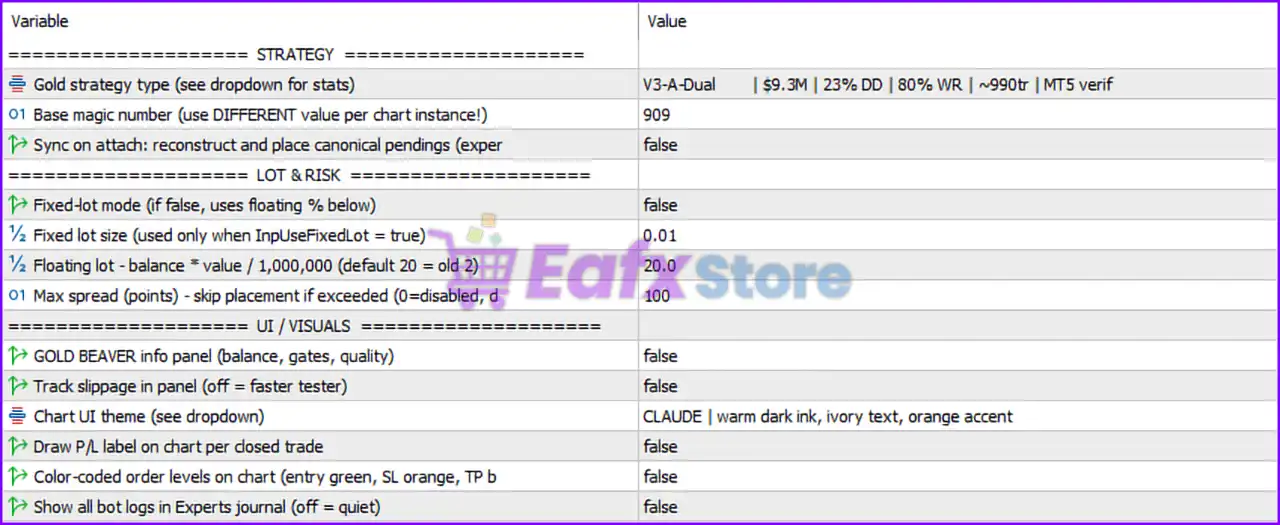
Below are the details of the parameters in the advisor’s trading system settings table:
🔶 Strategy Settings
🔹 Gold strategy type (see dropdown for stats) = V3-A-Dual | $9.3M | 23% DD | 80% WR | ~990t | MT5 verif — Selects the V3-A-Dual trading strategy profile, displaying historical statistics including approximately $9.3M profit, 23% drawdown, 80% win rate, around 990 trades, and MT5 verification status.
🔹 Base magic number (use DIFFERENT value per chart instance!) = 909 — Unique identifier used by the EA to manage its trades; each chart instance should use a different value.
🔹 Sync on attach: reconstruct and place canonical pendings = false — Disables automatic reconstruction and placement of canonical pending orders when the EA is attached to a chart.
🔶 Lot & Risk Settings
🔹 Fixed-lot mode (if false, uses floating % below) = false — Fixed lot mode is disabled, allowing the EA to use balance-based floating lot sizing.
🔹 Fixed lot size (used only when InpUseFixedLot = true) = 0.01 — Defines a fixed trade volume of 0.01 lots if fixed-lot mode is enabled.
🔹 Floating lot - balance * value / 1,000,000 (default 20 = old 2) = 20.0 — Floating lot calculation coefficient set to 20.0, used to scale position sizes according to account balance.
🔹 Max spread (points) - skip placement if exceeded (0 = disabled) = 100 — Prevents new trade placement whenever the spread exceeds 100 points.
🔶 UI & Visual Settings
🔹 GOLD BEAVER info panel (balance, gates, quality) = false — Disables the on-chart information panel showing balance, trade gates, and quality metrics.
🔹 Track slippage in panel (off = faster tester) = false — Disables slippage monitoring in the information panel, improving backtesting speed.
🔹 Chart UI theme (see dropdown) = CLAUDE | warm dark ink, ivory text, orange accent — Uses the CLAUDE visual theme featuring a warm dark background, ivory text, and orange highlights.
🔹 Draw P/L label on chart per closed trade = false — Disables display of profit/loss labels for closed trades directly on the chart.
🔹 Color-coded order levels on chart (entry green, SL orange, TP blue) = false — Disables visual color-coding of entry, stop-loss, and take-profit levels.
🔹 Show all bot logs in Experts journal (off = quiet) = false — Disables detailed EA logging in the MT5 Experts Journal to reduce log output.
🔢 Conclusion
Gold Beaver MT5 is a gold-focused automated trading system that emphasizes controlled execution, dynamic lot sizing, and spread protection. In this configuration, the EA operates using the V3-A-Dual strategy, floating lot management with a coefficient of 20.0, and a maximum spread filter of 100 points.
Most visual and logging features are disabled, creating a cleaner chart environment and improving testing efficiency while maintaining core trading functionality.
🔢 FAQs
❓ What strategy is currently selected in Gold Beaver MT5?
The EA is configured to use V3-A-Dual, a strategy profile showing approximately $9.3M profit, 23% drawdown, 80% win rate, and around 990 trades.
❓ Does Gold Beaver MT5 use fixed lots or dynamic lot sizing?
The current configuration uses dynamic (floating) lot sizing because Fixed-Lot Mode is set to false.
❓ What is the purpose of the Magic Number 909?
Magic Number 909 uniquely identifies trades opened by this EA instance and helps prevent conflicts with other EAs.
❓ How does the spread filter work?
The EA will not place new trades if the market spread exceeds 100 points, helping avoid unfavorable trading conditions.
❓ Are chart visualization features enabled by default in this setup?
No. The information panel, trade labels, color-coded order levels, slippage tracking, and detailed journal logs are all disabled in this configuration.