


🔢 Philosopher EA MT5 Settings & Parameters Guide
Philosopher EA MT5 is an advanced automated Gold trading system designed to combine multiple strategy modules, flexible position sizing, drawdown protection, execution controls, news filtering, and basket-based trade management. Its configuration is organized into dedicated sections covering general settings, strategy selection, position sizing, account protection, execution, entry filters, basket exits, news protection, dashboard display, and diagnostics.
With 22 selectable strategy modules, customizable risk profiles, floating-loss protection, spread control, and high-impact news filtering, Philosopher EA MT5 provides traders with extensive control over how the Expert Advisor operates in the market.
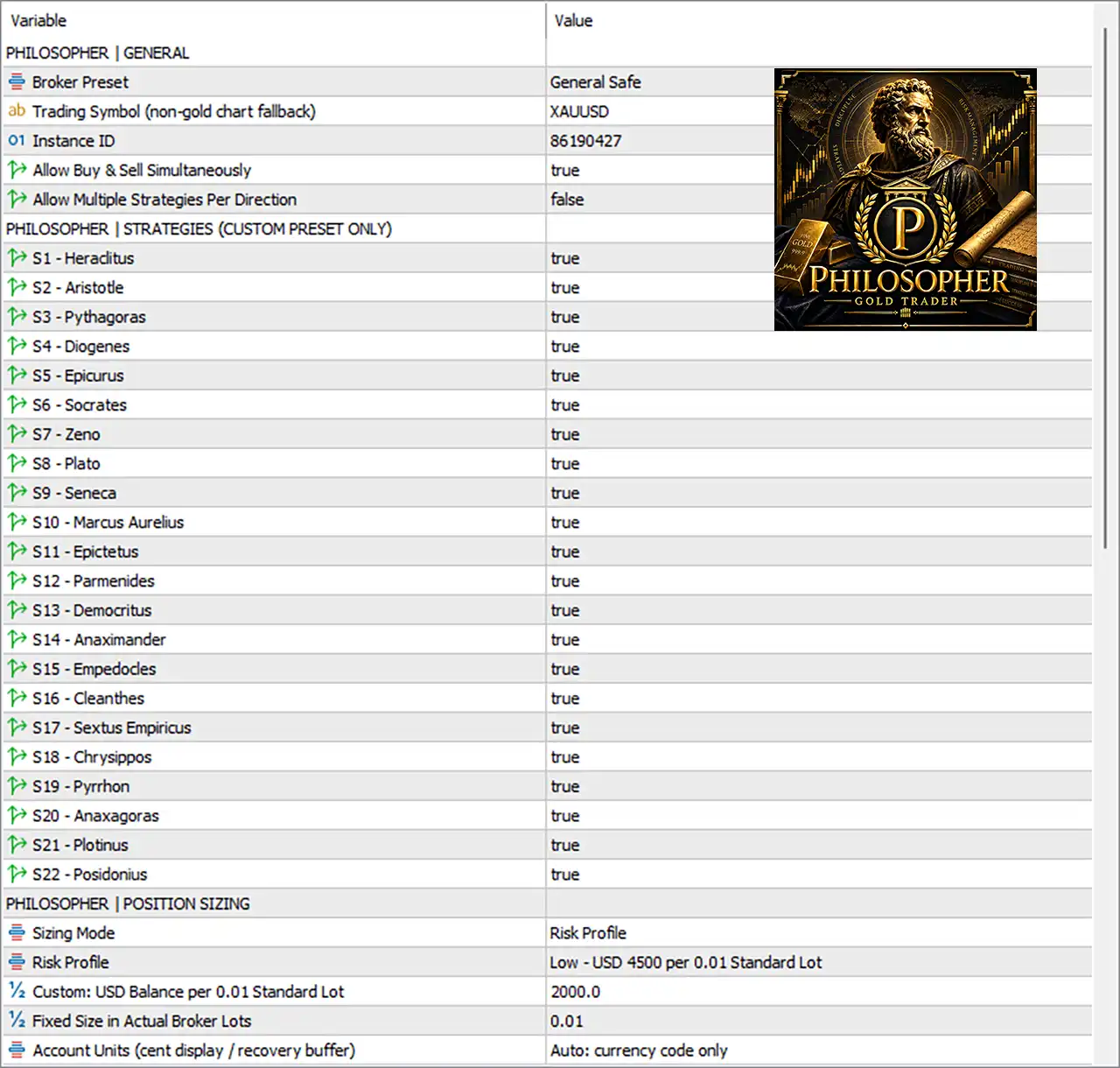
⚙️ PHILOSOPHER | GENERAL
🔹 Broker Preset = General Safe — Selects the broker configuration preset used by the EA. “General Safe” provides the default conservative broker compatibility profile.
🔹 Trading Symbol (non-gold chart fallback) = XAUUSD — Defines the Gold symbol used as a fallback when the EA is attached to a chart that is not recognized as a Gold symbol.
🔹 Instance ID = 86190427 — A unique identifier used to distinguish this EA instance from other instances or trading systems running on the account.
🔹 Allow Buy & Sell Simultaneously = true — Allows the EA to maintain Buy and Sell exposure at the same time when the selected strategies generate opposing trading signals.
🔹 Allow Multiple Strategies Per Direction = false — Prevents multiple strategy modules from simultaneously opening separate positions in the same direction.
⚙️ PHILOSOPHER | STRATEGIES (CUSTOM PRESET ONLY)
The following parameters control which individual Philosopher strategy modules are enabled when using the Custom Preset configuration.
🔹 S1 - Heraclitus = true — Enables the Heraclitus strategy module for generating trading opportunities.
🔹 S2 - Aristotle = true — Enables the Aristotle strategy module as part of the active strategy portfolio.
🔹 S3 - Pythagoras = true — Enables the Pythagoras strategy module for signal generation.
🔹 S4 - Diogenes = true — Enables the Diogenes strategy module.
🔹 S5 - Epicurus = true — Enables the Epicurus strategy module.
🔹 S6 - Socrates = true — Enables the Socrates strategy module.
🔹 S7 - Zeno = true — Enables the Zeno strategy module.
🔹 S8 - Plato = true — Enables the Plato strategy module.
🔹 S9 - Seneca = true — Enables the Seneca strategy module.
🔹 S10 - Marcus Aurelius = true — Enables the Marcus Aurelius strategy module.
🔹 S11 - Epictetus = true — Enables the Epictetus strategy module.
🔹 S12 - Parmenides = true — Enables the Parmenides strategy module.
🔹 S13 - Democritus = true — Enables the Democritus strategy module.
🔹 S14 - Anaximander = true — Enables the Anaximander strategy module.
🔹 S15 - Empedocles = true — Enables the Empedocles strategy module.
🔹 S16 - Cleanthes = true — Enables the Cleanthes strategy module.
🔹 S17 - Sextus Empiricus = true — Enables the Sextus Empiricus strategy module.
🔹 S18 - Chrysippos = true — Enables the Chrysippos strategy module.
🔹 S19 - Pyrrhon = true — Enables the Pyrrhon strategy module.
🔹 S20 - Anaxagoras = true — Enables the Anaxagoras strategy module.
🔹 S21 - Plotinus = true — Enables the Plotinus strategy module.
🔹 S22 - Posidonius = true — Enables the Posidonius strategy module.
Current strategy configuration: All 22 strategy modules (S1–S22) are enabled in the provided settings.
⚙️ PHILOSOPHER | POSITION SIZING
🔹 Sizing Mode = Risk Profile — Determines how the EA calculates trading volume. With Risk Profile selected, position sizing follows the predefined risk-profile settings.
🔹 Risk Profile = Low - USD 4500 per 0.01 Standard Lot — Uses the Low risk profile, based on approximately USD 4500 per 0.01 Standard Lot according to the selected configuration.
🔹 Custom: USD Balance per 0.01 Standard Lot = 2000.0 — Defines the account balance reference used for calculating 0.01 Standard Lot when custom sizing is selected.
🔹 Fixed Size in Actual Broker Lots = 0.01 — Sets a fixed trading volume of 0.01 broker lots when Fixed Size mode is used.
🔹 Account Units (cent display / recovery buffer) = Auto: currency code only — Automatically determines the account-unit display behavior using the account currency code and provides the configured recovery-buffer handling.
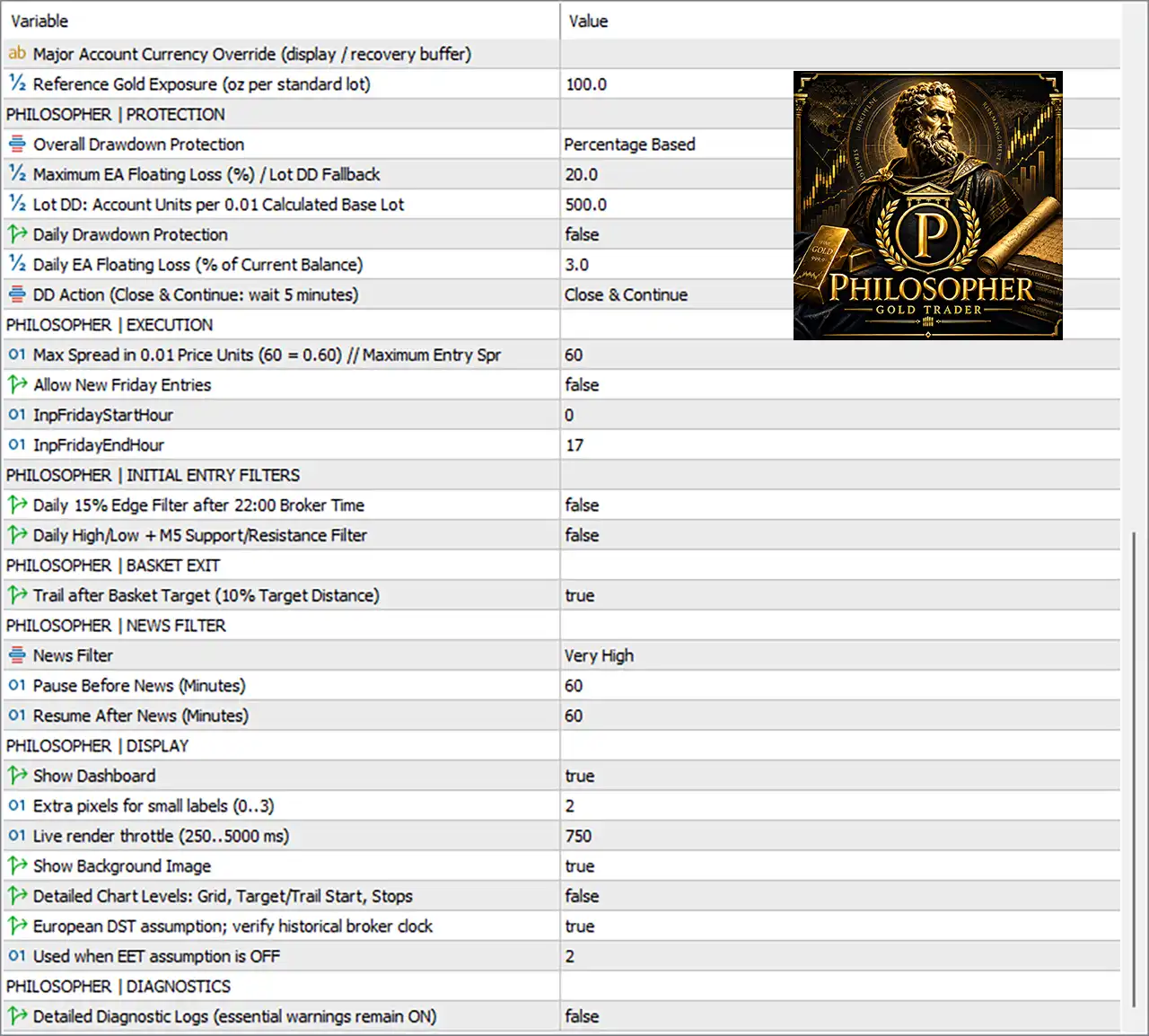
🔹 Major Account Currency Override (display / recovery buffer) = [blank/default] — Allows the major account currency to be manually overridden for display and recovery-buffer calculations when required. No manual override is specified in the provided settings.
🔹 Reference Gold Exposure (oz per standard lot) = 100.0 — Defines the reference Gold exposure as 100.0 ounces per standard lot, which can be used for exposure and position-size calculations.
⚙️ PHILOSOPHER | PROTECTION
🔹 Overall Drawdown Protection = Percentage Based — Uses percentage-based protection to monitor the EA's floating-loss or drawdown conditions.
🔹 Maximum EA Floating Loss (%) / Lot DD Fallback = 20.0 — Sets the maximum EA floating loss threshold at 20.0% before the configured drawdown protection mechanism is activated.
🔹 Lot DD: Account Units per 0.01 Calculated Base Lot = 500.0 — Defines 500.0 account units as the lot-based drawdown reference for each 0.01 calculated base lot.
🔹 Daily Drawdown Protection = false — Disables the dedicated daily drawdown protection feature in the current configuration.
🔹 Daily EA Floating Loss (% of Current Balance) = 3.0 — Defines a 3.0% daily EA floating-loss threshold. This value is available as the daily protection limit, although Daily Drawdown Protection is currently disabled.
🔹 DD Action (Close & Continue: wait 5 minutes) = Close & Continue — When the applicable drawdown protection is triggered, the EA closes the affected positions and continues operation after the configured 5-minute waiting period.
⚙️ PHILOSOPHER | EXECUTION
🔹 Max Spread in 0.01 Price Units (60 = 0.60) // Maximum Entry Spr = 60 — Limits new entries when the spread exceeds 60 units, equivalent to 0.60 according to the parameter's stated price-unit conversion.
🔹 Allow New Friday Entries = false — Prevents the EA from opening new trades on Friday under the current configuration.
🔹 InpFridayStartHour = 0 — Defines the starting hour for the Friday entry window as 0.
🔹 InpFridayEndHour = 17 — Defines the Friday entry-window ending hour as 17. Since new Friday entries are disabled, these hours are currently inactive unless the Friday-entry option is enabled.
⚙️ PHILOSOPHER | INITIAL ENTRY FILTERS
🔹 Daily 15% Edge Filter after 22:00 Broker Time = false — Disables the daily 15% Edge Filter that would otherwise apply after 22:00 broker time.
🔹 Daily High/Low + M5 Support/Resistance Filter = false — Disables the entry filter based on the daily High/Low combined with M5 Support and Resistance levels.
⚙️ PHILOSOPHER | BASKET EXIT
🔹 Trail after Basket Target (10% Target Distance) = true — Enables trailing after the basket reaches its target, with the trailing mechanism starting at 10% of the target distance according to the parameter description.
⚙️ PHILOSOPHER | NEWS FILTER
🔹 News Filter = Very High — Sets the news filter to Very High, providing a strong restriction around significant economic news events.
🔹 Pause Before News (Minutes) = 60 — Stops or restricts new trading activity 60 minutes before the relevant news event.
🔹 Resume After News (Minutes) = 60 — Resumes trading 60 minutes after the relevant news event has passed.
⚙️ PHILOSOPHER | DISPLAY
🔹 Show Dashboard = true — Displays the Philosopher EA dashboard directly on the trading chart.
🔹 Extra pixels for small labels (0..3) = 2 — Adds 2 extra pixels to the spacing or sizing used for small dashboard labels.
🔹 Live render throttle (250..5000 ms) = 750 — Sets the dashboard's live rendering interval to 750 milliseconds, balancing visual updates with chart-processing efficiency.
🔹 Show Background Image = true — Enables the Philosopher EA background image on the trading chart.
🔹 Detailed Chart Levels: Grid, Target/Trail Start, Stops = false — Disables the detailed chart-level visualization for the grid, target/trailing-start levels, and stop levels.
🔹 European DST assumption; verify historical broker clock = true — Enables the European Daylight Saving Time assumption and indicates that historical broker-server clock behavior should be verified.
🔹 Used when EET assumption is OFF = 2 — Uses 2 as the configured alternative setting when the EET/DST assumption is disabled.
⚙️ PHILOSOPHER | DIAGNOSTICS
🔹 Detailed Diagnostic Logs (essential warnings remain ON) = false — Disables detailed diagnostic logging while keeping essential warnings enabled for important operational messages.
🔢 Conclusion
Philosopher EA MT5 offers a highly configurable framework for automated Gold trading, with its settings divided into clear modules for strategy selection, position sizing, drawdown protection, execution, entry filtering, basket management, news protection, display, and diagnostics.
The current configuration activates all 22 Philosopher strategies, uses a Low Risk Profile, applies a 20.0% maximum EA floating-loss threshold, enables basket trailing, and applies a Very High news filter with 60-minute buffers before and after news. At the same time, Daily Drawdown Protection, Friday entries, and the additional initial-entry filters remain disabled.
Because the EA contains numerous independent strategy and risk controls, traders should test any changes to position sizing, drawdown limits, news settings, or strategy combinations through appropriate backtesting and demo/forward testing before using them on a live account.
🔢 FAQs
❓ What symbol is Philosopher EA MT5 configured to trade?
The provided configuration uses XAUUSD as the Trading Symbol fallback, making it primarily configured around Gold trading.
❓ How many strategy modules are enabled in Philosopher EA MT5?
All 22 strategies, from S1 - Heraclitus through S22 - Posidonius, are currently set to true.
❓ What is the maximum EA floating-loss setting?
The Maximum EA Floating Loss (%) / Lot DD Fallback is set to 20.0% under the Percentage Based drawdown protection mode.
❓ Does Philosopher EA MT5 use a news filter?
Yes. The News Filter is configured as Very High, with trading paused 60 minutes before news and resumed 60 minutes after news.
❓ Does Philosopher EA MT5 allow trading on Friday?
The current setting Allow New Friday Entries = false, so the EA does not open new Friday entries. The configured Friday hours are 0 to 17, but they become relevant only when Friday entries are enabled.


