



Gold Digger AI EA MT4 Settings Explained – Complete Configuration Guide
Gold Digger AI EA is an advanced automated trading robot designed for MetaTrader 4 traders who focus on gold and forex markets. The EA combines AI-based grid trading, moving average filters, HILO trend detection, trailing stop systems, drawdown protection.
Gold Digger AI EA provides flexible risk management and customizable trading logic suitable for both conservative and aggressive traders.

Gold Digger AI EA MT4 Full Settings Explanation
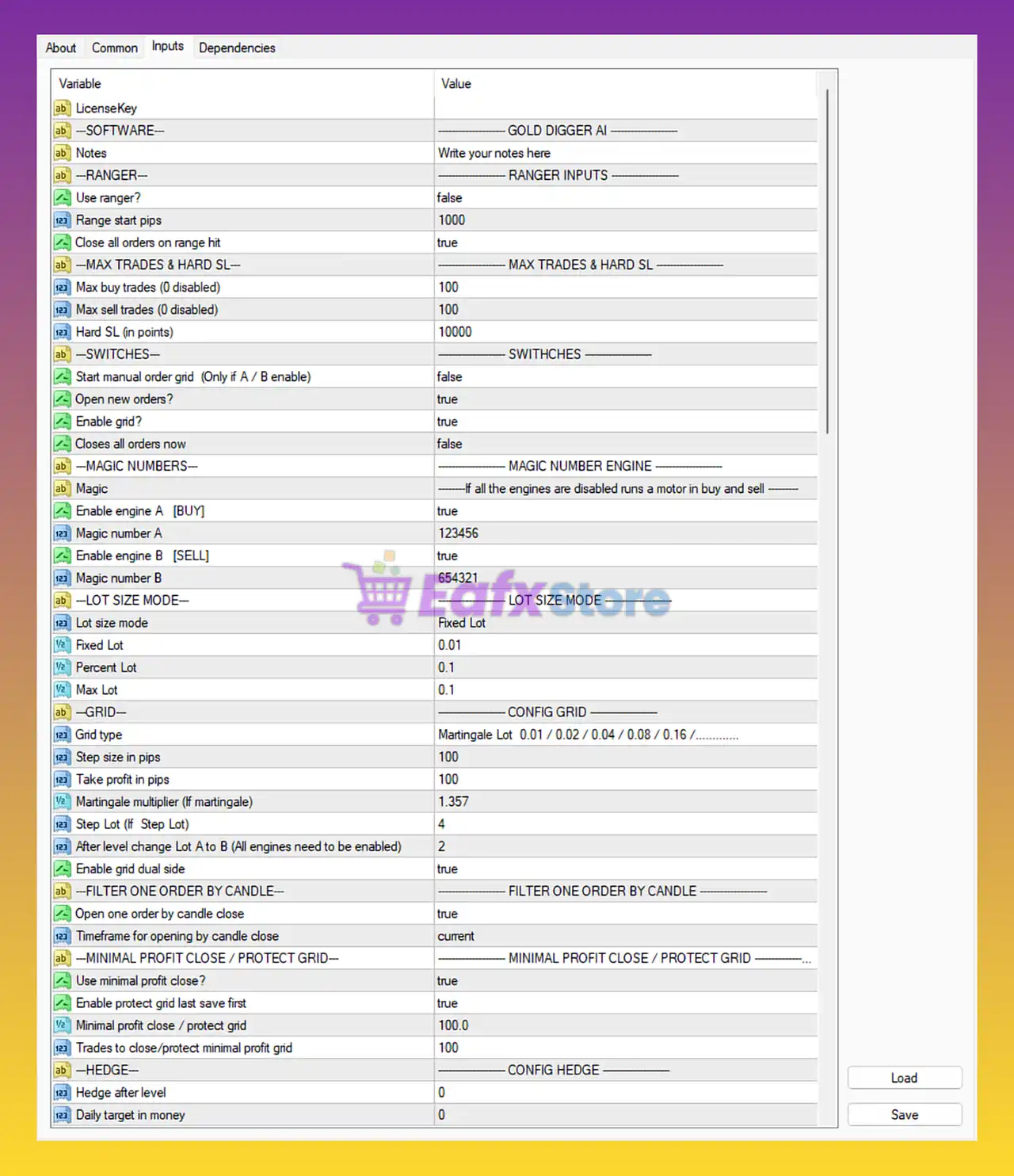
Below are the details of the parameters in the advisor’s trading system settings table:
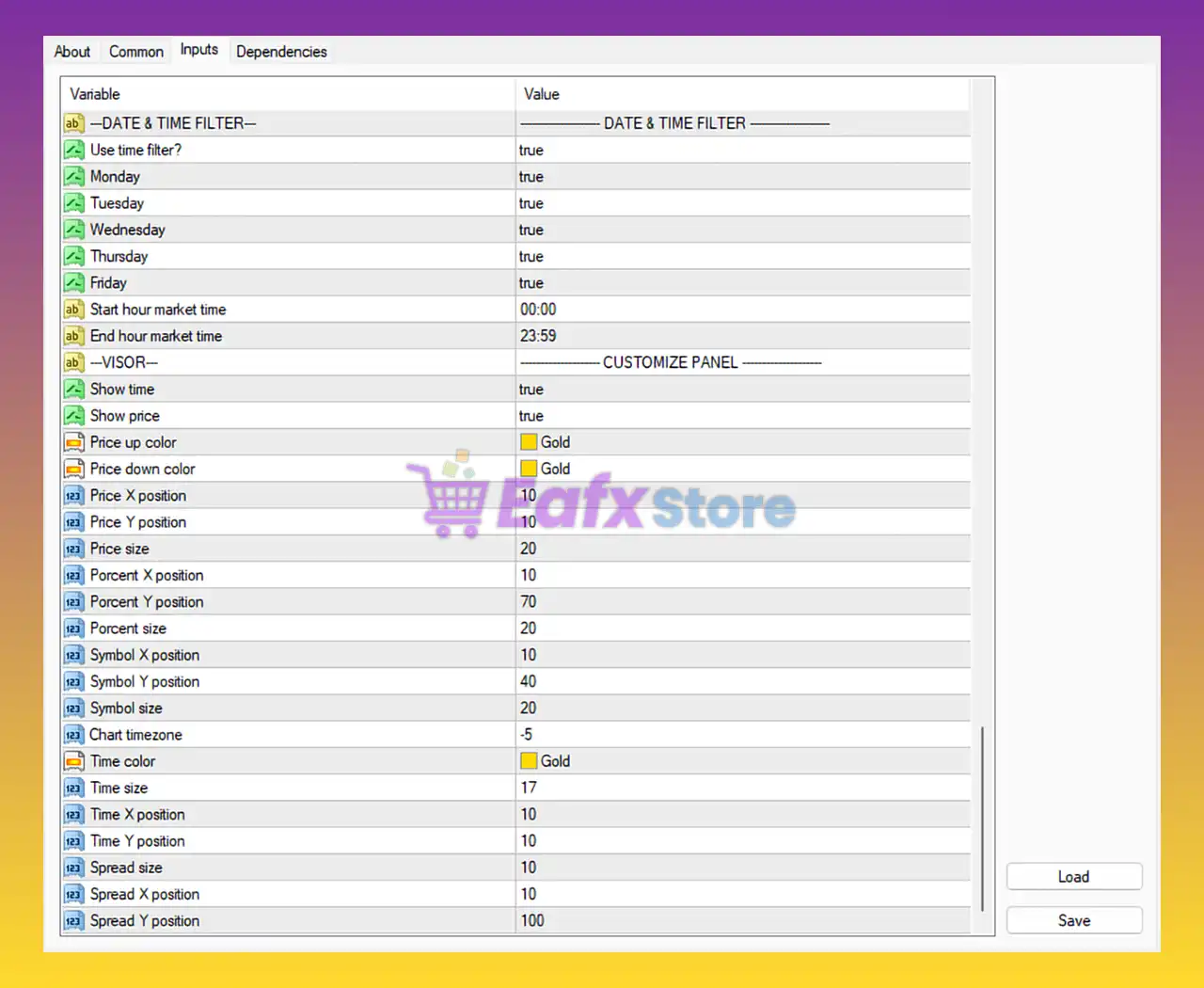
Date & Time Filter Settings
🔹 Use time filter? = true: Enables the trading session time filter.
🔹 Monday = true: Allows trading on Monday.
🔹 Tuesday = true: Allows trading on Tuesday.
🔹 Wednesday = true: Allows trading on Wednesday.
🔹 Thursday = true: Allows trading on Thursday.
🔹 Friday = true: Allows trading on Friday.
🔹 Start hour market time = 00:00: Trading session starts at 00:00 broker time.
🔹 End hour market time = 23:59: Trading session ends at 23:59 broker time.
Customize Panel Settings
🔹 Show time = true: Displays broker/server time on the dashboard panel.
🔹 Show price = true: Displays live market price on the panel.
🔹 Price up color = Gold: Sets bullish price color to Gold.
🔹 Price down color = Gold: Sets bearish price color to Gold.
🔹 Price X position = 10: Horizontal position of the price display.
🔹 Price Y position = 10: Vertical position of the price display.
🔹 Price size = 20: Font size of displayed prices.
🔹 Porcent X position = 10: Horizontal position of percentage display.
🔹 Porcent Y position = 70: Vertical position of percentage display.
🔹 Porcent size = 20: Font size for percentage information.
🔹 Symbol X position = 10: Horizontal position of trading symbol display.
🔹 Symbol Y position = 40: Vertical position of trading symbol display.
🔹 Symbol size = 20: Font size of trading symbol.
🔹 Chart timezone = -5: Sets chart timezone offset to -5.
🔹 Time color = Gold: Dashboard time display color is Gold.
🔹 Time size = 17: Font size for time display.
🔹 Time X position = 10: Horizontal position of time display.
🔹 Time Y position = 10: Vertical position of time display.
🔹 Spread size = 10: Font size for spread display.
🔹 Spread X position = 10: Horizontal spread display position.
🔹 Spread Y position = 100: Vertical spread display position.
Software & Ranger Inputs
🔹 LicenseKey: Field used for EA activation and license verification.
🔹 Notes = Write your notes here: Custom notes section for traders.
🔹 Use ranger? = false: Disables ranger trading mode.
🔹 Range start pips = 1000: Ranger mode activation distance set to 1000 pips.
🔹 Close all orders on range hit = true: Closes all positions when range target is reached.
Max Trades & Hard Stop Loss Settings
🔹 Max buy trades (0 disabled) = 100: Maximum allowed buy trades is 100.
🔹 Max sell trades (0 disabled) = 100: Maximum allowed sell trades is 100.
🔹 Hard SL (in points) = 10000: Hard stop loss protection set to 10000 points.
Trading Switches
🔹 Start manual order grid (Only if A / B enable) = false: Disables manual grid startup mode.
🔹 Open new orders? = true: Allows the EA to open new positions.
🔹 Enable grid? = true: Activates grid trading strategy.
🔹 Closes all orders now = false: Prevents immediate closing of all open trades.
Magic Number Engine
🔹 Enable engine A [BUY] = true: Activates BUY trading engine.
🔹 Magic number A = 123456: Unique identifier for BUY orders.
🔹 Enable engine B [SELL] = true: Activates SELL trading engine.
🔹 Magic number B = 654321: Unique identifier for SELL orders.
Lot Size Mode Settings
🔹 Lot size mode = Fixed Lot: EA uses fixed lot size management.
🔹 Fixed Lot = 0.01: Default fixed lot size is 0.01.
🔹 Percent Lot = 0.1: Risk-based lot percentage set to 0.1.
🔹 Max Lot = 0.1: Maximum lot size allowed is 0.1.
Grid Configuration Settings
🔹 Grid type = Martingale Lot 0.01 / 0.02 / 0.04 / 0.08 / 0.16 / …: Uses martingale lot progression strategy.
🔹 Step size in pips = 100: Distance between grid orders is 100 pips.
🔹 Take profit in pips = 100: Take profit target per grid cycle is 100 pips.
🔹 Martingale multiplier (If martingale) = 1.357: Lot multiplier for each new grid level.
🔹 Step Lot (If Step Lot) = 4: Step lot increase parameter set to 4.
🔹 After level change Lot A to B (All engines need to be enabled) = 2: Switches engine lots after level 2.
🔹 Enable grid dual side = true: Enables simultaneous BUY and SELL grid trading.
Candle Filter Settings
🔹 Open one order by candle close = true: Opens trades only after candle closes.
🔹 Timeframe for opening by candle close = current: Uses current chart timeframe.
Minimal Profit Close & Grid Protection
🔹 Use minimal profit close? = true: Enables minimum profit basket close system.
🔹 Enable protect grid last save first = true: Protects oldest grid positions first.
🔹 Minimal profit close / protect grid = 100.0: Basket closes at 100.0 profit value.
🔹 Trades to close/protect minimal profit grid = 100: Number of trades used for protection logic.
Hedge Configuration
🔹 Hedge after level = 0: Hedge starts immediately from level 0.
🔹 Daily target in money = 0: No daily monetary target configured.
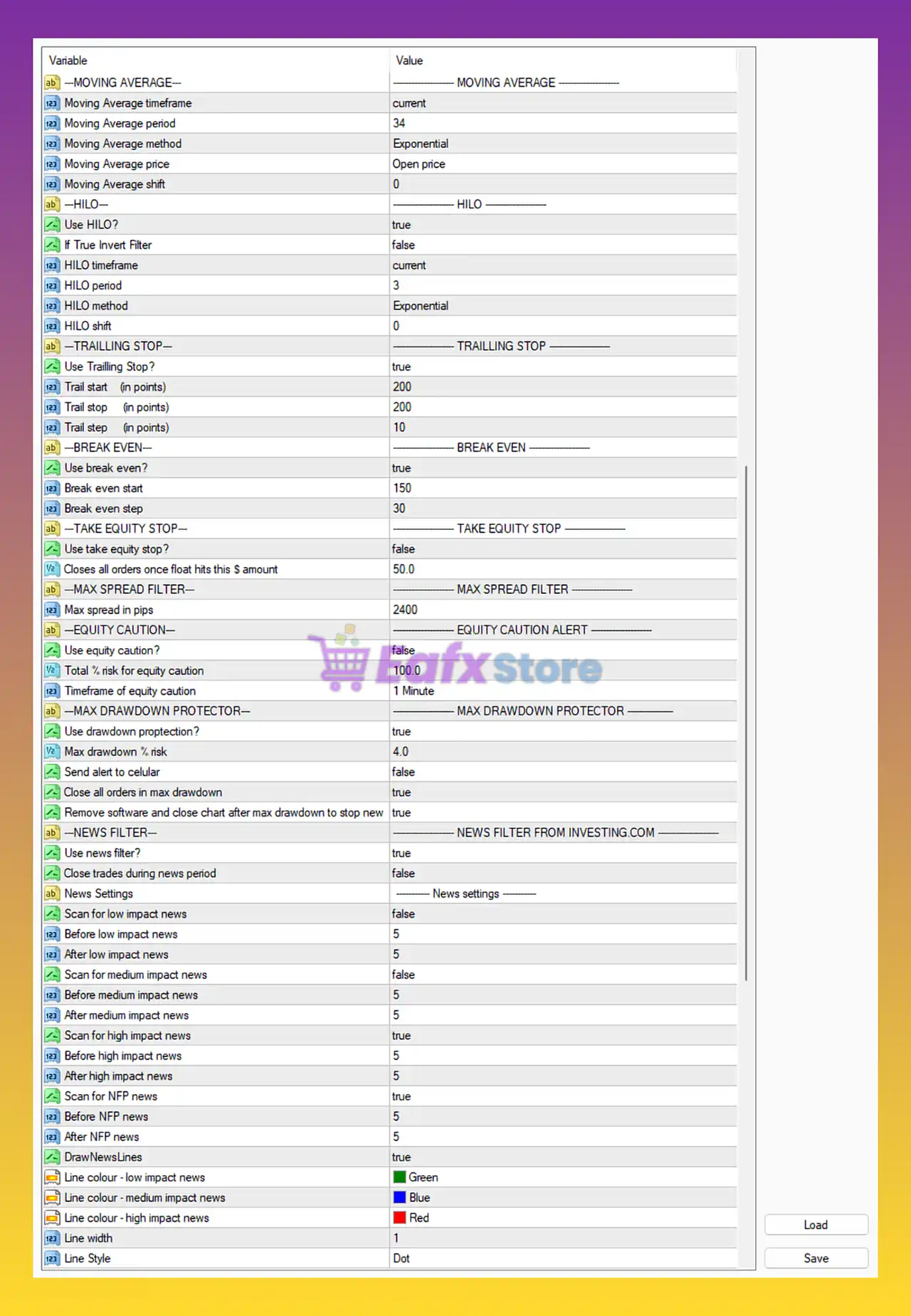
Moving Average Settings
🔹 Moving Average timeframe = current: Uses current chart timeframe.
🔹 Moving Average period = 34: MA period is 34.
🔹 Moving Average method = Exponential: Uses Exponential Moving Average (EMA).
🔹 Moving Average price = Open price: EMA calculated using open prices.
🔹 Moving Average shift = 0: No shift applied to moving average.
HILO Settings
🔹 Use HILO = true: Enables HILO trend filter.
🔹 If True Invert Filter = false: HILO filter direction is not inverted.
🔹 HILO timeframe = current: Uses current chart timeframe.
🔹 HILO period = 3: HILO indicator period set to 3.
🔹 HILO method = Exponential: HILO uses exponential smoothing.
🔹 HILO shift = 0: No HILO shift applied.
Trailing Stop Settings
🔹 Use Trailing Stop? = true: Activates trailing stop system.
🔹 Trail start (in points) = 200: Trailing activates after 200 points profit.
🔹 Trail stop (in points) = 200: Trailing stop distance is 200 points.
🔹 Trail step (in points) = 10: Trailing updates every 10 points.
Break Even Settings
🔹 Use break even? = true: Enables automatic break-even protection.
🔹 Break even start = 150: Break-even activates after 150 points profit.
🔹 Break even step = 30: Break-even adjusts every 30 points.
Equity Stop Settings
🔹 Use take equity stop? = false: Disables equity stop protection.
🔹 Closes all orders once float hits this $ amount = 50.0: Floating profit target set to $50.0.
Max Spread Filter
🔹 Max spread in pips = 2400: Maximum allowed spread is 2400 points.
Equity Caution Alert
🔹 Use equity caution? = false: Disables equity warning alerts.
🔹 Total % risk for equity caution = 100.0: Risk warning threshold set to 100%.
🔹 Timeframe of equity caution = 1 Minute: Equity caution evaluated every 1 Minute.
Max Drawdown Protector
🔹 Use drawdown protection? = true: Enables drawdown protection system.
🔹 Max drawdown % risk = 4.0: Maximum drawdown limit is 4.0%.
🔹 Send alert to celular = false: Mobile alerts disabled.
🔹 Close all orders in max drawdown = true: Closes all trades when drawdown limit is hit.
🔹 Remove software and close chart after max drawdown to stop new = true: EA stops completely after maximum drawdown event.
News Filter Settings
🔹 Use news filter? = true: Enables Investing.com news filter.
🔹 Close trades during news period = false: EA keeps positions open during news events.
🔹 Scan for low impact news = false: Low-impact news filtering disabled.
🔹 Before low impact news = 5: Trading paused 5 minutes before low-impact news.
🔹 After low impact news = 5: Trading resumes 5 minutes after low-impact news.
🔹 Scan for medium impact news = false: Medium-impact news filtering disabled.
🔹 Before medium impact news = 5: Trading paused 5 minutes before medium news.
🔹 After medium impact news = 5: Trading resumes 5 minutes after medium news.
🔹 Scan for high impact news = true: High-impact news filtering enabled.
🔹 Before high impact news = 5: Trading paused 5 minutes before high-impact news.
🔹 After high impact news = 5: Trading resumes 5 minutes after high-impact news.
🔹 Scan for NFP news = true: Non-Farm Payroll news filtering enabled.
🔹 Before NFP news = 5: Trading paused 5 minutes before NFP.
🔹 After NFP news = 5: Trading resumes 5 minutes after NFP.
🔹 DrawNewsLines = true: Displays news event lines on chart.
🔹 Line colour - low impact news = Green: Low-impact news line color is Green.
🔹 Line colour - medium impact news = Blue: Medium-impact news line color is Blue.
🔹 Line colour - high impact news = Red: High-impact news line color is Red.
🔹 Line width = 1: News line thickness set to 1.
🔹 Line Style = Dot: News lines displayed with dotted style.
Conclusion
Gold Digger AI EA MT4 is a feature-rich automated trading system combining AI-driven grid logic, moving average filters, HILO confirmation, advanced martingale management and robust drawdown protection.
With flexible lot sizing, hedge capabilities, news filters, and fully customizable dashboard settings, the EA provides traders with a professional-level automated trading environment for MetaTrader 4.
FAQs
❓ What is Gold Digger AI EA MT4?
Gold Digger AI EA MT4 is an automated MetaTrader 4 trading robot designed for gold and forex grid trading.
❓ Does Gold Digger AI EA MT4 use martingale strategy?
Yes, the EA includes martingale grid functionality with customizable multipliers.
❓ Can Gold Digger AI EA MT4 filter news events?
Yes, the EA integrates an Investing.com news filter with high-impact and NFP news protection.
❓ Does Gold Digger AI EA MT4 include drawdown protection?
Yes, the EA includes a maximum drawdown protection system with automatic trade closure.
❓ What indicators are used in Gold Digger AI EA MT4?
The EA uses Moving Average (EMA), HILO filters, trailing stop systems, and break-even management.



