
🔢 Apex Trader MT5 Settings Explained – Complete Parameter Guide
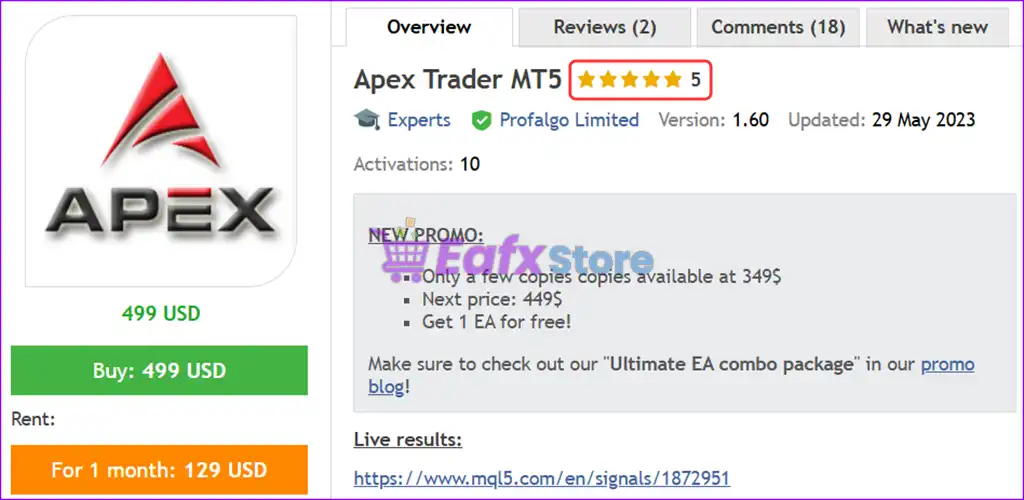
Apex Trader MT5 is a professional grid-based Expert Advisor for MetaTrader 5 that provides flexible money management, pending order execution, drawdown protection, GMT synchronization and adaptive lot sizing.
With configurable spread filters, virtual take profit options, and advanced risk controls, Apex Trader MT5 allows traders to optimize automated trading while maintaining strict capital management.

🔢 Installation Panel Parameters
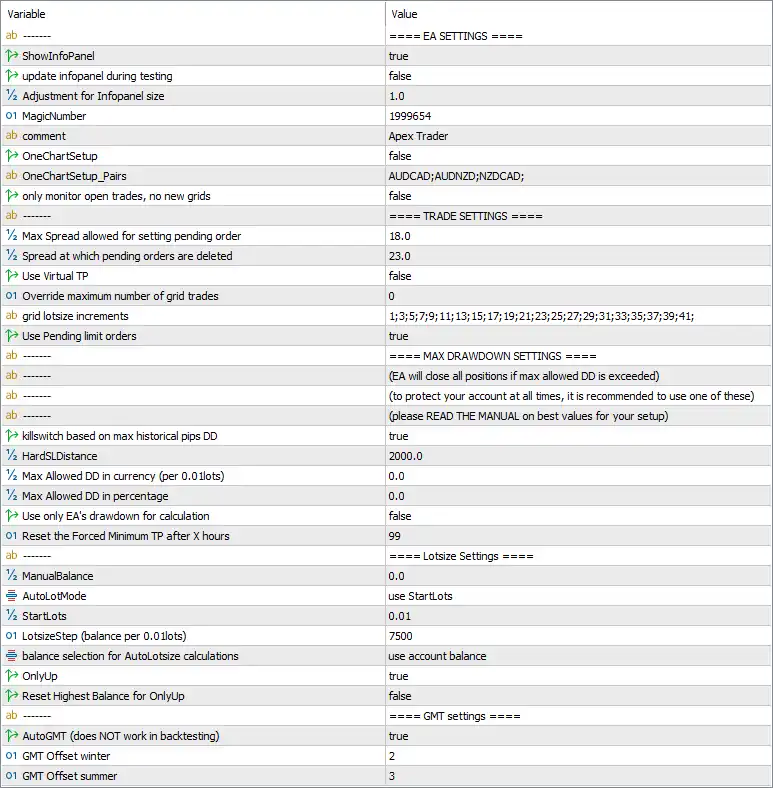
Below are the details of the parameters in the advisor’s trading system settings table:
🔶 EA Settings
🔹 ShowInfoPanel = true – Displays the EA information panel directly on the chart for real-time monitoring.
🔹 update infopanel during testing = false – Disables updating the information panel while running Strategy Tester.
🔹 Adjustment for Infopanel size = 1.0 – Sets the scaling factor of the information panel to 1.0.
🔹 MagicNumber = 1999654 – Assigns the unique identifier 1999654 to all trades opened by Apex Trader MT5.
🔹 comment = Apex Trader – Adds the trade comment "Apex Trader" to every position opened by the EA.
🔹 OneChartSetup = false – Disables one-chart multi-symbol trading mode.
🔹 OneChartSetup_Pairs = AUDCAD;AUDNZD;NZDCAD; – Lists the symbols available for One Chart Setup: AUDCAD, AUDNZD, and NZDCAD.
🔹 only monitor open trades, no new grids = false – Allows the EA to continue opening new grid positions instead of only monitoring existing trades.
🔶 Trade Settings
🔹 Max Spread allowed for setting pending order = 18.0 – Pending orders are placed only when the market spread is 18.0 points or lower.
🔹 Spread at which pending orders are deleted = 23.0 – Automatically removes pending orders if the spread reaches 23.0 points.
🔹 Use Virtual TP = false – Uses broker-side Take Profit orders instead of virtual Take Profit management.
🔹 Override maximum number of grid trades = 0 – Keeps the default maximum grid trade limitation. A value of 0 means no custom override.
🔹 grid lotsize increments = 1;3;5;7;9;11;13;15;17;19;21;23;25;27;29;31;33;35;37;39;41; – Defines the custom lot increment sequence used for successive grid orders.
🔹 Use Pending limit orders = true – Enables pending limit orders for grid entries.
🔶 Max Drawdown Settings
🔹 killswitch based on max historical pips DD = true – Activates an emergency kill switch based on the maximum historical drawdown measured in pips.
🔹 HardSLDistance = 2000.0 – Sets a hard emergency Stop Loss distance of 2000.0 points.
🔹 Max Allowed DD in currency (per 0.01 lots) = 0.0 – Currency-based drawdown protection is disabled with a value of 0.0.
🔹 Max Allowed DD in percentage = 0.0 – Percentage-based drawdown protection is disabled with a value of 0.0.
🔹 Use only EA's drawdown for calculation = false – Calculates drawdown using the entire trading account instead of only this EA.
🔹 Reset the Forced Minimum TP after X hours = 99 – Resets the forced minimum Take Profit after 99 hours.
🔶 Lotsize Settings
🔹 ManualBalance = 0.0 – Uses the actual account balance instead of a manually specified balance.
🔹 AutoLotMode = use StartLots – Uses the StartLots method for position sizing.
🔹 StartLots = 0.01 – Opens the first trade with 0.01 lots.
🔹 LotsizeStep (balance per 0.01 lots) = 7500 – Increases the lot size by 0.01 lots for every 7500 units of account balance.
🔹 balance selection for AutoLotsize calculations = use account balance – Calculates automatic lot sizing based on the current account balance.
🔹 OnlyUp = true – Allows automatic lot sizes to increase with account growth but not decrease after temporary balance reductions.
🔹 Reset Highest Balance for OnlyUp = false – Keeps the historical highest balance for OnlyUp calculations without resetting it.
🔶 GMT Settings
🔹 AutoGMT (does NOT work in backtesting) = true – Automatically detects the broker's GMT offset during live trading.
🔹 GMT Offset winter = 2 – Uses a GMT offset of +2 during winter.
🔹 GMT Offset summer = 3 – Uses a GMT offset of +3 during daylight saving (summer).
🔢 Conclusion
Apex Trader MT5 offers a comprehensive combination of grid trading, adaptive lot sizing, pending order management, spread protection, and drawdown safety controls. Features such as automatic GMT detection, emergency kill switch protection, configurable lot progression, and flexible money management make it a robust Expert Advisor for traders seeking automated and disciplined grid trading on MetaTrader 5.
🔢 FAQs
❓ What is the purpose of the AutoLotMode in Apex Trader MT5?
AutoLotMode automatically determines position sizing based on the configured StartLots and balance growth settings.
❓ Does Apex Trader MT5 include drawdown protection?
Yes. It provides multiple protection mechanisms including a historical drawdown kill switch, Hard Stop Loss, and optional currency or percentage drawdown limits.
❓ Can Apex Trader MT5 trade multiple currency pairs from one chart?
Yes. The OneChartSetup feature supports multi-symbol trading, although it is currently disabled in these settings.
❓ Why are spread filters important in Apex Trader MT5?
The EA prevents placing or maintaining pending orders when spreads exceed the configured thresholds (18.0 and 23.0 points), helping reduce trading costs during volatile conditions.
❓ What does the OnlyUp option do?
The OnlyUp feature allows automatic lot sizes to increase as the account balance grows while preventing lot sizes from decreasing after temporary equity declines, maintaining consistent position scaling.