
🔢 Night Hunter Pro MT5 Settings Explained – Complete Parameter Guide
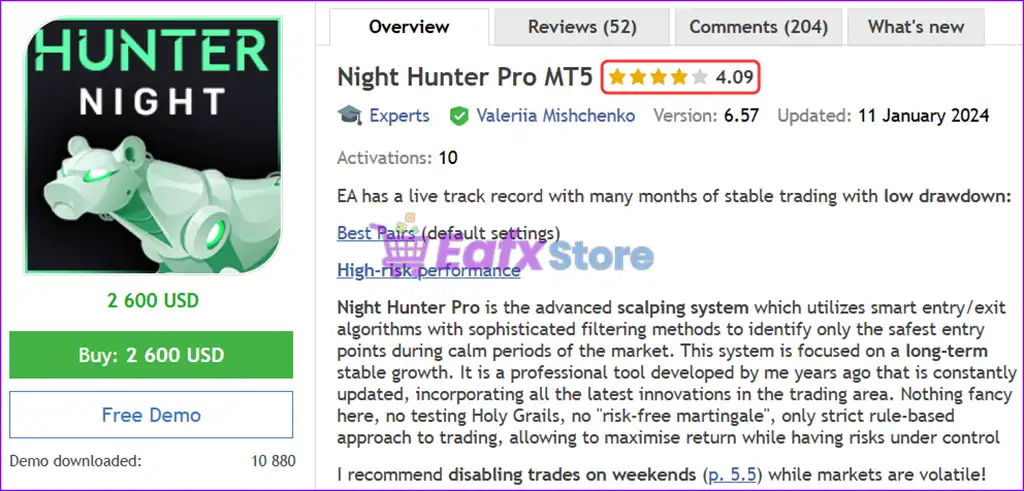
Night Hunter Pro MT5 is an advanced night trading Expert Advisor for MetaTrader 5 that combines intelligent money management, smart time filters, ATR-based strategy logic, rollover protection, news filtering, swap filtering, and customizable risk controls.
The EA is designed to trade multiple Forex pairs while providing flexible risk management and extensive protection against unfavorable market conditions.

🔢 Installation Panel Parameters
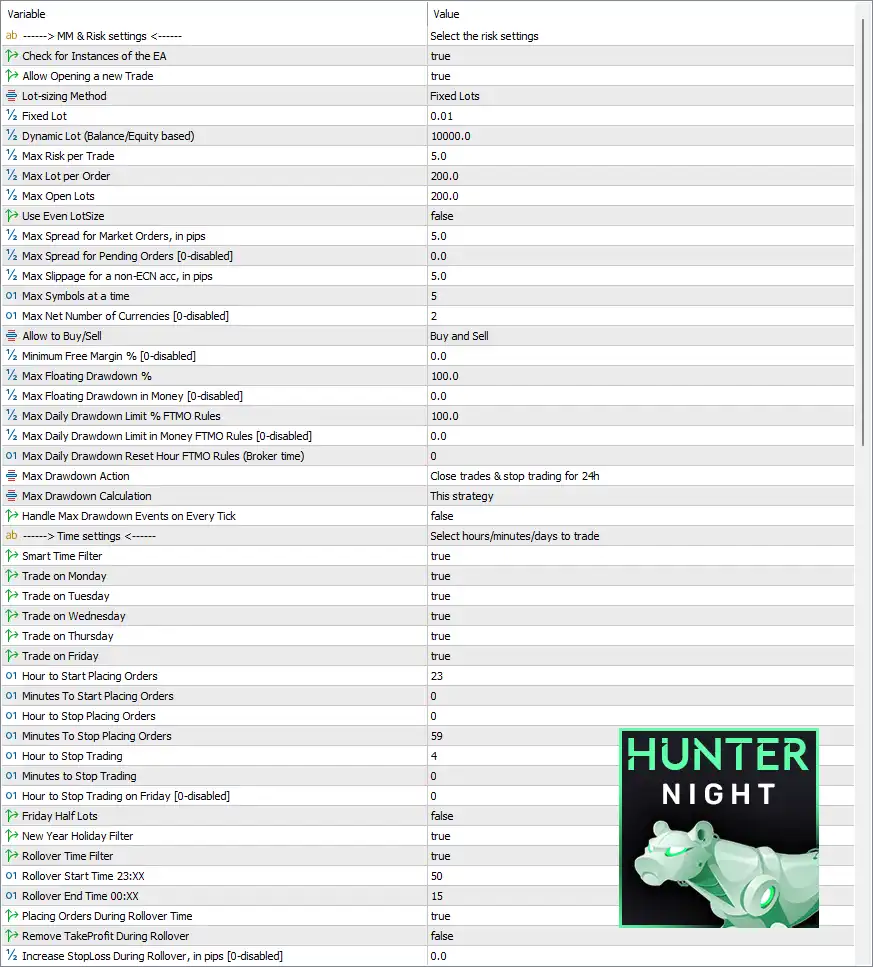
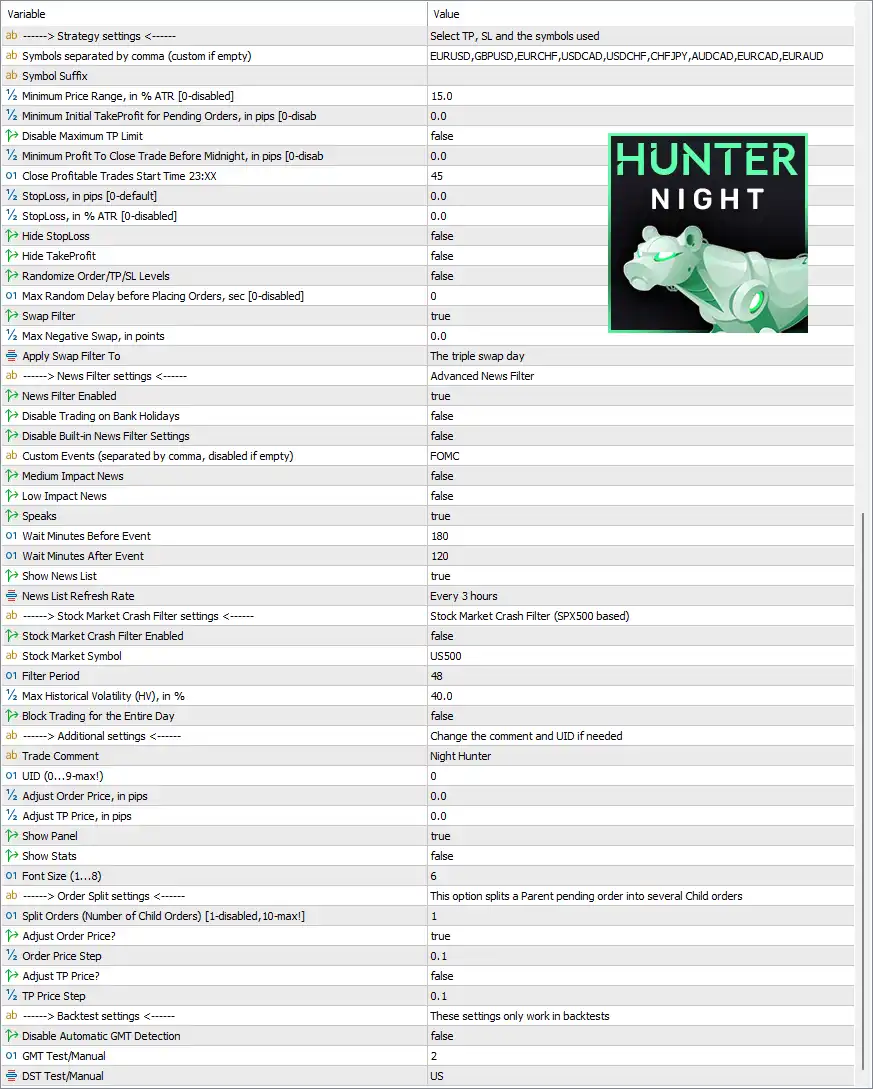
Below are the details of the parameters in the advisor’s trading system settings table:
🔶 MM & Risk Settings
🔹 Check for Instances of the EA = true – Prevents multiple instances of the EA from opening conflicting trades.
🔹 Allow Opening a new Trade = true – Allows the EA to open new trading positions.
🔹 Lot-sizing Method = Fixed Lots – Uses a fixed lot size instead of dynamic money management.
🔹 Fixed Lot = 0.01 – Opens every trade with a fixed volume of 0.01 lots.
🔹 Dynamic Lot (Balance/Equity based) = 10000.0 – Defines the balance/equity reference of 10000.0 when dynamic lot sizing is enabled.
🔹 Max Risk per Trade = 5.0 – Limits the maximum risk per trade to 5.0%.
🔹 Max Lot per Order = 200.0 – Limits each order to a maximum size of 200.0 lots.
🔹 Max Open Lots = 200.0 – Limits the total simultaneously opened lots to 200.0.
🔹 Use Even LotSize = false – Disables even lot normalization.
🔹 Max Spread for Market Orders, in pips = 5.0 – Only allows market entries when the spread is 5.0 pips or lower.
🔹 Max Spread for Pending Orders [0=disabled] = 0.0 – Spread filtering for pending orders is disabled.
🔹 Max Slippage for a non-ECN acc, in pips = 5.0 – Accepts up to 5.0 pips of slippage on non-ECN accounts.
🔹 Max Symbols at a time = 5 – Trades up to 5 symbols simultaneously.
🔹 Max Net Number of Currencies [0=disabled] = 2 – Limits exposure to a maximum of 2 currencies.
🔹 Allow to Buy/Sell = Buy and Sell – Enables both Buy and Sell trading directions.
🔹 Minimum Free Margin % [0=disabled] = 0.0 – Minimum free margin protection is disabled.
🔹 Max Floating Drawdown % = 100.0 – Allows floating drawdown up to 100.0%.
🔹 Max Floating Drawdown in Money [0=disabled] = 0.0 – Money-based floating drawdown protection is disabled.
🔹 Max Daily Drawdown Limit % FTMO Rules = 100.0 – Sets the daily drawdown limit to 100.0%.
🔹 Max Daily Drawdown Limit in Money FTMO Rules [0=disabled] = 0.0 – Daily money drawdown limit is disabled.
🔹 Max Daily Drawdown Reset Hour FTMO Rules (Broker time) = 0 – Resets daily drawdown calculations at 00:00 broker time.
🔹 Max Drawdown Action = Close trades & stop trading for 24h – Closes all trades and pauses trading for 24 hours after the maximum drawdown is reached.
🔹 Max Drawdown Calculation = This strategy – Calculates drawdown using only this EA's positions.
🔹 Handle Max Drawdown Events on Every Tick = false – Drawdown events are not evaluated on every market tick.
🔶 Time Settings
🔹 Smart Time Filter = true – Enables intelligent trading time management.
🔹 Trade on Monday = true – Allows trading on Monday.
🔹 Trade on Tuesday = true – Allows trading on Tuesday.
🔹 Trade on Wednesday = true – Allows trading on Wednesday.
🔹 Trade on Thursday = true – Allows trading on Thursday.
🔹 Trade on Friday = true – Allows trading on Friday.
🔹 Hour to Start Placing Orders = 23 – Begins placing orders at 23:00.
🔹 Minutes To Start Placing Orders = 0 – Starts at 00 minutes.
🔹 Hour to Stop Placing Orders = 0 – Stops placing new orders at 00:00.
🔹 Minutes To Stop Placing Orders = 59 – Stops at 00:59.
🔹 Hour to Stop Trading = 4 – Stops trading at 04:00.
🔹 Minutes to Stop Trading = 0 – Trading ends at 04:00 exactly.
🔹 Hour to Stop Trading on Friday [0=disabled] = 0 – Friday stop hour is disabled.
🔹 Friday Half Lots = false – Does not reduce lot sizes on Fridays.
🔹 New Year Holiday Filter = true – Avoids trading during New Year holidays.
🔹 Rollover Time Filter = true – Enables rollover protection.
🔹 Rollover Start Time 23:XX = 50 – Starts rollover protection at 23:50.
🔹 Rollover End Time 00:XX = 15 – Ends rollover protection at 00:15.
🔹 Placing Orders During Rollover Time = true – Allows placing orders during rollover.
🔹 Remove TakeProfit During Rollover = false – Keeps Take Profit active during rollover.
🔹 Increase StopLoss During Rollover, in pips [0=disabled] = 0.0 – Stop Loss expansion during rollover is disabled.
🔶 Strategy Settings
🔹 Symbols separated by comma (custom if empty) = EURUSD, GBPUSD, EURCHF, USDCAD, USDCHF, CHFJPY, AUDCAD, EURCAD, EURAUD – Specifies the trading instruments used by the EA.
🔹 Symbol Suffix – Defines the broker symbol suffix if required.
🔹 Minimum Price Range, in % ATR [0=disabled] = 15.0 – Requires a minimum price range equal to 15.0% of ATR.
🔹 Minimum Initial TakeProfit for Pending Orders, in pips [0=disabled] = 0.0 – Initial TP requirement is disabled.
🔹 Disable Maximum TP Limit = false – Keeps the maximum Take Profit limitation active.
🔹 Minimum Profit To Close Trade Before Midnight, in pips [0=disabled] = 0.0 – Midnight profit filter is disabled.
🔹 Close Profitable Trades Start Time 23:XX = 45 – Starts closing profitable trades after 23:45.
🔹 StopLoss, in pips [0=default] = 0.0 – Uses the EA default Stop Loss.
🔹 StopLoss, in % ATR [0=disabled] = 0.0 – ATR-based Stop Loss is disabled.
🔹 Hide StopLoss = false – Displays Stop Loss on the broker.
🔹 Hide TakeProfit = false – Displays Take Profit on the broker.
🔹 Randomize Order/TP/SL Levels = false – Disables price randomization.
🔹 Max Random Delay before Placing Orders, sec [0=disabled] = 0 – No random delay before execution.
🔹 Swap Filter = true – Enables swap filtering.
🔹 Max Negative Swap, in points = 0.0 – Rejects symbols with negative swap beyond 0.0 points.
🔹 Apply Swap Filter To = The triple swap day – Applies swap filtering on triple-swap days.
🔶 News Filter Settings
🔹 News Filter Enabled = true – Enables the integrated news filter.
🔹 Disable Trading on Bank Holidays = false – Allows trading during bank holidays.
🔹 Disable Built-in News Filter Settings = false – Uses the built-in news filter.
🔹 Custom Events (separated by comma, disabled if empty) = FOMC – Monitors the FOMC event.
🔹 Medium Impact News = false – Ignores medium-impact news.
🔹 Low Impact News = false – Ignores low-impact news.
🔹 Speaks = true – Enables news speech notifications.
🔹 Wait Minutes Before Event = 180 – Stops trading 180 minutes before events.
🔹 Wait Minutes After Event = 120 – Resumes trading 120 minutes after events.
🔹 Show News List = true – Displays the news calendar.
🔹 News List Refresh Rate = Every 3 hours – Refreshes news every 3 hours.
🔶 Stock Market Crash Filter
🔹 Stock Market Crash Filter Enabled = false – Disables crash protection.
🔹 Stock Market Symbol = US500 – Uses US500 (S&P 500) as the volatility benchmark.
🔹 Filter Period = 48 – Uses a 48-period lookback.
🔹 Max Historical Volatility (HV), in % = 40.0 – Uses 40.0% HV as the threshold.
🔹 Block Trading for the Entire Day = false – Does not block trading for the entire day.
🔶 Additional Settings
🔹 Trade Comment = Night Hunter – Adds Night Hunter to every order.
🔹 UID (0...9-max!) = 0 – Uses unique identifier 0.
🔹 Adjust Order Price, in pips = 0.0 – No entry price adjustment.
🔹 Adjust TP Price, in pips = 0.0 – No Take Profit adjustment.
🔹 Show Panel = true – Displays the EA control panel.
🔹 Show Stats = false – Disables on-chart statistics.
🔹 Font Size (1...8) = 6 – Uses font size 6.
🔶 Order Split Settings
🔹 Split Orders (Number of Child Orders) [1-disabled,10-max!] = 1 – Order splitting is disabled.
🔹 Adjust Order Price? = true – Allows automatic adjustment of order prices.
🔹 Order Price Step = 0.1 – Uses 0.1 pip adjustment steps.
🔹 Adjust TP Price? = false – Does not adjust Take Profit automatically.
🔹 TP Price Step = 0.1 – TP adjustment step is 0.1 pip.
🔶 Backtest Settings
🔹 Disable Automatic GMT Detection = false – Automatically detects GMT during live trading.
🔹 GMT Test/Manual = 2 – Uses GMT offset 2 during testing.
🔹 DST Test/Manual = US – Uses US Daylight Saving Time rules.
🔢 Conclusion
Night Hunter Pro MT5 is a professional night trading Expert Advisor featuring comprehensive money management, smart time filters, rollover protection, swap filtering, advanced news filtering, ATR-based strategy conditions, and extensive risk controls. Its highly customizable configuration allows traders to optimize trading sessions, reduce market exposure during volatile periods, and maintain disciplined portfolio management across multiple currency pairs.
🔢 FAQs
❓ What markets can Night Hunter Pro MT5 trade?
Night Hunter Pro MT5 supports multiple Forex pairs, including EURUSD, GBPUSD, EURCHF, USDCAD, USDCHF, CHFJPY, AUDCAD, EURCAD, and EURAUD.
❓ Does Night Hunter Pro MT5 include a built-in news filter?
Yes. The EA features an advanced news filter with customizable waiting periods before and after major events such as FOMC announcements.
❓ Can I trade both Buy and Sell positions?
Yes. The Allow to Buy/Sell parameter is configured for both Buy and Sell trading.
❓ How does the rollover filter work?
The rollover filter helps manage trading around broker rollover periods by controlling order placement and protecting positions during low-liquidity conditions.
❓ Is Night Hunter Pro MT5 suitable for risk-controlled trading?
Yes. The EA includes fixed or dynamic lot sizing, spread and slippage protection, drawdown limits, swap filters, holiday filters, and multiple risk management options to support disciplined trading.