



GoldPro EA MT4 Settings Explained – Complete Configuration Guide
GoldPro EA is a professional automated trading robot designed for MetaTrader 4, focusing primarily on Gold (XAUUSD) trading with advanced averaging, WPR signal filtering, trailing stop management and flexible trading schedule controls.
The EA combines smart money management, automated recovery systems, and customizable trading filters to help traders optimize risk and maximize trading opportunities in volatile market conditions.

GoldPro EA MT4 Full Settings Explanation
Below are the details of the parameters in the advisor’s trading system settings table:
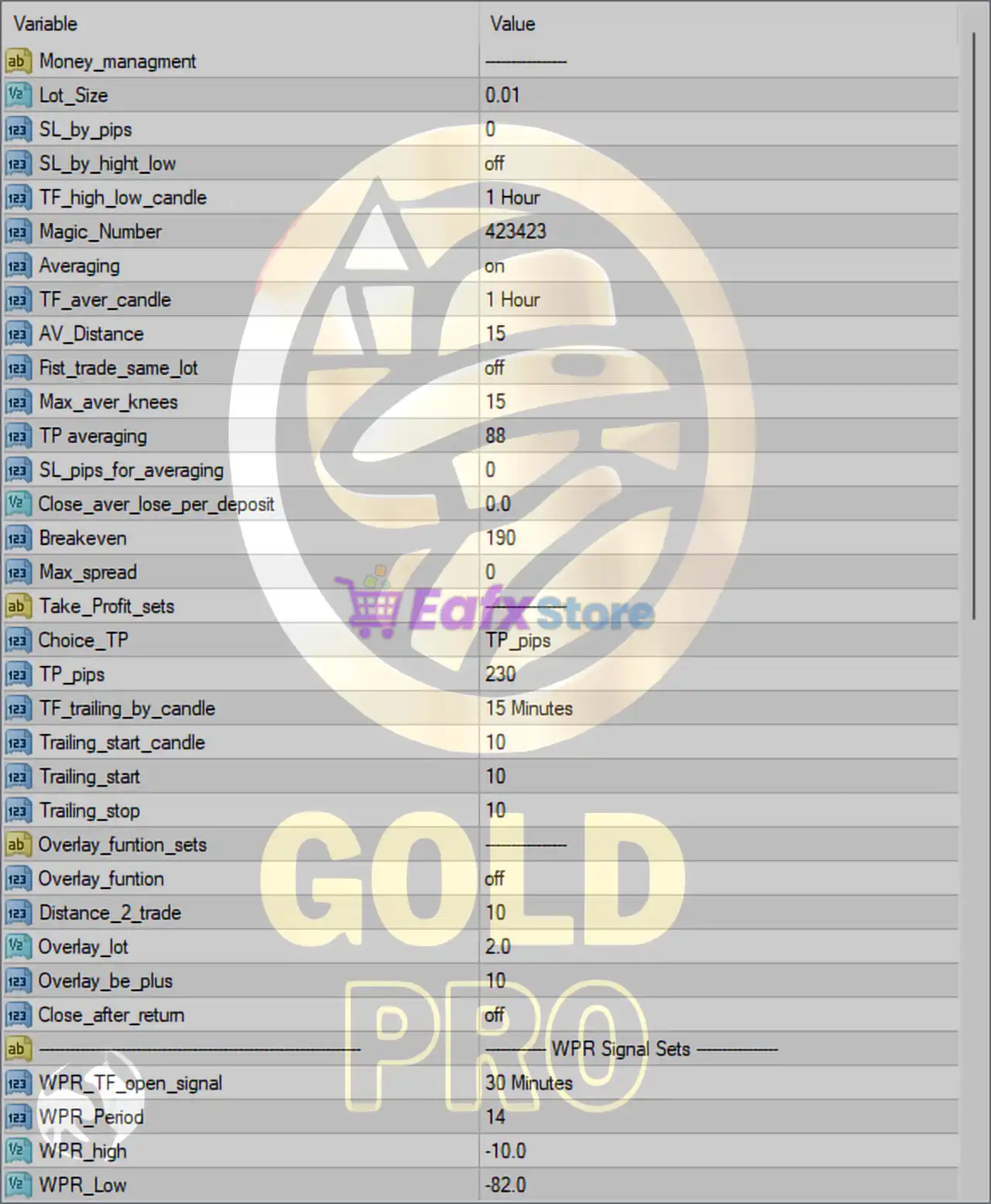
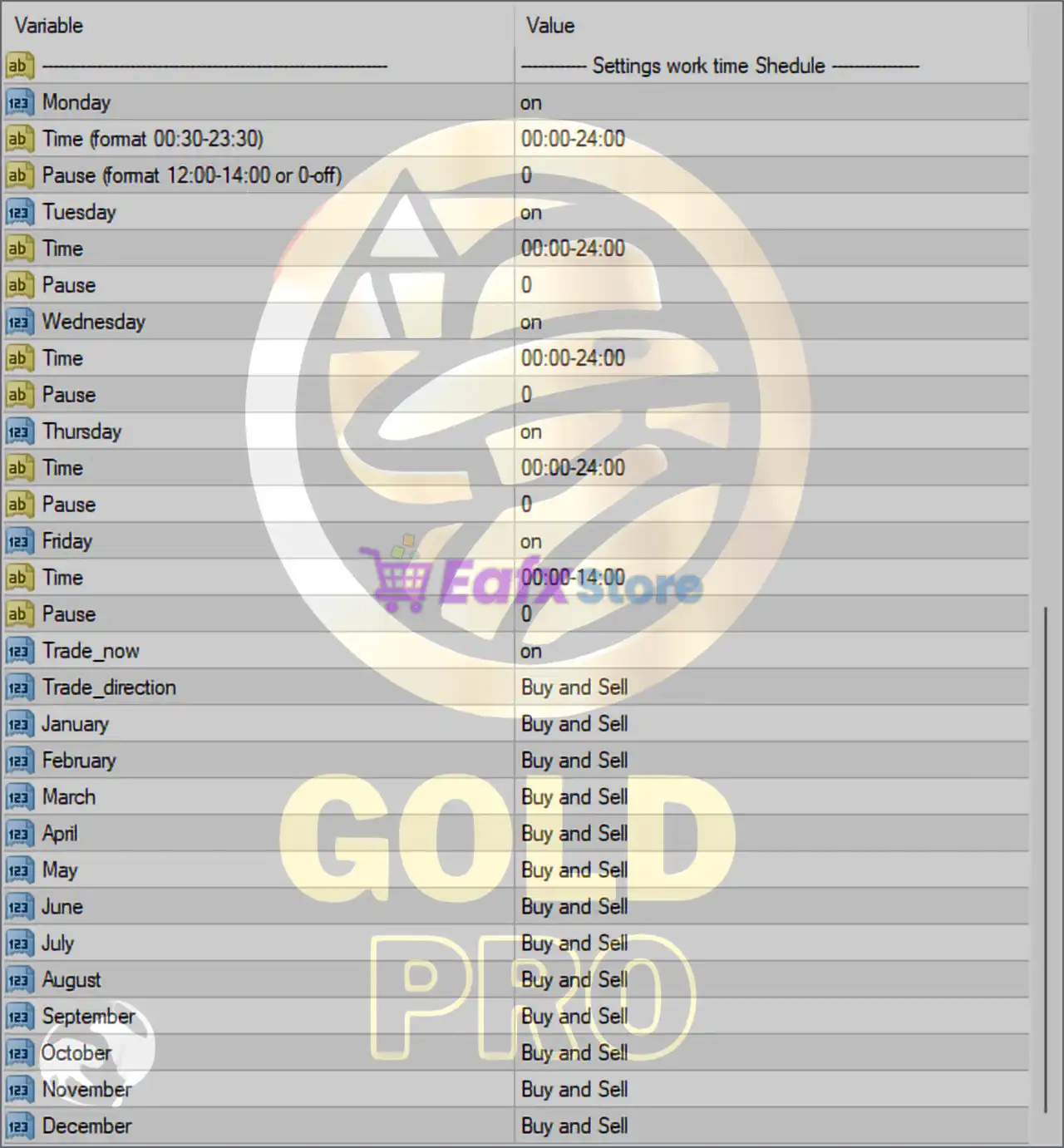
Money Management Settings
🔹 Money_management: Main section for configuring risk and lot management parameters.
🔹 Lot_Size = 0.01: Sets the default starting trade size to 0.01 lots.
🔹 SL_by_pips = 0: Stop Loss in pips is disabled because the value is set to 0.
🔹 SL_by_hight_low = off: Disables automatic Stop Loss calculation based on candle highs and lows.
🔹 TF_high_low_candle = 1 Hour: Uses the 1 Hour timeframe for candle high/low analysis.
🔹 Magic_Number = 423423: Unique identifier used by the EA to manage its own trades.
Averaging Settings
🔹 Averaging = on: Enables the averaging or grid recovery trading system.
🔹 TF_aver_candle = 1 Hour: Uses the 1 Hour timeframe for averaging calculations.
🔹 AV_Distance = 15: Distance between averaging orders is set to 15 points/pips.
🔹 Fist_trade_same_lot = off: Disables using the same lot size for the first recovery trade.
🔹 Max_aver_knees = 15: Allows a maximum of 15 averaging levels/orders.
🔹 TP averaging = 88: Take Profit target for averaged positions is 88 points/pips.
🔹 SL_pips_for_averaging = 0: No Stop Loss is applied to averaging positions.
🔹 Close_aver_lose_per_deposit = 0.0: Automatic closing based on deposit loss percentage is disabled.
🔹 Breakeven = 190: Activates breakeven protection after 190 points/pips profit.
🔹 Max_spread = 0: No maximum spread restriction is enabled.
Take Profit Settings
🔹 Take_Profit_sets: Section used for configuring profit-taking methods.
🔹 Choice_TP = TP_pips: The EA uses fixed pip-based Take Profit targets.
🔹 TP_pips = 230: Fixed Take Profit target is set to 230 pips.
Trailing Stop Settings
🔹 TF_trailing_by_candle = 15 Minutes: Trailing stop logic uses the 15 Minutes timeframe.
🔹 Trailing_start_candle = 10: Trailing logic activates after 10 candle conditions are met.
🔹 Trailing_start = 10: Trailing Stop starts after 10 points/pips of profit.
🔹 Trailing_stop = 10: Trailing Stop distance is maintained at 10 points/pips.
Overlay Function Settings
🔹 Overlay_funtion_sets: Section for hedge or overlay trade configuration.
🔹 Overlay_funtion = off: Overlay trading functionality is disabled.
🔹 Distance_2_trade = 10: Minimum distance between overlay trades is 10 points/pips.
🔹 Overlay_lot = 2.0: Overlay trade lot size is configured at 2.0 lots.
🔹 Overlay_be_plus = 10: Overlay breakeven activation is set at 10 points/pips.
🔹 Close_after_return = off: Disables automatic closing after price recovery.
WPR Signal Settings
🔹 WPR Signal Sets: Section for Williams Percent Range signal configuration.
🔹 WPR_TF_open_signal = 30 Minutes: WPR signals are generated using the 30 Minutes timeframe.
🔹 WPR_Period = 14: Uses a 14-period Williams Percent Range indicator.
🔹 WPR_high = -10.0: Overbought threshold is set at -10.0.
🔹 WPR_Low = -82.0: Oversold threshold is set at -82.0.
Trading Schedule Settings
🔹 Settings work time Shedule: Section controlling trading sessions and operational schedules.
🔹 Monday = on: Trading is enabled on Monday.
🔹 Time (Monday) = 00:00-24:00: Monday trading runs continuously for 24 hours.
🔹 Pause (Monday) = 0: No pause period is configured for Monday.
🔹 Tuesday = on: Trading is enabled on Tuesday.
🔹 Time (Tuesday) = 00:00-24:00: Tuesday trading session runs all day.
🔹 Pause (Tuesday) = 0: No pause period for Tuesday.
🔹 Wednesday = on: Trading is enabled on Wednesday.
🔹 Time (Wednesday) = 00:00-24:00: Wednesday trading session runs continuously.
🔹 Pause (Wednesday) = 0: No trading pause on Wednesday.
🔹 Thursday = on: Trading is enabled on Thursday.
🔹 Time (Thursday) = 00:00-24:00: Thursday trading session is active all day.
🔹 Pause (Thursday) = 0: No pause configured on Thursday.
🔹 Friday = on: Trading is enabled on Friday.
🔹 Time (Friday) = 00:00-14:00: Friday trading ends at 14:00.
🔹 Pause (Friday) = 0: No Friday pause period is configured.
Trading Direction Settings
🔹 Trade_now = on: Enables live trading activity.
🔹 Trade_direction = Buy and Sell: The EA can open both Buy and Sell positions.
Monthly Trading Filters
🔹 January = Buy and Sell: Trading is enabled for both directions during January.
🔹 February = Buy and Sell: Trading is enabled for both directions during February.
🔹 March = Buy and Sell: Trading is enabled for both directions during March.
🔹 April = Buy and Sell: Trading is enabled for both directions during April.
🔹 May = Buy and Sell: Trading is enabled for both directions during May.
🔹 June = Buy and Sell: Trading is enabled for both directions during June.
🔹 July = Buy and Sell: Trading is enabled for both directions during July.
🔹 August = Buy and Sell: Trading is enabled for both directions during August.
🔹 September = Buy and Sell: Trading is enabled for both directions during September.
🔹 October = Buy and Sell: Trading is enabled for both directions during October.
🔹 November = Buy and Sell: Trading is enabled for both directions during November.
🔹 December = Buy and Sell: Trading is enabled for both directions during December.
Conclusion
GoldPro EA MT4 is a feature-rich automated trading system that combines averaging strategies, WPR signal filtering, trailing stop protection, and advanced scheduling tools for Gold trading. With customizable money management settings and flexible Buy/Sell controls, the EA provides traders with a scalable solution for handling volatile market conditions while maintaining structured risk management.
FAQs
❓ What is GoldPro EA MT4?
GoldPro EA MT4 is an automated MetaTrader 4 Expert Advisor designed mainly for Gold trading with averaging and WPR-based signal filtering.
❓ Does GoldPro EA MT4 support averaging strategies?
Yes, the EA includes a fully configurable averaging system with up to 15 recovery levels.
❓ Can I trade both Buy and Sell positions with GoldPro EA MT4?
Yes, the setting Trade_direction = Buy and Sell allows both trading directions.
❓ Which indicator does GoldPro EA MT4 use for entry signals?
The EA uses the Williams Percent Range (WPR) indicator with a 14-period configuration.
❓ Can I customize trading hours in GoldPro EA MT4?
Yes, the EA includes detailed trading schedules for each weekday with customizable time filters.



