






Nesco MT4 v6.1 with SetFiles (Platform build 1471+)

Subscriptions for Special Plan
- 30 EA package is more economical!
- Special package with 99%
- Download 1 EA/Day

Subscriptions for Premium Membership
- Download Unlimited in 1 Year
- Get 100% Discount
- Get free access to all

Subscriptions for Gold Membership
- 1 Year Membership
- Get 100% Discount
- Access EA+Indicator+Course
Frequently bought together 🎁
Add these products to enhance your purchase




What is Nesco MT4?
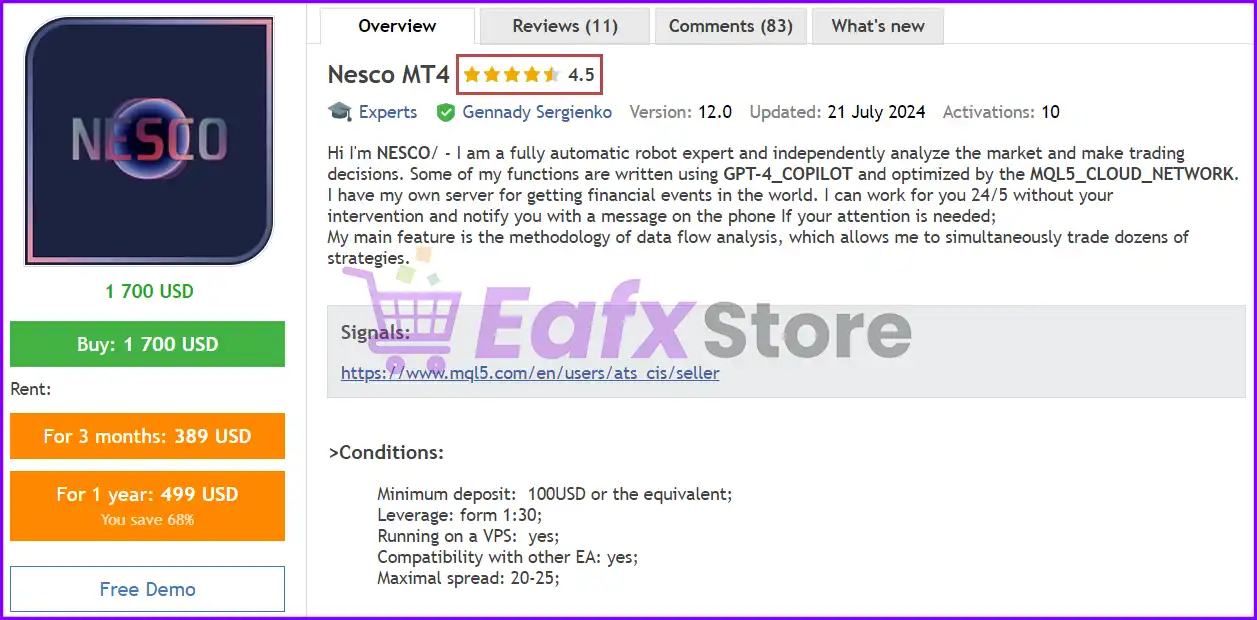
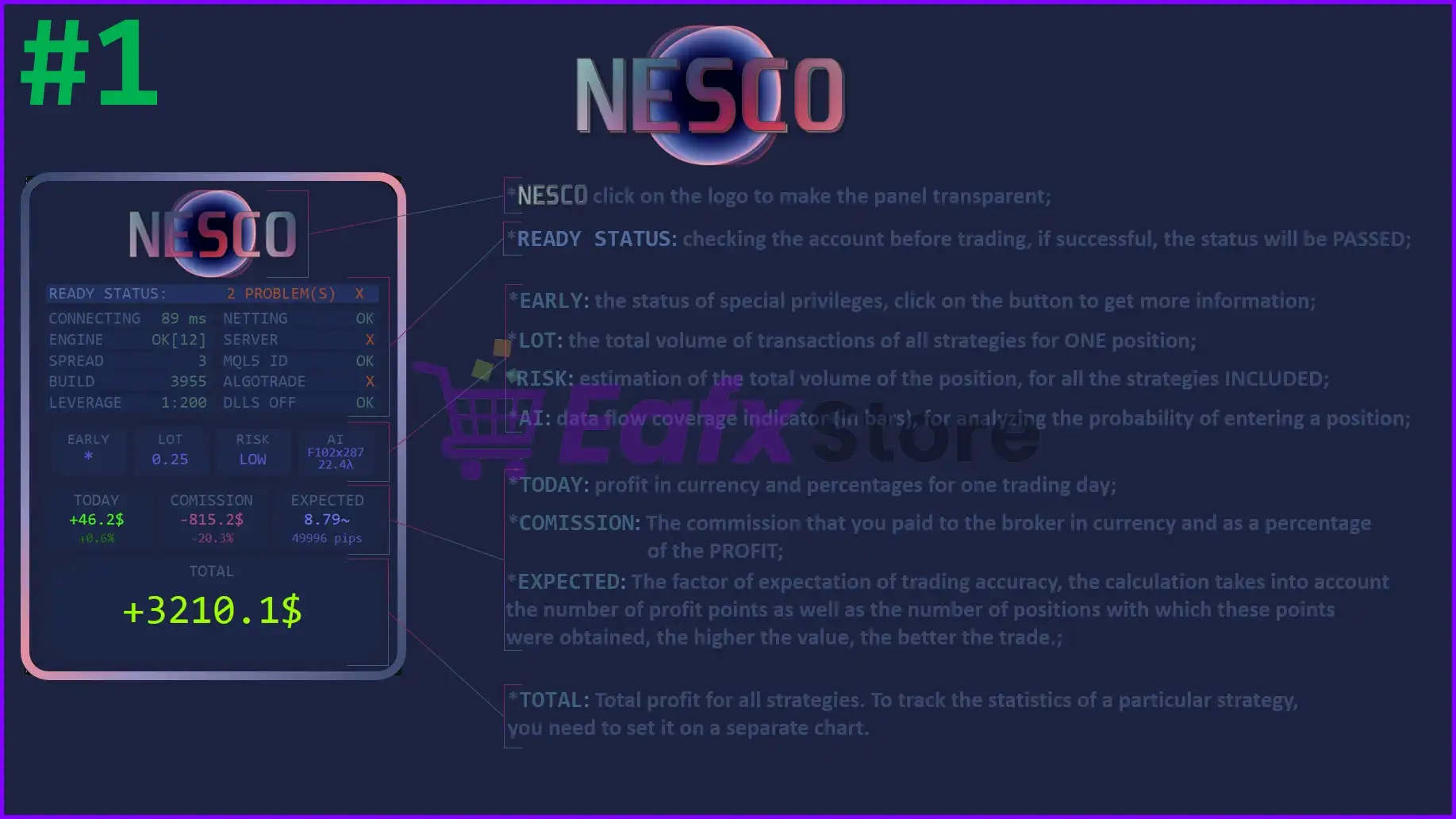
Nesco MT4 is an advanced Expert Advisor (EA) designed for automated forex trading with adaptive market analysis, intelligent indicators and robust risk management. The EA incorporates multiple trading strategies, dynamic stop-loss management, financial event monitoring, and automated execution to deliver stability, adaptability and consistency in long-term trading.
🔶 Vendor Website: Click Here
About the Author
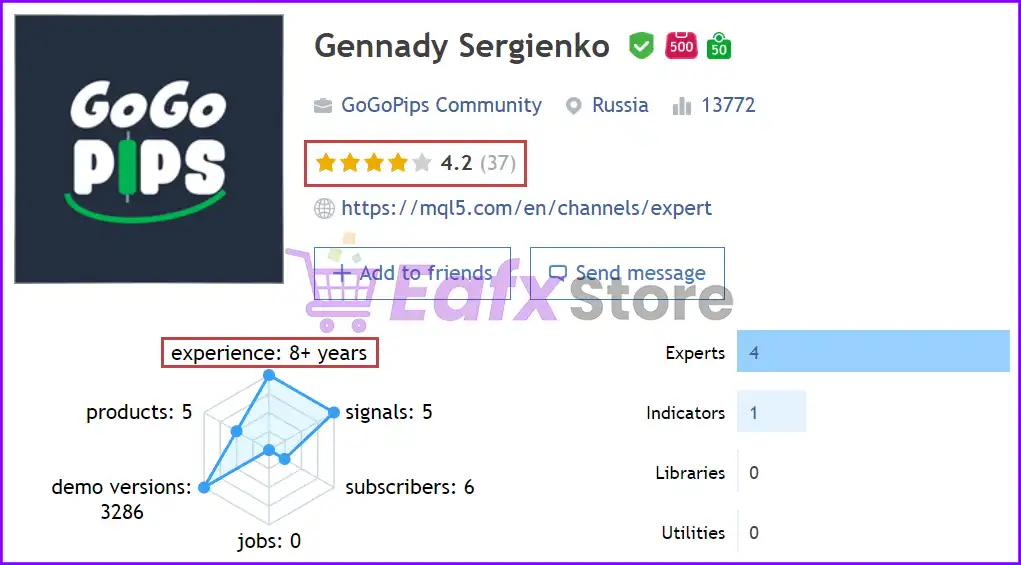
This product is compiled by Gennady Sergienko. This author has more than +10 years of experience working on MQL5 with many famous products such as Nesco MT4, Mad Turtle EA MT5, Nesco MT5, Trader Station MT4, Mad Turtle MT4 and other products. Among them, Nesco MT4 is his best performing products.
Nesco MT4 Overview
Key Features of Nesco MT4
🔹 Multi-Strategy Framework: Combines multiple trading systems into one adaptive execution engine.
🔹 Advanced Risk Management: Includes loss protection, trading pauses and dynamic exposure controls.
🔹 Automated News Monitoring: Uses financial event analysis to improve trading decision quality.
🔹 Dynamic SL/TP Control: Calculates Stop Loss (SL) and Take Profit (TP) levels based on market conditions.
🔹 Flexible Lot Management: Supports automatic sizing and manual risk customization options.
Why Choose & Use Nesco MT4?
🔹 Stable Automated Trading: Designed for traders seeking consistency through diversified strategies.
🔹 Controlled Risk Exposure: Helps preserve capital with advanced protection and pause features.
🔹 Adaptive Market Intelligence: Responds efficiently to evolving market trends and volatility.
🔹 Flexible Configuration: Supports multiple risk profiles and customizable strategy portfolios.
🔹 Marketplace-Ready Solution: Suitable for traders seeking scalable and professional automation.
Nesco EA MT4 Review
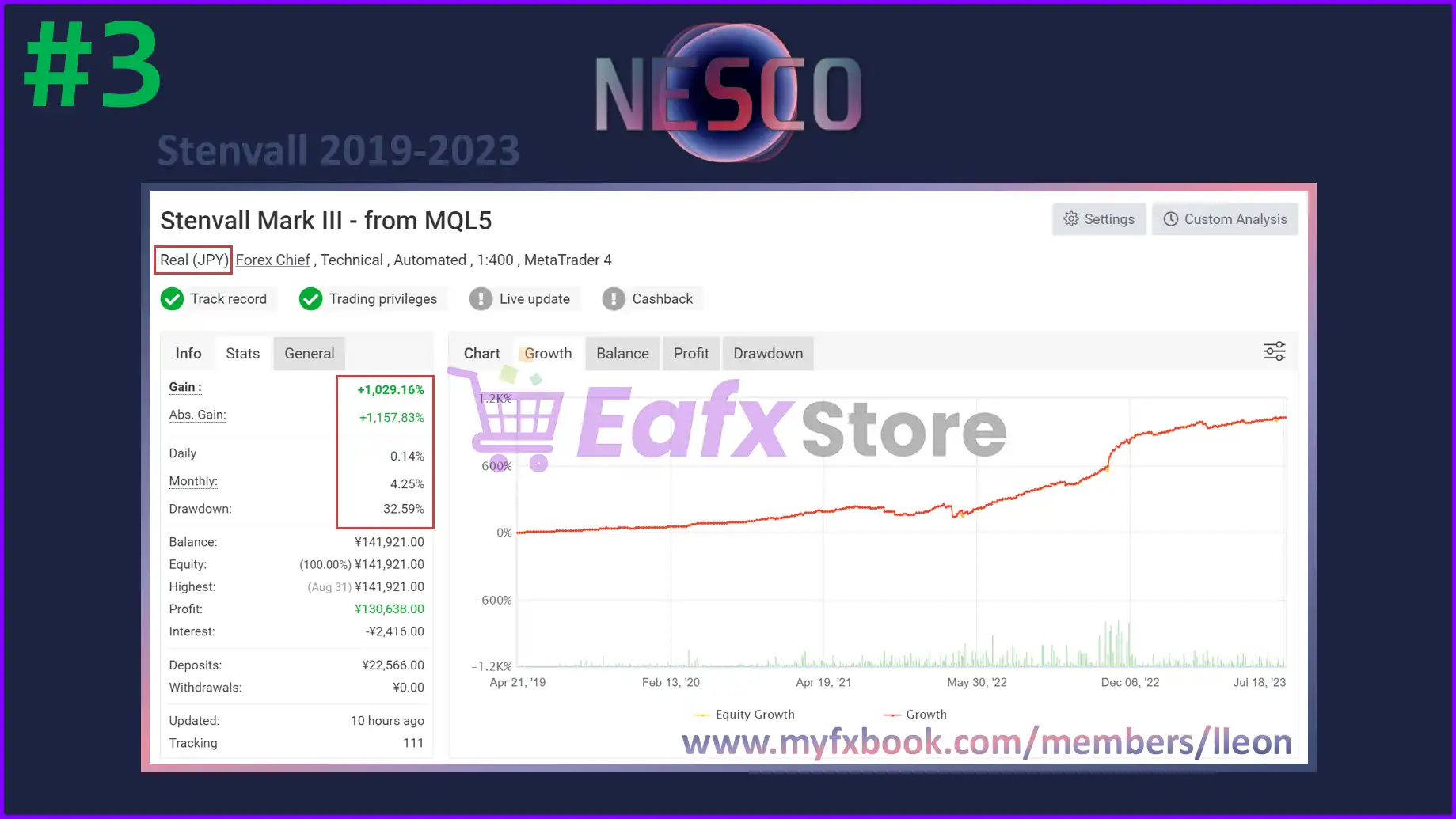
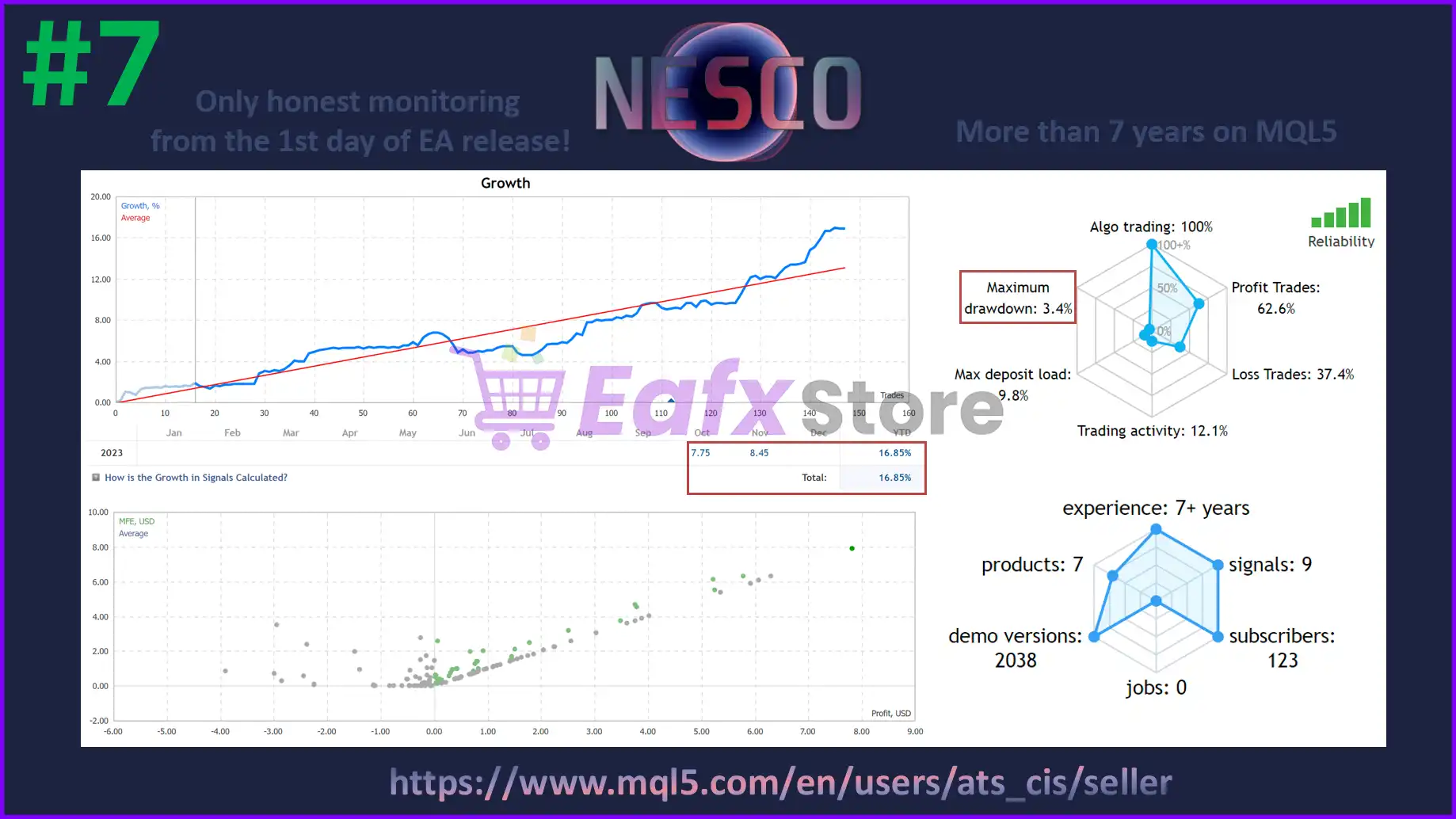
Nesco MT4’s performance has been rigorously verified by Myfxbook, ensuring transparency and credibility. The trading parameters are fully disclosed, providing a clear understanding of the strategy employed. The profit performance is exceptional, demonstrating both high profitability and remarkable safety.
The total profit achieved is an impressive +1029.16% (Gian), with an average monthly profit of 4.25%. The Drawdown stands at 32.59%, indicating a robust ability to withstand market fluctuations. These performance metrics highlight the strong potential for profit generation and the ability to navigate the challenges inherent in the forex market.
✅ Total Profit: +1029.16% (Gian)
✅ Average Monthly Profit: 4.25%
✅ Maximum Drawdown: 32.59%
Nesco MT4 performance verified by Myfxbook
What is the Nesco MT4 Trading Strategy?
🔹 Data Flow Analysis: Evaluates market information continuously to identify trading opportunities.
🔹 Portfolio Strategy Logic: Combines multiple strategy modules for diversified market exposure.
🔹 Adaptive Trade Execution: Adjusts trading behavior according to changing market conditions.
🔹 Dynamic Range Calculations: Uses market volatility to optimize stop loss and profit targets.
🔹 Event-Aware Trading: Integrates financial news analysis to refine trade selection processes.
Is Nesco MT4 Safe?
Nesco MT4 is highly appreciated by professional traders for its high profitability and safety. The performance of the advisor has been fully verified and recognized by the trading community on the forex market.
➡️ Coy0te (2025.01.25): “I have been using this stategy since the first stenvall days, thats enough time to know this is a long term strategy and if used with a moderate risk i get profit every single year. I consider this ea a must have on my eas portfolio.”
➡️ Dae Neung Kim (2023.11.25): “I highly recommend EA as it is very stable and profitable.”
➡️ Ronny (2023.12.02): “It’s the Holy grail in my actually workin’ portfolio of stable EA’s! All in all I try to get 10% monthly and Nesco’s work is responsible for around the half of the Profits…on low/lowest risk. One of the best advisers in the market here, no doubt.”
Recommended settings
Recommended settings and parameters to pay attention to from developers and experts:
| Features | Type |
|---|---|
| Trading platform | MetaTrader 4 (MT4) |
| Minimum / Recommended deposit | $100 |
| Minimum / Recommended leverage | 1:30+ |
| Currency pairs | EURUSD (Any) |
| Time frames | M5 (5 minute chart) |
| Maximal spread | 20-25 |
| Product type | NoDLL / Fix |
| Additional services | Unlock and Decompile |
| Recommended brokers | Exness Broker, Icmarkets Broker |
| Recommended VPS | MyfxVPS.com ( Blue VPS, Golden VPS). Lowest Latency, 2 week Free Trial, 100% Free for 12-18 Months. |
➡️ Reviewed by David Easton
Product Download Package?
The download package of the product suite includes:
1. Experts:
✅ Nesco MT4 v6.1_fix.ex4
2. SetFiles:
✅ Nesco_LowRisk.set
✅ Nesco_MediumRisk.set
✅ Nesco_HighRisk.set
Conclusion
In short, Nesco MT4 stands out as a fully autonomous trading system built on advanced data flow analysis and AI-enhanced logic. It trades 24/5, manages multiple strategies, and protects capital through smart risk allocation. Easy to launch and highly configurable, Nesco EA is a powerful solution for traders seeking efficient, future-ready automation.
🔢 Nesco MT4 – Complete Settings & Parameters Guide
Nesco MT4 is an automated Forex trading Expert Advisor designed for MetaTrader 4 that combines multiple built-in trading strategies, dynamic Stop Loss and Take Profit calculations, risk management controls, and multi-day trading filters.
The EA allows traders to choose predefined strategy portfolios, manage lot sizing automatically or manually, and optimize trade execution through configurable risk and performance parameters.
Nesco MT4 Settings
🔢 Nesco MT4 Settings Explained
Below are the details of the parameters in the advisor’s trading system settings table:
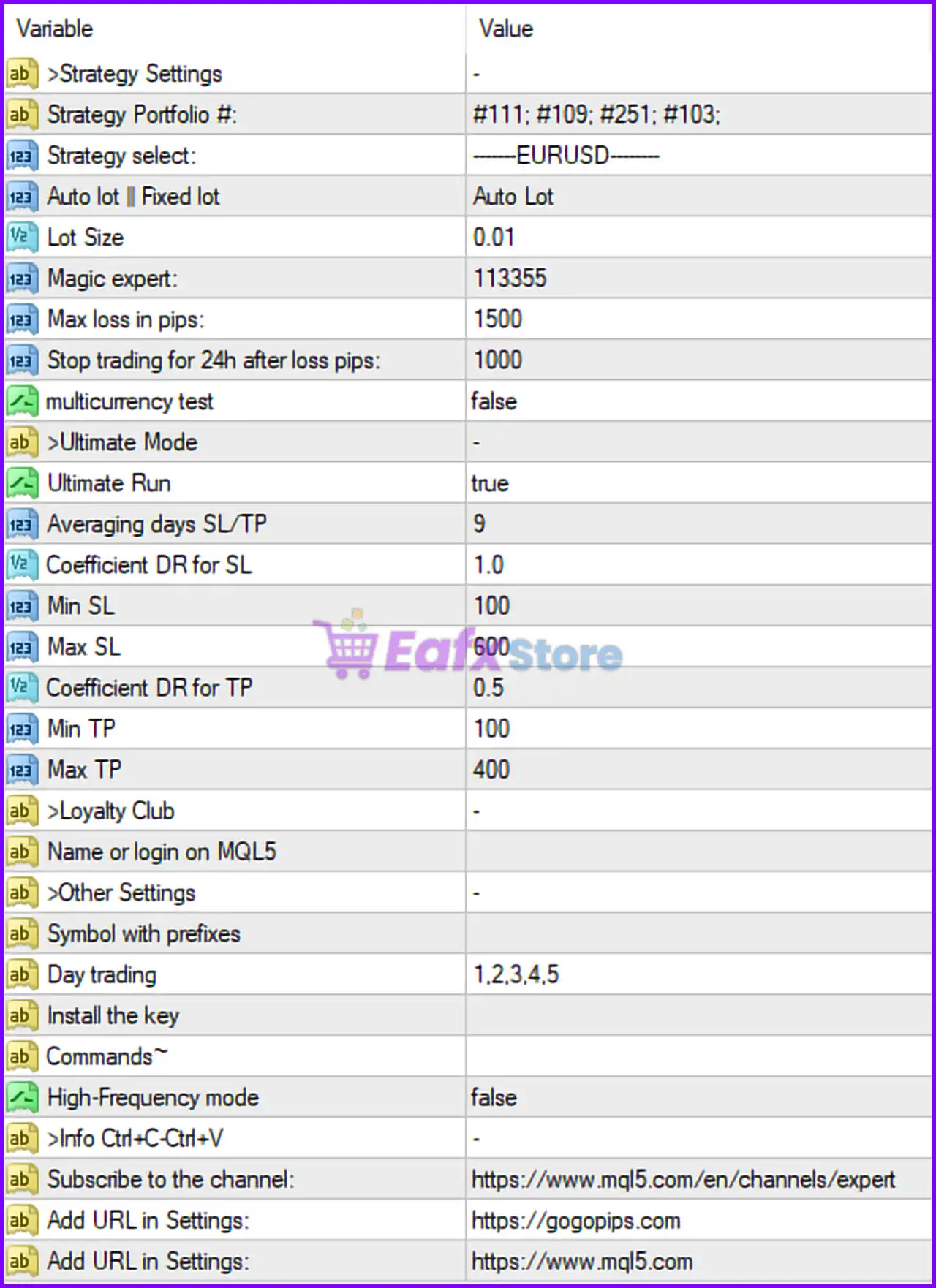
Nesco MT4 Settings Panel
🔶 Strategy Settings
🔹 Strategy Portfolio # = #111; #109; #251; #103 — Defines the active collection of trading strategies used by the EA, combining strategies #111, #109, #251, and #103.
🔹 Strategy select = ——-EURUSD——- — Specifies that the selected strategy configuration is optimized for the EURUSD currency pair.
🔹 Auto lot | Fixed lot = Auto Lot — Enables automatic lot size calculation based on the EA’s money management rules.
🔹 Lot Size = 0.01 — Fixed lot size value used when Auto Lot is disabled.
🔹 Magic expert = 113355 — Unique Magic Number used by Nesco MT4 to identify and manage its own trades.
🔹 Max loss in pips = 1500 — Maximum cumulative loss allowed before the EA applies protective actions.
🔹 Stop trading for 24h after loss pips = 1000 — Suspends trading for 24 hours after reaching a loss of 1000 pips.
🔹 multicurrency test = false — Multi-currency testing mode is disabled.
🔶 Ultimate Mode
🔹 Ultimate Run = true — Activates the EA’s Ultimate Mode for enhanced strategy execution and optimization.
🔹 Averaging days SL/TP = 9 — Uses a 9-day averaging period when calculating Stop Loss and Take Profit levels.
🔹 Coefficient DR for SL = 1.0 — Dynamic Range coefficient applied to Stop Loss calculations.
🔹 Min SL = 100 — Minimum Stop Loss value allowed is 100 points/pips.
🔹 Max SL = 600 — Maximum Stop Loss value allowed is 600 points/pips.
🔹 Coefficient DR for TP = 0.5 — Dynamic Range coefficient applied to Take Profit calculations.
🔹 Min TP = 100 — Minimum Take Profit value allowed is 100 points/pips.
🔹 Max TP = 400 — Maximum Take Profit value allowed is 400 points/pips.
🔶 Loyalty Club
🔹 Name or login on MQL5 = (empty) — Optional field for entering the trader’s MQL5 account name or login.
🔶 Other Settings
🔹 Symbol with prefixes = (empty) — Allows configuration of broker-specific symbol prefixes if required.
🔹 Day trading = 1,2,3,4,5 — Trading is enabled from Monday (1) through Friday (5).
🔹 Install the key = (empty) — Field used for activation or licensing key entry if required by the developer.
🔶 Commands
🔹 High-Frequency mode = false — High-frequency trading mode is disabled.
🔢 Conclusion
Nesco MT4 is a versatile automated trading system that combines multiple strategy portfolios with advanced risk management and dynamic Stop Loss/Take Profit calculations.
Features such as Ultimate Mode, automatic lot sizing, daily trading filters, and loss-protection mechanisms make it suitable for traders seeking a structured and configurable Forex trading solution.
Proper optimization of lot sizing, SL/TP limits, and trading schedules can help improve overall EA performance while maintaining risk control.
🔢 FAQs
❓ What currency pair is configured in the provided Nesco MT4 settings?
The displayed configuration is set for EURUSD.
❓ Does Nesco MT4 support automatic lot sizing?
Yes, the current setup uses Auto Lot, allowing the EA to calculate position sizes automatically.
❓ What happens if the EA loses 1000 pips?
The parameter Stop trading for 24h after loss pips = 1000 instructs the EA to pause trading for 24 hours after reaching that loss threshold.
❓ Is High-Frequency Trading enabled by default?
No. The setting High-Frequency mode = false means HFT mode is currently disabled.
❓ What are the default Stop Loss and Take Profit limits?
The EA uses a dynamic system with Min SL = 100, Max SL = 600, Min TP = 100, and Max TP = 400, adjusted through the Dynamic Range coefficients.
User Reviews
Only logged in customers who have purchased this product may leave a review.
What trading platform is Nesco EA compatible with?
Nesco EA is designed specifically for the MetaTrader 4 (MT4) platform and works seamlessly with it.
Which currency pairs and timeframes does Nesco EA support?
Nesco is optimized for EURUSD and works best on the M5 (5-minute) timeframe. However, it is flexible and may support other pairs with proper testing.
How much do I need to start using Nesco EA?
The minimum recommended deposit is $100, though a higher balance may allow for safer long-term performance, especially when running at medium or high risk.
Does Nesco EA use a single strategy or multiple?
It uses a data stream analysis method that allows it to trade multiple strategies simultaneously, increasing trading opportunities and diversification.
Can I control the risk level?
Yes, Nesco EA allows users to choose from LOW, MEDIUM, or HIGH risk modes, offering flexible risk management tailored to your comfort level.
Is a VPS required to run Nesco EA?
While not strictly required, running Nesco EA on a VPS is strongly recommended for 24/5 stable operation and faster execution.
Can I run other EAs alongside Nesco on the same account?
Yes, Nesco is compatible with other Expert Advisors, making it ideal for diversified portfolios or combined EA strategies.
What kind of results can I expect with Nesco EA?
Verified by Myfxbook, Nesco EA has delivered over +1029% total profit with an average of 4.25% monthly return and a maximum drawdown of 32.59%, based on real accounts.
Is the EA suitable for beginners?
Yes, Nesco EA is easy to install, fully automated, and doesn't require prior trading experience. The setup process takes only a few minutes.
How often is Nesco EA updated or improved?
The developer is actively improving the EA, adding new features and strategies. Users also benefit from support via Telegram and the broader MQL5 community.
🔥 Get This EA for FREE with Our Membership! 🚀🚀
Unlock access to this EA, premium Indicators, and exclusive trading tools completely FREE with any of our Membership Plans! Thousands of traders already benefit from our VIP library—join them and level up your trading instantly. Choose Your Membership:
- SPECIAL – 1 Month Membership
- GOLD – 1 Year Membership
- PREMIUM – 1 Year Membership
-
 Price range: $89.00 through $599.00
 -
 Price range: $89.00 through $599.00
 -
 Price range: $89.00 through $599.00
 -
 Price range: $70.00 through $599.00
-
 1Original price was: $1,599.00.$59.00Current price is: $59.00.
 -
 1Original price was: $950.00.$59.00Current price is: $59.00.
 -
 10Original price was: $2,100.00.$69.00Current price is: $69.00.
 -
 3Original price was: $499.00.$59.00Current price is: $59.00.
There are no reviews yet.