


🔢 Index Sniper Pro MT5 Settings Explained – Complete Parameter Guide
Index Sniper Pro MT5 is an advanced automated Expert Advisor designed primarily for US30 (Dow Jones) trading on MetaTrader 5. It combines configurable money management, pending order execution, trailing stop protection, time-based trading filters, and prop firm risk controls to help traders automate index trading while maintaining flexible risk management.
🔢 Installation Panel Parameters
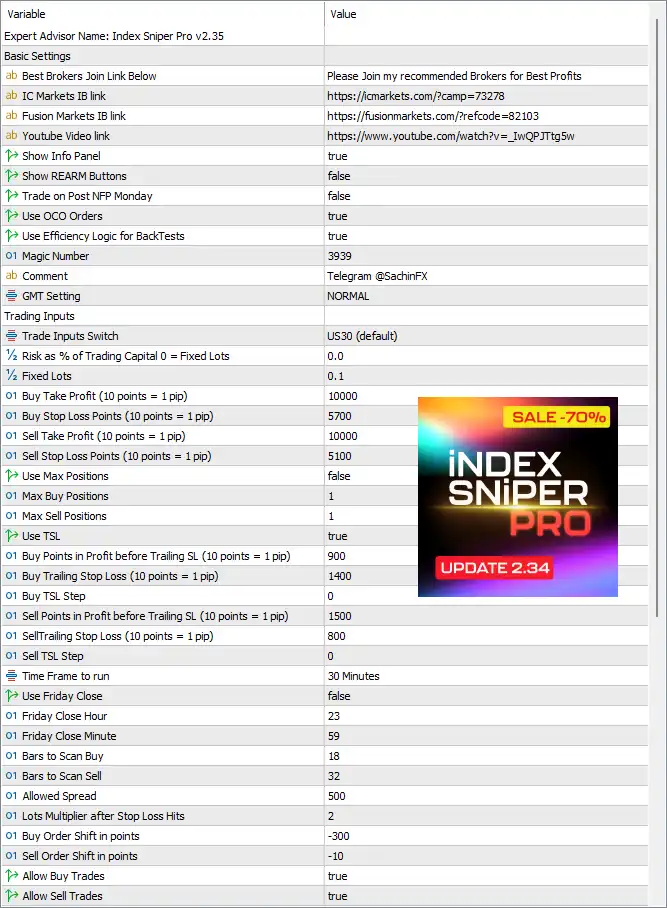
Below are the details of the parameters in the advisor’s trading system settings table:
🔶 Basic Settings
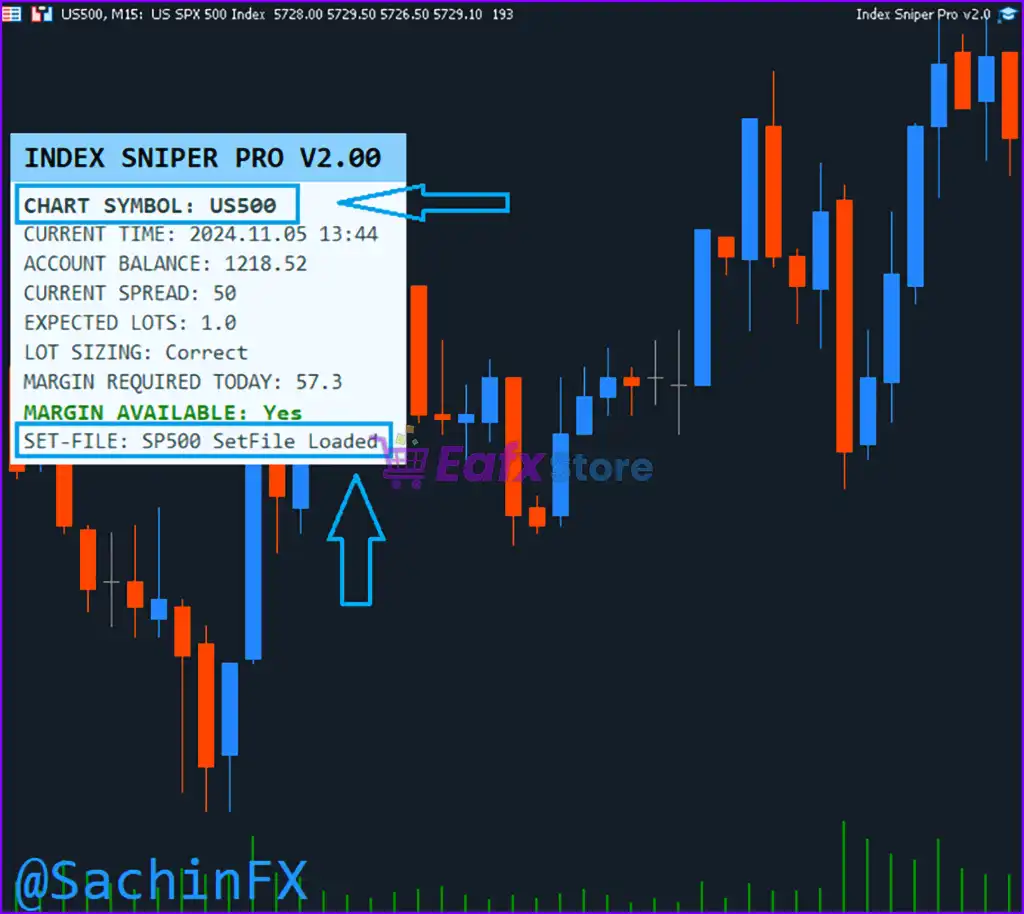
🔹 Show Info Panel = true – Displays the EA information panel directly on the trading chart.
🔹 Show REARM Buttons = false – Hides the REARM control buttons from the interface.
🔹 Trade on Post NFP Monday = false – Prevents trading on the Monday immediately following Non-Farm Payroll (NFP).
🔹 Use OCO Orders = true – Enables One Cancels the Other (OCO) pending order management.
🔹 Use Efficiency Logic for BackTests = true – Optimizes EA calculations for faster and more efficient strategy testing.
🔹 Magic Number = 3939 – Assigns the unique Magic Number 3939 to identify trades opened by the EA.
🔹 Comment = Telegram @SachinFX – Adds the specified trade comment to all EA positions.
🔹 GMT Setting = NORMAL – Uses the default GMT configuration.
🔶 Trading Inputs
🔹 Trade Inputs Switch = US30 (default) – Loads the preset optimized for US30 (Dow Jones) trading.
🔹 Risk as % of Trading Capital (0 = Fixed Lots) = 0.0 – Uses fixed lot sizing because the value is 0.0.
🔹 Fixed Lots = 0.1 – Opens every trade with a fixed position size of 0.10 lots.
🔹 Buy Take Profit (10 points = 1 pip) = 10000 – Sets the Buy Take Profit to 10,000 points.
🔹 Buy Stop Loss Points (10 points = 1 pip) = 5700 – Sets the Buy Stop Loss to 5,700 points.
🔹 Sell Take Profit (10 points = 1 pip) = 10000 – Sets the Sell Take Profit to 10,000 points.
🔹 Sell Stop Loss Points (10 points = 1 pip) = 5100 – Sets the Sell Stop Loss to 5,100 points.
🔹 Use Max Positions = false – Disables the maximum position limitation.
🔹 Max Buy Positions = 1 – Allows a maximum of 1 Buy position.
🔹 Max Sell Positions = 1 – Allows a maximum of 1 Sell position.
🔹 Use TSL = true – Enables the Trailing Stop Loss feature.
🔹 Buy Points in Profit before Trailing SL (10 points = 1 pip) = 900 – Starts Buy trailing after 900 points of profit.
🔹 Buy Trailing Stop Loss (10 points = 1 pip) = 1400 – Sets the Buy trailing distance to 1,400 points.
🔹 Buy TSL Step = 0 – Uses continuous Buy trailing without incremental steps.
🔹 Sell Points in Profit before Trailing SL (10 points = 1 pip) = 1500 – Starts Sell trailing after 1,500 points of profit.
🔹 Sell Trailing Stop Loss (10 points = 1 pip) = 800 – Sets the Sell trailing distance to 800 points.
🔹 Sell TSL Step = 0 – Uses continuous Sell trailing without incremental steps.
🔹 Time Frame to run = 30 Minutes – Runs the trading logic on the M30 timeframe.
🔹 Use Friday Close = false – Keeps trading active through Friday instead of closing positions automatically.
🔹 Friday Close Hour = 23 – Defines 23:00 as the Friday closing hour if Friday Close is enabled.
🔹 Friday Close Minute = 59 – Defines 23:59 as the Friday closing minute.
🔹 Bars to Scan Buy = 18 – Uses the latest 18 candles for Buy signal analysis.
🔹 Bars to Scan Sell = 32 – Uses the latest 32 candles for Sell signal analysis.
🔹 Allowed Spread = 500 – Allows trading while the spread remains below 500 points.
🔹 Lots Multiplier after Stop Loss Hits = 2 – Doubles the lot size after a Stop Loss event.
🔹 Buy Order Shift in points = -300 – Shifts Buy pending orders by -300 points.
🔹 Sell Order Shift in points = -10 – Shifts Sell pending orders by -10 points.
🔹 Allow Buy Trades = true – Enables Buy trading.
🔹 Allow Sell Trades = true – Enables Sell trading.
🔶 Trade Days
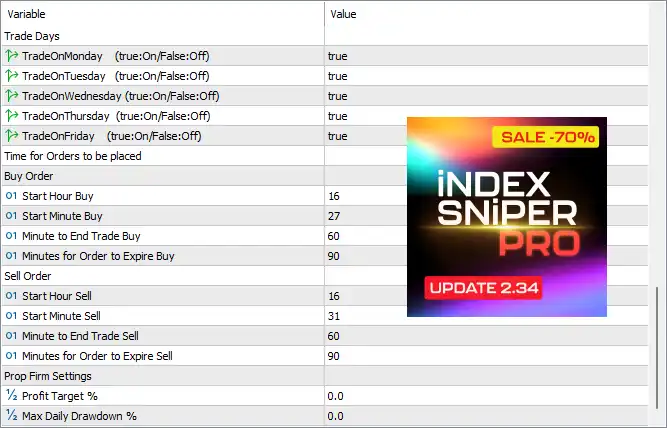
🔹 TradeOnMonday (true:On/False:Off) = true – Allows trading on Monday.
🔹 TradeOnTuesday (true:On/False:Off) = true – Allows trading on Tuesday.
🔹 TradeOnWednesday (true:On/False:Off) = true – Allows trading on Wednesday.
🔹 TradeOnThursday (true:On/False:Off) = true – Allows trading on Thursday.
🔹 TradeOnFriday (true:On/False:Off) = true – Allows trading on Friday.
🔶 Buy Order Schedule
🔹 Start Hour Buy = 16 – Starts placing Buy orders at 16:00.
🔹 Start Minute Buy = 27 – Starts Buy orders at 16:27.
🔹 Minute to End Trade Buy = 60 – Stops placing Buy orders after 60 minutes.
🔹 Minutes for Order to Expire Buy = 90 – Buy pending orders expire after 90 minutes.
🔶 Sell Order Schedule
🔹 Start Hour Sell = 16 – Starts placing Sell orders at 16:00.
🔹 Start Minute Sell = 31 – Starts Sell orders at 16:31.
🔹 Minute to End Trade Sell = 60 – Stops placing Sell orders after 60 minutes.
🔹 Minutes for Order to Expire Sell = 90 – Sell pending orders expire after 90 minutes.
🔶 Prop Firm Settings
🔹 Profit Target % = 0.0 – No Profit Target percentage restriction is enabled.
🔹 Max Daily Drawdown % = 0.0 – Daily Drawdown protection is disabled.
🔢 Conclusion
Index Sniper Pro MT5 is a specialized US30 trading Expert Advisor built around pending order execution, OCO order management, trailing stop protection, and flexible session scheduling. With configurable money management, Buy/Sell timing controls, spread protection, and optional prop firm settings, it provides traders with a structured framework for automating Dow Jones trading while maintaining precise control over risk and execution.
🔢 FAQs
❓ What market is Index Sniper Pro MT5 optimized for?
Index Sniper Pro MT5 is primarily optimized for US30 (Dow Jones), using the built-in US30 (default) preset.
❓ Does Index Sniper Pro MT5 support both Buy and Sell trading?
Yes. Both Allow Buy Trades and Allow Sell Trades are enabled by default.
❓ Can I use fixed lots or percentage-based risk?
Yes. The EA supports both methods. The default configuration uses a 0.10 fixed lot, while percentage-based risk can be activated by changing Risk as % of Trading Capital.
❓ Does the EA include Trailing Stop functionality?
Yes. Trailing Stop Loss is enabled separately for Buy and Sell trades with customizable activation levels and trailing distances.
❓ Can Index Sniper Pro MT5 restrict trading to specific days and hours?
Yes. The EA provides individual weekday controls along with dedicated Buy and Sell trading schedules, including order expiration timing for precise session management.



