


🔢 Dark Algo MT5 – Complete Settings Guide & Parameter Explanation
Dark Algo MT5 is an advanced automated trading Expert Advisor for MetaTrader 5 that combines grid trading, Stochastic analysis, ADX trend filtering, CCI confirmation, money management and risk-control mechanisms.
The EA is designed to trade both buy and sell positions while using multiple technical indicators to improve entry timing and trade management. With customizable trading hours, monetary stop-loss protection, and indicator-based filtering, Dark Algo MT5 provides a flexible framework for algorithmic trading.
🔢 Installation Panel Parameters
Below are the details of the parameters in the advisor’s trading system settings table:
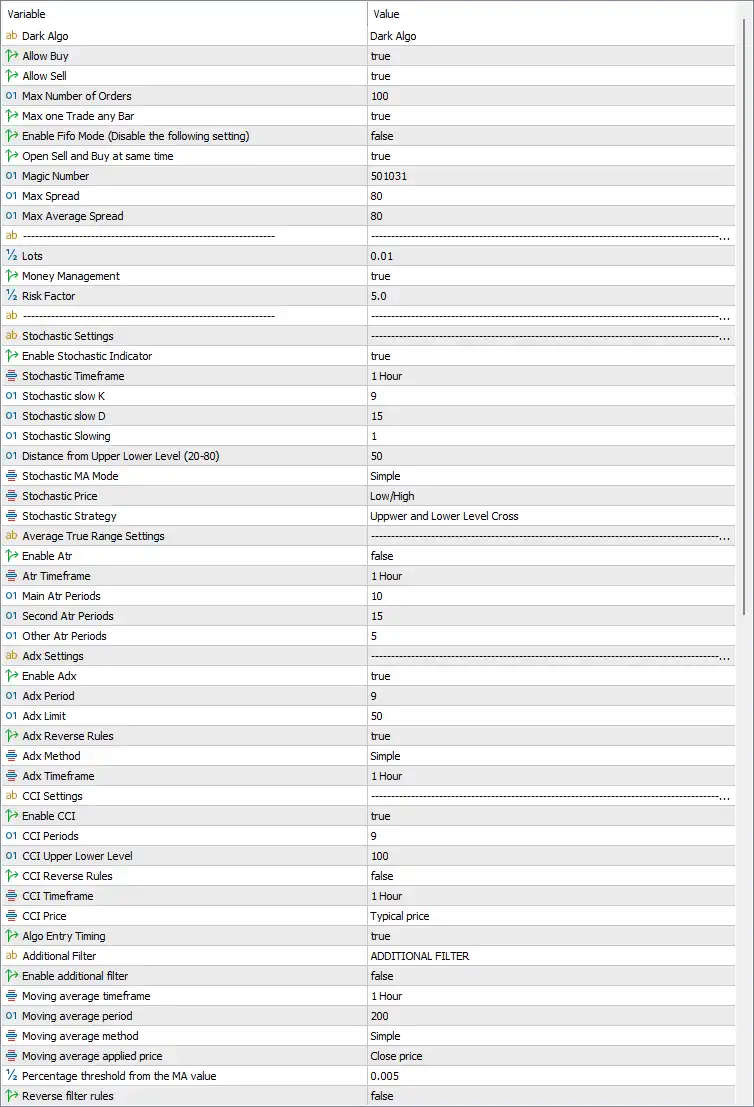
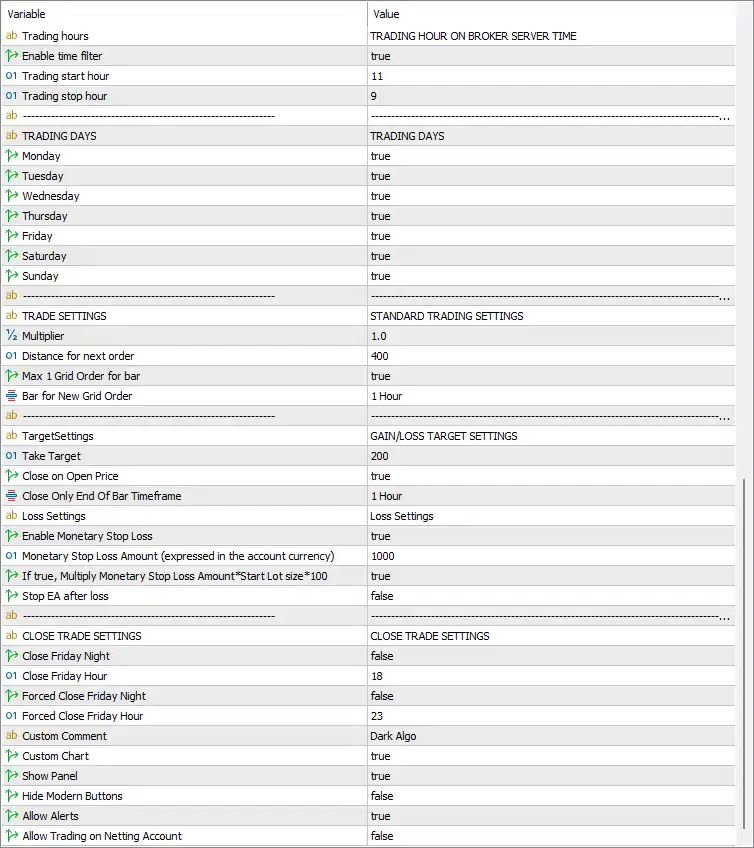
🔶 Dark Algo Core Settings
🔹 Dark Algo = Dark Algo — Internal EA identification and strategy profile name.
🔹 Allow Buy = true — Enables opening Buy positions.
🔹 Allow Sell = true — Enables opening Sell positions.
🔹 Max Number of Orders = 100 — Maximum number of simultaneous orders allowed is 100.
🔹 Max one Trade any Bar = true — Restricts the EA to one trade per candle/bar.
🔹 Enable FIFO Mode (Disable the following setting) = false — FIFO compliance mode is disabled.
🔹 Open Sell and Buy at same time = true — Allows simultaneous Buy and Sell positions.
🔹 Magic Number = 501031 — Unique identifier assigned to EA-generated trades.
🔹 Max Spread = 80 — Maximum spread allowed for opening new trades is 80 points.
🔹 Max Average Spread = 80 — Maximum average spread allowed is 80 points.
🔶 Money Management Settings
🔹 Lots = 0.01 — Fixed starting lot size is 0.01 lots.
🔹 Money Management = true — Dynamic money management system is enabled.
🔹 Risk Factor = 5.0 — Risk multiplier used in position-sizing calculations is 5.0.
🔶 Trading Hours Settings
🔹 Enable time filter = true — Restricts trading to specified broker server hours.
🔹 Trading start hour = 11 — Trading begins at broker server hour 11.
🔹 Trading stop hour = 9 — Trading stops at broker server hour 9 (next cycle).
🔶 Trading Days Settings
🔹 Monday = true — Trading is allowed on Monday.
🔹 Tuesday = true — Trading is allowed on Tuesday.
🔹 Wednesday = true — Trading is allowed on Wednesday.
🔹 Thursday = true — Trading is allowed on Thursday.
🔹 Friday = true — Trading is allowed on Friday.
🔹 Saturday = true — Trading is allowed on Saturday.
🔹 Sunday = true — Trading is allowed on Sunday.
🔶 Standard Trading Settings
🔹 Multiplier = 1.0 — Position size multiplier is set to 1.0.
🔹 Distance for next order = 400 — Grid spacing between consecutive orders is 400 points.
🔹 Max 1 Grid Order for bar = true — Only one grid order can be opened per candle.
🔹 Bar for New Grid Order = 1 Hour — Grid calculations use the H1 timeframe.
🔶 Gain/Loss Target Settings
🔹 Take Target = 200 — Profit target is 200 points.
🔹 Close on Open Price = true — Trades may be closed when price returns to entry level under certain conditions.
🔹 Close Only End Of Bar Timeframe = 1 Hour — Trade closure evaluations occur at the end of each H1 candle.
🔶 Loss Settings
🔹 Enable Monetary Stop Loss = true — Account-currency stop-loss protection is enabled.
🔹 Monetary Stop Loss Amount (expressed in the account currency) = 1000 — Trading basket closes when loss reaches 1000 account currency units.
🔹 *If true, Multiply Monetary Stop Loss Amount * Start Lot size 100 = true — Monetary stop-loss value scales with starting lot size.
🔹 Stop EA after loss = false — EA continues trading after a stop-loss event.
🔶 Close Trade Settings
🔹 Close Friday Night = false — Trades are not automatically closed on Friday evening.
🔹 Close Friday Hour = 18 — Scheduled Friday close hour is 18 if Friday close is enabled.
🔹 Forced Close Friday Night = false — Forced weekend closure is disabled.
🔹 Forced Close Friday Hour = 23 — Forced closing hour is 23 if enabled.
🔹 Custom Comment = Dark Algo — Comment attached to EA-generated trades.
🔹 Custom Chart = true — Custom chart interface is enabled.
🔹 Show Panel = true — Trading information panel is displayed.
🔹 Hide Modern Buttons = false — Modern control buttons remain visible.
🔹 Allow Alerts = true — Alert notifications are enabled.
🔹 Allow Trading on Netting Account = false — Trading is restricted on netting account types.
🔶 Stochastic Indicator Settings
🔹 Enable Stochastic Indicator = true — Stochastic filter is enabled.
🔹 Stochastic Timeframe = 1 Hour — Stochastic calculations use the H1 timeframe.
🔹 Stochastic slow K = 9 — Slow K period is 9.
🔹 Stochastic slow D = 15 — Slow D period is 15.
🔹 Stochastic Slowing = 1 — Smoothing factor is 1.
🔹 Distance from Upper Lower Level (20-80) = 50 — Entry filtering distance from stochastic zones is 50.
🔹 Stochastic MA Mode = Simple — Uses Simple Moving Average for stochastic calculations.
🔹 Stochastic Price = Low/High — Indicator is calculated using High/Low prices.
🔹 Stochastic Strategy = Upper and Lower Level Cross — Signals are generated from level-cross events.
🔶 ATR Settings
🔹 Enable ATR = false — ATR filtering is disabled.
🔹 ATR Timeframe = 1 Hour — ATR calculations would use H1 timeframe if enabled.
🔹 Main ATR Periods = 10 — Primary ATR period is 10.
🔹 Second ATR Periods = 15 — Secondary ATR period is 15.
🔹 Other ATR Periods = 5 — Additional ATR period is 5.
🔶 ADX Settings
🔹 Enable ADX = true — ADX trend-strength filter is enabled.
🔹 ADX Period = 9 — ADX calculation period is 9.
🔹 ADX Limit = 50 — ADX threshold level is 50.
🔹 ADX Reverse Rules = true — Reverse trading logic based on ADX conditions is enabled.
🔹 ADX Method = Simple — Uses Simple calculation method.
🔹 ADX Timeframe = 1 Hour — ADX uses the H1 timeframe.
🔶 CCI Settings
🔹 Enable CCI = true — Commodity Channel Index (CCI) filter is enabled.
🔹 CCI Periods = 9 — CCI period is 9.
🔹 CCI Upper Lower Level = 100 — CCI trigger level is ±100.
🔹 CCI Reverse Rules = false — Reverse logic for CCI signals is disabled.
🔹 CCI Timeframe = 1 Hour — CCI uses the H1 timeframe.
🔹 CCI Price = Typical price — CCI is calculated using Typical Price.
🔹 Algo Entry Timing = true — Entry timing optimization based on indicator alignment is enabled.
🔶 Additional Filter Settings
🔹 Additional Filter = ADDITIONAL FILTER — Section label for supplementary filtering options.
🔹 Enable additional filter = false — Additional trend filter is disabled.
🔹 Moving average timeframe = 1 Hour — Moving Average filter timeframe is H1.
🔹 Moving average period = 200 — MA period is 200.
🔹 Moving average method = Simple — Uses Simple Moving Average (SMA).
🔹 Moving average applied price = Close price — MA is calculated using Close prices.
🔹 Percentage threshold from the MA value = 0.005 — Price deviation threshold from MA is 0.005.
🔹 Reverse filter rules = false — Reverse filtering logic is disabled.
🔢 Configuration Summary
🔹 Trading Direction: Buy & Sell.
🔹 Lot Size: 0.01.
🔹 Money Management: Enabled.
🔹 Risk Factor: 5.0.
🔹 Maximum Orders: 100.
🔹 Grid Distance: 400 points.
🔹 Take Target: 200 points.
🔹 Monetary Stop Loss: 1000 account currency units.
🔹 Stochastic Filter: Enabled.
🔹 ADX Filter: Enabled.
🔹 CCI Filter: Enabled.
🔹 ATR Filter: Disabled.
🔹 Trading Time Filter: Enabled.
🔹 Trading Days: Monday–Sunday.
🔹 Magic Number: 501031.
🔢 Conclusion
Dark Algo MT5 is a comprehensive automated trading solution that combines grid management, money management, stochastic analysis, ADX trend confirmation, CCI filtering and monetary stop-loss protection.
The provided configuration enables Buy and Sell trading, utilizes a 0.01 lot base size, enforces a 400-point grid distance, and relies heavily on Stochastic, ADX, and CCI indicators for signal generation. Its extensive risk controls and scheduling options make it suitable for traders seeking a highly configurable MT5 trading system.



