


🔢 Tom Scalper MT5 Settings Explained – Complete Parameter Guide
Tom Scalper MT5 is a fully automated MetaTrader 5 Expert Advisor designed for fast scalping with flexible trade management, trailing stop automation and configurable money management. The EA includes built-in order protection, risk controls, trendline filtering, and multiple trading strategies, allowing traders to customize performance according to their preferred risk profile.
🔢 Installation Panel Parameters
Below are the details of the parameters in the advisor’s trading system settings table:
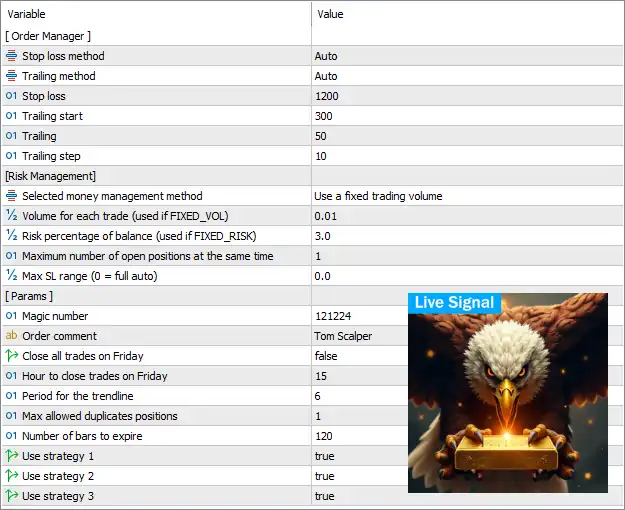
🔶 Order Manager
🔹 Stop loss method = Auto – Automatically determines the Stop Loss method based on the EA's internal trading logic.
🔹 Trailing method = Auto – Automatically manages the trailing stop mechanism without requiring manual configuration.
🔹 Stop loss = 1200 – Sets the Stop Loss distance to 1200 points when a fixed Stop Loss is applied.
🔹 Trailing start = 300 – Activates the trailing stop once the trade reaches 300 points in profit.
🔹 Trailing = 50 – Maintains a trailing stop distance of 50 points after activation.
🔹 Trailing step = 10 – Updates the trailing stop every 10 points of favorable price movement.
🔶 Risk Management
🔹 Selected money management method = Use a fixed trading volume – Uses a fixed lot size instead of percentage-based risk management.
🔹 Volume for each trade (used if FIXED_VOL) = 0.01 – Opens every trade with a fixed position size of 0.01 lots.
🔹 Risk percentage of balance (used if FIXED_RISK) = 3.0 – Risks 3.0% of the account balance per trade when percentage-based money management is enabled.
🔹 Maximum number of open positions at the same time = 1 – Limits the EA to 1 active position at any given time.
🔹 Max SL range (0 = full auto) = 0.0 – Uses fully automatic Stop Loss range calculation because the value is 0.0.
🔶 Parameters
🔹 Magic number = 121224 – Assigns the unique Magic Number 121224 to identify trades opened by Tom Scalper MT5.
🔹 Order comment = Tom Scalper – Adds the comment "Tom Scalper" to every trade executed by the EA.
🔹 Close all trades on Friday = false – Keeps trades open on Friday instead of automatically closing them before the weekend.
🔹 Hour to close trades on Friday = 15 – Specifies 15:00 as the Friday closing time if the Friday close option is enabled.
🔹 Period for the trendline = 6 – Uses a trendline calculation period of 6 for trade analysis.
🔹 Max allowed duplicates positions = 1 – Allows only 1 duplicate position under the same trading conditions.
🔹 Number of bars to expire = 120 – Pending trade signals or orders expire after 120 bars if they remain unfilled.
🔹 Use strategy 1 = true – Enables Strategy 1 for trade generation.
🔹 Use strategy 2 = true – Enables Strategy 2 for trade generation.
🔹 Use strategy 3 = true – Enables Strategy 3 for trade generation.
🔢 Conclusion
Tom Scalper MT5 provides a streamlined yet powerful configuration for automated scalping on MetaTrader 5. Its combination of automatic Stop Loss management, intelligent trailing stops, flexible money management, trendline filtering, and multiple built-in strategies makes it suitable for traders seeking disciplined and efficient short-term trading. With configurable risk controls and trade management features, the EA can be adapted to different account sizes and trading styles.
🔢 FAQs
❓ What is the default lot size in Tom Scalper MT5?
The default configuration uses a fixed trading volume of 0.01 lots.
❓ Does Tom Scalper MT5 support percentage-based risk management?
Yes. The EA supports 3.0% balance risk when the FIXED_RISK money management method is selected.
❓ How many trades can Tom Scalper MT5 open simultaneously?
By default, the EA allows only 1 open position at the same time.
❓ Does Tom Scalper MT5 include an automatic trailing stop?
Yes. The EA uses an Auto Trailing Method, with the default settings activating at 300 points, trailing by 50 points, and updating every 10 points.
❓ Can I enable or disable individual trading strategies?
Yes. Strategy 1, Strategy 2, and Strategy 3 can each be enabled or disabled independently, allowing you to customize the EA's trading behavior.



