


🔢 Inova Prime EA MT4 Settings Guide – Full Configuration Explained
Inova Prime EA MT4 is an advanced automated Forex trading robot developed for MetaTrader 4 traders who want intelligent trend filtering, martingale recovery management, and dynamic order block trading strategies.
The EA combines trend management, lot control, automatic position sizing, and risk protection tools to optimize trading performance in different market conditions.
With support for both-side trading and customizable martingale settings, Inova Prime EA MT4 is designed for traders seeking flexible automation and advanced recovery systems.

🔢 Complete Inova Prime EA MT4 Settings Explained
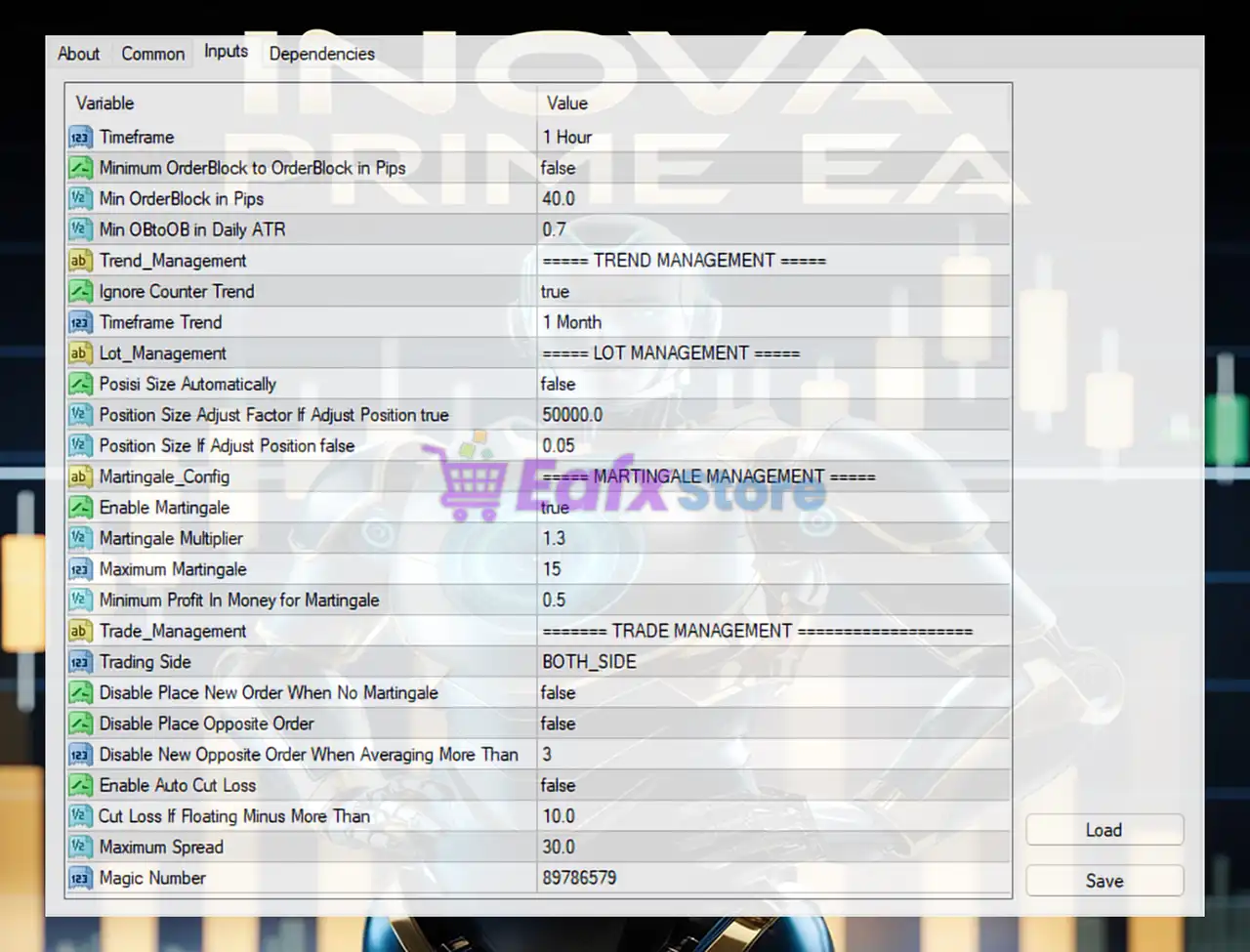
Below are the details of the parameters in the advisor’s trading system settings table:
🔶 Core Trading Settings
🔹 Timeframe = 1 Hour: The EA operates and analyzes the market using the 1 Hour timeframe.
🔹 Minimum OrderBlock to OrderBlock in Pips = false: Disables the minimum distance filter between order blocks.
🔹 Min OrderBlock in Pips = 40.0: Sets the minimum order block size requirement to 40.0 pips.
🔹 Min OBtoOB in Daily ATR = 0.7: Requires the minimum order block distance to equal 0.7 of the daily ATR value.
🔶 Trend Management Settings
🔹 Ignore Counter Trend = true: Prevents the EA from opening trades against the main market trend.
🔹 Timeframe Trend = 1 Month: Uses the 1 Month timeframe for long-term trend confirmation.
🔶 Lot Management Settings
🔹 Posisi Size Automatically = false: Disables automatic lot size calculation.
🔹 Position Size Adjust Factor If Adjust Position true = 50000.0: Sets the automatic position adjustment factor to 50000.0 when auto-sizing is enabled.
🔹 Position Size If Adjust Position false = 0.05: Uses a fixed lot size of 0.05 when automatic sizing is disabled.
🔶 Martingale Management Settings
🔹 Enable Martingale = true: Activates the martingale recovery system.
🔹 Martingale Multiplier = 1.3: Multiplies the lot size by 1.3 after each martingale step.
🔹 Maximum Martingale = 15: Limits the martingale sequence to a maximum of 15 levels.
🔹 Minimum Profit In Money for Martingale = 0.5: Requires at least 0.5 account currency profit before closing martingale cycles.
🔶 Trade Management Settings
🔹 Trading Side = BOTH_SIDE: Allows the EA to open both buy and sell positions.
🔹 Disable Place New Order When No Martingale = false: Allows new positions even when martingale conditions are inactive.
🔹 Disable Place Opposite Order = false: Allows opposite-direction orders to be opened.
🔹 Disable New Opposite Order When Averaging More Than = 3: Prevents opening new opposite trades when averaging exceeds 3 positions.
🔹 Enable Auto Cut Loss = false: Disables automatic emergency loss-cutting functionality.
🔹 Cut Loss If Floating Minus More Than = 10.0: Sets emergency floating loss threshold at 10.0 account currency units.
🔹 Maximum Spread = 30.0: Prevents trading if spread exceeds 30.0 points.
🔹 Magic Number = 89786579: Assigns the unique EA trade identifier 89786579.
🔢 Conclusion
Inova Prime EA MT4 is a sophisticated Forex Expert Advisor that combines trend filtering, order block analysis, martingale recovery systems and flexible trade management features.
The EA is designed for traders who want automated execution with advanced averaging and recovery mechanisms while maintaining control over risk exposure and spread conditions.
Proper optimization and disciplined risk management are highly recommended before using Inova Prime EA MT4 on live trading accounts.
🔢 FAQs
❓ What is Inova Prime EA MT4?
Inova Prime EA MT4 is an automated Forex trading EA for MetaTrader 4 that uses trend filtering, order block analysis, and martingale management.
❓ Does Inova Prime EA MT4 support martingale trading?
Yes, the EA includes a martingale system with Martingale Multiplier = 1.3 and a maximum of 15 levels.
❓ Can Inova Prime EA MT4 trade both buy and sell positions?
Yes, the Trading Side = BOTH_SIDE setting allows simultaneous buy and sell trading.
❓ What timeframe does Inova Prime EA MT4 use?
The EA trades on the 1 Hour timeframe while using the 1 Month timeframe for trend analysis.
❓ How does spread protection work in Inova Prime EA MT4?
The EA blocks new trades whenever the spread exceeds the configured 30.0 point limit.


