


🔢 Sharp AI EA MT4 Settings Explained – Full Configuration Guide
Sharp AI EA MT4 is an advanced automated Forex trading robot designed for MetaTrader 4 traders who want precision entry execution, intelligent trade management and customizable risk controls.
The EA combines spread filtering, trailing stop technology, break-even protection, partial close functions, and trading session management to optimize automated trading performance across multiple market conditions.
🔢 Complete Sharp AI EA MT4 Settings Explanation
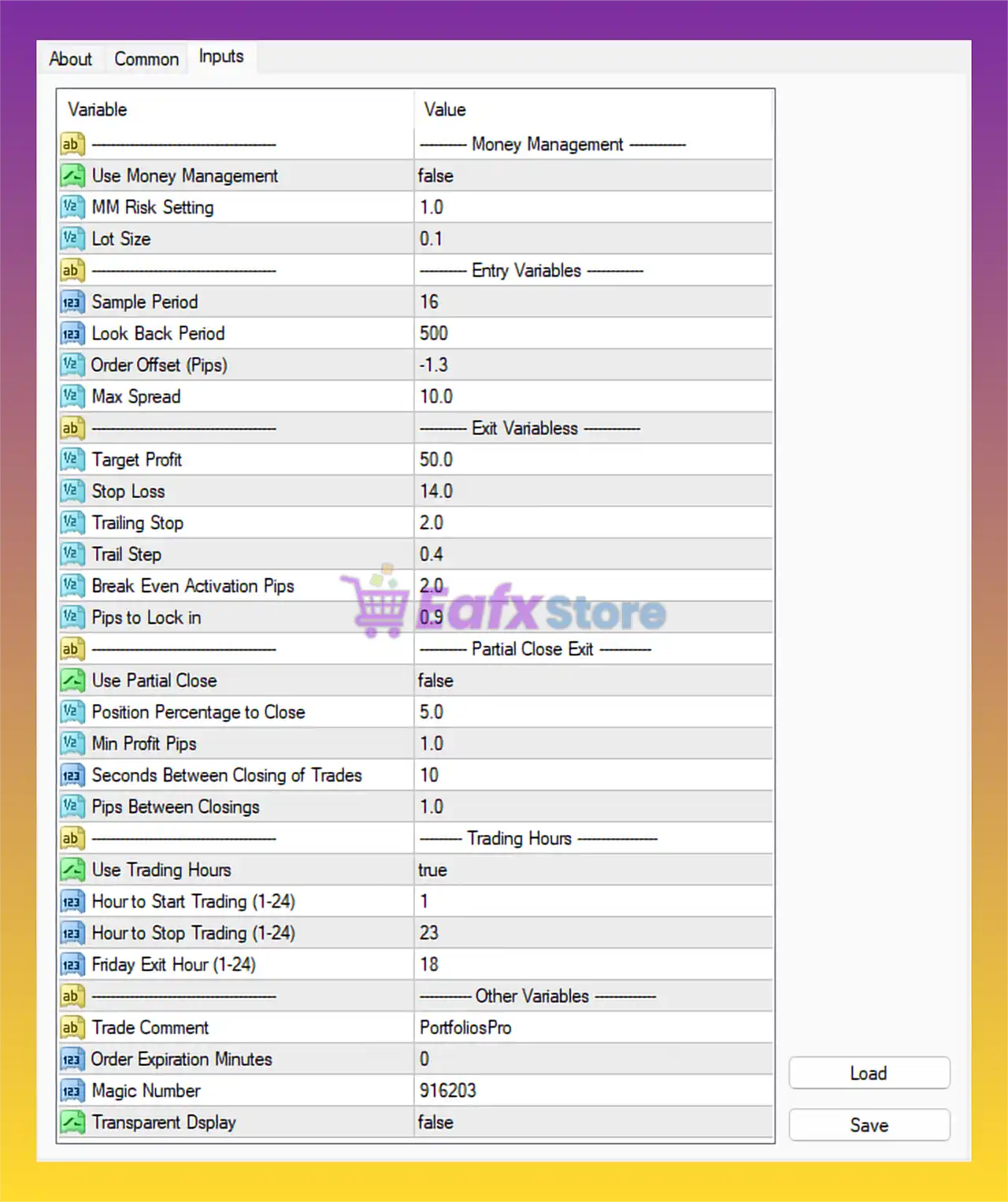
Below are the details of the parameters in the advisor’s trading system settings table:
🔶 Money Management Settings
🔹 Use Money Management = false: Disables automatic money management and uses fixed lot sizing instead.
🔹 MM Risk Setting = 1.0: Defines the risk percentage value at 1.0 when money management is enabled.
🔹 Lot Size = 0.1: Sets the fixed trading lot size to 0.1.
🔶 Entry Variables
🔹 Sample Period = 16: Uses a sample calculation period of 16 candles or data points for market analysis.
🔹 Look Back Period = 500: The EA analyzes the previous 500 bars for trading calculations.
🔹 Order Offset (Pips) = -1.3: Applies an order offset adjustment of -1.3 pips for entry execution.
🔹 Max Spread = 10.0: Prevents new trades if the spread exceeds 10.0 points.
🔶 Exit Variables
🔹 Target Profit = 50.0: Sets the Take Profit target at 50.0 pips.
🔹 Stop Loss = 14.0: Defines the Stop Loss distance at 14.0 pips.
🔹 Trailing Stop = 2.0: Activates trailing stop protection with a distance of 2.0 pips.
🔹 Trail Step = 0.4: Moves the trailing stop incrementally by 0.4 pips.
🔹 Break Even Activation Pips = 2.0: Enables break-even protection once profit reaches 2.0 pips.
🔹 Pips to Lock in = 0.9: Locks in 0.9 pips of secured profit after break-even activation.
🔶 Partial Close Exit Settings
🔹 Use Partial Close = false: Disables partial closing of positions.
🔹 Position Percentage to Close = 5.0: Closes 5.0% of the position size when partial close is enabled.
🔹 Min Profit Pips = 1.0: Minimum profit required before executing partial close is 1.0 pip.
🔹 Seconds Between Closing of Trades = 10: Waits 10 seconds between each partial close action.
🔹 Pips Between Closings = 1.0: Requires 1.0 pip movement between sequential partial closes.
🔶 Trading Hours Settings
🔹 Use Trading Hours = true: Enables restricted trading session control.
🔹 Hour to Start Trading (1-24) = 1: Trading starts at hour 1.
🔹 Hour to Stop Trading (1-24) = 23: Trading stops at hour 23.
🔹 Friday Exit Hour (1-24) = 18: The EA exits trading positions on Friday at hour 18.
🔶 Other Variables
🔹 Trade Comment = PortfoliosPro: Adds the trade comment label PortfoliosPro to all EA trades.
🔹 Order Expiration Minutes = 0: Pending order expiration is disabled with value 0.
🔹 Magic Number = 916203: Unique identifier 916203 used to separate EA trades from other systems.
🔹 Transparent Display = false: Disables transparent information panel display on the chart.
🔢 Conclusion
Sharp AI EA MT4 is a professional-grade automated trading system that combines precise entry logic, intelligent exit management, and advanced trade protection features. With configurable money management, trailing stop controls, partial closing functionality, and trading session filters, the EA provides traders with flexible automation for various Forex market conditions. Proper optimization and risk management are recommended before deploying Sharp AI EA MT4 on a live trading account.
🔢 FAQs
❓ What is Sharp AI EA MT4?
Sharp AI EA MT4 is an automated Forex Expert Advisor for MetaTrader 4 designed for advanced trade execution and risk management.
❓ Does Sharp AI EA MT4 support trailing stop?
Yes, the EA includes a trailing stop feature with Trailing Stop = 2.0 and Trail Step = 0.4.
❓ Can I use fixed lot sizes in Sharp AI EA MT4?
Yes, fixed lots are enabled because Use Money Management = false and Lot Size = 0.1.
❓ What is the purpose of Break Even Activation Pips?
It automatically protects open trades by moving the stop loss to break-even once profit reaches 2.0 pips.
❓ Can I restrict trading hours in Sharp AI EA MT4?
Yes, the EA includes trading session controls with configurable start, stop, and Friday exit hours.



