




IS Scalp Hunter EA MT4 with SetFiles (Unlimited)

Subscriptions for Special Plan
- 30 EA package is more economical!
- Special package with 99%
- Download 1 EA/Day

Subscriptions for Premium Membership
- Download Unlimited in 1 Year
- Get 100% Discount
- Get free access to all

Subscriptions for Gold Membership
- 1 Year Membership
- Get 100% Discount
- Access EA+Indicator+Course
Frequently bought together 🎁
Add these products to enhance your purchase



Quick Verdict
Best For
✅ Gold traders interested in automated scalping.
✅ MetaTrader 4 users seeking a configurable trading system.
✅ Traders who want adjustable trading hours.
✅ Users interested in short-term XAUUSD strategies.
✅ Experienced traders who understand drawdown and execution risks.
Overall Rating
9.2/10 ⭐⭐⭐⭐⭐
What is IS Scalp Hunter EA?

IS Scalp Hunter EA MT4 Review
Key Features of IS Scalp Hunter EA
Automated Scalping Approach
IS Scalp Hunter EA is associated with short-term trading, particularly Gold. Its displayed account analytics show extremely short average holding periods, which are consistent with brief trade durations, although the precise entry and exit logic cannot be confirmed from the available information.
Configurable Risk Input
The Risk parameter allows the EA’s risk-related configuration to be adjusted. Since the exact formula is not established by the input label, traders should verify how this value affects position sizing and potential losses before changing it.
Trailing Stop-Related Control
The ExpTrailSL parameter provides a configurable input associated with trailing stop-loss behavior. Its exact function should be confirmed through testing, especially to understand when the stop begins moving and how it responds to changing prices.
Adjustable Bar Period
The PeriodBar setting allows the bar-period parameter to be configured. Its effect on signal calculations and trading frequency depends on the EA’s internal implementation.
Configurable Trading Hours
The EA provides separate start and end hour settings. This allows users to configure the intended trading window, subject to how the EA interprets time and handles the selected hours.
Customizable Information Panel
The information display can be enabled, with configurable text and data colors, background color, and font size. These options help traders adjust the interface to their chart layout and visibility preferences.
Trade Identification
The Magic parameter helps distinguish trades associated with the EA from orders placed by other systems, depending on how trade identification is implemented.
Profit Performance Verified by MyFxBook
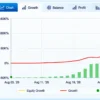
MyFxBook Account Overview
IS Scalp Hunter EA MT4 Myfxbook Reuslts
| Performance Metric | Results |
|---|---|
| Total Gain | +187,802.14% |
| Absolute Gain | +187,802.14% |
| Daily Gain | 11.72% |
| Monthly Gain | 15,592.04% |
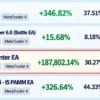
| Drawdown | 30.27% |
| Balance | $1,879,021.39 |
| Equity | $1,879,021.39 |
| Highest Balance | $2,043,721.39 |
| Displayed Profit | $1,878,021.39 |
| Initial Deposits | $1,000 |
| Withdrawals | $0.00 |
| Tracking | 2 |
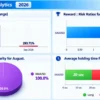
Monthly Performance Analysis
The supplied monthly analytics panel displays the following gain figures for 2026.
IS Scalp Hunter EA Myfxbook Reuslts
| Month | Displayed Monthly Gain |
|---|---|
| August 2026 | 47.63K% |
| September 2026 | 293.71% |
How Does IS Scalp Hunter EA Work?
Automated Market Analysis
IS Scalp Hunter EA is designed for automated short-term trading, with a focus on Gold.
It uses its internal trading logic to evaluate market conditions and determine when trading opportunities meet its entry requirements.
Bar Period Settings
The PeriodBar setting controls a bar-related calculation used by the EA.
Its exact role in generating trading signals depends on the internal strategy, so testing is recommended to understand how it affects trading behavior.
Risk and Trade Management
The EA includes a risk-related setting that may influence position sizing or risk calculations.
Traders should verify how this parameter works before live deployment to understand the potential exposure associated with each trade.
Trailing Stop Management
The ExpTrailSL setting is associated with trailing stop-loss behavior.
This feature may help manage open positions as prices move, but its exact activation conditions and adjustment method should be confirmed through testing.
Trading Schedule
IS Scalp Hunter EA allows trading hours to be configured.
The selected schedule determines the intended operating window according to the EA’s time settings, so the broker server time should be checked to ensure the schedule matches the desired trading period.
Trade Identification and Chart Display
The EA uses a trade identifier to distinguish its orders from other trading activity.
It also provides an information panel with customizable text, data colors, background color, and font size, making it easier to view supported EA information directly on the chart.
Risk Management Features
Risk Settings
IS Scalp Hunter EA includes a configurable risk setting that influences its trading behavior.
The exact calculation is not fully documented in the supplied information, so traders should test how it affects position sizes and potential losses before using the EA on a live account.
Trailing Stop Protection
The EA includes a setting related to trailing stop management, which may help protect profits by adjusting a stop as the market moves favorably.
Trading Time Control
The EA allows traders to configure its operating hours. Restricting trading to selected periods may help align the system with preferred market conditions, but it cannot eliminate losses or guarantee better trading results.
Trade Identification
The EA uses a unique trade identifier to distinguish its orders from trades placed manually or by other automated systems. This helps keep trading activity organized when multiple strategies operate on the same account.
Recommended Trading Conditions
For optimal performance, the developer recommends:
| Features | Type |
|---|---|
| Trading platform | MetaTrader 4 (MT4) |
| Time frames | M1, M5 |
| Currency pairs | XAUUSD (Gold) |
| Minimum / Recommended deposit | $200+ |
| Minimum / Recommended leverage | Any |
| Account types | Any |
| Product type | NoDLL / Unlimited |
| Additional services | Unlock and Decompile |
| Recommended brokers | Exness Broker, Icmarkets Broker |
| Recommended VPS | MyfxVPS.com (Blue VPS, Golden VPS). Lowest Latency, 2 week Free Trial, 100% Free for 12-18 Months. |
Weaknesses and Risk Warnings
Unclear Risk Calculation
The exact risk formula is not fully documented, so traders should verify how the EA determines position sizes and manages potential losses before live trading.
Trailing Stop Behavior Requires Testing
The trailing stop settings are available, but their precise activation rules and stop-adjustment behavior should be confirmed through demo testing.
Significant Reported Drawdown
The displayed account performance includes substantial drawdown, showing that strong returns can involve meaningful risk to trading capital.
High Sensitivity to Trading Costs
The very short average holding times may make profitability sensitive to spreads, commissions, slippage, and execution speed, particularly when trading Gold.
Who Should Use IS Scalp Hunter EA?
Gold Trading Enthusiasts
Traders interested in automated XAUUSD strategies may consider evaluating IS Scalp Hunter EA, provided they first confirm instrument compatibility and understand the potential risks of short-term trading.
MetaTrader 4 Users
The EA is designed for the MetaTrader 4 environment, making it relevant to users who already operate that platform and are comfortable configuring Expert Advisors.
Traders Who Understand Execution Costs
Users familiar with spreads, commissions, slippage, and broker execution differences are better positioned to evaluate a strategy with very short displayed holding times.
Experienced Automated Trading Users
Traders who can monitor account equity, inspect trading records, and conduct controlled testing may be better equipped to assess whether the EA’s behavior fits their objectives and risk tolerance.
Product Download Package?
The download package of the product suite includes:
 Experts: IS Scalp Hunter EA.ex4
SetFiles: Scalp_Hunter_Scalper.set
 Reviewed by David Easton
Final Verdict
IS Scalp Hunter EA offers a configurable automated trading approach for MetaTrader 4, with inputs for risk-related calculations, trailing stop behavior, trading hours, and chart information. Its displayed MyFxBook results are notable, but high reported growth must be considered alongside drawdown and execution costs. Traders should verify the EA’s risk logic, review its complete trading history, and test it under realistic broker conditions before using it on a live account.
🔢 IS Scalp Hunter EA MT4 Settings: Complete Inputs Guide
IS Scalp Hunter EA is an automated trading system associated with short-term scalping, with published descriptions highlighting Gold (XAUUSD) trading on the MetaTrader 4 platform. Its input parameters provide controls for risk sizing, trailing stop-loss behavior, bar-period calculations, trading hours, trade identification, and information-panel appearance. Understanding these settings helps traders configure the EA, evaluate its operating schedule, and prepare for demo testing before live deployment.
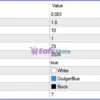
IS Scalp Hunter EA MT4 Settings Panel
⚙️ Risk and Trading Logic Settings
🔹 Risk = 0.001: Sets the EA’s risk-related input to 0.001. The parameter may influence position sizing or risk calculations, but the exact meaning and calculation formula depend on the EA’s internal implementation.
🔹 ExpTrailSL = 1.0: Sets the trailing stop-loss-related parameter to 1.0. The name suggests a relationship with an exponential or specialized trailing stop-loss method, but the exact behavior cannot be confirmed from the input label alone.
🔹 PeriodBar = 10: Sets the bar-period parameter to 10. This may define the number of chart candles used for a calculation or trading condition. The exact indicator or strategy component using this period depends on the EA’s code.
⚙️ Trading Time Settings
🔹 TimeStart = 1: Sets the configured trading start hour to 1. The EA may use this value to determine when trading operations can begin, according to its internal schedule and time reference.
🔹 TimeEnd = 23: Sets the configured trading end hour to 23. This establishes the ending hour for the operating window, although the precise handling of the final hour depends on the EA’s scheduling logic.
⚙️ Trade Identification and Information Display
🔹 Magic = 2026: Assigns the magic number 2026 to identify trades associated with the EA. This helps distinguish its orders from trades placed by other expert advisors or manual trading, subject to how the EA manages order identification.
🔹 Info = true: Enables the information display feature. When active, the EA may show trading or status information on the chart, depending on the interface implemented in the software.
⚙️ Text and Interface Color Settings
🔹 TextColor = White: Sets the main text color to White. This option controls the color of text elements associated with the EA’s information display, where supported.
🔹 InfoDataColor = DodgerBlue: Sets the information-data color to DodgerBlue. This blue color can help distinguish displayed values or data fields from the main text.
🔹 FonColor = Black: Sets the interface or information-panel background color to Black, based on the parameter name. The exact area affected depends on the EA’s chart-panel design.
🔹 FontSizeInfo = 7: Sets the information display’s font size to 7. This controls the text size used by the corresponding interface elements and can affect readability depending on chart scale and screen resolution.
🔢 Conclusion
IS Scalp Hunter EA MT4 provides a compact set of input parameters for risk-related calculations, trailing stop-loss behavior, bar-period settings, trading hours, order identification, and chart information display. The current configuration uses Risk = 0.001, PeriodBar = 10, a trading window from hour 1 to hour 23, and magic number 2026.
Several parameters, particularly Risk and ExpTrailSL, cannot be interpreted precisely from their names alone. Their formulas and effects should be verified through the EA’s original description or controlled testing. Before live trading, testing on a demo account with the intended broker, checking execution costs, and confirming the EA’s time zone and risk behavior are recommended.
User Reviews
Only logged in customers who have purchased this product may leave a review.
❓ What is IS Scalp Hunter EA designed for?
IS Scalp Hunter EA is an automated trading system for MetaTrader 4 associated with short-term scalping, particularly on Gold and XAUUSD. Its settings cover risk-related calculations, trailing stop management, trading hours, and trade identification.
❓ What does the Risk setting control in IS Scalp Hunter EA?
IS Scalp Hunter EA uses a Risk value of 0.001 in the supplied configuration. Its exact effect on position sizing or risk calculations depends on the EA's internal implementation.
❓ How does the trailing stop work in IS Scalp Hunter EA?
IS Scalp Hunter EA has a trailing stop-related parameter called ExpTrailSL, currently set to 1.0. The precise trailing method and its activation conditions cannot be confirmed from the available settings alone.
❓ What is the purpose of PeriodBar in IS Scalp Hunter EA?
IS Scalp Hunter EA uses a PeriodBar value of 10. This parameter may define the number of candles used in a calculation or trading condition, although its exact function depends on the EA's internal logic.
❓ What are the trading hours of IS Scalp Hunter EA?
IS Scalp Hunter EA is configured with a start hour of 1 and an end hour of 23. The actual operating schedule depends on how the EA handles its time reference and trading-hour boundaries.
❓ What does the Magic setting mean in IS Scalp Hunter EA?
IS Scalp Hunter EA uses the Magic Number 2026 to identify its trades. This helps distinguish the EA's orders from trades placed manually or by other automated systems.
❓ Can IS Scalp Hunter EA display trading information on the chart?
Yes. IS Scalp Hunter EA has its Info setting enabled, allowing its supported information or status elements to appear on the chart.
❓ Can the interface colors be customized in IS Scalp Hunter EA?
Yes. IS Scalp Hunter EA provides settings for text color, information-data color, and panel background color. The supplied configuration uses White text, DodgerBlue data, and a Black background.
❓ Can the information panel font size be adjusted in IS Scalp Hunter EA?
Yes. IS Scalp Hunter EA includes a FontSizeInfo setting, currently set to 7. This controls the text size of supported information-panel elements.
❓ What should be checked before using IS Scalp Hunter EA on a live account?
IS Scalp Hunter EA should be tested on a demo account to verify its risk calculations, trailing stop behavior, trading schedule, and execution conditions. The exact functions of certain inputs should be confirmed before live deployment.
🔥 Get This EA for FREE with Our Membership! 🚀🚀
Unlock access to this EA, premium Indicators, and exclusive trading tools completely FREE with any of our Membership Plans! Thousands of traders already benefit from our VIP library—join them and level up your trading instantly. Choose Your Membership:
- SPECIAL – 1 Month Membership
- GOLD – 1 Year Membership
- PREMIUM – 1 Year Membership
-
 Original price was: $30,000.00.$249.00Current price is: $249.00.
 -
 Original price was: $16,000.00.$249.00Current price is: $249.00.
 -
 Original price was: $999.00.$249.00Current price is: $249.00.
 -
 Original price was: $1,200.00.$249.00Current price is: $249.00.
-
 10Original price was: $499.00.$69.00Current price is: $69.00.
 -
 0Original price was: $500.00.$69.00Current price is: $69.00.
 -
 3Original price was: $999.00.$69.00Current price is: $69.00.
 -
 3Original price was: $999.00.$69.00Current price is: $69.00.
There are no reviews yet.